E invoicing software in India should do more than make a good-looking bill. It should send the required invoice data to an Invoice Registration Portal, bring back the registration result, and help your team deal with errors before the document reaches the customer.
Start with what you already use. Check whether your existing accounting software can complete the e-invoice process. Buy another tool only when it solves a real gap in registration, volume, controls or recordkeeping.
The main routes, in plain English: TallyPrime, Zoho Books, BUSY, an IRP portal or upload utility, and a specialist integration service such as Clear. There is also a free cost-and-check workbook.
In this guide
Which e-invoicing route should you check first?
Your present software already does the accounts
Check its e-invoice connection first. A supported update or service renewal may be enough. Moving all your accounts is a much bigger decision.
You report only a few covered documents
Compare a portal or upload-tool route with a connected billing plan. Include the time needed to move the registration result back into your records.
You send large batches or use several GST registrations
Ask for a connected service that shows each document’s result, lets staff fix failures, and controls access by registration.
You are unsure whether the mandate applies
Resolve that question with your accountant before buying. A sales brochure or an enabled portal account is not a complete legal check.
Our buying rule is simple: choose the least complicated route that registers the right documents and brings the result back into your books. A larger software bundle is useful only when you need the extra work it handles.
For the wider decision about users, stock and bookkeeping, use our accounting software selection checklist. This guide focuses on e-invoice registration, not a ranking of every billing app.
First check whether your business needs e-invoicing
The general mandate covers notified registered businesses whose aggregate turnover exceeded ₹5 crore in any preceding financial year from 2017–18 onwards, subject to exemptions and the documents involved. The ₹5 crore threshold took effect on 1 August 2023. Use the notification and GSTN’s applicability guidance, not a rule based only on this month’s sales.
Aggregate turnover is assessed on a PAN basis. In simple terms, do not look only at one branch’s sales when several registrations share the same PAN. Ask your accountant to confirm the relevant years and registrations. A later fall in sales does not, by itself, erase an earlier qualifying year.
The covered documents include invoices and GST credit/debit notes for relevant business-to-business supplies and exports. Ordinary sales to unregistered consumers are outside this IRN-reporting route. There are also entity exemptions, including insurers, banks and SEZ units. This is not an exhaustive exemption list; the business’s actual position needs checking.
E-invoicing also covers credit and debit notes.
Two different thresholds: the general e-invoicing mandate uses turnover above ₹5 crore. A separate portal restriction applies to AATO of ₹10 crore or more. AATO means aggregate annual turnover.
From 1 April 2025, businesses in that ₹10 crore-and-above group must report covered invoices, credit notes and debit notes within 30 days of the document date. The IRP blocks documents outside that window. The official example says an invoice dated 1 April must be reported by 30 April. Read the reporting-window notice.
That window is a portal limit, not advice to hold bills for 30 days. Build registration into the issuing process. Confirm your applicability, document list and responsible person before the first live submission.
A PDF, an IRN and an e-way bill are different things
A PDF is a readable copy of an invoice. The Invoice Registration Portal (IRP) receives the required invoice data. When registration succeeds, it returns an Invoice Reference Number (IRN) and signed QR-code data. Your software uses that result on the invoice shared with the buyer. See the IRP workflow.
Your business still creates its invoice. The portal registers the data; it does not replace your accounting system. Rule 48 makes this distinction important for documents covered by the mandate: an ordinary invoice copy without the required registration is not a substitute.
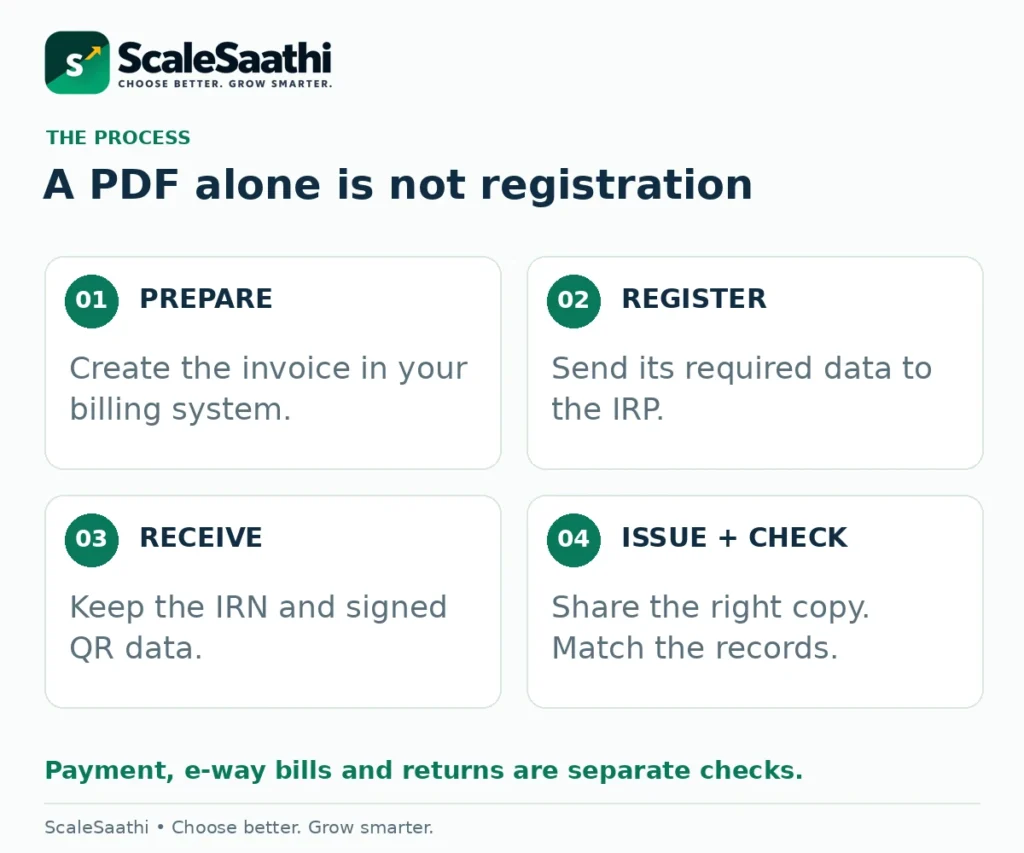
An e-way bill is a separate goods-movement document. A connected program may help create both, but you must still confirm the transport details and whether an e-way bill is needed. In Zoho Books, for example, sending invoice data alone and sending invoice plus e-way bill data are distinct options. See the documented options.
Also separate registration from payment and return filing. Receiving an IRN does not mean the customer has paid. Auto-filled GSTR-1 entries still need review and filing by the responsible person. GSTR-1 is the return that reports outward supplies. See the GST portal’s explanation.
Five practical e-invoicing software and portal options
The options below serve different needs. Pick a route first, then confirm the exact edition, service renewal, document limit and support scope in writing. The recommendations are based on the documented functions linked below.
1. TallyPrime: start here when your accounts already run in Tally
TallyPrime can send selected transactions or batches for IRN generation and show which succeeded, failed or could not be uploaded. Its online e-invoicing activity needs an active TSS subscription. TSS is Tally’s update and connected-services subscription. Bulk-generation guide; TSS and e-invoice FAQ.
Check in the demo: select one failed transaction, correct it and retrieve the final registration result. Ask which current release and TSS entitlement your business needs. Do not buy a second connector before confirming whether the built-in route already covers your work.
Tally also documents a file-export route. “Offline” here means preparing the data file before uploading it to the IRP—not obtaining a valid IRN without an internet connection. Offline export explained.
2. Zoho Books: check this for a shared online accounts workflow
Zoho Books connects to the IRP and supports approvals, bulk pushing and error summaries. Its India Standard plan lists e-invoice management; higher plans differ in users and other limits. Check the current India plan matrix rather than assuming a free invoice tool has the same entitlements. Overview; Submission functions; India plans.
Check in the demo: have one user prepare the invoice and another approve it, where your plan supports that process. Confirm how a rejected document returns to the person who can correct it, and how the IRN and signed QR reach the final copy.
3. BUSY: check the exact product family, not just the brand name
BUSY Smart’s current product page includes e-invoicing alongside GST billing and stock. Separate BUSY help for older editions names Standard/Saffron/Enterprise/Emerald and requires active BLS, its service subscription. These are different product-generation labels, not interchangeable packages. BUSY Smart; Older-edition requirements.
Check in the demo: ask the seller to use the precise product and edition on your quote. Have them show generation, failure correction and cancellation, plus the renewal needed to keep the connection working.
4. An IRP portal or upload utility: check the low-cost starting route
IRIS IRP publishes a free Basic option and lists web, Excel and API routes. An API is a connection that lets two systems exchange data. The page also separates basic storage/access from value-added services. Free registration tools should not be confused with unlimited support or a permanent archive. IRIS IRP service options.
Check in the demo: how will the registered result get back into your billing records? A free upload route can suit a small workload, but repeated copying may become difficult as volume grows. Download and retain the records your business needs.
5. Clear: investigate when several systems need to connect
Clear’s enterprise offering includes e-invoicing integration with existing ERP systems and an error-handling workflow. ERP means the main software used to run business records and operations. Its enterprise page offers a demonstration and quotation route. Clear enterprise scope.
Check in the demo: show your actual software version, number of registrations and busiest batch. Ask for the connector scope, duplicate handling, access controls, document allowance, setup charge and renewal. Do not treat a broad bundle’s starting price as your final e-invoicing cost.
For a broader billing-and-bookkeeping shortlist, see our accounting and invoicing software guide. Keep the e-invoicing requirement separate from optional stock, payroll and customer-management features.
What should the software do beyond printing a QR code?
Make a short requirement list before the seller starts the demonstration. A polished invoice layout tells you little about a failed submission at dispatch time.
Catch errors before sending
Check customer registration details, document type, dates, item codes, tax values and required addresses. Ask what happens when one required field is missing.
Show a result for every document
Separate confirmed, rejected and unknown results. A message saying “batch sent” is not enough to close the work.
Bring the result back
Keep the IRN, acknowledgement and signed QR data linked to the correct document. Check the final saved or printed copy, not just the send button.
Control access and recovery
Decide who prepares, approves, submits, cancels and downloads records. Demonstrate access recovery and a usable export before moving live work.
Use the latest supported software and utility version. Portal validation and security requirements change; the IRP release notes are a reason to ask how updates reach your installed connector, not a reason to buy the largest plan.
Add one difficult example from your business: billing one party while shipping elsewhere, an export, a credit note or multiple registrations. Have your accountant define the correct treatment first. Then ask the vendor to demonstrate that specific case.
Try an eight-document test—not just one perfect invoice
Use a vendor demonstration or authorised sandbox with test records, not invented transactions sent to the live GST system. A sandbox is a separate test environment. The workbook’s examples are classroom records only; they contain no real IRNs or taxpayer identities.
Suppose a test batch contains eight documents. Six have a confirmed response, one is rejected and one has no clear response after a connection interruption. The correct first view is 6 confirmed + 1 rejected + 1 unknown. Two documents still need attention.
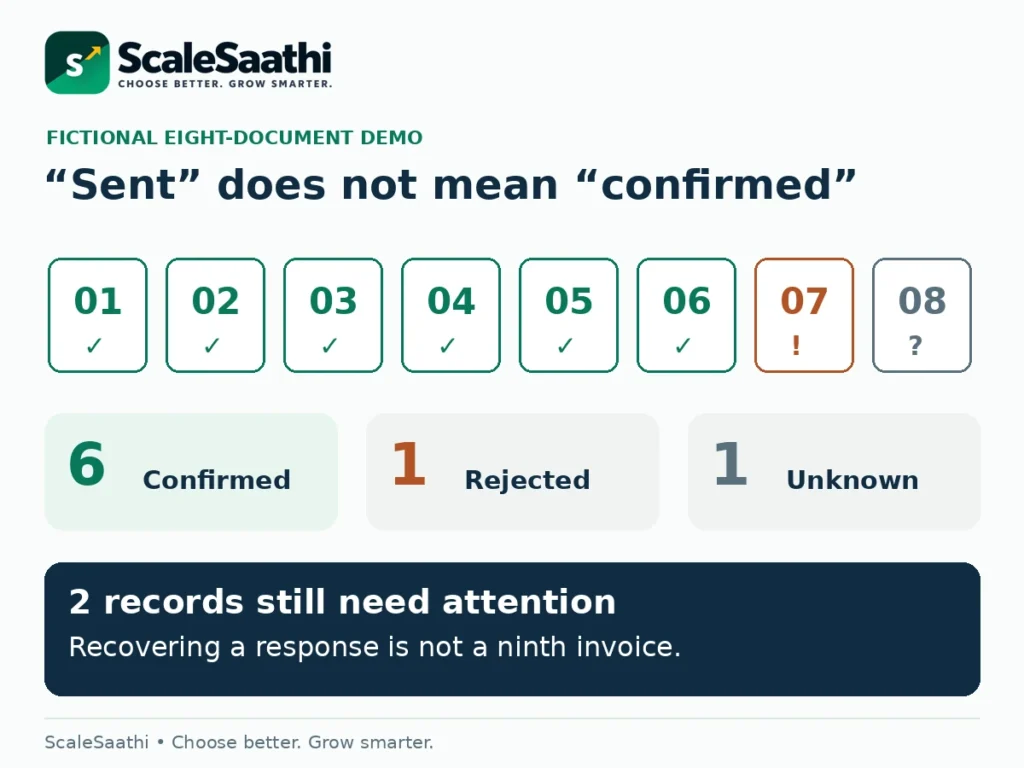
For the rejected item, ask the seller to show the error and the correction. For the unknown item, ask how the program checks the portal result before attempting another registration. Do not casually change the invoice number just to make an error disappear.
If the unknown item was already registered and its response is recovered, the view becomes 7 confirmed + 1 rejected. The original batch still contains eight documents. A retry or a recovered response is not a ninth sale.
Tally’s bulk report distinguishes generated, rejected and technically unsuccessful submissions. Zoho’s bulk workflow provides failure notifications and an error summary. Those documented functions give you concrete things to ask each vendor to demonstrate. Tally batch results; Zoho bulk results.
Check corrections and cancellations before buying
A registered e-invoice cannot simply be edited on the IRP. IRN cancellation is normally available within 24 hours of generation, subject to conditions such as an active linked e-way bill. This is a different clock from the 30-day reporting restriction. IRP cancellation guidance.
Ask the vendor to demonstrate both the local accounting record and the portal result. Deleting or cancelling a voucher in your program does not necessarily cancel its IRN. Tally’s help explicitly warns about this difference once the portal cancellation window has passed. Local cancellation versus IRN cancellation.
Outside the allowed window, take the issue to your accountant for the correct adjustment and return treatment. Do not backdate a replacement, issue an unsupported credit note, or delete evidence to make two screens agree. The correct action depends on the error and the actual transaction.
Also ask how exports preserve the original document, its registration response and later cancellation or adjustment records. You need a traceable history, not just the latest PDF.
What does e-invoicing software really cost?
Start with the extra spending needed for your chosen route. An existing licence may already cover invoice creation. Your additional cost could instead be a service renewal, a connector, training or a higher document allowance.
Request a quote showing the billing period, registrations, users, document limits, any per-document charges, storage, support, setup and exit/export costs. Ask whether failed attempts and repeat requests use the paid allowance. Do not assume they do—or do not.
Illustrative budget, not a provider price: software ₹1,200 a month, connector ₹300 a month, setup ₹6,000 once and training ₹2,000 once. Assume no other charges for this example.
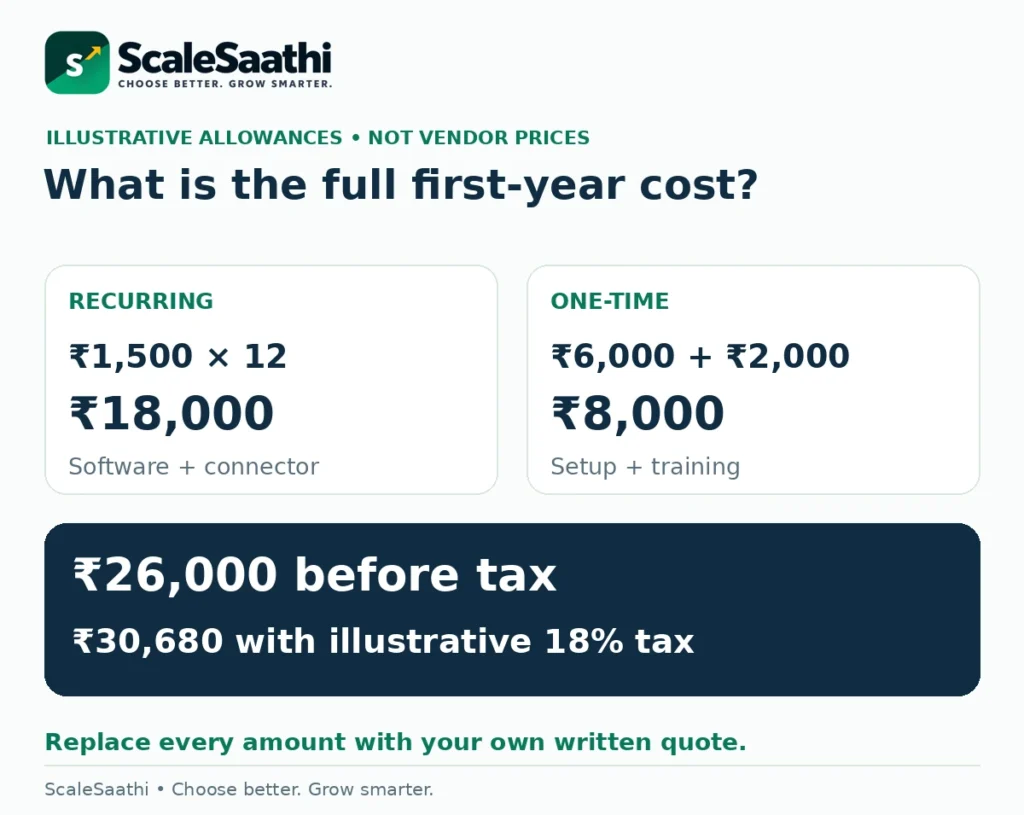
(₹1,200 + ₹300) × 12 + ₹6,000 + ₹2,000 = ₹26,000 before tax. With a hypothetical 18% tax on every line, cash cost is ₹30,680. Replace the amounts and tax treatment with your written quote.
With unchanged rates and no repeat setup or training, a later full year would be ₹18,000 before tax, or ₹21,240 at the same illustrative tax rate. Neither figure is a guaranteed renewal quote. A discount for annual payment also changes cash due today, not just the monthly equivalent.
The workbook handles each cost as monthly, annual or one-time and distinguishes tax-inclusive from before-tax amounts. A blank quote remains unknown. Enter zero only after confirming that the cost is not needed or is included elsewhere.
Can you use a free option?
Possibly. The free Basic portal route is worth comparing when your work is limited and someone can reliably manage uploads, results and records. It does not make staff time, bookkeeping or long-term storage disappear. Check Basic versus paid services.
Before upgrading, run a small work test. Count the repeated steps: exporting, uploading, retrieving responses, adding the result to the invoice and checking the books. A paid connection earns its place when it removes work you actually have—not merely because it advertises “automation”.
Keep the monthly amount and staff time separate. Time saved is not automatically cash saved. A person still on the same salary may use that time for other useful work, but the payroll bill has not necessarily fallen.
A practical go-live checklist
First, record the accountant’s applicability decision and covered registrations. Clean the customer and item records. Confirm the purchased edition and connection method, including who owns the account and recovery contact.
Next, run the required demonstrations in a test environment. Include a successful invoice, a rejection, an uncertain response, a credit note, cancellation and record export. Where relevant, test a separate delivery address and e-way bill data.
Finally, choose a controlled start date and a named reviewer. Check the first live documents individually. Reconcile the software’s registered-document list with its sales records and the return data. The GST portal’s guidance explains that e-invoice details flow into GSTR-1; that is not a substitute for checking and filing the return.
Keep a short daily exception list: document, status, owner and next action. Agree how staff reach support during billing hours and who takes over when the normal operator is absent. Use our business software buying process to record that ownership and handover.
Download the e-invoicing software check workbook
Free Excel workbook
Record requirements, compare a quotation, run trial checks and practise the eight-document status example.
The seven sheets are Start Here, My Requirements, My Budget, Worked Cost, Trial Checks, Batch Demo and Sources. Blue cells are inputs; green cells contain calculations or checks. Keep an untouched copy before editing.
This is a buying and checking aid. It does not decide legal eligibility, upload GST data, calculate statutory deadlines, generate IRNs or create signed QR codes. A checklist marked complete means the recorded checks are complete—not that a product or business is certified compliant.
Our final recommendation
Start with your present accounting system. If its supported e-invoice connection handles your covered documents, error recovery and exports, that may be the simplest choice. Compare a portal route for a small workload and a dedicated connector when several systems or large batches make manual work difficult.
Choose only after the exact edition completes your required trial tasks and the full quote is clear. The useful result is not “invoice sent”. It is “correct document registered, response saved, records matched”. Keep the accountant’s legal review separate from the vendor’s feature demonstration.
What users commonly report
Dedicated review files for TallyPrime, Zoho Books, BUSY and Clear were not available for this draft. These themes instead summarise public reviews of Vyapar (Google Play, Capterra, Software Advice) and Marg ERP (Trustpilot, Capterra, Software Advice, SoftwareSuggest)—GST billing tools Indian businesses often use when e-invoicing or e-way bill workflows sit next to day-to-day billing. They are paraphrased and should be read alongside the software options above, not as a substitute for them.
- Simple GST billing is well liked: Vyapar reviewers commonly praise quick invoices and everyday GST use for small shops.
- Marg e-way bill and GST reports: Marg users often praise e-way bill or e-challan creation and GST reports that can be matched with the portal.
- Support after go-live matters: both products draw repeated complaints about slow or hard-to-reach help once the sale is done—relevant when IRN failures need a fast fix.
- Vyapar data and update glitches: mismatches, failed updates and hangs during business hours are recurring themes.
- Marg dealer dependence: being passed between head office and a local dealer, plus renewal or AMC surprises, repeats across sources.
- Depth versus simplicity: Vyapar users note limits for complex accounting; Marg users note dated technology—neither replaces a dedicated high-volume IRP connector on its own.
Frequently asked questions
What is e-invoicing software?
It prepares the required invoice data, sends or exports it for registration with an IRP, and brings the returned IRN and signed QR data into your invoice records. A tool that only makes a PDF does not complete that process.
Does every GST-registered business need e-invoicing?
No. The general mandate concerns notified businesses with aggregate turnover above ₹5 crore in a preceding financial year from 2017–18 onwards, subject to exemptions and covered documents. Ask your accountant to confirm the PAN-based position, not just one branch’s sales.
Is the reporting deadline 30 days for everyone?
The portal restriction effective from 1 April 2025 applies to AATO of ₹10 crore or more and covers relevant invoices, credit notes and debit notes. Do not treat it as permission to delay issuing properly registered documents. Confirm the current rule for your business.
Can I use TallyPrime or Zoho Books instead of buying a separate tool?
Yes, where the exact edition, connection and service entitlement meet your requirements. Tally’s online process needs active TSS. Zoho’s India plan and usage limits need checking. Demonstrate the full process before paying for an additional connector.
Can I generate an IRN without the internet?
You can prepare some invoice files offline, but registration still requires sending the data to an IRP and receiving its response. Offline preparation is not offline government registration.
Is a payment QR code the same as an e-invoice QR code?
No. A payment QR helps collect money. The signed e-invoice QR comes from the registration response and relates to invoice details. One cannot replace the other.
Does an IRN also mean the GST return has been filed?
No. E-invoice data can populate parts of GSTR-1, but the records still need review and the return still needs filing. Payment collection and e-way bill completion are separate checks too.
What should I do if a request times out?
Check whether the IRP registered the original document before making another request. Ask the software provider to show its supported status-recovery method. Do not create a second sale or change the invoice number merely to get past the error.
Can I cancel a registered e-invoice later?
The IRP cancellation window is generally 24 hours from generation and has conditions, including linked e-way bill status. Local deletion is not the same as IRN cancellation. Outside the permitted window, ask your accountant about the correct adjustment and return treatment.
Does the free Excel workbook generate e-invoices?
No. It helps record requirements, compare costs and check a demonstration. It cannot register an invoice, generate an IRN, produce a signed QR, decide your GST obligation or file a return.
Sources and further reading
- GST Council: Notification 10/2023-Central Tax — turnover threshold and effective date
- GSTN: E-Invoicing FAQs — PAN-based turnover, covered documents and portal process; read with later advisories
- CBIC: CGST Rule 48 — invoice registration requirements
- IRIS IRP: 30-day reporting restriction for AATO of ₹10 crore and above
- IRIS IRP: E-invoice mandate — preceding financial years and registration workflow
- IRIS IRP: Basic and value-added services — published pricing and storage distinctions
- TallyHelp: Generate bulk IRNs — prerequisites, results and retrieval
- TallyHelp: E-invoice FAQ — active TSS, permissions and IRN information
- TallyHelp: Offline JSON export — subsequent IRP upload is still required
- TallyHelp: Cancel e-invoice — local voucher changes versus portal cancellation
- Zoho Books India: E-invoicing overview and IRP connection
- Zoho Books India: E-invoicing functions — approvals, bulk submissions, error handling and cancellations
- Zoho Books India: Plan inclusions and transaction limits
- BUSY Smart: Current GST, accounting and e-invoicing scope
- BUSY: Legacy edition prerequisites and active BLS for e-invoicing
- Clear: Enterprise products, e-invoicing integration and demonstration requests
- GST Portal: GSTR-1 guidance — e-invoice auto-population, review and filing
- IRIS IRP: FAQ — corrections, cancellation window and active e-way bill restrictions; threshold history is outdated
- IRIS IRP: Release notes — validation and account-security changes
Product names and logos are trademarks of their respective owners. They are shown only to identify the products compared in this guide, and their use does not imply endorsement by or affiliation with ScaleSaathi.