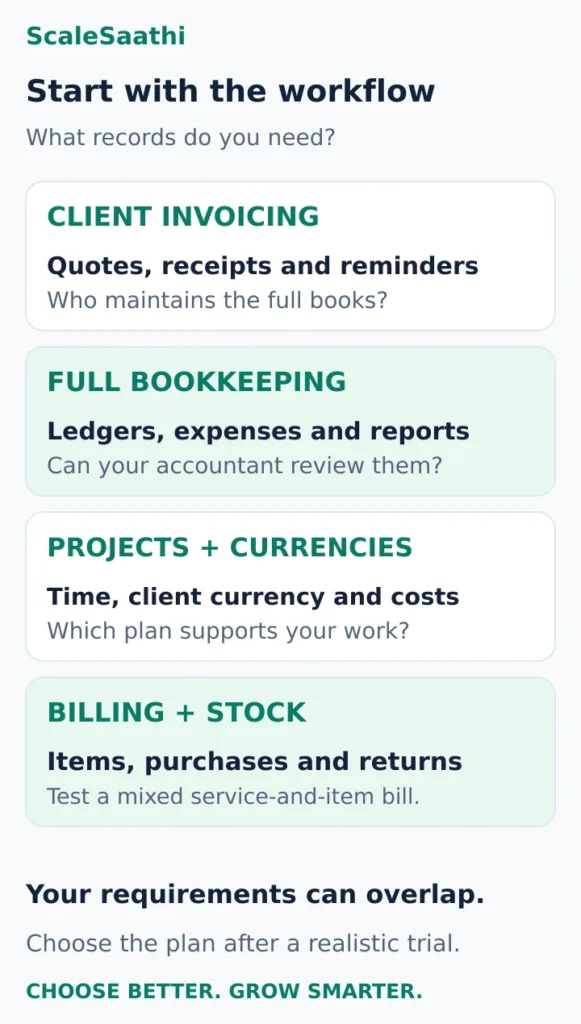
Choosing accounting software for a small business in India starts with one question: do you need to send better invoices, or maintain the complete books? A freelancer who sends eight invoices a month has different needs from a small agency tracking project costs, overseas payments and several users.
Last updated: 25 October 2026. Prices checked on 25 October 2026 on the Zoho Books, TallyPrime, Busy and Marg price pages. Prices are before 18% GST unless a column says otherwise.
Our starting recommendation: shortlist Zoho Books for connected bookkeeping, Zoho Invoice for a lean invoicing workflow, TallyPrime when your accountant will operate the books, and Vyapar when billing and stock move together. The right choice depends on the exact plan and who will use it.
What I’d settle before paying for accounting software
- ScopeZoho Invoice is free (500 invoices a year, two users, three projects) but it only covers billing. Someone still has to keep the full books.
- Free tierZoho Books Free allows one user plus an accountant and 1,000 invoices a year, and only while revenue stays within ₹25 lakh. That is Zoho’s rule, not the GST threshold.
- Billing termZoho Books Standard is ₹749 a month billed annually (₹8,988 a year) against ₹899 month to month (₹10,788), before GST.
- Two yearsWith 18% GST, the trader example costs ₹21,211.68 on Zoho Books Standard, ₹19,116 on TallyPrime Silver rental, ₹31,860 on Silver lifetime with year-two TSS, ₹16,862.20 on Marg Basic and ₹27,140 on Busy Standard.
- RenewalsTally lifetime includes the first year of TSS, and year two adds ₹4,500 plus GST. Marg’s ARC is ₹3,990 and Busy’s BLS is ₹6,500.
- Your CAIf your accountant works in Tally, price the exact licence first. Silver allows one user at a time; Gold is for several users on a LAN.
- E-invoicingMandatory for B2B invoices once turnover has crossed ₹5 crore in any year since 2017-18. Near that line, choose software that generates the IRN for you.
- TrialRaise an invoice and a credit note, enter a bill, match one month of bank statement, check the reports with your accountant, then export everything.
- ExitBefore you commit, ask what happens to your data if you stop paying and get a sample export.
This comparison uses official product information and published plan terms. Recommendations are editorial judgments about fit. Provider links go to official destinations. Confirm the final India price, billing term, taxes and required features before payment.
First decide which job you are buying software for
An invoicing tool helps you turn work into a bill, record receipts and follow up unpaid clients. Accounting software also brings those records into ledgers and financial reports so you and your accountant can review the business as a whole. One of those reports is the trial balance, the starting point for year-end accounts.
Related reading: using AI with Tally, Zoho Books and Excel.
Related reading: using ChatGPT with Excel for GST and reports.
Expense tracking alone does not settle that distinction. Ask whether your proposed workflow produces the complete records your accountant needs, or whether they will maintain another set of books elsewhere.
Use these starting points:
- Solo writer, designer or consultant: prioritise quotes, invoices, reminders and a clear list of unpaid bills.
- Freelancer keeping their own books: add bank reconciliation, expense evidence and accountant access.
- Small agency or international consultant: test project costing, timesheets, currencies and permissions at the required plan tier.
- Services plus product sales: include stock, purchase entries and returns in the trial.
For the wider decision about how this fits your other tools, use ScaleSaathi’s business software selection guide.
4 accounting and invoicing tools worth shortlisting
Zoho Books: a strong starting point for cloud bookkeeping
Best for: freelancers who want invoices, expenses and accounts in one shared system.
The India Free plan allows one user plus an accountant, up to 1,000 invoices and 1,000 bills/expenses combined annually. Its ongoing eligibility requires financial-year revenue not to exceed ₹25 lakh. That is a product eligibility rule, not a GST registration threshold.
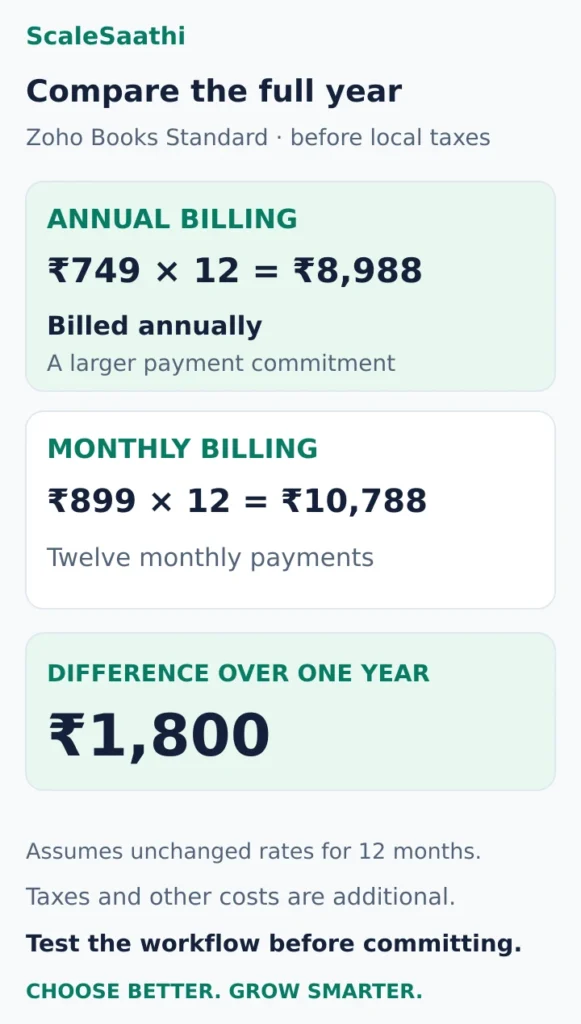
Standard costs ₹749 per organisation per month on annual billing, or ₹8,988 for a year, before local taxes; month-to-month pricing is ₹899. Professional is ₹1,499 on annual billing, or ₹17,988 a year; monthly billing is ₹1,799. Check Zoho Books India pricing.
Why consider it: the detailed comparison includes accountant access, journals, bank reconciliation and financial reporting. Standard adds transaction locking. Professional adds timesheets and multi-currency invoicing; using multiple currencies for the same customer requires Premium or above. Compare the exact plan features.
Main trade-off: the cheapest eligible plan may miss the workflow you actually need. Put your required features beside the plan name before comparing costs.
Trial question: can your accountant review an expense, reconcile a receipt and export the required reports without asking you to rebuild them in a spreadsheet?
Zoho Invoice: useful when getting paid is the main problem
Best for: a small service business that needs organised invoicing while bookkeeping is handled separately.
The software is free, with limits of 500 invoices a year, two users and three projects. Its invoices carry Zoho Invoice branding. Free use still has terms: the pricing FAQ describes deletion after extended inactivity, so keep your own exports and review the retention policy. See Zoho Invoice pricing and limits.
Why consider it: quotes, time tracking, expense recording, payment reminders and a customer portal support a freelancer’s billing workflow. Explore Zoho Invoice’s features.
Main trade-off: treat this as the invoicing part of your accounting process. Confirm who maintains the complete books and how records reach them. A project-heavy practice could hit the project allowance well before its invoice allowance.
Trial question: can you turn a quote into an invoice, record a part-payment, and give your accountant usable records without entering the same work twice?
TallyPrime: consider it when the accountant owns the workflow
Best for: a freelancer or small firm whose bookkeeper already works in Tally and will maintain the accounts.
TallyPrime supports accounting records, bank reconciliation, financial reporting and multiple currencies. That makes it relevant when the requirement extends beyond sending client invoices. Read Tally’s accounting overview.
Pricing approach: Tally publishes rental and lifetime prices, listed in the price table below and in full in our TallyPrime price guide. If you buy through a partner, ask for the licence, GST, setup and any remote-access cost as separate lines.
Silver is for one user working at a time; Gold supports simultaneous users on a LAN. A new perpetual licence includes one year of Tally Software Services, with renewal relevant to updates and connected services. Rental includes TSS for its duration. Check official licence terms.
Main trade-off: accountant familiarity is useful only if the owner can still obtain invoices, outstanding balances and exports when needed. Agree access and responsibility before committing.
Trial question: if your accountant is unavailable, can you issue an invoice, see who owes you money and retrieve a backup using your agreed setup?
Vyapar: more relevant when services include stock and frequent billing
Best for: a repair professional, small studio or service business that also buys and sells physical items.
Vyapar describes billing, stock tracking, estimates, payment recording and offline operation with later synchronisation. Those features give it a different emphasis from a consultant’s time-billing workflow. Review Vyapar’s billing and inventory capabilities.
Pricing approach: select the required device bundle and subscription term on the official pricing page, then obtain the India checkout total. The page displayed dollar pricing during our review, so we have not treated it as an Indian rupee offer or converted it into one.
Main trade-off: a billing-focused product needs an accountant review of its reports and exports before you rely on it for the full accounting process. Confirm which features belong to your selected plan, particularly syncing and additional users.
Trial question: can you invoice labour plus an item, record its purchase, process a return and give your accountant the resulting records?
Which would we try first in these situations?
Eight domestic client invoices a month, with an accountant keeping the books: start by comparing Zoho Invoice’s handoff with the eligible Zoho Books Free workflow. Eight per month means 96 a year; volume alone is unlikely to decide between them. Ask which option reduces the combined work for you and the accountant.
A consultant who needs foreign-currency invoices and project time inside the accounts: start a Zoho Books Professional trial, with the relevant currencies and project workflow. If one client needs invoices in different currencies, check the higher-tier requirement before paying. Do not select Standard merely because the headline rate is lower.
A business already running smoothly with a Tally bookkeeper: first price the exact access and licence arrangement. Switching solely for a more attractive invoice template can create avoidable migration work. Establish what daily visibility you need and ask the bookkeeper to demonstrate it.
A professional who bills for services and supplies items: trial Vyapar alongside the accounting workflow your accountant prefers. Use an actual mixed service-and-item example; an attractive invoice template cannot show whether returns and stock records work for you.
These are starting points, not automatic winners. If a product fails an essential workflow, remove it even when its subscription is cheaper.
Compare the annual payment, not just the monthly label
Using Zoho Books Standard’s published rates, annual billing works out as ₹749 × 12 = ₹8,988 before local taxes. Paying ₹899 each month for twelve months totals ₹10,788. The difference is ₹1,800, assuming the rates remain unchanged throughout that period.
The annual option requires the larger commitment. A short paid monthly period can be reasonable while you confirm the workflow, provided you understand cancellation and billing terms.
Add these costs to whichever product you shortlist:
- Required upgrades: the lowest advertised plan may omit your currencies, users or project workflow.
- Accountant and setup work: importing balances, cleaning records and configuring accounts take time.
- Payment collection: a software subscription does not establish that every connected payment service is free.
- Access and continuity: include any paid remote setup, backup service or support you actually require.
- Taxes and renewal: compare the final payable amount and the next term’s conditions.
ScaleSaathi’s SaaS Cost Calculator can help organise recurring software costs. Use a written quote for licence-specific extras and implementation work. For online collection, compare fees and settlement needs with the payment gateway comparison for small businesses.
If a zero subscription is a firm constraint, the free accounting software guide focuses on that narrower choice. Here, the objective is a workable accounting process at an acceptable total cost.
Prices side by side, with GST
Zoho Books is priced per organisation per month and billed yearly. TallyPrime and Marg sell licences, with a yearly renewal for updates. That makes them hard to compare from the price label alone, so the table below shows each price before and after 18% GST.
| Option | Price (before GST) | With 18% GST | Limits that matter |
|---|---|---|---|
| Zoho Books Free | ₹0 | ₹0 | Revenue up to ₹25 lakh a year; 1 user plus 1 accountant; 1,000 invoices a year |
| Zoho Books Standard | ₹749/month, billed yearly (₹8,988 a year) | ₹10,605.84 a year | 3 users; 5,000 invoices a year |
| Zoho Books Professional | ₹1,499/month, billed yearly (₹17,988 a year) | ₹21,225.84 a year | 5 users; 10,000 invoices a year |
| Zoho Books Premium | ₹2,999/month, billed yearly (₹35,988 a year) | ₹42,465.84 a year | 10 users; 25,000 invoices a year |
| TallyPrime Silver rental, 12 months | ₹8,100 | ₹9,558 | Single PC |
| TallyPrime Silver lifetime | ₹22,500 | ₹26,550 | Single PC; 1 year of Tally Software Services included |
| TallyPrime Gold lifetime | ₹67,500 | ₹79,650 | Multi-user on a local network |
| Marg ERP 9+ Basic licence | ₹10,300 | ₹12,154 | 1 user full rights; yearly renewal ₹3,990 |
| Busy Standard licence | ₹16,500 | ₹19,470 | Full GST edition, single user; yearly BLS renewal ₹6,500 |
| Busy SMART (BUSY Magic) | ₹8,000 per 360 days | ₹9,440 per 360 days | Subscription with complete GST features |
Worked example: what two years actually cost
Take a small trader with one owner and an outside accountant. Zoho Books Free may fit if revenue stays within ₹25 lakh a year and invoices stay under 1,000 a year. If not, here is what the paid options cost over two years:
| Option | Year 1 (before GST) | Year 1 (with GST) | Two years (with GST) |
|---|---|---|---|
| Zoho Books Standard | ₹8,988 | ₹10,605.84 | ₹21,211.68 |
| TallyPrime Silver rental (12 months) | ₹8,100 | ₹9,558 | ₹19,116 |
| TallyPrime Silver lifetime + TSS in year 2 | ₹22,500 | ₹26,550 | ₹31,860 |
| Marg ERP 9+ Basic + renewal in year 2 | ₹10,300 | ₹12,154 | ₹16,862.20 |
| Busy Standard + BLS renewal in year 2 | ₹16,500 | ₹19,470 | ₹27,140 |
| Busy SMART, two 360-day terms | ₹8,000 | ₹9,440 | ₹18,880 |
TallyPrime’s lifetime licence includes the first year of Tally Software Services (TSS). The year-two figure adds Silver TSS at ₹4,500 + GST = ₹5,310. Marg’s year-two figure adds the Basic renewal (ARC) of ₹3,990 + GST = ₹4,708.20. Busy’s year-two figure adds the Standard BLS renewal of ₹6,500 + GST = ₹7,670. Zoho, Tally rental and Busy SMART keep charging every term, while the licence options cost less from year two onwards. Busy’s 360-day terms are slightly shorter than a calendar year.
Watch the Busy edition name. Busy’s pricing page labels its cheapest licence, Basic at ₹11,000, as billing and accounting for a non-GST business. For full GST features it lists Standard (₹16,500) or the SMART subscription (₹8,000 per 360 days). Remote access is separate: Busy lists BUSY Online from ₹10,800 per 360 days, before GST. Tally similarly sells TallyPrime Cloud Access as an add-on (₹1,800 for 3 months alongside a 3-month rental, before GST). Busy’s official price list; our Busy review.
Vyapar, myBillBook and other billing apps also have paid plans. Their price pages load prices with scripts we could not read reliably on 25 October 2026, so check the current price on the vendor’s website before you compare.
Run one realistic trial before moving your books
Choose a sample from your own business and use the same transactions in each trial. Keep sample documents clearly labelled and separate from live invoices or filings.
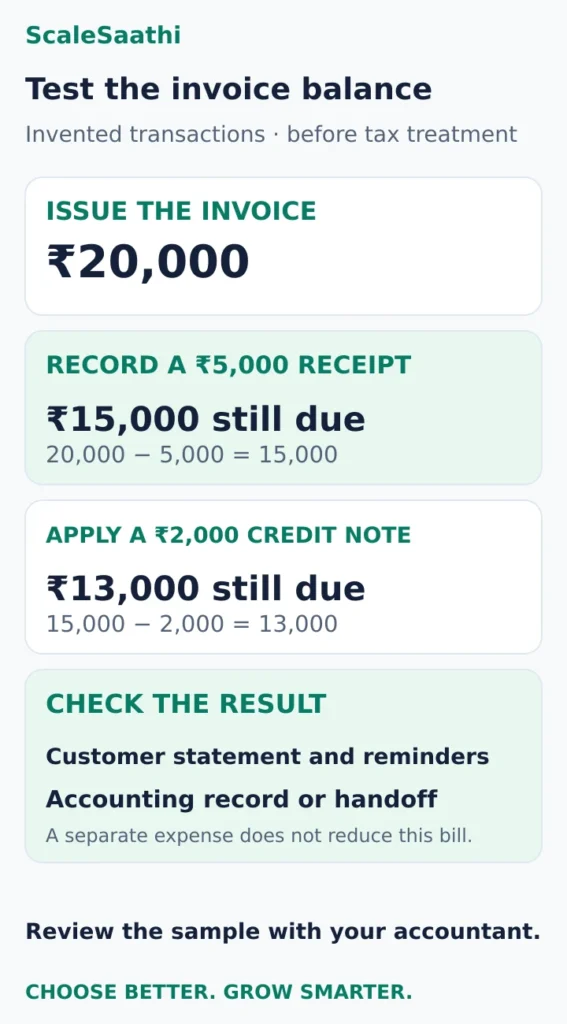
An illustrative service-only exercise, before any tax treatment, is:
- Create a ₹20,000 quote with a clear description and agreed payment terms.
- Convert it to an invoice and record a ₹5,000 part-payment. The amount still due should be ₹15,000.
- Enter a ₹1,200 business expense with its supporting receipt. Check how it appears in the expense report.
- Issue a ₹2,000 credit note against that invoice. With no other changes, the remaining receivable should become ₹13,000.
- Check the customer statement and the reminder amount. Neither should continue demanding the original full invoice value.
- In a full accounting product, match the receipt to a sample bank statement and review the ledger with your accountant. In an invoicing-only workflow, demonstrate the handoff into the accountant’s books instead.
These invented numbers test transaction handling. They do not determine how a particular sale, expense or credit note should be taxed.
Add one case that reflects your hardest routine task: an overseas receipt with fees, a client deduction, a cancelled job, a monthly retainer or an item return. Ask the accountant how it should be recorded, then test whether the selected plan supports that treatment.
Record where you needed help and whether support answered the actual question. A five-minute invoice demo tells you little about correcting a mistake a month later.
For a wider review of controls, reports and migration, follow the accounting software selection checklist.
How to choose accounting software: a checklist
Most small businesses compare accounting software by brand or by the monthly price. A better starting point is the list of things your books must do. Use the table below to turn your needs into features to check, then confirm each one on the exact plan you would buy. The first column covers the questions most owners ask: GST and e-invoicing, stock, users, your CA, TDS, banking, desktop or cloud, data export, support and total cost.
| If you need | Look for | What we found |
|---|---|---|
| GST invoices and returns | GST invoice formats, HSN/SAC codes, credit notes, GSTR-1 and GSTR-3B reports, and whether returns are filed from the software or exported | Zoho Books lists GST returns and filing; TallyPrime lists GST and compliance in every edition; Busy reserves full GST for Standard and SMART |
| E-invoicing | Direct IRN generation from the invoice screen and a clear error list when the portal rejects a document. Mandatory for B2B invoices if your aggregate turnover has exceeded ₹5 crore in any year since 2017-18; at ₹10 crore and above, invoices must be reported within 30 days | Zoho Books’ plan comparison lists e-Invoicing; Tally lists e-invoicing in all editions. Check which Zoho plan includes it |
| E-way bills | E-way bill generation from the same invoice, with vehicle and transporter details. Generally needed when you move goods worth more than ₹50,000; some states set different limits for movement within the state | Listed by Zoho Books (check the plan) and by Tally in all editions |
| Inventory | Stock by item and location, purchase entries, returns, reorder levels; batches, expiry or multiple godowns if your trade needs them | Zoho Books lists stock tracking and reorder points, with warehouses and barcodes under advanced inventory (check the plan). Tally, Busy and Marg list inventory management as a core feature |
| More than one user | User count included in the plan, role-based permissions and the price of each extra user | Zoho Books: 1 user + 1 accountant (Free), 3 (Standard), 5 (Professional), 10 (Premium). TallyPrime Silver is one user at a time; Gold allows several users on a local network |
| CA or accountant access | A free accountant login or an easy data handover your CA already uses, and transaction locking after the books are closed | Zoho Books has an “invite accountant” feature and transaction locking (check which plan). Many CAs already work in Tally |
| TDS | TDS deduction on vendor bills, the right section and rate, and a TDS report your accountant can use for returns | Ask each vendor to demonstrate this on your plan. We have not verified plan-level TDS features |
| Bank feeds and reconciliation | Automatic bank feeds or statement import, matching rules, and how many bank accounts are included | Zoho Books lists connected banking with partner banks (including SBI, ICICI, Axis, Kotak and HSBC) and third-party feeds. Ask desktop vendors how statements are imported |
| Desktop or cloud | Cloud: access anywhere, automatic updates, depends on internet. Desktop: works offline, but you own backups and remote access | Zoho Books is cloud. TallyPrime, Busy and Marg are desktop-first, with paid cloud or remote-access add-ons |
| Data export and migration | Full export of masters, transactions and reports in Excel/CSV, import of opening balances, and migration help | Zoho Books lists report export as spreadsheet or PDF and migration assistance. Ask every vendor for a sample export during the trial |
| Support | Phone, chat or email, support hours and language, and whether support comes from the vendor or a local partner | Zoho Books lists email, voice and chat support. Tally, Busy and Marg also sell through partners, so ask who supports you |
| Total cost | Price before and after 18% GST, renewal or TSS charges, extra users, cloud access, e-invoice add-ons, setup and accountant time | See the price table and two-year example above |
Compliance thresholds can change and depend on your turnover and transactions. Confirm with your accountant whether e-invoicing and e-way bills apply to you; the figures above are from the GST e-invoice portal and GSTN advisories as of 25 October 2026.
A 10-minute shortlist method
- Minute 1–2: Write down your three non-negotiables from the checklist above, for example e-invoicing, stock with batches, and CA access.
- Minute 3–4: Decide desktop or cloud. If your accountant already runs your books in Tally and nobody else needs remote access, start there. If several people need access from different places, start with cloud.
- Minute 5–6: Open the accounting software selector or the price table above, and keep only products whose exact plan covers your three non-negotiables.
- Minute 7–8: For each survivor, write the two-year cost with 18% GST, including renewal and any cloud access.
- Minute 9–10: Keep the two cheapest that pass. Send both vendors the questions below and book trials using the five tests.
Questions to ask a vendor before you pay
- Which plan do I need for e-invoicing, e-way bills and multiple GSTINs, and what does that plan cost after 18% GST?
- How many users are included, what does an extra user cost, and does my CA need a paid login?
- What happens to my data if I stop paying? Can I still view and export it?
- Can you show a full export of masters, transactions and GST reports in Excel or CSV?
- What is the yearly renewal (TSS, BLS, ARC or subscription), and has it increased in the last two years?
- Is remote or mobile access included, or is it a separate cloud add-on?
- Who gives support: you or a local partner? In which hours and languages?
- Will you import my opening balances and masters, and is that charged separately?
- How are statutory changes (GST rules, e-invoice schema) delivered, and are they included in my plan?
- Can I see TDS on a vendor bill and the TDS report on my plan?
Ask for answers in writing, in an email or on the quote. A demo that skips a question usually means the answer depends on a higher plan.
Five tests to run in the trial
| Area | What to do in the trial | What it tells you |
|---|---|---|
| Sales | Raise a real invoice, a credit note and a payment receipt | Whether the document and tax workflow matches yours |
| Purchases | Enter a vendor bill, an expense and a vendor payment | How much day-to-day typing the system needs |
| Bank | Match one month of a sample bank statement | How much manual reconciliation is left |
| Reports | Open the ledger, receivables, P&L and balance sheet with your accountant | Whether the owner and CA can both see what they need |
| Exit | Export customers, vendors, items, transactions and reports | How easily you can leave or migrate later |
If two products pass all five, choose the one your accountant finds faster at month end. The sections below explain how to map your transactions, choose desktop or cloud, test controls and plan the move.
Map transactions and compliance first
List how the business sells, buys, receives money and pays expenses. Include branches, inventory, projects, multiple GST registrations, e-commerce channels or donor restrictions only where they genuinely apply. The software should follow the real record flow and produce the documents and reports the organisation is required to maintain.
Compliance features are not a substitute for professional judgement. GST rates, e-invoicing applicability and filing responsibilities can change and depend on the taxpayer. Ask a qualified accountant to confirm requirements and review configuration before live use. ScaleSaathi’s comparison is educational, not tax or accounting advice.
Choose cloud, desktop or mobile-first by operating reality
Cloud software can make remote access, collaboration and automatic updates easier. It depends on connectivity and the provider’s service. Desktop-oriented software can suit established accountant workflows and local control, but the business must manage installation, backup, remote access and version updates. Mobile-first tools can be convenient for field billing and micro businesses but may have limits as reporting and controls grow.
Do not choose from category labels alone. Test the real devices and connection conditions, the accountant’s workflow and how a second authorised person gains access. Review user limits and paid add-ons because collaboration can change the total cost substantially.
Test controls and month-end work
Create user roles for entry, approval and review. Check whether periods can be locked, changes can be traced and deleted records are controlled. Test bank reconciliation, outstanding receivables, expense evidence and the reports used at month end. A system that produces an invoice quickly can still be weak for review and correction. If you reconcile by hand today, our bank reconciliation statement format shows what the software should be doing.
Ask the accountant to inspect a sample ledger, profit and loss statement, balance sheet and tax report. Record any manual spreadsheet still required. The goal is not zero manual work; it is a clear and controlled process where adjustments and responsibility can be explained.
If your accounting tool’s payroll is too basic, compare standalone payroll software options.
Plan migration and ownership
Clean customer, vendor, item and account masters before import. Decide whether to migrate opening balances, the current financial year or full history. Keep the old system read-only until reports reconcile and the accountant signs off. A rushed full-history migration can add cost without helping current operations.
Export sample data during the trial. Keep administrative accounts in the organisation’s control, enable MFA where available and document backup responsibilities. Review plan limits for invoices, users, locations, inventory and exports on the official page before payment.
Keep GST configuration separate from the buying decision
A GST feature badge does not decide whether you must register, how a transaction should be treated or who will file the return. Resolve those questions with your accountant, using the GST basics for freelancers for orientation.
Then give each vendor a precise requirement: the document you must issue, the report you must produce and the person who will review it. Ask whether the selected plan performs that workflow directly or produces an export for another step.
If e-invoicing is relevant to your business, ask for that specific process to be demonstrated. Do not assume that emailing an invoice PDF establishes the required e-invoicing workflow.
Make the final choice with your accountant
Choose the smallest plan that passes your real transaction test, gives the right people access and produces usable records. Agree who enters expenses, checks receipts, resolves mismatches and closes the month.
Before migration, request an export of sample customers, invoices, payments and reports. Have the accountant inspect it. Keep the old records available until balances reconcile, and keep the owner’s account and recovery details under the business’s control.
For many freelancers, the decision will come down to Zoho Invoice versus Zoho Books. TallyPrime deserves a close look where the bookkeeper’s existing process is valuable; Vyapar deserves one where billing and stock are central. Buy the workflow you have demonstrated, then review the plan when a real limit or new requirement appears.
Most of these tools produce a balance sheet automatically; see our balance sheet format to check what it should contain.
Related guides
- Accounting software selector: answer a few questions for a shortlist
- Free accounting software for small business in India
- Tally vs Zoho Books
- TallyPrime price in India, with GST
- Zoho Books pricing in India
- Marg ERP price in India
- Busy accounting software review
- E-invoicing software in India
- GST billing software in India
- Running Tally on the cloud
Frequently asked questions
Which accounting software should an Indian freelancer try first?
Start with Zoho Books when you want invoicing and bookkeeping together, or Zoho Invoice when you mainly need billing and your accountant keeps the books separately. Consider TallyPrime for an established accountant-led process and Vyapar when services include stock and frequent billing. Test the exact plan before choosing.
Is Zoho Invoice the same as Zoho Books?
No. They serve different scopes. Zoho Invoice focuses on the billing workflow, while Zoho Books provides broader accounting. Decide who will maintain the complete books and check the limits of each product separately; a free invoicing allowance is not the same as free accounting eligibility.
Can a freelancer use free accounting software?
Yes, if the product’s eligibility, usage limits and features fit the business. Check revenue conditions, users, invoices, projects, exports and the accountant’s workflow. A free subscription can still involve bookkeeping, setup or payment-collection costs.
Is annual billing always the better choice?
No. Compare the saving with the larger commitment and your confidence in the product. Test the required plan and review cancellation and renewal terms first. The worked example assumes the published rates stay unchanged for twelve months and excludes local taxes and other costs.
What should freelancers with overseas clients test?
Test the invoice currency, the currency actually received, any fees or deductions and the accountant’s handling of the difference. Confirm the required plan supports the complete workflow. Also check whether one customer needs invoices in more than one currency, since that can be a separate plan restriction.
What should I ask my accountant before buying?
Ask who will enter and review transactions, which reports and exports they need, how corrections will be handled and what access they require. Have them review the sample invoice, part-payment, credit note and resulting records. Agree migration scope and opening balances before moving live books.
Is there free accounting software for a small business in India?
Yes. Zoho Books has a free plan for businesses with revenue up to ₹25 lakh a financial year. It allows 1 user plus 1 accountant and 1,000 invoices a year. Check the limits before you depend on it.
What does Zoho Books cost in India?
Paid plans, billed yearly, are Standard ₹749, Professional ₹1,499 and Premium ₹2,999 per organisation per month, before GST. Standard for a year is ₹8,988 before GST, or ₹10,605.84 with 18% GST. Prices checked on 25 October 2026.
Is Tally cheaper than Zoho Books?
In the first year, Zoho Books Standard (₹8,988) costs about the same as a 12-month TallyPrime Silver rental (₹8,100), both before GST. A TallyPrime Silver lifetime licence costs ₹22,500 upfront but only ₹4,500 a year in TSS after the first year.
Do accounting software prices include GST?
Usually not. Zoho, Tally and Marg all show prices before GST. Add 18%. A GST-registered business can usually claim it back as input tax credit.
How do I choose accounting software for my small business?
List your must-haves first: GST and e-invoicing, stock, number of users, CA access, TDS and bank feeds. Decide between desktop and cloud. Keep only products whose exact plan covers your must-haves, compare their two-year cost with 18% GST and renewals, then trial the two cheapest with your own invoices, bills and bank statement.
Do I still need an accountant if the software supports GST?
Yes, for most businesses. Software can produce invoices, records and GST reports, but it does not decide how a transaction should be taxed, which returns apply or how to correct a mistake. Have a qualified accountant review your setup before you go live.
Is cloud accounting better than desktop accounting?
Neither is better for everyone. Cloud software suits teams that need access from several places and want automatic updates, but it needs a reliable connection. Desktop software works offline and suits accountant-led books, but you handle backups, and remote access is usually a paid add-on.
Do I need accounting software that generates e-invoices?
Only if e-invoicing applies to you. It is mandatory for B2B invoices of GST-registered businesses whose aggregate turnover exceeded ₹5 crore in any financial year since 2017-18. If you are close to that level, choose software that generates IRNs directly so you do not have to switch later.
What data should I export before changing accounting software?
Export your chart of accounts, customers, vendors, items, opening balances, all transactions, GST reports and attachments where possible, plus final trial balance, P&L and balance sheet. Check that key totals match after importing into the new system.
What does Busy accounting software cost?
Busy’s pricing page lists the Standard licence, with full GST features, at ₹16,500 and the SMART subscription at ₹8,000 per 360 days, both before 18% GST. The ₹11,000 Basic licence is labelled for non-GST businesses. Standard’s yearly BLS renewal is ₹6,500. Prices checked on 25 October 2026.
Sources and further reading
- Zoho Books — India plan pricing, free eligibility and usage limits
- Zoho Books — detailed plan comparison and currency restrictions
- Zoho Invoice — free-plan limits, branding and retention terms
- Zoho Invoice — billing, timesheets and reminder features
- TallyHelp — accounting capabilities in TallyPrime
- TallyHelp — Silver, Gold, rental licences and TSS
- Vyapar — billing, inventory and offline workflow overview
- Vyapar — device and subscription-term pricing selector
- Tally Solutions — TallyPrime rental, lifetime and Cloud Access prices
- Busy — licence, BUSY Magic subscription, BLS renewal and BUSY Online prices
- GST e-invoice portal — FAQs on who must issue e-invoices
Product names and logos are trademarks of their respective owners. They are shown only to identify the products compared in this guide, and their use does not imply endorsement by or affiliation with ScaleSaathi.