Microsoft business email prices in India start at ₹170 per user/month for Microsoft 365 Business Basic (with Teams), on an annual subscription paid yearly. Microsoft has also sold a version without Teams at a lower rate; check whether it is offered for your account at checkout. Both include custom-domain email; desktop Office apps require a different plan. GST is extra. Microsoft’s Business Basic prices.
Last updated: 25 October 2026 · . Prices checked on 25 October 2026 on Microsoft’s and Google’s India pages. Figures are per user/month before GST unless a column says otherwise.
For Google Workspace, India storefront annual-commitment rates start at ₹99 for Business Base and ₹270 for Starter, per user/month before tax. Base has a smaller user limit. Google’s India storefront.
The better choice depends on the work surrounding the inbox. A team that lives in desktop Excel has a different requirement from one that shares Google Docs all day. Compare the plan that passes your work test, its full commitment and the cost of moving.
Microsoft 365 or Google Workspace: the prices and the catches
Which suite should you shortlist?
- Custom email with Microsoft web apps: start with Business Basic. Decide whether the team needs the version with Teams.
- Installed Word, Excel and PowerPoint: evaluate Microsoft 365 Business Standard using your actual files and devices.
- Gmail and Google Docs are already the normal workflow: check Workspace Base or Starter before accepting the disruption of a switch.
- Large shared files and recorded Google Meet sessions: evaluate Workspace Standard.
- Device management or specific security controls: write down the required control, then compare suitable editions with the administrator who will configure it.
These are starting points based on the documented plan differences below. If you are still choosing the type of service, the ScaleSaathi Business Email Provider Finder can help organise your requirements.
Microsoft business email plans and prices in India
All figures here are per user/month, before GST. The lower Microsoft rates shown require an annual subscription paid yearly; the alternative is a monthly subscription. These are ordinary plan listings, excluding the separately named “with Copilot” bundles. Confirm the exact product and renewal terms on your order.
Business Basic without Teams: email and web apps
₹130 on the annual subscription; ₹156 on a monthly subscription.
Includes business email, web and mobile Office apps, and 1 TB of cloud file storage per user. It does not supply the installed desktop Office suite or Teams. Business Basic plan details.
Best fit: staff can complete their work in web apps and already have an adequate meeting arrangement.
Buying check: ask someone to complete a normal client task in the web version. An Excel file opening successfully does not prove every required feature works there.
Business Basic with Teams: add the meeting workflow
₹170 on the annual subscription; ₹204 on a monthly subscription.
This version adds Teams to the Basic offering. Microsoft lists custom email and 1 TB of cloud storage per user. Microsoft’s business email comparison.
Best fit: a team choosing Microsoft email, browser-based documents, meetings and chat together.
Buying check: if you keep paying for another meeting product, write down why. Paying for two can be reasonable, but the second bill belongs in the comparison.
Business Standard: include installed Office apps
With Teams: ₹860 annually committed and paid yearly; ₹1,032 on a monthly subscription. Without Teams: ₹665 and ₹798 respectively.
Standard includes business email and desktop Office apps. Business Standard plan details and prices.
Best fit: installed Microsoft apps are required for the team’s documents, spreadsheets or established working process.
Buying check: test the actual operating system, templates, add-ins and workbook features you rely on. Also check whether an existing licence already covers that work before buying overlapping subscriptions.
Business Premium: buy it for defined controls
With Teams: ₹1,830 annually committed and paid yearly; ₹2,196 monthly. Without Teams: ₹1,565 and ₹1,878 respectively.
Premium adds capabilities including Intune device management and Defender protection to the desktop-app and business-email offering. Business Premium pricing and capabilities.
Best fit: a business with a clear requirement to manage devices, access or threats, and someone responsible for operating those controls.
Buying check: request a demonstration of the policy you need. A licence purchase alone does not configure devices, establish retention procedures or ensure compliance.
Note on other Microsoft rates: when we rechecked on 25 October 2026, Microsoft’s India pages showed the annual “paid yearly” prices for Business Basic, Standard and Premium. The monthly-subscription rates and the without-Teams rates mentioned here were not shown on the pages we checked, so treat them as a guide and confirm the figure at checkout.
Two Microsoft products that are easy to confuse
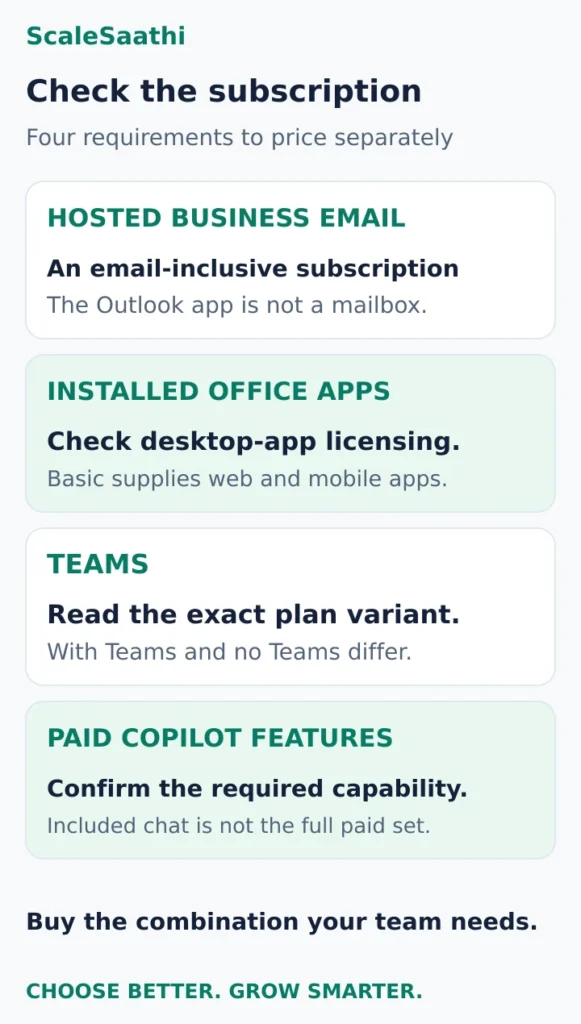
Exchange Online Plan 1 is a standalone hosted-email option listed at ₹335 per user/month, paid yearly, before GST. That is higher than the displayed Business Basic rates in India. An email-only product is therefore not automatically the cheapest purchase. Check its specific fit and your eligibility for the suite alternatives. Exchange Online plans.
Microsoft 365 Apps for business supplies desktop apps, but does not include hosted business email. The presence of the Outlook app does not create an Exchange mailbox. Microsoft states this distinction explicitly in its mailbox subscription guidance. If you choose an apps-only subscription, budget for the email service separately.
The Google Workspace plans worth comparing
Use these India storefront figures alongside the Microsoft cards, before tax:
- Business Base: ₹99 with an annual commitment; ₹120 flexible.
- Business Starter: ₹270 with an annual commitment; ₹325 flexible.
- Business Standard: advertised introductory rates of ₹864 annual-commitment or ₹1,040 flexible. Displayed regular rates are ₹1,080 and ₹1,300. The offer is for eligible new customers’ first 20 users for 12 months. Storefront and offer conditions.
Base supports up to 20 users with 20 GB pooled storage per user. Base edition documentation. Starter provides 30 GB pooled storage per user; Standard provides 2 TB and meeting recording. Both support up to 300 users in the relevant business setup. Google’s edition comparison.
Do not treat a country offer as everyone’s renewal price. Google’s general billing reference lists Starter at ₹540 annual-commitment or ₹650 flexible, and explains that country-specific discounts can apply. Confirm your account’s actual rate and next renewal. Google’s billing reference.
Our Google Workspace pricing guide covers Google editions, aliases and signup budgeting in more detail. Here, use the smallest suitable edition to compare the two working environments.
Both suites side by side, with GST
The table below puts the main business plans from both companies in one place. Microsoft lists its prices as “user/month, paid yearly”, and Google lists annual-commitment rates. Neither includes GST. If your business is GST-registered, you can usually claim the GST back as input tax credit, so the before-GST column is your real cost. If you are not registered, use the with-GST column.
| Plan | Per month (before GST) | Per month (with 18% GST) | Per year (before GST) | Per year (with 18% GST) |
|---|---|---|---|---|
| Microsoft 365 Business Basic | ₹170 | ₹200.60 | ₹2,040 | ₹2,407.20 |
| Microsoft 365 Business Standard | ₹860 | ₹1,014.80 | ₹10,320 | ₹12,177.60 |
| Microsoft 365 Business Premium | ₹1,830 | ₹2,159.40 | ₹21,960 | ₹25,912.80 |
| Business Standard with Copilot | ₹1,955 | ₹2,306.90 | ₹23,460 | ₹27,682.80 |
| Business Premium with Copilot | ₹2,660 | ₹3,138.80 | ₹31,920 | ₹37,665.60 |
| Google Workspace Business Base (up to 20 users) | ₹99 | ₹116.82 | ₹1,188 | ₹1,401.84 |
| Google Workspace Business Starter | ₹270 | ₹318.60 | ₹3,240 | ₹3,823.20 |
| Google Workspace Business Standard (regular rate) | ₹1,080 | ₹1,274.40 | ₹12,960 | ₹15,292.80 |
| Google Workspace Business Standard (new-customer offer) | ₹864 | ₹1,019.52 | ₹10,368 | ₹12,234.24 |
| Google Workspace Business Plus | ₹1,700 | ₹2,006 | ₹20,400 | ₹24,072 |
Google’s Business Standard offer of ₹864 applies to an eligible new customer’s first 20 users for 12 months. After that, budget for the regular ₹1,080. Business Base is limited to 20 users, so a growing team may have to move to Starter later.
What 5 and 20 users cost in a year
| Plan | 5 users (before GST) | 5 users (with GST) | 20 users (before GST) | 20 users (with GST) |
|---|---|---|---|---|
| Google Base | ₹5,940 | ₹7,009.20 | ₹23,760 | ₹28,036.80 |
| Microsoft Basic | ₹10,200 | ₹12,036 | ₹40,800 | ₹48,144 |
| Google Starter | ₹16,200 | ₹19,116 | ₹64,800 | ₹76,464 |
| Microsoft Standard | ₹51,600 | ₹60,888 | ₹2,06,400 | ₹2,43,552 |
| Google Standard (regular) | ₹64,800 | ₹76,464 | ₹2,59,200 | ₹3,05,856 |
| Microsoft Premium | ₹1,09,800 | ₹1,29,564 | ₹4,39,200 | ₹5,18,256 |
Worked example: a 20-person firm on Microsoft Business Standard pays ₹860 × 20 × 12 = ₹2,06,400 a year before GST. With 18% GST that is ₹2,43,552. The same team on Google Business Standard at the regular rate pays ₹1,080 × 20 × 12 = ₹2,59,200 before GST, or ₹3,05,856 with GST.
Microsoft’s compare page also lists separate add-ons, such as Teams Phone Standard at ₹830 per user/month. These are not included in the plan prices above.
Compare the work, storage and AI you actually need
Desktop files versus browser collaboration
Choose three files that regularly cause work: perhaps a quotation workbook, a client proposal and a shared project tracker. Ask the people who use them to edit, review, export and send them in each shortlisted setup.
Record broken formatting, unsupported features, permission problems and extra steps. For a team already working comfortably in Google Docs, changing suites needs a clear benefit. For a team that must retain installed Excel, a cheaper email-and-web plan leaves part of the requirement unpaid.
Mailbox capacity is different from file storage
Microsoft’s 1 TB cloud-storage headline should not be read as a 1 TB email inbox. Its comparison separates mailbox and cloud-storage limits. Microsoft’s plan comparison.
Google describes the storage figures above as pooled across the organisation. Before deciding, measure current email and file use separately, then ask how the proposed edition allocates capacity. A generous total is unhelpful if an individual mailbox, archive or working folder hits a different limit.
Compare specific AI tasks, not the badge
Microsoft’s “with Copilot” bundles are priced separately from its ordinary business plans. Included Copilot Chat access should not be treated as the full paid Copilot feature set. Microsoft’s AI and subscription FAQ.
Google’s edition documentation distinguishes Gmail assistance in Starter from AI in more apps in Standard. Use a concrete test: draft a client reply, summarise an allowed sample document or analyse a non-sensitive worksheet. Confirm the required feature, usage limits and administrator settings before assigning it a monthly value.
What users commonly report
These themes summarise public reviews of both suites on sites such as Capterra, Software Advice, PeerSpot, Trustpilot and Reddit. They are paraphrased and mostly global rather than India-specific.
- Google Workspace is seen as simple and collaborative: reviewers praise the familiar Gmail interface and easy shared work in Docs, Drive and Meet.
- Microsoft 365 is valued for its apps: reviewers often highlight the full Office apps plus Teams, SharePoint and OneDrive for teams that live in Word, Excel and Outlook.
- Microsoft licensing and admin feel complex: a common theme is confusing plan choice, scattered admin portals and a steeper learning curve.
- Google pricing changes draw attention: users discuss per-user price rises and paying extra for storage.
- Support is a shared complaint: reviewers of both report slow or hard-to-reach support; Google complaints lean towards billing and cancellation, while Microsoft users note that plans bought through a reseller are referred back to that reseller.
What does a five-person team cost for a year?
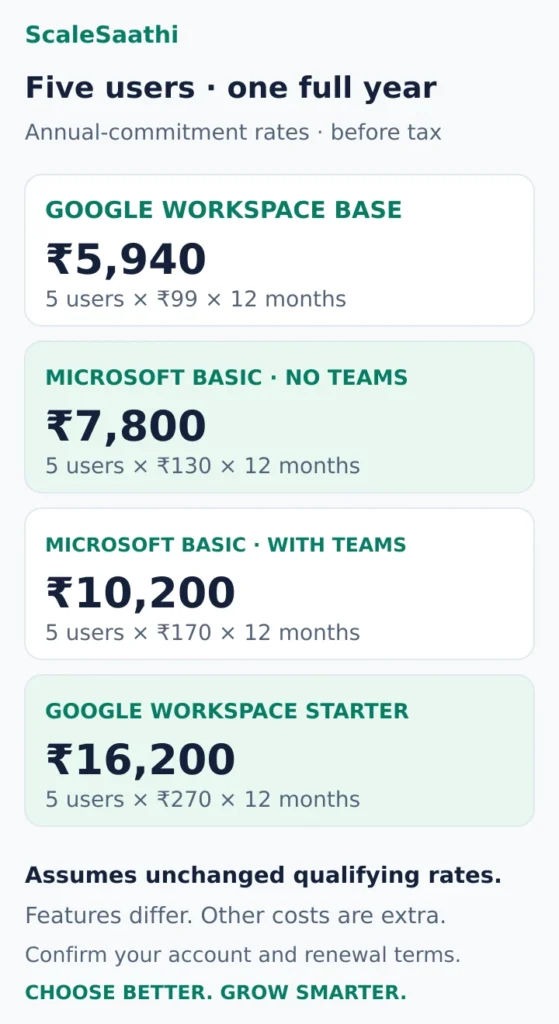
For five users kept for 12 months at unchanged rates, the subscription arithmetic is:
Annual cost before tax = 5 × monthly price per user × 12.
The following uses the annual-commitment figures above. These plans have different capabilities; the totals compare bills, not equivalent products.
- Workspace Base at ₹99: ₹5,940.
- Microsoft Basic without Teams at ₹130: ₹7,800.
- Microsoft Basic with Teams at ₹170: ₹10,200.
- Workspace Starter at ₹270: ₹16,200.
- Microsoft Standard without Teams at ₹665: ₹39,900.
- Microsoft Standard with Teams at ₹860: ₹51,600.
- Workspace Standard at ₹864 introductory: ₹51,840; at the displayed ₹1,080 regular rate, ₹64,800.
All totals exclude tax, domain renewal, migration, add-ons and outside support. The Google offer example assumes all five seats qualify. It does not establish the renewal bill for an existing account.
For Microsoft Basic with Teams, ₹10,200 becomes ₹12,036 if 18% GST is charged. Use your order’s actual tax treatment; this is a cash-budget illustration, not an input-tax-credit calculation. Microsoft quotes GST separately. Google’s India billing guidance also explains its tax treatment and says GSTINs are mandatory for new Business-account signups. If you lack a GSTIN, confirm the available purchase route before planning a move.
Enter the whole team’s recurring cost into the ScaleSaathi SaaS Cost Calculator. Match its tax setting to your inputs, and add separately quoted migration or support costs to the decision.
A lower monthly price can lose after switching costs
Suppose five staff currently qualify for Workspace Starter at ₹270, and Microsoft Basic with Teams at ₹170 passes their work test. The illustrative subscription difference is ₹500 a month, or ₹6,000 a year, before tax.
If moving costs an invented ₹8,000 for setup and staff time, the simple payback is ₹8,000 ÷ ₹500 = 16 months. That assumes unchanged prices and no other cost differences. A move for better capability may still be worthwhile, but the first year would not produce a cash saving under these assumptions.
Count users, shared addresses and commitment correctly
List everyone who needs independent access before counting role addresses such as sales or support. A shared address is a workflow requirement; it is not automatically another employee licence.
Microsoft permits an unlicensed shared mailbox up to 50 GB under its standard conditions, while each person accessing it needs an appropriately licensed Exchange Online mailbox. Additional storage, archiving or advanced features can require further licences. Use delegated access through individual accounts and block direct sign-in to the shared account. Shared-mailbox rules.
Ask the supplier whether different staff can use different licences in your proposed setup. Get the quantities and permitted combination in writing. Do not assume Google and Microsoft have identical edition-mixing rules, or that buying one advanced seat enables advanced controls for everyone.
Billing frequency and commitment are separate. Google’s annual plan can be billed monthly while still committing you to purchased licences until renewal; flexible billing permits user reductions. Google’s payment-plan rules. For Microsoft or a reseller, record the term, payment schedule, cancellation terms and earliest seat-reduction date on the quote.
Test a normal working day before moving email
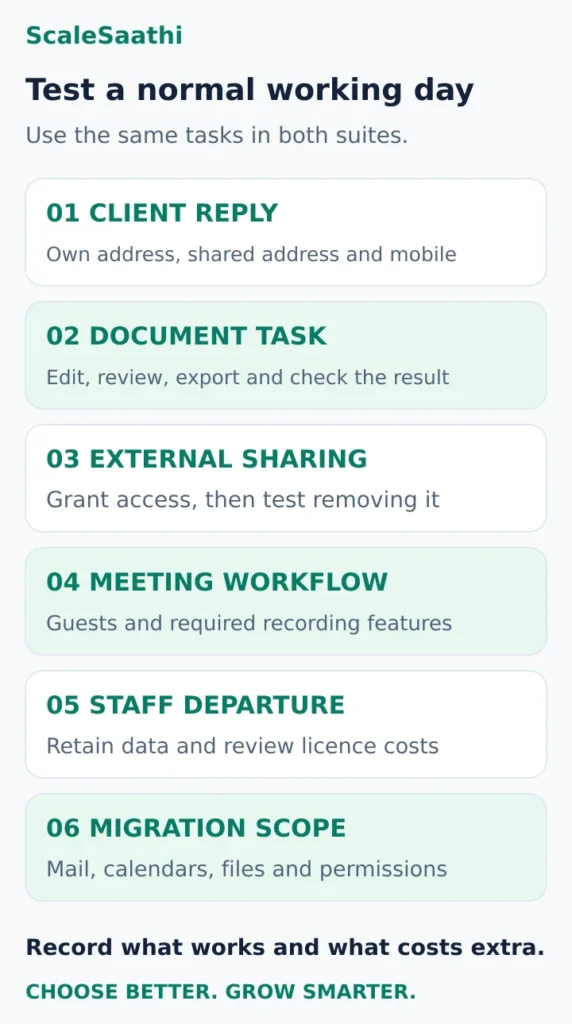
Use a small pilot and clearly labelled sample data. The goal is to find the work that becomes slower, breaks or needs extra help.
- Send a client reply. Test your own address, the required shared address, attachments and mobile access.
- Finish a real document task. Check workbook behaviour, formatting, comments, export and the recipient’s experience.
- Share a file outside the business. Test access and removal of access with the permissions you intend to use.
- Run the required meeting. Check invitations, guest joining and recording if your chosen edition must supply it.
- Rehearse a staff departure. Confirm who retains email, files and shared access, and which licences remain chargeable.
- Ask for a migration plan. Specify historical mail, calendars, contacts, files and permissions; do not accept “email migration included” as a complete scope.
Keep the domain and administrator accounts under the business’s control. Our domain registrar comparison explains ownership and renewal checks. Agree who will change mail-routing and authentication records, preserve unrelated website records, test delivery and handle problems. Keep the old service available until the agreed transfer and checks are complete.
Use the ScaleSaathi business software selection guide to record the pilot result and owner of the service. Approve the edition that completes the work at an acceptable full cost, with renewal, recovery and handover responsibilities written down.
If you only need email, compare the cheapest business email options, including Zoho Mail’s free plan and Hostinger.
Frequently asked questions
What is Microsoft’s starting business email price in India?
Business Basic without Teams is listed at ₹130 per user/month on an annual subscription paid yearly, before GST. Confirm the version, commitment and final order price.
Is Microsoft 365 cheaper than Google Workspace?
It depends on the qualifying edition and required features. Compare the full team bill for plans that pass your work test, including desktop apps, meeting needs, renewal rates and any switching costs.
Does Microsoft 365 Apps for business include an email mailbox?
No. It supplies apps, including Outlook, but the hosted business email service must be obtained separately. Check that the proposed subscription includes the mailbox service you need.
Can I keep my domain when changing email providers?
Normally, yes. Keep control of the domain, agree the data migration and configure the new provider’s mail records correctly. Preserve unrelated website records and test delivery before closing the old service.
Does annual billing mean I can remove seats each month?
No. Check the commitment separately from the payment schedule. Seat reductions and cancellation depend on the subscription terms; a monthly invoice can still belong to an annual contract.
Should everyone buy the same Microsoft or Google plan?
First list each person’s requirements. Ask the provider or reseller which licence combinations are permitted for your account, and obtain the quantities and prices in writing before budgeting for a mixed setup.
Is Microsoft 365 cheaper than Google Workspace in India?
It depends on the plan. Google Business Base at ₹99 is the cheapest for teams of up to 20 users. Microsoft Business Basic at ₹170 is cheaper than Google Business Starter at ₹270. Microsoft Business Standard at ₹860 is cheaper than Google Business Standard at its regular ₹1,080. All prices are per user/month on an annual commitment, before GST, checked on 25 October 2026.
Is GST included in Microsoft 365 and Google Workspace prices?
No. Both companies list Indian prices before GST. Add 18% GST to the listed price. For example, Microsoft Business Basic at ₹170 becomes ₹200.60 per user/month with GST. A GST-registered business can usually claim this GST back.
How much does Microsoft 365 Business Standard cost for 20 users?
On an annual subscription paid yearly, 20 users cost ₹860 × 20 × 12 = ₹2,06,400 a year before GST, or ₹2,43,552 with 18% GST.
Which plans include desktop Word and Excel?
Microsoft 365 Business Standard and Business Premium include the installed desktop apps. Business Basic gives web and mobile versions only. Google Workspace plans work in the browser and do not include Microsoft’s desktop apps.
How many users can Microsoft 365 Business plans have?
Microsoft’s business plans support up to 300 users. Google Business Base supports up to 20 users, and Starter, Standard and Plus support up to 300.
Sources and further reading
- Microsoft India — Business Basic prices and plan variants
- Microsoft India — business email plan comparison
- Microsoft India — Business Standard prices and desktop apps
- Microsoft India — Business Premium prices and controls
- Microsoft India — Exchange Online standalone plans
- Microsoft Learn — shared mailboxes and licensing
- Microsoft India — suite, mailbox and storage comparison
- Microsoft India — AI, subscriptions and business-plan FAQ
- Google Workspace India — storefront rates and offer conditions
- Google Workspace Help — Business Base edition
- Google Workspace Help — edition features
- Google Workspace Help — payment plans and reference prices
- Google Workspace Help — India tax and signup requirements
Product names and logos are trademarks of their respective owners. They are shown only to identify the products compared in this guide, and their use does not imply endorsement by or affiliation with ScaleSaathi.