WhatsApp Business API providers differ most in the work around each message: assigning replies, connecting your store or CRM, handling exceptions and keeping records your team can use.
Our starting shortlist for Indian businesses: AiSensy for campaign-led teams, Wati for shared-inbox operations and routing, Interakt for a Shopify-connected workflow, and Twilio for a developer-built integration. These are starting points based on documented capabilities; each needs a test on the exact plan you intend to buy. If you are down to Wati or Interakt, our Wati vs Interakt comparison works out the monthly bill for three kinds of business.
Choose two candidates that fit your workflow, give them the same brief, and compare the result. Detailed tariffs and budget calculations are covered in our WhatsApp Business API pricing guide. This guide concentrates on choosing the service you will operate every day.
If you mainly want automation, compare chatbot and AI add-ons in our WhatsApp AI chatbot guide.
Choosing a WhatsApp API provider: test this before you sign
- Start with the job: AiSensy for campaigns with agent follow-up, Wati for team routing, Interakt for a Shopify-linked workflow, Twilio when your developers own the integration.
- If one person can handle enquiries in the free WhatsApp Business app, name the missing capability before you pay for a platform.
- Give two finalists the same brief, then trace one workflow from trigger to message, reply, record update and failure handling.
- Check the plan, not the demo. AiSensy’s chatbot flow builder and AI agent are add-ons outside the base subscription.
- Keep control of the account. Know which Meta Business Portfolio, WABA and number are yours, and who can recover admin access.
- Want to keep the number in the app? Ask about coexistence. On Twilio’s app-to-platform route, the number can’t stay in the app.
- Plan the exit now. AiSensy’s migration doesn’t move chat history or insights, and templates may need resubmitting.
- Consent is your job. An imported contact list is not opt-in, and no plan guarantees template approval or delivery.
- Pilot with opted-in contacts first. Expand only once staff can run it and an admin can explain the bill.
First decide whether you need a platform subscription
If one person can reliably manage customer enquiries with the WhatsApp Business app, identify a specific missing capability before paying for more software. Common reasons to evaluate the API route include assigning conversations across a team, triggering notifications from another system, and keeping a consistent record of follow-ups.
There are two broad buying routes:
- A ready-to-use business application: your staff work in the provider's inbox, campaign tools and automation builder. Evaluate usability, plan limits and support.
- A developer platform or direct integration: your team builds messaging into its own software. Evaluate APIs, incoming-message handling, delivery information and maintenance effort.
Businesses with developers can also investigate building directly on Meta's platform. The official Developer Hub provides a route to the Meta-hosted service, testing resources and integration documentation. A third-party inbox subscription is therefore a product choice, not something every business must buy.
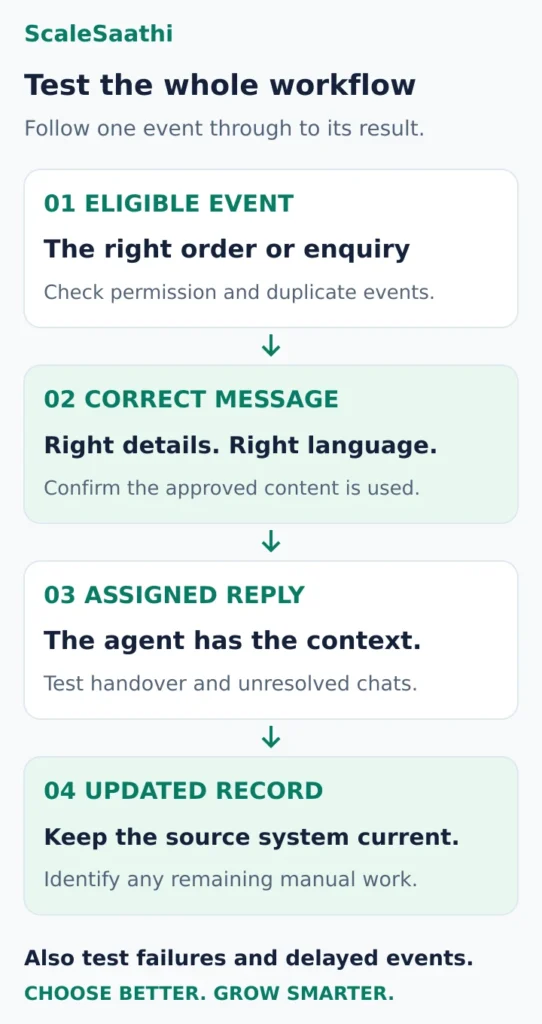
Write a one-sentence requirement: “When an eligible order is ready, send the customer an update; if they reply, assign the conversation and keep the order record current.” That gives a provider something concrete to demonstrate.
Four WhatsApp Business API providers worth shortlisting
The following recommendations are editorial judgments about fit, based on official product information. We have not purchased these accounts or measured delivery rates and support performance. All provider destinations are official links.
AiSensy: start here for campaigns with agent follow-up
Best fit: a small marketing or sales team that wants to organise audiences, send campaigns and manage the replies in one application.
AiSensy documents audience segmentation, multi-agent live chat, conversation assignment and bot-to-agent transfer. Those are useful capabilities to test when the real problem is following up the responses generated by a campaign. AiSensy features.
Plan check: its pricing page separates the chatbot flow builder and AI-agent add-ons from the base subscription, with message credits managed separately. A demonstration using an add-on does not establish that the quoted base plan includes it. AiSensy plans and add-ons.
Ask for this demonstration: select an eligible audience, handle a reply, assign it to a colleague and carry the customer's context through the handover. Check the permissions available to each staff role.
Shortlist it if your team can operate that flow comfortably and the required automation fits the complete quote.
Wati: investigate team routing and operating limits
Best fit: a business where several staff need clear responsibility for enquiries and a supervisor needs to see what remains unresolved.
Wati's plan comparison lists inbox assignment and tracking, with more advanced team routing and operator reporting in higher plans. It also distinguishes automation allowances, API access and webhook availability between tiers. A webhook is a notification sent to another system when an event occurs. Wati plan comparison.
Plan check: get the precise routing rule, required integrations and support coverage included in your India quote. “API access” alone does not establish that every incoming event your CRM needs is available.
Ask for this demonstration: two agents open the same enquiry, one takes responsibility, and the conversation later moves to another team. Can the supervisor identify unanswered or incorrectly assigned chats?
Shortlist it if the team controls remove real coordination work, and the required tier remains affordable at your expected usage.
Interakt: test the connection to your Shopify store
Best fit: a Shopify merchant evaluating order notifications, checkout follow-up and customer conversations alongside store activity.
Interakt lists Shopify order updates, abandoned-checkout reminders and contact or catalogue synchronisation. Its comparison explicitly marks the Shopify integration as included on the Shopify plan. Other plan configurations and integrations should be confirmed separately. Interakt plans and Shopify eligibility.
Plan check: ask which store events, custom fields and reply events the selected integration handles. A connection that sends an order update may still need additional work to write the customer's response back into the right record.
Ask for this demonstration: create a test order, change its status, receive the appropriate message and handle a customer query about that same order. Include a cancellation so an obsolete follow-up is not sent.
Shortlist it if the exact store connection removes recurring manual work. If your store platform is still undecided, use our ecommerce platform comparison before choosing messaging around a particular integration.
Twilio: consider it when developers own the workflow
Best fit: a business building WhatsApp into an existing application, CRM or support system, with someone responsible for the integration.
Twilio's documentation covers notifications, two-way messaging, incoming webhooks and outbound message status monitoring. Those building blocks let developers connect messaging to an application's own records and rules. Twilio WhatsApp platform documentation.
Plan check: price the interface, hosting, development and support arrangement you need alongside messaging. Twilio's WhatsApp pricing separates its inbound and outbound processing fee from applicable Meta template charges. Twilio WhatsApp pricing.
Ask for this demonstration: a reply reaches the correct customer record, a failed send becomes visible, and a delayed or repeated event does not create duplicate business actions.
Shortlist it if custom control solves a real requirement and the integration has a maintenance owner. A successful API request alone does not establish a usable support operation.
Compare one complete workflow, including the exceptions
Give both finalists the same short brief: business activity, existing number setup, staff roles, recipient countries, sending schedule, store or CRM, required languages and desired result.
Then trace the work through these checkpoints:
- Trigger: which order, booking or customer event starts the message? How are cancelled or duplicate events handled?
- Message: is the approved content populated with the right customer details and language?
- Reply: does the right agent receive it with enough history to respond?
- Record: does the result update the source system, or must staff copy it manually?
- Exception: who sees an integration failure, rejected template or exhausted allowance, and what happens next?
For payment-related flows, check the verified payment status in the actual payment system before confirming an order as paid. Sending a payment link and reconciling a payment are separate jobs; our payment gateway selection guide explains the latter.
Treat AI automation as another workflow to test. Give it an unavailable product, an ambiguous question and a request to speak to someone. Decide which actions need staff approval and check that the handover preserves context. Measure the useful work completed, not just the number of automated replies.
Settle account control before onboarding
Keep a record of the Meta Business Portfolio, WhatsApp Business Account (WABA), registered number and administrators involved in the setup. Twilio's account explanation describes how the business identity, WABA and registered phone numbers relate.
Ask the provider to show you:
- Which account belongs to your business and which access the provider receives.
- How your authorised administrator accesses it and recovers access if a staff member leaves.
- Who controls the number and can complete required verification.
- Who approves additional staff and integration access.
If keeping the WhatsApp Business app on the same number is essential, ask specifically about coexistence support for your account and onboarding route. Do not assume every provider offers it. Twilio's documented app-to-platform migration route says the same number cannot continue in the app after that migration. Confirm the intended route and preserve needed records before changing an existing setup.
Check what you can take away when you leave
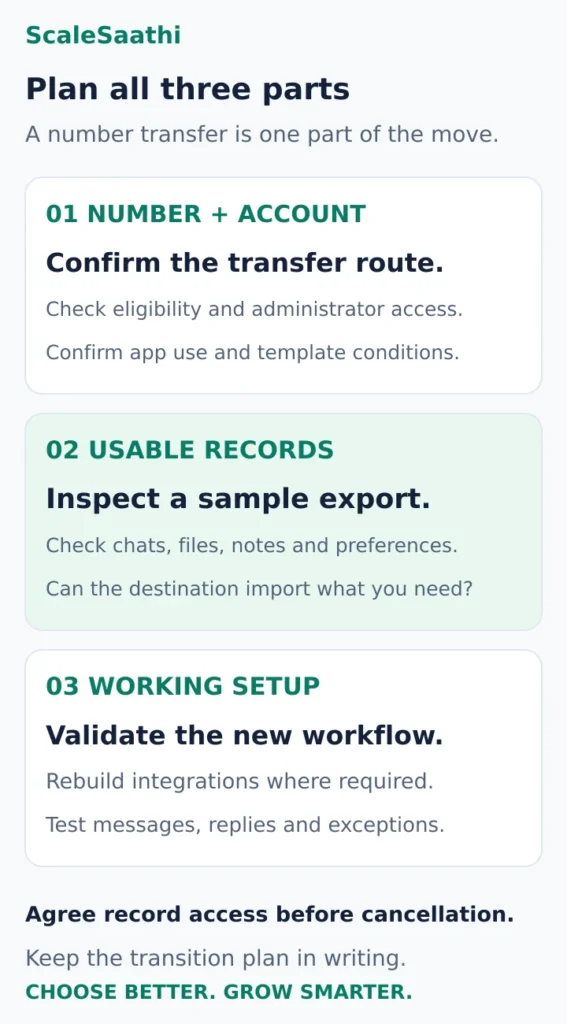
Number migration and usable data export are separate checks. AiSensy's migration documentation says chat history, message insights and authentication tokens are not included in the provider-to-provider migration it describes. AiSensy migration scope.
Twilio's migration guide also explains that copied templates can be reviewed again and some may require resubmission. Neither a number-transfer promise nor an export button proves that your complete working setup will move unchanged.
During evaluation, request a sample export and identify what it contains: contacts, permitted messaging preferences, chat text, attachments, timestamps, notes, tags and delivery records. Check which items can actually be imported into the proposed destination. Automations and integrations may need rebuilding.
Ask about notice periods, unused message credits, export access after cancellation, migration charges and who coordinates the change. Get a written transition plan before ending an established service. These questions matter even if you expect to stay for years.
Choose tools that make responsible messaging practical
WhatsApp's Business Messaging Policy requires the recipient's number and permission to receive subsequent messages or calls, respect for opt-outs, and approved templates outside the 24-hour customer-service window. It also requires clear escalation options when using automation. Provider software should help your staff operate within those rules.
Test how the service records permission, suppresses opted-out contacts, shows template status and handles a customer who asks for help beyond the bot. Use the languages your customers actually use. An imported contact list is not evidence of permission, and a provider subscription does not guarantee template approval or delivery.
For team access, request a demonstration of roles, access removal and available activity records. Ask where chat data and backups are stored and what the contract says about retention and deletion. An Indian sales office alone does not establish where customer data is processed.
Compare the full quote and the support arrangement
Request the lowest plan that passes your workflow, with subscription, seats, numbers, required integrations, automation or AI usage, messaging, setup and applicable taxes shown separately. Confirm the invoice currency, billing commitment and what changes when an allowance is exceeded.
Ask for a support example that resembles your business: an order-update integration fails during a busy period. Who investigates, through which channel, during what hours, and with which escalation or response commitment? Distinguish help using the product from someone repairing your custom integration.
Record both the ordinary-month and busy-month total. Add the resulting recurring estimate to Other software / month in the ScaleSaathi SaaS Cost Calculator, using a consistent tax basis. It totals your assumptions; it does not calculate WhatsApp tariffs or provider eligibility.
To estimate the monthly bill for any provider, use our WhatsApp API cost calculator.
For a store, include messaging and its implementation in the complete ecommerce website budget. Staff time spent fixing a weak connection is part of the operating cost even when it is absent from the provider's invoice.
Run a small pilot before a long commitment
Use provider-supported testing with sample records and opted-in participants. Ask a staff member who will actually use the service to complete the workflow, rather than relying entirely on a sales demonstration.
Agree these acceptance conditions before starting:
- A valid event produces the intended message with the right details.
- A reply reaches the correct agent and customer record.
- An opt-out is respected in the next eligible campaign selection.
- A failed or repeated event is visible and does not create a duplicate action.
- An administrator can retrieve the agreed export and explain the usage bill.
Keep the result as passed, needs work or unsupported, with the plan name and any additional cost beside it. Choose the finalist that passes the essential workflow and gives clear ownership, support and exit terms. Expand usage only after the team can operate the pilot reliably.

Frequently asked questions
Which WhatsApp Business API provider should a small Indian business try first?
Match the first trial to the work you need: AiSensy for campaigns and agent follow-up, Wati for team routing, Interakt for a Shopify-connected workflow, or Twilio for a developer-built integration. These are editorial starting points. Choose two candidates and test the exact plan, support arrangement and required integrations.
Do I have to buy a provider subscription to use the WhatsApp Business Platform?
A ready-made provider application is one route. Businesses with developers can also investigate direct integration through Meta’s developer resources. Include the cost of building and maintaining the staff interface, business-system connections and monitoring before comparing that route with a subscription.
Can I keep using the WhatsApp Business app on the same number?
Confirm coexistence support for your exact account, number and onboarding route before making changes. Do not assume all providers support it. Twilio’s documented app-to-platform migration route says the same number cannot continue in the app afterwards. Preserve needed records and agree the transition first.
Will my chat history and automations move when I switch providers?
Do not assume they will. Number transfer, data export and workflow setup have separate conditions. Inspect a sample export, confirm what the destination can import and identify any automation or integration that needs rebuilding. Check template status and agree access to required records before cancellation.
Can an API provider guarantee message delivery or approval?
A subscription does not guarantee either. Evaluate how the product displays template status, delivery failures and account alerts, and how its support handles problems. Your team still needs to obtain appropriate permission and respect opt-outs when operating the service.
What should I ask for before paying annually?
Request the lowest plan that passes your pilot, including all required seats, numbers, integrations and automation. Confirm the billing term, variable charges, support responsibilities, cancellation terms and export access. Keep the pilot results and complete quote together so a sales demonstration does not become an assumption about the purchased plan.
Sources and further reading
- WhatsApp — Business app overview
- WhatsApp — direct development and the Meta-hosted platform
- AiSensy — segmentation, agent assignment and handover features
- AiSensy — plan, message-credit and automation add-on structure
- Wati — team routing, reporting and plan-dependent integration access
- Interakt — Shopify integration scope and plan eligibility
- Twilio — incoming messages, webhooks and delivery-status handling
- Twilio — processing fees and separate Meta messaging charges
- Twilio — business identity, WhatsApp accounts and phone numbers
- Twilio — app and provider migration routes, template review
- AiSensy — migration scope and excluded chat history
- WhatsApp — permission, opt-outs, templates and escalation rules
Product names and logos are trademarks of their respective owners. They are shown only to identify the products compared in this guide, and their use does not imply endorsement by or affiliation with ScaleSaathi.