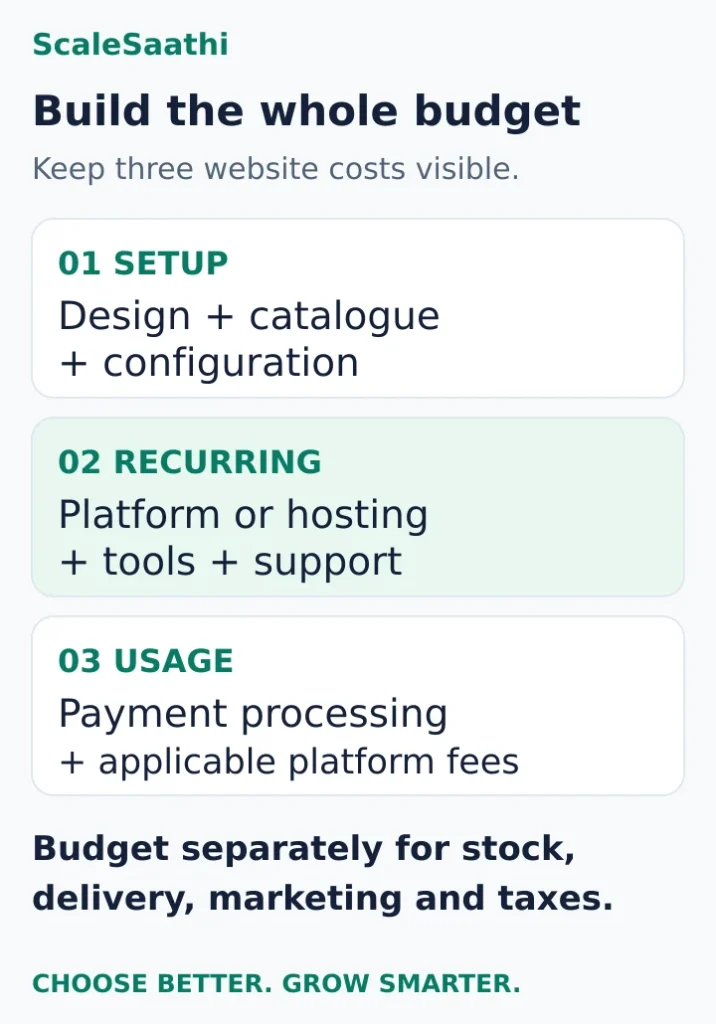
An ecommerce website budget has three parts: getting the store ready, keeping it running, and paying for orders as they arrive. A development quote covers only the first part unless it explicitly includes the others.
For a small Indian store, the worked examples below produce first-year website budgets of ₹7,200 for an owner-built setup, ₹62,200 for an assisted WooCommerce setup, and ₹46,188 for an assisted hosted setup—before payment fees and taxes. These are transparent budgeting exercises, not surveyed market prices or provider quotations. Replace the allowances with your own quotes before buying.
This ecommerce website cost guide for India helps you build that budget, understand a developer’s proposal, and decide what you can afford to maintain after launch.
Listed prices and examples exclude taxes unless stated otherwise. Promotions are not used to estimate a normal full year.
What payment fees do to the three store budgets
- Owner-built WooCommerce: ₹7,200 fixed. A 2% gateway fee on ₹25,000 a month of online payments adds ₹6,000, so ₹13,200 for the year.
- Assisted WooCommerce: ₹25,000 setup + ₹37,200 a year of services = ₹62,200. At ₹1,00,000 a month in payments, 2% adds ₹24,000, so ₹86,200.
- Assisted hosted store (Shopify Basic at ₹17,988 a year): ₹46,188 fixed. A 2% gateway charge plus Shopify’s 2% third-party fee adds ₹48,000, so ₹94,188. Cheaper than WooCommerce before fees, dearer after them.
- Shopify’s third-party fee comes on top of the gateway’s charge. It is worked out on the order total including tax and shipping, and isn’t returned when you refund. Standard cash on delivery is excluded.
- Razorpay advertises 2% plus GST as standard. Confirm the rate for each payment method in your merchant agreement.
- A low monthly equivalent can mean paying the whole year on day one, so plan cash before launch separately from the first-year cost.
- None of this includes stock, packaging, delivery, returns or marketing. Budget those separately.
Start with a 12-month ecommerce website budget
Use this calculation:
First-year website cost = one-time setup + 12 months of recurring services + usage-based fees.
Then add the rest of your business budget: inventory, packaging, delivery, returns, marketing, staff and any professional services. A working checkout does not pay for those activities.
Keep two figures beside each other:
- Cash needed before launch: upfront development instalments, prepaid subscriptions, domain registration and initial stock.
- Cost over the first year: everything you expect to spend during 12 months, including amounts paid later.
A service advertised as a monthly equivalent may require annual payment. A lower monthly equivalent can therefore require more cash on day one.
Use the ScaleSaathi online store cost calculator to explore your assumptions. Its output is a planning estimate, not a quote. Add shipping, returns, packaging, photography, compliance and applicable taxes separately; they are not automatically covered by the result.
What should an ecommerce development quote include?
Write a short store specification before requesting a price. “An ecommerce website with 100 products” leaves too much undefined. A hundred straightforward products and a hundred products with size, colour and personalised engraving options can involve very different work.
For a first store, specify:
- Product count, categories, variants and who supplies clean catalogue data.
- Pages and design requirements, including whether a standard theme is acceptable.
- Payment integration, shipping rules and the destinations you intend to serve.
- Tax and invoice settings based on instructions from your accountant.
- Order emails, customer accounts, stock handling and refund workflows.
- Any required connection to accounting, inventory, courier or other software.
- Mobile checkout testing, handover, training and the post-launch support period.
Ask who pays for every theme, extension and subscription in the quote. “Payment integration included” should explain which provider, whether onboarding assistance is included, and who resolves a failed test payment. It does not mean payment-processing fees disappear.
If you also need a company website, keep general website development costs separate from store-specific work. This prevents an attractive brochure-site price from being mistaken for the price of a functioning shop.
Four questions that make quotes comparable
What will you deliver? Request a named list of pages, templates, integrations and catalogue work, rather than a promise of an “advanced website”.
What counts as complete? Use practical acceptance checks: a product can be ordered on a phone, shipping is calculated correctly, the confirmation arrives and staff can process the order.
What costs extra? Agree how additional products, revisions, features and support requests will be charged.
What will I own and control? Keep the domain, store account and payment account under your business’s control. Document access to licences, backups, data exports and any custom code.
Hosted store, WooCommerce or custom development?
Hosted store: budget for the subscription and additions
A hosted platform can suit an owner who wants to spend less time managing the underlying hosting. Confirm that the required checkout, shipping and integration features fit before committing.
Shopify’s India pricing page lists Basic at ₹1,499 per month on yearly billing, equivalent to ₹17,988 for 12 months, before applicable taxes. Hosting and SSL are included; paid apps, a domain purchase and external setup help can add to the bill. Basic also lists a 2% third-party payment-provider fee. That is separate from the payment provider’s own charge.
Use a normal annual budget rather than an introductory offer to judge affordability. Evaluate Shopify’s plan-by-plan costs when deciding which features you actually need; this article uses Basic only as a concrete cost example.
WooCommerce: free core software, a separately funded store
WooCommerce’s official pricing explanation describes its core WordPress ecommerce software as free, with no monthly core-platform subscription or revenue share. Hosting, paid extensions and payment processing still need to be budgeted.
This route can suit someone who values control and can manage maintenance or pay a named person to do it. Ask who tests updates, restores backups and fixes checkout problems. “I will do it myself” can reduce cash spending, but it is a commitment of time rather than free labour.
Do not buy the cheapest hosting allocation in a spreadsheet without checking that it can support your catalogue and checkout workload.
Custom development: define the requirement first
Consider custom work when a specific operational need cannot be met sensibly with an existing platform and suitable extensions. Examples might include unusual product configuration or a tightly specified connection to an existing business system.
Ask for a written scope, staged deliverables and a maintenance proposal. A single universal “custom ecommerce price” would be misleading without that information. Include the cost of someone else maintaining the system if the original developer becomes unavailable.
If you are undecided, the ScaleSaathi website platform selector helps compare convenience and control. Use it to frame your decision, then verify your required features with the shortlisted platform.
Three worked first-year budgets
How to read these examples: all figures are before tax. Apart from the cited hosted-plan price, line items are editorial allowances chosen to show the calculation—not market averages, verified quotes or recommended minimum spending. Each example assumes a simple domestic store, a free theme, no custom integration and a full year at unchanged rates. Inventory, marketing and fulfilment are outside the website totals.
Payment-fee examples assume the stated volume is successfully paid online and that the quoted percentage applies to that entire fee base. They exclude refunds, premium payment methods and optional services. Actual payment mix and contract terms can change the result.
Budget A: owner-built WooCommerce test store
Best fit: a technically comfortable owner testing a small catalogue and doing setup and maintenance personally.
- External setup labour: ₹0; the owner does the work.
- Domain allowance: ₹1,200 per year.
- Hosting allowance: ₹6,000 per year.
- Paid extensions and external maintenance: ₹0 in this deliberately limited example.
- First-year fixed website cost: ₹7,200.
At an assumed ₹25,000 in monthly online payments, a 2% gateway fee adds ₹6,000 per year before tax. The illustrated first-year website-plus-payment total becomes ₹13,200, before tax and business operating costs.
The constraint is the owner’s time and the absence of paid help. If the necessary features or support cannot fit these allowances, revise the budget instead of assuming the store can run at this cost.
Budget B: assisted WooCommerce store
Best fit: an owner who wants help launching and maintaining a standard store while retaining a self-hosted setup.
- One-time setup allowance: ₹25,000.
- Domain allowance: ₹1,200 per year.
- Hosting allowance: ₹12,000 per year.
- Paid extensions allowance: ₹6,000 per year.
- Maintenance allowance: ₹18,000 per year.
- Recurring fixed services: ₹37,200 per year.
- First-year fixed website cost: ₹62,200.
At ₹1,00,000 in monthly online payments, an assumed 2% gateway fee adds ₹24,000 per year. The illustrated first-year website-plus-payment total is ₹86,200, before tax and business operating costs.
Get written confirmation of what the maintenance allowance buys. Adding products, redesigning a page and repairing a failed update may be treated as different services.
Budget C: assisted hosted store
Best fit: an owner using the cited Basic plan with modest outside setup help and a small app budget.
- One-time setup allowance: ₹15,000.
- Annual platform subscription: ₹17,988 at the cited yearly-billed rate.
- Domain allowance: ₹1,200 per year.
- Apps allowance: ₹6,000 per year.
- External store-support allowance: ₹6,000 per year.
- Recurring fixed services: ₹31,188 per year.
- First-year fixed website cost: ₹46,188.
Assume ₹1,00,000 in monthly online payments, a 2% gateway charge and the cited 2% platform third-party fee, each applying to the same amount. Together they add ₹48,000 per year before tax. The illustrated first-year website-plus-payment total is ₹94,188, before tax and business operating costs.
The support allowance here is for store help such as content or configuration work; it is not a claim that hosting needs to be bought separately.
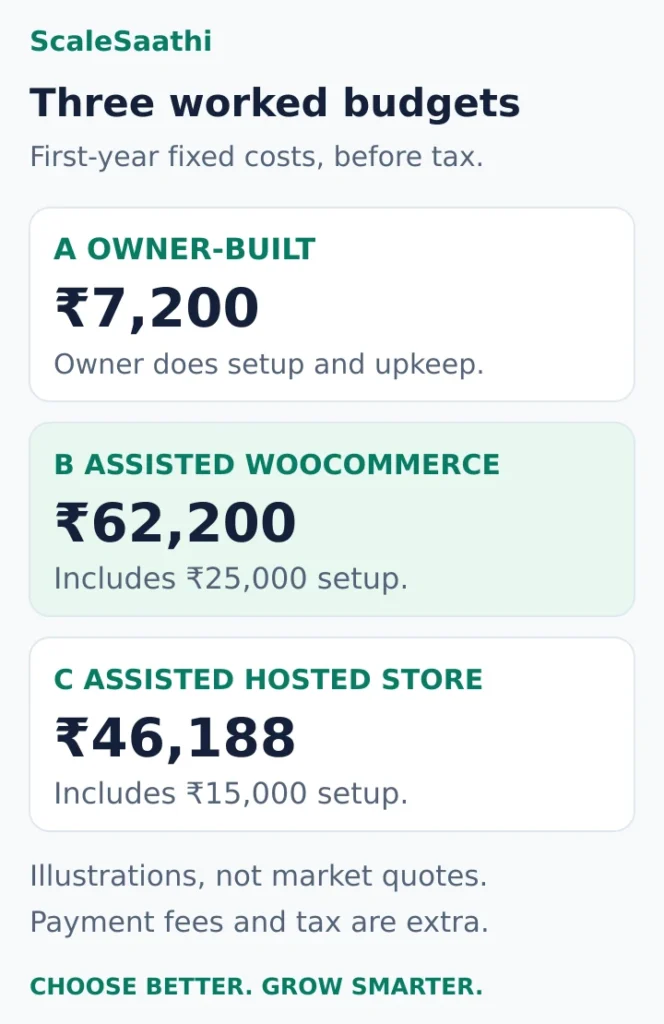
What the examples show: Budget C has a lower fixed first-year total than B, but a higher total after the assumed payment fees. This is a result of these specific assumptions, not proof that one platform is universally cheaper. Change support, apps, negotiated fees or sales volume and the comparison can change.
Payment fees: work from the amount being charged
Razorpay’s pricing page advertises a standard 2% plus GST rate. Treat that as a starting point: confirm the rates for your actual payment methods and any optional services in your merchant agreement.
The basic calculation is:
Monthly gateway cost before tax = successful payment amount subject to the fee × your gateway rate.
Where the platform charges a separate transaction fee, calculate that separately. Shopify’s billing documentation confirms that its third-party transaction fee is additional to processor fees. Its calculation includes product cost after discounts, tax and shipping charges.
For example, ₹1,00,000 × 2% = ₹2,000. If another 2% applies to the same base, that adds ₹2,000. Combined fees are ₹4,000 before applicable taxes. This is not a universal all-inclusive rate.

Do not multiply all store revenue by a gateway percentage if some orders use other payment routes. The same Shopify documentation excludes manual payments such as standard cash on delivery from its third-party transaction fees, but a courier’s COD collection charge is a different expense. It also states that Shopify third-party transaction fees are not returned when an order is refunded.
When choosing a payment gateway, ask about refunds, settlement timing, payment-method rates, optional service fees and the amount on which each charge is calculated. Test a successful payment and a refund workflow before launch.
Costs that sit outside the website bill
A complete store budget needs these separate lines:
Stock and packaging. Opening inventory, replenishment and packing materials consume cash even when the website is inexpensive. Decide whether product photos and descriptions are supplied by your team or purchased separately.
Shipping and returns. Request rates based on actual parcel weight, dimensions and delivery locations. Add return shipments, failed deliveries and COD handling where relevant. Do not assume a generic per-order delivery figure will suit your products.
Customer acquisition. Budget your planned advertising or content work explicitly. Building a store does not provide a guaranteed flow of orders. Start with an amount you can afford to test and review it against the orders it produces.
Customer service and administration. Someone must answer questions, resolve delivery issues, reconcile settlements and maintain product information. Add paid email, messaging, accounting or other tools only when you need them.
Taxes and professional services. Use provider invoices to identify applicable taxes and obtain advice for your business’s registration, invoicing and compliance requirements. The pre-tax examples above are not the final amount payable. Do not assume every tax paid is recoverable.
Check year-two costs before paying for year one
For each subscription, record its normal renewal price, billing period, next charge date and cancellation conditions. Keep domain registration and renewal in that renewal list alongside hosting, apps and extensions.
In Budget B, removing the one-time ₹25,000 setup allowance leaves ₹37,200 in annual fixed services. With the same payment assumptions, that becomes ₹61,200 before tax. This is a year-two illustration only: it assumes no price increase, redevelopment or change in sales volume.
A free first-year extra may renew at a charge. A developer-owned licence may need replacing when the support relationship ends. An annual subscription may also need to be renewed before the business has collected enough cash from orders.
Keep a renewal calendar and ask for business-owned accounts wherever practical. Before committing, find out how to export your catalogue and order data and what help would be needed to move later.
Choose the budget you can actually operate
Choose an owner-built setup only if you have time to configure it, test it and maintain it. Include an allowance for outside help if you would struggle to restore a broken checkout.
Choose assisted WooCommerce when control matters and you have a clear support arrangement. Compare the full maintenance and extension bill rather than treating free software as the deciding factor.
Choose a hosted setup when its feature limits and continuing charges fit your business and the reduced hosting responsibility is valuable to you. Cost the apps and payment routes you will actually use.
Before accepting a quote, check five things:
- The first-year total is separated from the amount due immediately.
- Each renewal and recurring service has a named owner and billing period.
- Payment fees use a realistic online payment volume and payment mix.
- The scope includes a tested mobile order and a usable handover.
- There is enough money left for stock, fulfilment and acquiring customers.
If the budget only works by excluding essential maintenance or assuming immediate sales, reduce the launch scope. Start with the catalogue, checkout and operational features you need to fulfil real orders, then pay for additions when the requirement is clear.
Frequently asked questions
Can I start an ecommerce website with a small budget?
Yes, if the scope is limited and you can do much of the work yourself. Budget A illustrates that approach; it is not a guaranteed purchase price. Verify hosting, required features, payment fees and the time needed for maintenance before committing.
What is the difference between ecommerce development cost and running cost?
Development covers the initial agreed work, such as design, catalogue setup and integrations. Running costs include recurring subscriptions, hosting where needed, maintenance and usage fees. A quote should identify both and state what is excluded.
Do these website budgets include inventory, shipping and marketing?
No. The worked website totals exclude inventory, packaging, delivery, returns, marketing, staff and professional services. Taxes are also excluded. Add these separately to calculate the cash your business needs.
Should I choose the lowest monthly platform price?
Compare the annual bill, required apps, support and payment fees at your expected sales volume. A lower fixed subscription can be offset by other charges. Check upfront payment commitments and renewal prices as well.
What should I ask a developer before accepting a quote?
Request a written scope, clear acceptance checks, a list of exclusions, ownership and access arrangements, and the cost of continuing support. Confirm who supplies product data and who pays for any required subscriptions.
Sources and further reading
- Shopify India — current plan pricing and included services
- Shopify Help — third-party transaction fees, calculation and exceptions
- WooCommerce — core software and separately budgeted costs
- Razorpay — standard payment gateway pricing
Product names and logos are trademarks of their respective owners. They are shown only to identify the products compared in this guide, and their use does not imply endorsement by or affiliation with ScaleSaathi.