Last updated 31 October 2026 · Prices seen 31 October 2026 on each company’s own pricing page · Sources
The practical answer
Start free, pay for a bot only when chats pile up
Most Indian small businesses should start with the free WhatsApp Business app: greeting and away messages, quick replies and a catalogue cost nothing. Move to a WhatsApp Business API provider with a button-based chatbot when you get a few hundred chats a month or need several staff on one number; on published prices, that comes to roughly ₹3,500 a month for 500 chats. Add AI replies only when the same questions arrive in too many different ways for buttons, keep the AI limited to your own prices and policies, and always give customers a way to reach a person.
I have set up WhatsApp bots for kirana and clothing shops, a dental clinic, two coaching centres, a cloud kitchen and a hardware distributor. The ones that paid for themselves were rarely the clever ones. They answered the five questions customers ask every day, passed everything else to a person within minutes, and were checked every week by someone who cared. The ones that failed usually started with “let’s put AI on WhatsApp” before anyone had read a month of old chats. This guide follows the order I now use with clients: what you actually need, what Meta allows, what it costs, then how to build and run it.
What to remember
Before you pay for a WhatsApp bot
- Start on the free WhatsApp Business app. Move to an API provider only when chats pile up or several staff must share one number.
- Customer messages are free, and each business number gets 1,000 free service replies a month. After that, Meta charges ₹0.115 per service reply in India, plus provider markup and 18% GST.
- AI that answers questions about your own shop is allowed. A general “ask me anything” AI assistant as your product has been banned on WhatsApp since 15 January 2026.
- At volume the AI, not WhatsApp, is usually the big cost. Meta’s Business Agent works out to about 4–5 US cents a reply, many times a ₹0.115 service reply.
- Buttons first, AI second. Most small businesses I work with handle most chats with a five-button menu.
- Give the bot only approved facts, never let it quote a price or discount from memory, and keep a “talk to a person” option in every flow.
- Message only people who gave you their number and agreed to hear from you, and keep a record of when they agreed.
Prices seen 31 October 2026 on Meta’s WhatsApp rate card and each provider’s own pricing page, before GST. Dollar prices are shown in dollars, as the company bills them.
The three levels of WhatsApp bot
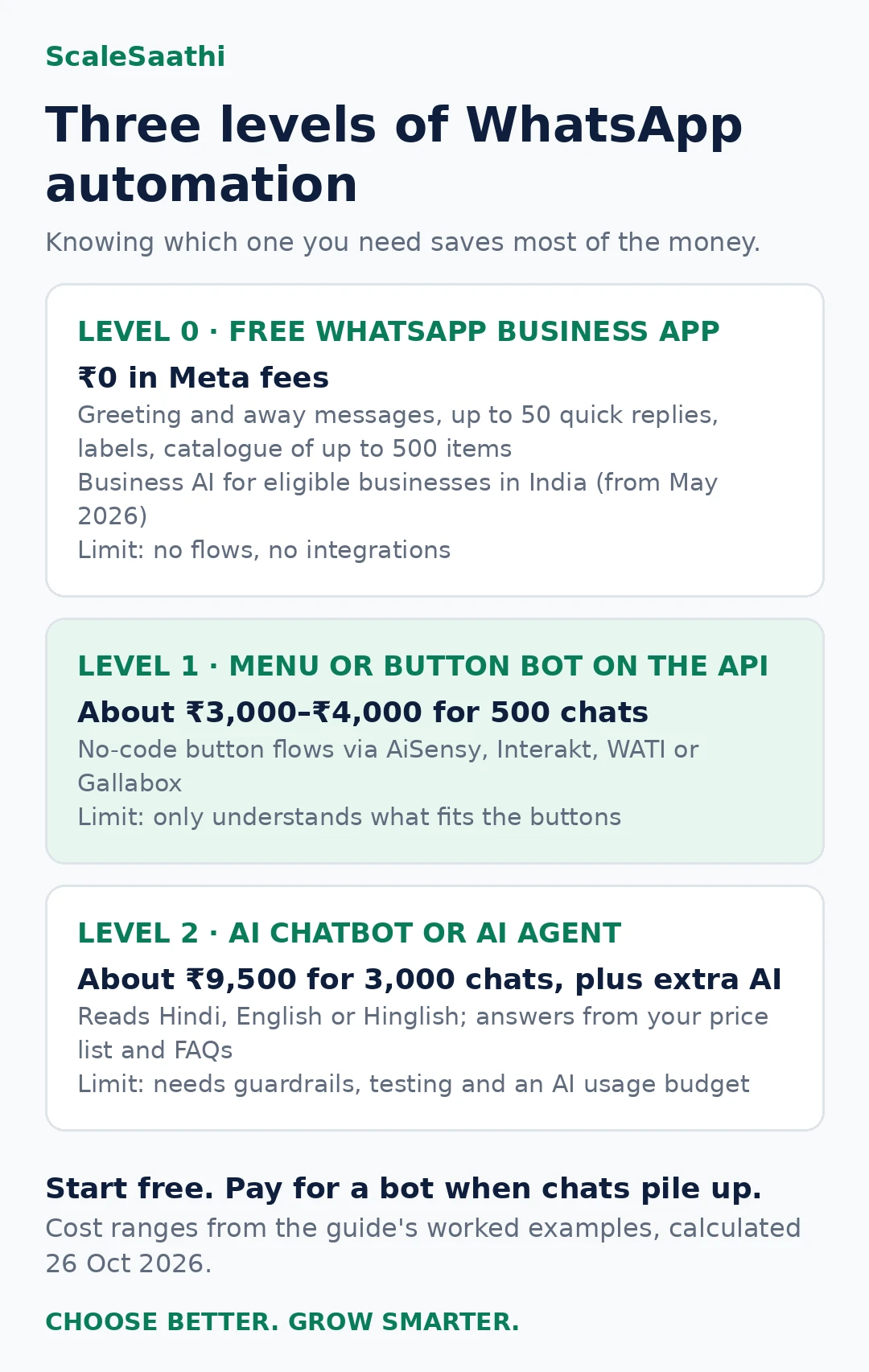
“WhatsApp AI chatbot” is used for three quite different things. Knowing which one you need saves most of the money.
Level 0: the free WhatsApp Business app
The WhatsApp Business app is free to download and has light automation built in: a greeting message for new chats, an away message outside business hours, quick replies (WhatsApp says up to 50 saved replies, triggered by typing “/”), labels to sort chats, and a catalogue that can hold up to 500 items. There are no Meta message fees for normal chats in the app. The limits: one main phone plus a few linked devices, no real branching flows, and no link to your billing or CRM.
In May 2026 Meta launched Business AI in the WhatsApp Business app in India. It answers customer questions about products, prices, offers and delivery in Indian languages, learns from your catalogue, Facebook Page and website, and lets you take over the chat at any time. Meta says it is for eligible businesses, set up under Tools → Your Business AI, and WhatsApp’s help pages describe a gradual rollout with a waitlist. Meta’s India announcement does not state a fee, so check inside your app before you rely on it.
Level 1: a menu or button bot on the API
This is what most providers call a “chatbot”: you draw a flow with buttons and lists (“1. Price list 2. Track order 3. Talk to us”) in a no-code builder. It needs a WhatsApp Business API number through a provider such as AiSensy, Interakt, WATI or Gallabox. It is predictable, cheap to run and good for repeated questions. It cannot understand a question that does not fit your buttons.
Level 2: an AI chatbot or AI agent
An AI bot reads the customer’s own words, in English, Hindi or Hinglish, and writes a reply from the information you give it: your price list, policies, FAQs and catalogue. A stronger “AI agent” can also look things up, such as order status in Shopify or a free slot in your booking calendar, and hand over to staff. Options include provider add-ons (AiSensy AI Agent, Gallabox AI credits, WATI AI features, respond.io AI Agents), bot platforms like Botpress connected to your WhatsApp number, or Meta’s own Business Agent. The risk is that AI can state a wrong price or invent a policy, so it must be fenced in.
| Level | Best for | Monthly cost range (published prices) | Main limit |
|---|---|---|---|
| 0: Free app (+ Business AI if eligible) | Up to a few hundred chats, one or two people replying | ₹0 in Meta fees | No flows, no integrations, one number on few devices |
| 1: Menu bot on API | Repeated questions, order status, bookings, several staff | About ₹3,000–₹4,000 for 500 chats (Example A) | Only understands what fits the buttons |
| 2: AI bot or agent on API | Many ways of asking, big catalogues, Hinglish questions at volume | About ₹9,500 for 3,000 chats plus extra AI (Example B) | Needs guardrails, testing and AI usage budget |
How a WhatsApp chatbot actually works
It helps to picture the path one message takes, because every cost and every failure sits somewhere on it.
- The customer writes “price kya hai?” to your business number. That message is free and opens the 24-hour service window.
- Meta passes it to your provider (AiSensy, Interakt, WATI, Gallabox and the rest) through the WhatsApp Business Platform. This is why a real bot needs an API number and the normal app cannot run one.
- The bot decides. A menu bot matches the message to a button or a word you set up. An AI bot reads the words, looks up the facts you gave it, and drafts a reply. An agent can also check an order in Shopify or a slot in your calendar.
- The reply goes back as a service message. The first 1,000 each month per number are free, then each one is charged.
- If the bot is unsure, a person takes over in the provider’s shared inbox, ideally with the whole chat in front of them so the customer does not repeat themselves.
When something goes wrong, it is almost always at step 3 (the bot had the wrong or old facts) or step 5 (nobody was watching the inbox). The software is rarely the problem.
Meta’s rules for chatbots and AI on WhatsApp
WhatsApp is strict, and breaking its rules can get templates paused or a number restricted. Four rules matter most for a bot.
1. AI for your business is fine; a general AI assistant is not
Meta’s WhatsApp Business Platform terms (last modified 23 September 2026) say that providers of AI technologies, including large language models and general-purpose AI assistants, are “strictly prohibited” from using the platform to offer those technologies when they are “the primary (rather than incidental or ancillary) functionality being made available”. Meta’s developer documentation puts the start date at 15 January 2026 and allows exceptions only where Meta is legally required to, which does not include India.
In plain terms: a saree shop whose bot answers “is this available in red?” is using AI incidentally to serve its own customers, which the terms allow. A start-up offering “chat with our AI about anything on WhatsApp” is not. The same terms let you hire an AI company as your solution provider, but WhatsApp chat data must not be used to train or improve AI models, except a model fine-tuned only for you. Meta also decides which side of the line you fall on, so keep your bot clearly about your business.
2. Opt-in before you message anyone
The WhatsApp Business Messaging Policy (last updated 23 September 2026) says you may contact people only if they gave you their phone number and agreed to receive messages from you, and that you are responsible for how you collect that opt-in. Meta recommends separate opt-ins for different kinds of messages, for example order updates versus offers. A number from a bill book or a bought list is not opt-in.
3. The 24-hour window and templates
When a customer messages you, a 24-hour customer service window opens. Inside it, your bot or staff can send free-form replies. Outside it, you can only send templates that Meta has approved in advance, such as an order update, a reminder or an offer, and each delivered template is charged. Meta can pause or reject templates that customers block or report.
4. A human must be reachable
The same policy says you may use automation inside the 24-hour window, “but must also have available prompt, clear, and direct escalation paths”, and lists examples such as transfer to a human agent in the chat, a phone number, email, a web support page, a store visit or a support form. A bot that loops customers forever breaks the policy and loses sales.
What it costs: three ₹ examples
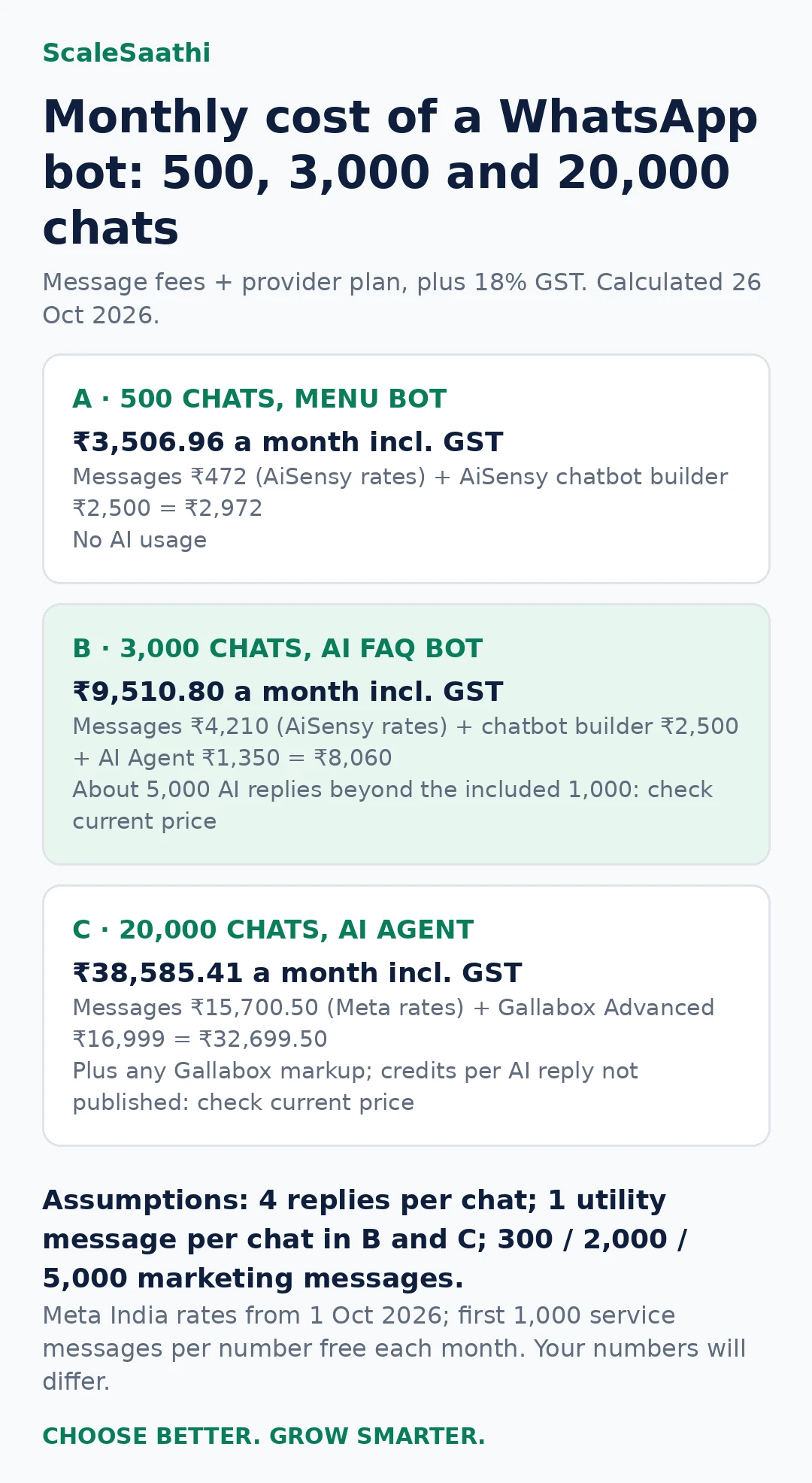
A WhatsApp AI chatbot bill has three parts: Meta’s message fees, the provider’s plan, and AI usage. These examples use Meta’s India rates from 1 October 2026: marketing ₹0.8631, utility ₹0.115 and service ₹0.115 per delivered message, with the first 1,000 service messages per number each month free. AiSensy bills its own published rates (marketing ₹1.09, service and utility ₹0.145), so we use those where the example uses AiSensy. All prices exclude GST unless stated; we add 18% GST to the full bill.
Assumptions: each chat gets 4 replies from the bot or staff; Examples B and C send 1 utility message per chat (such as a booking or delivery update); marketing messages are 300, 2,000 and 5,000 a month. Your numbers will differ, so use the WhatsApp API cost calculator with your own volumes.
| A: 500 chats, menu bot | B: 3,000 chats, AI FAQ bot | C: 20,000 chats, AI agent | |
|---|---|---|---|
| Service replies (paid after 1,000 free) | 2,000 (1,000 paid) | 12,000 (11,000 paid) | 80,000 (79,000 paid) |
| Utility / marketing messages | 0 / 300 | 3,000 / 2,000 | 20,000 / 5,000 |
| Message fees | ₹472 (AiSensy rates; ₹373.93 at Meta rates) | ₹4,210 (AiSensy rates; ₹3,336.20 at Meta rates) | ₹15,700.50 at Meta rates, plus any Gallabox markup |
| Provider plan | AiSensy chatbot builder ₹2,500 (plus base plan if not on Free Forever) | AiSensy chatbot builder ₹2,500 + AI Agent ₹1,350 (1,000 AI messages) | Gallabox Advanced ₹16,999 (billed quarterly; 8,000 AI credits) |
| Subtotal | ₹2,972 | ₹8,060 | ₹32,699.50 |
| With 18% GST | ₹3,506.96 | ₹9,510.80 | ₹38,585.41 |
| AI usage not covered | None (no AI) | About 5,000 AI replies beyond the included 1,000: check current price | Credits per AI reply not published: check current price |
Why the AI line matters. If half the replies in Example B are written by AI, that is 6,000 AI replies a month. At Meta Business Agent’s published rate of about 4–5 US cents per message, that alone would be US$240–300, or roughly ₹21,000–₹26,400 at an assumed ₹88 per dollar, more than double the rest of the bill. In Example C, 40,000 AI replies at that rate would be roughly ₹1.4–1.76 lakh. Provider AI add-ons with included messages are usually cheaper at small volumes, but read the overage price before you switch AI on for everyone.
Two cheaper paths are worth comparing: answer simple questions with buttons and use AI only when the customer types something the menu cannot handle, or stay on the free app and test Meta’s Business AI if your business is eligible.
WhatsApp chatbot providers compared
Prices below are from each provider’s official pricing page, seen 31 October 2026. Plans in US dollars are shown in dollars; your card may also be charged GST and currency conversion. WhatsApp message fees are extra on every plan unless stated.
| Provider | Plan price | Chatbot / AI | Message fees |
|---|---|---|---|
| AiSensy | Free Forever plan listed; paid plans: check current price | Chatbot builder ₹2,500/month (₹2,250 yearly), 5 bots; AI Agent ₹1,350/month with 1,000 AI messages | Marketing ₹1.09, service/utility ₹0.145; 1,000 free service messages |
| Gallabox | Basic ₹2,999, Essential ₹6,999, Advanced ₹16,999 per month, billed quarterly | Chatbot flows on every plan; 500 AI credits on Basic, 2,000 on Essential, 8,000 on Advanced | Charged extra; markup not shown |
| WATI | Growth ₹2,699 (3 users), Pro ₹5,799 (5 users) per month billed quarterly on WATI’s India page; Business custom | No-code chatbots and Astra AI agents; 2,000 AI credits on Growth, 5,000 on Pro | WATI rate card: check current price |
| Zoko | Starter US$49.99, Plus US$79.99, Elite US$139.99 per month | Chatbot flows for Shopify stores | Per WhatsApp rate card, plus Zoko usage fee on Starter |
| respond.io | Starter US$79, Growth US$159, Advanced US$279 per month | AI Agents on higher plans | Meta fees passed through |
| Botpress | Free (100 conversations); Plus US$150 and Team US$750 per month billed yearly | AI bot builder; connect to your own WhatsApp API number | Paid to Meta or your WhatsApp provider |
| Interakt | Growth ₹2,799, Advanced ₹3,799 per month (+taxes, monthly billing) | AI agents ₹2,499 per month with 100 AI messages, then ₹0.50 per AI message | Interakt’s India rate card, from about ₹0.95–₹0.97 per marketing message depending on plan; check your plan |
| Gupshup | Check current price | Chatbot and AI features | Check current price |
One thing the table hides: user limits. Gallabox Basic is a hard cap of 3 users and WATI Growth includes 3 users with no extra seats, so a shop with four people on the counter is really shopping for the next plan up. For a deeper comparison of onboarding, support and markups, read our guide to WhatsApp Business API providers in India.
Setup checklist (no coding)
- List your top 20 questions. Scroll your last month of chats and note what customers ask. Usually price, stock, timing, location, delivery and order status cover most of it.
- Decide the level. If 20 questions cover most chats, try the free app’s quick replies first. If you need staff sharing one number or flows, choose an API provider.
- Get a number ready. Use a number that is not active on the normal WhatsApp app, or plan to move it. Have your business name, GST or shop documents and website ready for Meta verification.
- Connect through the provider’s signup. Most providers connect your Meta Business account and WhatsApp number in their own screens. Add a payment method so service replies beyond 1,000 are delivered.
- Build the main menu. Five buttons or fewer, with “Talk to a person” always visible.
- Feed the AI only approved facts. Upload your current price list, return policy, timings and FAQs. Tell it not to promise discounts, refunds or medical or legal advice.
- Write templates and get them approved. Order confirmation, reminder and one offer template are enough to start.
- Collect opt-in properly. A checkbox at checkout, a QR code in store with a “Hi” message, or a website button, with clear words about what you will send.
- Test with 20 real messages. Include Hinglish, spelling mistakes, angry messages and voice notes.
- Review weekly. Read chats the bot could not answer, update facts and track your monthly bill against the calculator.
Build it yourself or use a provider?
People who can code often ask me whether to skip the provider and connect straight to Meta’s Cloud API with their own AI. You can, and for some businesses it is the right call. For most shops it is not, because the hard part is not the code. It is template approvals, the shared inbox for staff, opt-in records, and someone fixing it at 9 pm on Diwali week.
| Route | Good for | What you handle yourself | Typical cost shape |
|---|---|---|---|
| No-code provider (AiSensy, Interakt, WATI, Gallabox) | Shops and service businesses with no developer | Writing flows and facts, testing, watching the inbox | Monthly plan + message fees + AI add-on or credits |
| Bot platform on your number (Botpress and similar) | Businesses that want more control over the AI and already have, or will pay for, a WhatsApp API number | Connecting the number, building the bot, hand-off to staff | Platform plan in US dollars + Meta or provider message fees |
| Your own code on Meta’s Cloud API | Firms with an in-house developer and unusual needs, such as deep links to their own billing system | Hosting, security, templates, inbox, monitoring, every update Meta makes | Developer time + hosting + AI model usage + Meta message fees |
My rule of thumb: if nobody in the business can explain what a webhook is, use a no-code provider and spend the saved time on the bot’s facts. You can always move later; your number and opt-in list stay yours, so ask the provider how a migration works before you sign.
How long it takes to go live
From my own setups, a menu bot for a single shop usually takes one to two weeks of calendar time, though only a few hours of actual work. Expect delays in these places:
- Business verification and display name. Meta checks your business details and the name customers will see. Mismatched names between your GST papers, website and chosen display name are the most common hold-up I see.
- Moving the number. If the number is already on the normal WhatsApp Business app, plan when you will switch, and save any chats you need first.
- Template approvals. Order updates are usually approved quickly; offers worded like spam get rejected or pushed into the marketing category.
- Writing the facts. This is the step owners underestimate. A clean price list, timings and return policy can take longer than the whole technical setup.
An AI bot adds a week or two of testing on real chats before I let it answer customers on its own.
Sample flows for four Indian businesses
These are starting points. Replace the prices and timings with your own, and keep the language your customers actually use.
Clothing store
Menu: 1. New arrivals 2. Check size and stock 3. Track my order 4. Return or exchange 5. Talk to us
Customer: “Bhaiya ye kurti M size mein hai? Kitne ka hai?”
Bot: “Haan ji, ye kurti M size mein available hai. Price ₹899 hai, COD bhi chalega. Order karne ke liye ‘Order’ likhiye, ya photo bhejiye agar koi aur design dekhna hai.”
AI instruction: “Answer only from the catalogue and stock sheet. Never offer a discount. For exchanges, share the policy and pass to staff.”
Clinic or coaching centre
Menu: 1. Book an appointment / demo class 2. Timings and fees 3. Location 4. Reschedule 5. Talk to the front desk
Customer: “Kal shaam ko doctor available hain kya?”
Bot: “Kal shaam 5 se 8 baje tak slots hain: 5:30, 6:15 aur 7:00. Kaunsa slot book karun? Agar emergency hai to turant clinic ko call kijiye.”
For a coaching centre the same flow books a free demo class and sends a utility reminder the evening before. Guardrail: a clinic bot must never suggest a diagnosis or medicine; it books, reminds and hands over. Meta’s terms say the platform is not designed for regulated health data, so keep reports and prescriptions out of the bot.
Restaurant or cloud kitchen
Menu: 1. Today’s menu 2. Order for delivery 3. Table booking 4. Where is my order? 5. Talk to us
Customer: “Order kab tak aayega? 40 min ho gaye”
Bot: “Sorry for the wait! Aapka order #2145 nikal chuka hai, rider 10 minute mein pahunch jayega. Agar 15 minute mein nahi aaye to ‘Help’ likhiye, manager aapko call karenge.”
Order status needs a link to your ordering system. Without one, the bot should collect the order number and pass the chat to staff.
B2B distributor
Menu: 1. Price list 2. Place a repeat order 3. Outstanding and ledger 4. Dispatch status 5. Talk to sales
Customer: “Sir 10 carton Parle-G ka rate bhejo, aur pichla payment update kar do”
Bot: “Namaste! Aaj ka rate PDF bhej raha hoon. 10 carton ka order confirm karna ho to ‘Confirm 10’ likhiye. Payment update ke liye aapka ledger sales team check karke aaj shaam tak bhejegi.”
Guardrail: credit limits, special rates and outstanding amounts should come from your accounting data or a person, never from the AI guessing.
To write greeting, away and quick-reply messages for your flows, use the free AI prompt generator.
Writing the facts and instructions your AI bot uses
“Training” an AI bot for a small business mostly means giving it a short, current set of facts and firm rules. Good providers let you upload documents or paste text, and Meta’s own Business Agent learns from your catalogue, Facebook Page, website and the price lists you upload. What you put in decides what comes out.
- One fact sheet, one owner. Prices, stock rules, timings, delivery areas and charges, return policy, payment options. One person updates it, and it carries a date at the top.
- Write answers, not brochures. “Delivery in Pune city ₹40, free above ₹999, same day if ordered before 2 pm” works. A paragraph of marketing copy does not.
- Tell it what it must never do. No discounts, no refund promises, no medical, legal or tax advice, no guessing a price that is not in the sheet.
- Tell it when to hand over. Complaints, bulk orders, anything about money owed, and any customer who asks twice for a person.
- Give it your customers’ words. Paste twenty real questions, in the Hinglish and spellings people actually use, with the answer you would give.
A short instruction that has worked well for my shop clients: “You are the assistant for [shop name]. Answer only from the facts below. If the answer is not there, say you will check with the team and offer to connect them. Reply in the customer’s language and keep replies under three lines.”
Voice notes, photos and messages a bot will not expect
Indian customers send voice notes, screenshots of products from Instagram, photos of a broken part and “?” on its own. Plan for these before launch, not after the first angry review.
- Voice notes. Some providers now offer AI voice features, for example Gallabox lists AI voice on WhatsApp on its Advanced plan. If yours does not, the bot should reply “Please type your question or tap Talk to us” and flag the chat for staff.
- Photos and screenshots. A menu bot cannot read them. Route them straight to a person with a note of what the customer tapped last.
- Late-night messages. Say clearly when a person will reply, and keep the promise. “Our team replies from 10 am” beats a bot pretending to be awake.
How to tell if the bot is working
I ask owners to look at five numbers every week for the first two months. None needs a dashboard; most providers show them, and a notebook works too.
| What to look at | Healthy sign | What to do if it is off |
|---|---|---|
| Chats the bot finished without staff | Rising week by week | Read the chats it failed on and add those facts or buttons |
| Hand-offs to a person | Answered within your promised time | Fix the staff rota before touching the bot |
| Wrong answers spotted | Close to zero, and falling | Remove the fact or rule that caused it; tighten the instruction |
| Blocks, reports and opt-outs after offers | Low and steady | Send fewer offers, to people who opted in for them |
| Monthly bill vs your estimate | Within about 10–20% | Check AI overage and marketing volume first |
If the owner never reads the failed chats, the bot quietly gets worse as prices and stock change. That weekly fifteen minutes is the real cost of running one.
Meta AI in WhatsApp is not your business chatbot
Many owners confuse three things. Meta AI is the assistant anyone can chat with inside WhatsApp; it does not answer for your shop. Business AI is Meta’s agent inside the free WhatsApp Business app, which answers your customers from your own catalogue and information, for eligible businesses (see Meta’s India announcement). A provider bot runs on the WhatsApp Business Platform with your own flows, staff inbox and links to your other systems. If your chats are few and your catalogue is simple, test Business AI first; it may be all you need.
If you are also choosing the rest of your software, our guides to choosing a CRM and building a lean tool stack show where a WhatsApp bot fits, and AI tools for small business covers the AI subscriptions around it.
Data safety and consent
- Collect the minimum. Name, phone and order details are enough for most bots. Do not ask for Aadhaar, full card numbers, OTPs or bank passwords in chat.
- Know where chats go. Ask your provider which AI model answers your customers, where data is stored, how long chats are kept and how to delete them. Meta’s terms ban using WhatsApp business data to train shared AI models.
- Keep opt-in records. Save when and how each customer agreed to messages, and honour “STOP” quickly.
- Plan for the DPDP Rules. India’s Digital Personal Data Protection Rules, 2025 were notified on 13 November 2025, and most duties on businesses start 18 months later, around May 2027. Customer chat data is personal data, so use providers with clear data terms.
- Tell customers it is a bot. A simple “I’m the shop’s assistant; type ‘person’ any time to reach our team” builds trust.
Mistakes to avoid
- Letting AI quote prices from memory. Give it a current price list and tell it to say “let me check with the team” when unsure.
- Sending offers to every saved contact. Without opt-in you risk blocks, reports and paused templates, and each marketing message costs money.
- No exit to a human. It breaks Meta’s policy and loses angry customers.
- Paying for AI before buttons are tried. Many shops handle most chats with five buttons.
- Ignoring the per-message cost of AI. Check the AI overage price, not just the monthly plan.
- Forgetting GST and markup. Provider rates can sit above Meta’s; AiSensy’s published service rate is about 26% above Meta’s ₹0.115, and GST is added on top.
- Building a general “ask anything” AI. That is the use Meta bans. Keep it about your business.
- Not testing Hinglish. “Rate kya hai”, “kitne ka” and “price batao” should all reach the same answer.
- Letting the fact sheet go stale. The most common failure I am called in to fix: the bot is fine, but last month’s price list is still loaded.
- Launching to everyone on day one. Switch the bot on for new chats first, keep staff watching for a week, then widen it.
- Choosing on the plan price alone. User caps, AI credits and message markup decide the real bill. Work it out for your volumes with the WhatsApp Business API pricing guide.
Check the numbers for your shop
Use the free WhatsApp API cost calculator
Enter your monthly chats, templates and offers to see Meta’s fees in rupees before you pick a plan.
Related guides
- WhatsApp API cost calculator
- WhatsApp Business API pricing in India
- WhatsApp Business API providers in India
- ChatGPT, Gemini and Claude prices in India
- AI tools for small business in India
- AI for accountants and CAs in India
- ChatGPT for Excel
- How to choose a CRM for a small business in India
- Free CRM software in India
- Build a lean business tool stack
Frequently asked questions
Can I put ChatGPT on WhatsApp for my business in India?
You can use an AI model to answer customers about your own business, such as products, prices, order status and bookings, through an approved provider on the WhatsApp Business Platform. What Meta’s terms ban since 15 January 2026 is offering a general-purpose AI assistant as the product itself, except in a few countries where Meta is legally required to allow it. India is not one of them.
How much does a WhatsApp AI chatbot cost per month in India?
For a small shop handling about 500 chats a month with a simple menu bot, expect around ₹3,500 a month including 18% GST on one Indian provider. About 3,000 chats with an AI FAQ bot comes to roughly ₹9,500 plus any extra AI messages. About 20,000 chats on a team plan with an AI agent is roughly ₹38,600 plus AI credits. The free WhatsApp Business app costs ₹0 in Meta fees.
Are replies to customers free on WhatsApp?
Messages customers send you are free. Your free-form replies inside the 24-hour window are service messages: the first 1,000 per business number each month are free, then ₹0.115 each at Meta’s India rate from 1 October 2026, plus your provider’s markup and GST. Templates such as offers and reminders are charged per delivered message.
Do I need the WhatsApp Business API for a chatbot?
Not for basic automation. The free WhatsApp Business app has a greeting message, an away message, up to 50 quick replies, labels and a catalogue of up to 500 items. You need the API, through a provider, when you want a real chatbot flow, AI replies at volume, several staff on one number or links to your billing, CRM or booking system.
What is Meta Business AI on WhatsApp?
It is Meta’s own AI agent that answers customers using your Facebook Page, catalogue, website and past chats. Meta launched Business AI in the WhatsApp Business app in India in May 2026, in Indian languages, for eligible businesses. On the API, Meta charges US$2.00 per 1 million tokens, which Meta says is about 4–5 US cents per message.
Can a WhatsApp chatbot reply in Hindi or Hinglish?
Yes. Menu bots reply in whatever text you write, so you can write the buttons in Hindi, English or Hinglish. AI bots can usually understand mixed-language messages and reply in the same style if you instruct them to. Test with real customer messages, because spellings like “kitne ka hai” or “kab tak aayega” vary a lot.
Can my chatbot send offers to every customer?
Only to people who gave you their number and agreed to receive messages from you. Outside the 24-hour window you can only send Meta-approved templates, and marketing templates cost ₹0.8631 each at Meta’s India rate. Keep a separate opt-in for offers, make it easy to stop, and expect Meta to pause templates that customers block or report.
Must a WhatsApp bot hand over to a human?
Yes. Meta’s Business Messaging Policy allows automation inside the 24-hour window but says you must also offer prompt, clear and direct escalation paths, such as transfer to a human agent in the chat, a phone number, email, a support form or a store visit. Build a “talk to a person” option into every flow.
Is customer chat data safe with an AI chatbot provider?
It depends on the provider’s terms. Meta’s platform terms say WhatsApp business data must not be used to train or improve AI models other than one fine-tuned only for you. Ask your provider in writing where data is stored, which AI model it uses, whether chats train any model, and how to delete data. Do not collect Aadhaar or card numbers in chat.
Which is better: a rule-based chatbot or an AI chatbot?
Start rule-based if most questions repeat, such as price, timing, location and order status. Buttons are cheap, predictable and never invent a discount. Add AI when customers ask in many different ways or you have a large catalogue, and keep the AI limited to your own information with a human handover for anything about money, refunds or health.
What is a WhatsApp chatbot and how does it work?
It is software connected to your WhatsApp business number that replies to customers automatically. A menu bot matches messages to buttons you set up; an AI bot reads the customer’s words and answers from the facts you give it. Both run through a WhatsApp Business Platform provider and should hand over to a person when unsure.
How long does it take to set up a WhatsApp chatbot?
A simple menu bot for one shop usually takes one to two weeks of calendar time, mostly waiting for business verification, the display name and template approvals. An AI bot needs another week or two of testing on real chats before it answers customers on its own.
Can I build a WhatsApp chatbot for free?
Partly. The WhatsApp Business app’s greeting, away and quick-reply messages are free, and some providers list a free plan, such as AiSensy’s Free Forever plan or Botpress’s free tier of 100 conversations a month. A real flow bot usually needs a paid chatbot add-on, and service replies beyond 1,000 a month are charged by Meta.
Can a WhatsApp chatbot take orders and payments?
Yes, through a provider that supports catalogues and payments; Gallabox, for example, lists catalogue and payments on its Basic plan. Meta has also said Business AI in the WhatsApp Business app will soon be able to take UPI payments in the chat. Always confirm the order total with the customer before payment.
Can the same chatbot work on my website and Instagram?
Many providers offer this. Gallabox’s Basic plan, for example, includes one channel each for WhatsApp, Instagram and a web chat widget. Check that replies from all channels land in one shared inbox, so staff do not miss a customer.
Is Meta AI in WhatsApp the same as a business chatbot?
No. Meta AI is a general assistant anyone can chat with in WhatsApp. Business AI in the WhatsApp Business app answers your customers from your own catalogue and information, and a provider chatbot runs on the WhatsApp Business Platform with your own flows and staff inbox.
Can a WhatsApp bot understand voice notes?
Some can. A few providers offer AI voice features on higher plans, such as Gallabox’s Advanced plan. If yours does not, set the bot to ask the customer to type or tap “Talk to us”, and flag voice notes for staff.
Disclaimer: This guide is general information, not legal or tax advice. WhatsApp rules, Meta rates and provider prices change often, and examples use stated assumptions. Confirm current prices and policies on the official pages before you buy or send messages.
Sources
All pages seen 31 October 2026. Meta’s India rates are from the INR rate card linked on its pricing page. Rates and features change; confirm on the official page before buying or relying on them.
- Meta — WhatsApp Business Platform pricing (rates effective 1 October 2026)
- Meta — WhatsApp Business Platform terms (last modified 23 September 2026)
- WhatsApp — Business Messaging Policy (last updated 23 September 2026)
- Meta for Developers — Pricing policy for AI Providers
- Meta Newsroom — Business AI on WhatsApp for small businesses in India (14 May 2026)
- WhatsApp Business — Meta Business Agent in the Business app
- WhatsApp Help — Quick replies
- AiSensy — Pricing
- Gallabox — Pricing
- WATI — Pricing
- Zoko — Pricing
- respond.io — Pricing
- Botpress — Pricing
- Interakt — Pricing
- MeitY — Digital Personal Data Protection Rules, 2025