Last updated 31 October 2026 · Prices seen 31 October 2026 on each company’s own pricing page · Sources
The practical answer
Use AI for drafts and sorting, never for the final number
AI is useful for accountants in India when it does the slow, repetitive part of a job: turning invoices into draft entries, writing Excel formulas for a GSTR-2B match, cleaning bank statements, and drafting client emails and notice replies. It is not reliable for the final figure, the legal position or the filing. Start with the AI already in your accounting software (Docs by Ira in TallyPrime, Zia in Zoho Books), add one general assistant on a plan whose data settings you have checked, and keep PAN, GSTIN, Aadhaar and bank details out of personal AI accounts.
Most of my AI use in practice is unglamorous. It writes the XLOOKUP that matches a purchase register to GSTR-2B, splits a messy bank narration column into UPI, NEFT and charges, and turns my rough notes into a polite reminder for the client who still has not sent March bills. It does not decide whether ITC is eligible, which TDS section applies, or what goes into the audit report. Those stay with the person who signs. This guide is written in the order I would explain it to a new article assistant: what the tools in Tally and Zoho really do, where a chat assistant saves time on GST, TDS and Excel work, what must never be pasted into one, and how to bring it into a small office without putting a client file at risk.
What to remember
Before AI touches a client file
- AI drafts; you sign. Every amount, GSTIN, date and section number is checked by a person before it is filed or sent.
- TallyPrime 7.0 has no AI setting. Tally’s AI is Docs by Ira: draft vouchers from invoices, needing active TSS and Release 7.1 or later, with 100 free pages to start.
- GSTR-2B is generated on the portal on the 14th. Let AI write the matching formulas; take the ITC decision yourself in IMS.
- Describe the columns, not the client. Formulas built from headings and two made-up rows never expose PAN, GSTIN or bank details.
- Personal ChatGPT and Gemini accounts can use chats to improve models unless you change a setting. Client work belongs on a firm account.
- One general assistant plus the AI inside your accounting software covers most small practices. Overlapping subscriptions rarely pay off.
- Most DPDP Rules duties on organisations start around 13 May 2027. Write your office AI-use rules before then, not after.
Prices seen 31 October 2026 on each company’s own pricing page, before GST unless stated. Dollar prices are shown in dollars, as the company bills them.
What AI can and cannot do in accounting work
Think of a general AI assistant as a quick junior who has read a lot but has never seen your client’s books and sometimes invents things with confidence. It is good at structure and language, weaker at exact numbers and current law.
| Good at | Weak at or risky |
|---|---|
| Writing Excel formulas, Power Query steps and macros from a plain description | Doing arithmetic on long lists pasted into a chat; it can drop or change rows |
| Reading an invoice or statement image and pulling out fields | Handwritten bills (Tally’s Docs by Ira does not support them) and poor scans |
| Drafting client emails, reminders, engagement letters and first drafts of notice replies | Quoting the latest GST or income tax rate, notification, due date or section; it may be outdated or invented |
| Explaining a concept to a junior or a client in simple English or Hindi | Deciding whether ITC is eligible, whether TDS applies, or how to treat a transaction |
| Spotting unusual entries when you describe the pattern to look for | Taking responsibility; you sign, the client pays the penalty |
Is there a “Tally AI”? What TallyPrime actually offers
Searches for “Tally AI” bring up partner blogs that describe what TallyPrime 7.0 “may” do with AI. The official TallyPrime 7.0 release notes (released 19 December 2025) list SmartFind search, direct PrimeBanking payments, scheduled backup to TallyDrive, ITC reduction in IMS, e-invoice and e-way bill improvements and JSON import and export. None of these is described as AI.
Tally’s AI is a separate offering called TallyIra. Its first product, Docs by Ira, works like this, according to Tally’s TallyIra page and help pages:
- You scan or upload invoices from TallyPrime (Import → Transactions, or Vouchers → Autofill) or from the TallyIra mobile app.
- It reads party name, invoice number, date, amounts, GST and line items, maps them to your existing ledgers and items, can create missing masters, and flags duplicates and missing details.
- Entries arrive in draft under Import → Review Imported Transactions. You review and approve before they post.
- Requirements: a TallyPrime licence in India, active TSS, Release 7.1 or later. Up to 10 files per upload, one document per file, all of the same voucher type. Handwritten documents are not supported.
- Cost: 100 pages free to start, then Regular packs (200, 400 or 600 pages) or a Pro pack (3,000 pages), valid one year, plus 18% GST. Check current price on Tally’s page.
Two practical notes. TallyHelp’s Docs by Ira set-up page says the 100 free pages are for a period of two months, so try it on a real month’s purchase bills soon after you register rather than saving the pages. And TallyHelp now lists TallyPrime 7.2 as live, with GSTR-9 export, updated TDS/TCS filing support and other GST changes; Docs by Ira still only needs 7.1 or later.
Third-party “AI for Tally” tools also exist. They are separate products that read or write Tally data, so check how they store your data before connecting them. For licence and TSS costs, see our TallyPrime price guide, and for remote access, Tally on cloud.
AI built into other accounting software
Zoho Books (India) lists these AI features on its official AI page: Ask Zia (ask questions in plain English and act on answers), insights, anomaly detection and forecasts on reports, an invoicing agent that summarises overdue invoices and drafts reminders, AI suggestions when categorising bank statements, prompt-based creation of invoices and quotes, and AI custom fields that can read text from images. Zoho marks some features as early access, and the pricing page does not say which plan includes which AI feature, so check before you buy. Zoho Books plans start at ₹749 per organisation a month billed yearly (₹899 billed monthly), with a free plan for eligible micro businesses (Zoho pricing, checked 25 October 2026; GST not stated). Our Zoho Books pricing guide has the plan details.
For other software, look for the same three things: does the AI work on data already inside the software, does it create drafts you approve, and what does the vendor say about training on your data? Our accounting software guide compares the main Indian options.
Task by task: where AI helps and what to verify
This is the core of the guide. “Safe input” means what you can give a general assistant on a personal plan. “Verify before filing” is the check a person must do.
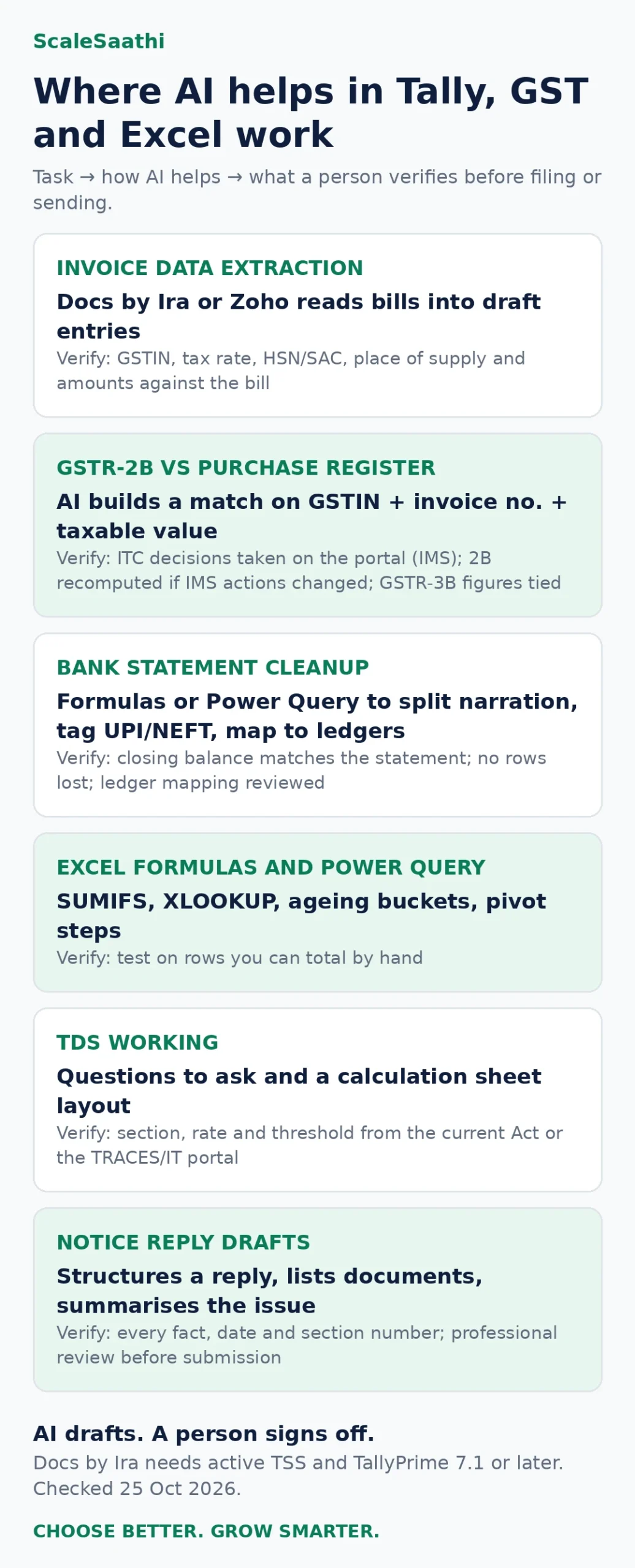
| Task | How AI helps | Safe input | Verify before filing or sending |
|---|---|---|---|
| Bank statement cleanup | Writes formulas or Power Query steps to split narration, tag UPI/NEFT, and map to ledgers | Column headings and 5–10 sample rows with account numbers and names masked | Closing balance matches the statement; no rows lost; ledger mapping reviewed |
| GSTR-2B vs purchase register | Builds a match on GSTIN + invoice number + taxable value, with tolerance and mismatch reasons | Column names and a few masked rows | ITC decisions taken on the portal (IMS); 2B recomputed if IMS actions changed; GSTR-3B figures tied |
| Invoice data extraction | Docs by Ira or Zoho reads bills into draft entries; a general assistant can extract fields from one bill | Supplier invoices are business documents; use the software’s own AI rather than a personal chat | GSTIN, tax rate, HSN/SAC, place of supply and amounts checked against the bill |
| Excel formulas and Power Query | Explains and writes SUMIFS, XLOOKUP, ageing buckets, pivot steps | Sheet structure only | Test on rows you can total by hand |
| Ledger scrutiny | Suggests what to look for: round sums, cash above limits, duplicates, entries on holidays, expenses without GST | A description of the ledger, or an anonymised export | Each flagged entry checked against vouchers and bills |
| TDS working | Lists questions to ask and builds a calculation sheet layout | Payment type and amount, no PAN | Section, rate and threshold confirmed from the current Act or the TRACES/IT portal |
| Notice reply drafts | Structures a reply, lists documents, summarises the issue | Notice text with names, GSTIN/PAN and DIN removed | Every fact, date and section number checked; professional review before submission |
| Client emails and reminders | Drafts polite reminders for documents, fees and due dates, in English or Hindi | First names or no names | Due dates checked on the official portal |
GSTR-2B reconciliation with AI: a safe workflow
On the GST portal, GSTR-2B is a read-only statement of input tax credit built from what your suppliers filed (GSTR-1, GSTR-1A, IFF, GSTR-5 and GSTR-6). The GST portal FAQ says it is generated on the 14th of the following month for monthly filers, and on the 14th after the quarter for quarterly filers. With the Invoice Management System (IMS), if you change actions on invoices after it is generated, the portal requires GSTR-2B to be recomputed before you file GSTR-3B.
- Download GSTR-2B (Excel) from the portal and export your purchase register from Tally, Zoho Books or your software.
- Give the AI only the column names and two or three made-up rows. Ask it for the formula or Power Query steps (prompts 5 to 8 below).
- Run the formulas on your real file, on your own computer. Your data never leaves Excel.
- Review each mismatch yourself: missing in 2B, missing in books, value difference, wrong GSTIN, wrong period.
- Take actions in IMS on the portal, recompute 2B if needed, and only then prepare GSTR-3B.
Many GST and accounting products now offer automatic 2B matching. They can save time, but you are still responsible for the ITC claimed.
TDS and income tax work: matching 26AS, AIS and Form 16A
The TDS side of a practice has the same shape as GST matching: two lists that should agree and rarely do. The deductor’s books say one thing, Form 26AS or AIS on the income tax portal says another, and the client’s Form 16A sits somewhere in between. AI is good at building the comparison sheet. It is poor at knowing the current section, rate or threshold, and those change often enough that I never take them from a chat.
| Comparison | Match on | Usual reasons for a mismatch | What the AI should build |
|---|---|---|---|
| Books vs Form 26AS (deductee side) | Deductor TAN (masked), quarter, amount credited | Deductor filed late or quoted a wrong PAN; amount booked in a different quarter | A match key, a status column and a summary by deductor and quarter |
| Books vs AIS | Information category, source, amount | Interest or dividend not booked; same receipt shown twice | A pivot of AIS categories against ledger heads, with differences highlighted |
| TDS deducted vs TDS deposited (deductor side) | Party code, month, section entered by you | Short deduction, late deposit, wrong section chosen | A monthly working with your own rate table that you fill from the current Act |
| Form 16A vs 26AS | Certificate number, quarter, amount | Revised return by the deductor; certificate issued before correction | A checklist of certificates to chase, with a draft reminder |
Download the files yourself from the portal, replace PAN and names with codes before you describe them, and run the formulas in Excel on your own machine. The bank reconciliation statement format uses the same match-key idea if you want a worked layout.
Audit work: where AI helps and where it weakens the file
Audit is where I am most careful, because the working papers have to show what you did and why. ICAI’s CA Journal article on ethics and AI puts it plainly: AI is a powerful assistant, not a replacement for professional scepticism or judgment, especially in audits. In practice that means AI can prepare and suggest, but the evidence, the sample and the conclusion are yours.
| Audit step | Useful AI job | Keep it human |
|---|---|---|
| Planning | Draft a risk checklist for the client’s industry; list questions for the walkthrough | Materiality, risk assessment and the audit plan itself |
| Data analytics | Write formulas to flag round amounts, weekend entries, duplicate invoices, cash above limits | Deciding which flags matter and following them up with vouchers |
| Sampling | Write a formula to pick a random or value-weighted sample from an exported ledger | Choosing the method and size, and recording why |
| Working papers | Turn your rough notes into a clean draft of the procedure performed | The evidence, the conclusion and the reviewer’s sign-off |
| Confirmations and requests | Draft balance confirmation letters and document request lists | Sending them, and checking the replies against the books |
| Reporting | Check a draft note for clarity and consistency of terms | Every opinion, qualification and figure in the report |
A habit that helps on review: when AI wrote a formula or a draft paragraph, note that in the working paper along with the check you did. A reviewer then knows what to test. If you are building trial balance and ledger layouts for the analytics, our trial balance format and journal entry format guides have ready templates.
Excel: Copilot or a chat assistant?
Copilot in Excel works inside the workbook, so it can see your columns. Microsoft’s Copilot in Excel FAQ (seen 31 October 2026) says it needs a Microsoft 365 Personal or Family subscription with an AI credits plan, Microsoft 365 Premium, a commercial Copilot subscription, or an eligible business plan. Because it sees the data, check whose account and which plan you use before opening a client’s file. On Microsoft’s India plans page, Microsoft 365 Premium is ₹1,999 a month or ₹19,999 a year, and Personal is ₹689 a month.
A chat assistant such as ChatGPT, Claude or Gemini never needs to see the data if you describe the layout. For most formula and Power Query work, this is the safer habit: describe the columns, get the formula, paste it into Excel yourself.
For 25 tested Excel prompts with GST and ledger examples, see ChatGPT for Excel.
See the yearly cost for your firm with the AI subscription cost calculator.
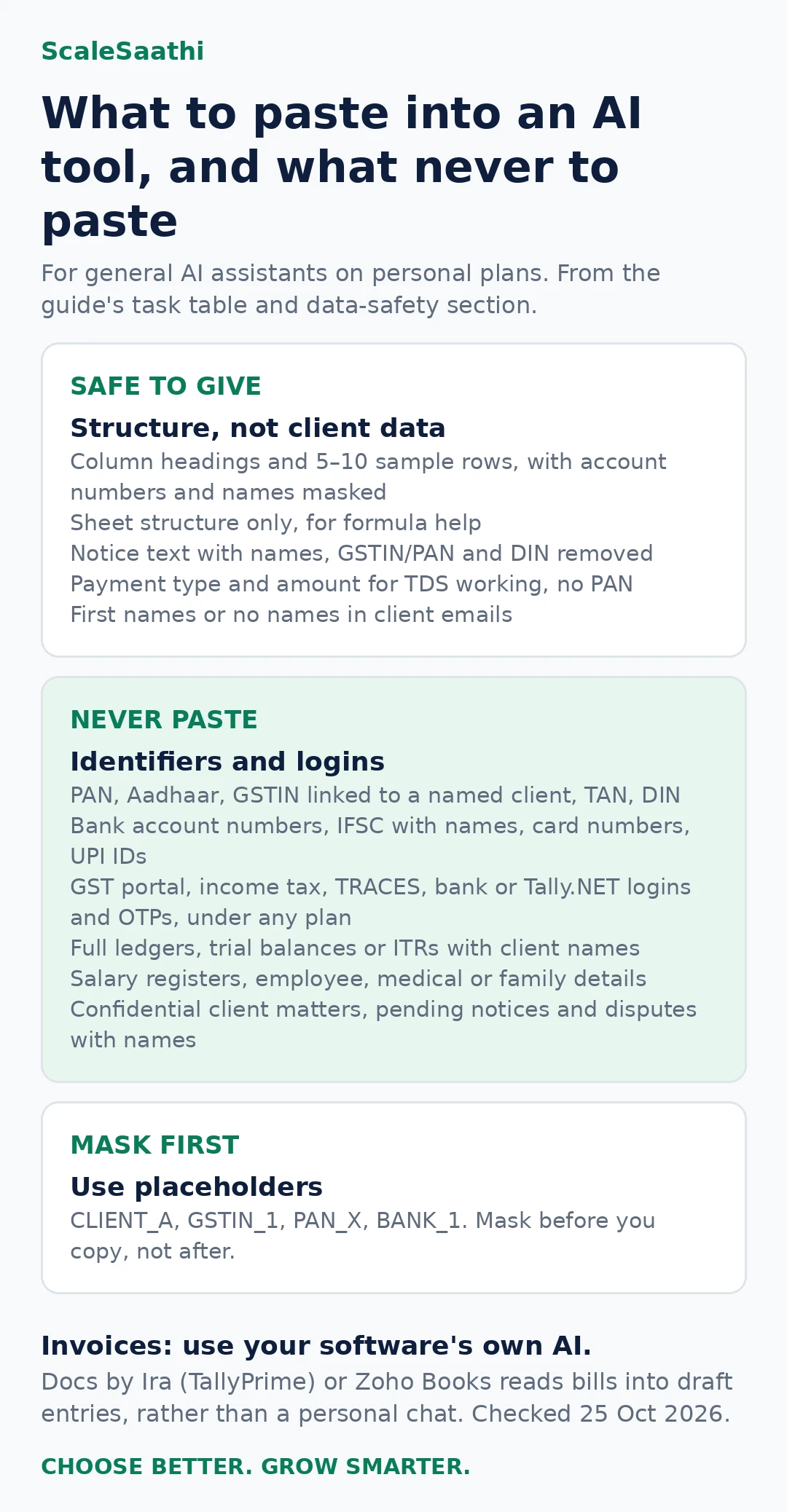
Data you should never paste into a personal AI account
- PAN, Aadhaar, GSTIN linked to a named client, TAN, DIN
- Bank account numbers, IFSC with names, card numbers, UPI IDs
- GST portal, income tax portal, TRACES, bank or Tally.NET usernames, passwords and OTPs, under any plan
- Full ledgers, trial balances or ITRs with client names
- Salary registers, employee details, medical or family information
- Anything a client has asked you to keep confidential, or information about pending notices and disputes with names
Replace them with placeholders: CLIENT_A, GSTIN_1, PAN_X, BANK_1. Mask before you copy, not after.
| Assistant | Personal plans | Business plans |
|---|---|---|
| ChatGPT | Chats can be used to improve models by default. Turn off Settings → Data controls → “Improve the model for everyone” (OpenAI help) | Business and Enterprise: not used for training by default |
| Claude | Used for training only if you allow it in privacy settings, or if a chat is flagged for safety review; incognito chats are not used (Anthropic) | Claude for Work and API have separate commercial terms |
| Gemini | Turn off Keep Activity to stop future chats being reviewed and used to improve Google services. Google itself says that if it is on, do not enter confidential data (Gemini privacy hub) | Google Workspace: Google says your content is not used to train models without permission |
| Copilot in Excel | Personal Microsoft accounts follow Microsoft’s home privacy terms | Work accounts follow your organisation’s Microsoft 365 data protections |
What ICAI and the DPDP law say
ICAI. ICAI runs an AI portal with certificate courses (AICA Level 1 and 2), a prompt library and CA GPT for members. An article in ICAI’s CA Journal applies the ICAI Code of Ethics to AI: confidentiality, due care and accountability still apply, and AI is “a powerful assistant, not a replacement for professional scepticism or judgment”. An ICAI AI portal article says ICAI has published a guidance note on the ethical use of AI; we could not locate the note itself on 25 October 2026, so check ICAI’s publications for the current text. We found no ICAI rule banning AI use.
DPDP Act, 2023. Names, phone numbers, PAN and bank details of your clients’ customers, employees and the clients themselves (if individuals) are personal data. MeitY notified the DPDP Rules, 2025 on 13 November 2025. Under the notification, most duties on organisations, such as notice, security safeguards and breach reporting, start 18 months later, around 13 May 2027. Practical meaning for a practice: know which tools hold client data, collect only what you need, and use AI tools whose data terms you can explain to a client. For your own obligations, take legal advice.
Third-party AI tools for Tally and GST: questions to ask first
Search for “AI for Tally” and you will find connectors, bookkeeping bots and GST reconciliation services, many of them Indian start-ups. Some are useful. All of them read, and some write, your client’s books. I ask the same questions of every one before it goes near a live company in Tally.
| Question | Why it matters | A good answer looks like |
|---|---|---|
| Does it only read data, or can it post vouchers? | Write access can change books without a visible review step | Drafts only, posted after a person approves |
| Where is the data stored and processed? | Client data and the DPDP Rules | A named country and cloud provider, in writing |
| Which AI model does it use, and is our data used for training? | Your data could end up improving someone else’s model | Named model; no training on customer data, stated in the terms |
| Who at the vendor can see our data? | Support staff access is often wider than you expect | Access only on request, logged |
| How do we export and delete everything if we stop? | You must be able to leave cleanly | A documented export and a deletion confirmation |
| Does it need portal usernames or passwords? | Sharing GST or income tax portal logins is a serious risk | No; it works from files you download, or official APIs with your consent |
If a vendor cannot answer these in writing, try the built-in AI in your software first. The GST billing software guide and e-invoicing software guide list tools that already include matching and e-invoice features.
Learning AI as a CA: ICAI’s AICA courses and what to practise
ICAI runs its own certificate courses on AI through the AI in ICAI portal. Fees below are from the batch listings seen 31 October 2026.
| Course | Fee listed | Format in current batches | Good for |
|---|---|---|---|
| AICA Level 1 | ₹5,000 + GST | Three-day batches in cities across India | Members starting out: prompts, everyday tools, ethics |
| AICA Level 2 | ₹10,000 + GST | Two online days followed by three classroom days | Members who already use AI and want deeper, practice-level use |
Check the Level 1 batch page and Level 2 batch page for dates near you and the eligibility details. The portal also has a prompt library and CA GPT for members.
A course helps, but the skill that matters most is practice on your own work. Pick three jobs you do every month, such as the 2B match, bank tagging and client reminders, and build a prompt for each that you keep refining. Within a quarter you will know which ones save real time.
AI tool choices by budget (prices checked 25 October 2026)
Gemini, Claude, Microsoft 365 and Zoho Books prices were seen on each company’s page on 31 October 2026. ChatGPT’s pricing page shows rupee prices only after it loads in your browser, so the ChatGPT figures below are as reported on 25 October 2026; confirm them at checkout.
Prices are from official pages, as recorded in our ChatGPT, Gemini and Claude price guide on the same date. Plans change often; check the total at checkout.
| Budget | Option | Price (official page, seen 31 Oct 2026) | Fits |
|---|---|---|---|
| ₹0 | ChatGPT Free, Gemini, Claude Free; ICAI CA GPT for members | Free | Formulas, drafts with masked data |
| ₹0 extra | Docs by Ira starter pages (TallyPrime with active TSS, Release 7.1+) | 100 pages free, then packs + 18% GST: check current price | Purchase and sales bill entry in Tally |
| Under ₹1,000 a month | ChatGPT Go; Google AI Plus; Microsoft 365 Personal | ₹399/month incl. GST; ₹399/month; ₹689/month | One person, daily drafting; Copilot in Excel needs an AI credits plan on Personal |
| Accounting software with AI | Zoho Books Standard and above | From ₹749/org/month billed yearly (GST not stated) | Small businesses moving off spreadsheets |
| ₹1,000 to ₹2,500 a month | ChatGPT Plus; Google AI Pro; Claude Pro | ₹1,999/month incl. GST; ₹1,950/month; US$20/month (US$17 billed yearly), tax extra | Heavy users, long documents |
| Team of 2 or more | ChatGPT Business | ₹1,800 per user/month billed yearly, plus GST | Practices handling client data: admin controls, no training by default |
22 copy-ready prompts for accountants
Replace anything in square brackets. Mask names, PAN, GSTIN and bank details before pasting anything from a real file, unless you are on a tool with suitable data controls and client permission. Always check the output.
Bank and ledgers
- I have a bank statement in Excel with columns Date, Narration, Withdrawal, Deposit, Balance. Write a formula for a new column that tags each row as UPI, NEFT, RTGS, IMPS, Cheque, Cash or Charges based on words in Narration. Assume data starts in row 2.
- Write Power Query steps to combine 12 monthly bank statement files with the same columns into one table, remove blank rows and the opening balance line, and add a Month column.
- Here are 10 sample narrations with names replaced by PARTY_1 to PARTY_10: [paste]. Suggest a ledger mapping table (narration word → Tally ledger name) I can use with XLOOKUP.
- Give me a checklist for scrutinising a cash ledger of a small Indian trading business before finalising accounts: what patterns, limits and entries should I look at?
GST and GSTR-2B
- I have GSTR-2B downloaded from the GST portal in one sheet (Supplier GSTIN, Invoice No, Invoice Date, Taxable Value, IGST, CGST, SGST) and my purchase register in another with the same columns. Write Excel formulas to build a match key, mark each row as Matched, Value difference (more than ₹10), Missing in 2B or Missing in books.
- Invoice numbers differ in format between my books and GSTR-2B (for example INV/23-24/045 and 45). Write a formula to normalise them before matching.
- Write a short email to a supplier, SUPPLIER_A, asking them to upload invoice numbers [list] in their GSTR-1 for [month], as these are not appearing in my GSTR-2B. Polite, firm, under 120 words.
- Explain in simple English, for a small shop owner, why ITC in GSTR-3B should match what appears in GSTR-2B, and what happens if a supplier files late. Do not quote section numbers; I will add them.
- Make a monthly GST calendar checklist for a regular monthly filer with columns Task, Usual date, Done by, Checked by. Leave the dates as placeholders that I will confirm from the GST portal.
TDS
- Create an Excel layout for a monthly TDS working with columns for party code (no PAN), payment nature, amount, section, rate, threshold check, TDS amount and remarks. I will fill sections and rates myself from the current Act.
- List the questions I should ask a client before deciding whether TDS applies to a payment to a contractor, so nothing is missed. Do not give me rates.
- Draft a reminder to a deductor client to share Form 16A for Q2 so we can match it with Form 26AS and AIS. Under 100 words.
Tally
- I export Day Book from TallyPrime to Excel. Write formulas to list vouchers above ₹50,000 paid in cash, and duplicate vouchers with the same party, amount and date.
- Write step-by-step instructions for a junior to review draft vouchers created by Docs by Ira in TallyPrime before approving them: which fields to check and in what order.
- I am preparing a ledger mapping before importing data into TallyPrime from Excel. Give me a checklist of master data I need to clean first (ledgers, groups, GST details, stock items).
Excel and reports
- Write a formula for receivables ageing in buckets 0–30, 31–60, 61–90 and over 90 days, using Invoice Date in column B and today’s date.
- Explain this formula line by line for a junior accountant: [paste formula].
- Build a simple monthly MIS layout for a small business: sales, gross margin, top expenses, cash balance, receivables over 60 days. Give the structure and formulas only.
Clients, notices and practice
- Here is the text of a GST notice with names, GSTIN and reference numbers removed: [paste]. Summarise what is being asked, list the documents I should collect, and draft an outline reply. Mark every legal point I must verify.
- Write a WhatsApp message to clients reminding them to send purchase bills and bank statements for [month] by [date]. Friendly, in English and Hindi.
- Draft a one-page note for our clients explaining how our firm uses AI tools and how we protect their data. Plain language, no promises we cannot keep.
- Draft an internal AI-use policy for a five-person accounting practice: allowed tools, data that must never be entered, review steps and who approves.
Need a client reminder or a GST documents checklist message? The free AI prompt generator builds one in English or Hinglish.
Mistakes and risks to avoid
- Trusting a quoted rate or due date. AI often repeats old GST or TDS rates and due dates. Confirm on the GST portal, the income tax portal or the official notification.
- Pasting the whole ledger into a chat. Long pastes get truncated or rows are changed. Use formulas in Excel instead.
- Approving AI-created vouchers in bulk. Even Tally says to review drafts. Check tax rates, GSTIN and ledger mapping.
- Using a staff member’s personal account for client work. You lose control of the history and its settings.
- Sharing portal passwords or OTPs with any AI tool or browser extension.
- Letting AI-written notice replies go out unchecked. Made-up case laws and sections are a known problem with AI tools.
- Paying for several overlapping tools. One general assistant plus the AI inside your accounting software is enough for most practices.
- Taking a TDS rate or threshold from a chat. Build the working with AI, but fill the rate table yourself from the current Act and the income tax portal.
- Leaving no trace in the audit file. If AI wrote a formula or a draft paragraph, record that and the check you did, so the reviewer knows what to test.
- Connecting a third-party tool with write access on day one. Start read-only or on a test company, and approve drafts by hand.
Bringing AI into a small practice: the first 30 days
Small offices that “try AI” usually let everyone sign up for whatever they like, and three months later nobody knows which client data went where. A short, boring rollout avoids that.
- Week 1: pick one tool and one account type. A firm-controlled plan where training is off by default, or the AI already inside Tally or Zoho. Turn off model training on any personal accounts staff already use.
- Week 1: write a one-page AI-use policy. Prompt 22 above drafts it. Cover allowed tools, data that is never entered, and who reviews output.
- Week 2: choose three tasks. Formulas for the 2B match, bank narration tagging and client reminders are low-risk and repeat every month.
- Weeks 2–3: run them side by side. Do the task the old way and the AI way for one month’s data, and compare. Keep the prompts that work in a shared file.
- Week 4: review. What saved time, what went wrong, what needs a tighter check. Only then add the next task.
- Tell clients. Prompt 21 drafts a short note on how you use AI and protect their data. Update engagement letters where needed.
If you are still choosing the base software, our free accounting software guide and Microsoft 365 vs Google Workspace comparison cover where Copilot and Gemini come bundled.
Before you use AI with client data: checklist
- Which tool and plan is it, and is model training switched off or off by default?
- Is it a firm-controlled account, not a personal one?
- Have you removed or masked PAN, GSTIN, Aadhaar, bank details and names that are not needed?
- Does your engagement letter or client consent cover using such tools?
- Who reviews the output, and is that review recorded?
- Where will the chat history be stored, and who can delete it?
- Have you checked figures against source documents and the official portal?
- Would you be comfortable explaining this use to the client and to ICAI?
Turn the guide into a decision
Use the free AI tool finder
Answer a few questions about your task, team, budget and how sensitive the data is, and get a shortlist with official links.
Related guides
- AI tools for small business in India: what to use and what it costs
- ChatGPT, Gemini and Claude price in India
- Accounting software for small business in India
- TallyPrime price in India
- Zoho Books pricing in India
- GST invoice format
- Ledger format
- Cash book format
- AI tool finder
- ChatGPT for Excel: prompts with GST and ledger examples
- Bank reconciliation statement format
- Trial balance format
- Best GST billing software in India
Frequently asked questions
Can AI do accounting work for a CA or accountant in India?
It can draft, sort, extract and explain, but it cannot take responsibility. Use it for first drafts of emails and notice replies, Excel formulas, invoice data extraction and spotting unusual entries. Every figure that goes into a return, a ledger or an audit file must be checked by a person against the books and the official portal.
Is there an official Tally AI?
Tally Solutions calls its AI offering TallyIra. Its first product, Docs by Ira, reads invoices in PDF or image form and creates draft vouchers in TallyPrime for you to review and approve. Tally says it needs an active TSS subscription and TallyPrime Release 7.1 or later, and is available in India. The TallyPrime 7.0 release notes do not list AI features.
How much does Docs by Ira cost?
Tally’s help pages say you get 100 pages free to start, then buy a one-year Regular pack (200, 400 or 600 pages) or Pro pack (3,000 pages), with 18% GST added. Check the current pack price on Tally’s TallyIra page before buying, as we could not read a reliable rupee figure on 25 October 2026.
Can ChatGPT or Gemini reconcile GSTR-2B with my purchase register?
Not directly from the GST portal. You can download GSTR-2B and your purchase register to Excel and ask an assistant to write the matching formulas or steps, or to explain mismatches. Do the actual matching in your own spreadsheet or accounting software and confirm ITC decisions on the portal before filing GSTR-3B.
Is it safe to paste PAN, GSTIN or bank details into ChatGPT?
Avoid it on personal plans. Replace names, PAN, GSTIN, Aadhaar and bank account numbers with placeholders such as CLIENT_A or GSTIN_1. If you must work with real client data, use a business plan that does not train on your data by default, get the client’s permission where needed, and follow your firm’s data policy.
Does ICAI allow chartered accountants to use AI?
ICAI actively promotes AI skills: it runs an AI portal with certificate courses, a prompt library and CA GPT for members. ICAI material stresses that the Code of Ethics still applies, especially confidentiality and due care, and that AI does not replace professional judgement. We could not find a rule that bans AI use; check ICAI’s latest announcements.
What does the DPDP Act mean for accountants using AI?
Client and employee data such as names, PAN, phone numbers and bank details is personal data. The DPDP Rules, 2025 were notified on 13 November 2025, and most duties on businesses start 18 months later, around 13 May 2027. Plan now: collect only what you need, use tools with proper data terms, and know where client data goes.
Which AI tool should a small accounting practice start with?
Start with what you already pay for. If you use TallyPrime with TSS, try Docs by Ira for purchase bills. If you use Zoho Books, try its built-in Zia features. Add one general assistant, such as ChatGPT, Claude or Gemini, for drafting and Excel help, on a plan whose data settings you have checked.
Can Copilot in Excel help with accounting spreadsheets?
Yes, for formulas, summaries, charts and explaining data in workbooks. Microsoft says it needs a Microsoft 365 Personal or Family plan with an AI credits plan, Microsoft 365 Premium, or an eligible business plan with Copilot. Check every formula on a few rows by hand before you rely on it.
Will AI replace accountants and CAs?
AI reduces typing, sorting and first drafts. It does not sign returns, carry professional liability, understand a client’s full situation or answer to the tax department. Accountants who use AI carefully are likely to do more advisory and review work, not less.
Can AI draft replies to GST or income tax notices?
It can produce a structured first draft and a list of documents to gather if you give it the notice text without personal identifiers. Check every section number, date and figure against the notice, the law and the books, and have a qualified professional review the reply before submitting it.
Which AI is best for Tally?
For entering purchase and sales bills, Tally’s own Docs by Ira is the safest start, because it creates draft vouchers inside TallyPrime that you approve. For Excel work on Tally exports, any general assistant such as ChatGPT, Claude or Gemini can write the formulas if you describe the columns instead of pasting client data.
Can ChatGPT do accounting?
It can help with accounting work, not do the accounts. It writes formulas, explains entries, drafts emails and summarises documents. It can make arithmetic mistakes on long pasted lists and may quote old rates, so keep the numbers in Excel or your accounting software and check every figure yourself.
Is there an ICAI course on AI for chartered accountants?
Yes. ICAI’s AI portal lists AICA Level 1 at ₹5,000 plus GST in three-day batches, and AICA Level 2 at ₹10,000 plus GST with two online days and three classroom days, in batch listings seen on 31 October 2026. Check the portal for dates and eligibility.
Can AI help with audit sampling and working papers?
Yes, as a helper. It can write formulas to pick a random or value-based sample from a ledger export, flag unusual entries and turn your notes into a clean draft. The sampling method, the evidence and the conclusion must be yours, and it helps to record in the file where AI was used.
Can AI reconcile Form 26AS or AIS with the books?
It can build the matching sheet. Download Form 26AS or AIS from the income tax portal, describe the columns with PAN and names replaced by codes, and ask for match keys and a status column. Run the formulas in Excel yourself and confirm sections and rates from the current law.
Can an AI tool file GST returns for me?
Do not let it. Filing needs your portal login and your judgement on ITC and tax liability. Use AI to prepare and check working files, then file on the GST portal or through your accounting software yourself, after reviewing the figures.
Disclaimer: This guide is general information, not tax or legal advice. AI can be wrong. Verify every figure, rate and due date with the official GST or income tax portal and the books, and consult a qualified professional before filing or replying to a notice.
Sources
All pages seen 31 October 2026, except where a line above says otherwise. Features and prices change; confirm on the official page before buying or relying on them.
- Tally Solutions — TallyPrime 7.0 release notes
- Tally Solutions — TallyIra and Docs by Ira
- TallyHelp — Docs by Ira for voucher creation
- TallyHelp — Get started with Docs by Ira (requirements and free pages)
- Zoho — AI in Zoho Books
- Zoho Books — India pricing
- GST portal — FAQs on Form GSTR-2B
- ICAI — AI in ICAI portal
- ICAI CA Journal — Navigating ethics and trust in the age of AI
- ICAI AI portal — article mentioning the guidance note on ethical AI use
- MeitY — Digital Personal Data Protection Rules, 2025
- Gazette of India — DPDP Act commencement notification, 13 November 2025
- OpenAI — Data controls in ChatGPT
- OpenAI — ChatGPT pricing
- Anthropic — Is my data used for model training?
- Anthropic — Claude pricing
- Google — Gemini Apps privacy hub
- Google — Google AI plans for India
- Microsoft — Copilot in Excel FAQ
- Microsoft — Microsoft 365 plans for India
- TallyHelp — Release notes (TallyPrime 7.2)
- ICAI — AICA Level 1 batches and fees
- ICAI — AICA Level 2 batches and fees