Tally on cloud means running TallyPrime and your company data on a hosted computer that you access over the internet. It can remove the need to keep an office computer available for remote work. It does not automatically include the TallyPrime software licence, unlimited simultaneous users or an independent backup you control. Tally separates Cloud Access from the product licence.
For an Indian business, the useful question is not simply “Can I open Tally from home?” It is whether the proposed setup lets the right people work on the correct books, with acceptable connection quality, recoverable data and a predictable total bill. Start by choosing the access method; compare hosting quotations after that.
This guide uses official Tally documentation and clearly identified providers’ published prices. The buying framework and worked budget are ScaleSaathi analysis, not a cloud-host performance test. We have not independently verified uptime, support response, security implementation or your account-specific checkout. Confirm the written scope before paying.
Quick decision
Keep local Tally when one office already works reliably and remote access is occasional. Evaluate hosted Tally when regular remote working needs a centrally available environment. Compare a different accounting platform when your real requirement is a browser-native workflow rather than retaining Tally.
Download the Tally on cloud cost planner (.xlsx). It separates per-user or fixed-pack hosting, initial billing term, software, annual charges, setup and an editable tax assumption. A separate checklist records the questions to resolve during a trial.
In this guide
Tally on cloud, remote access and browser reports are different
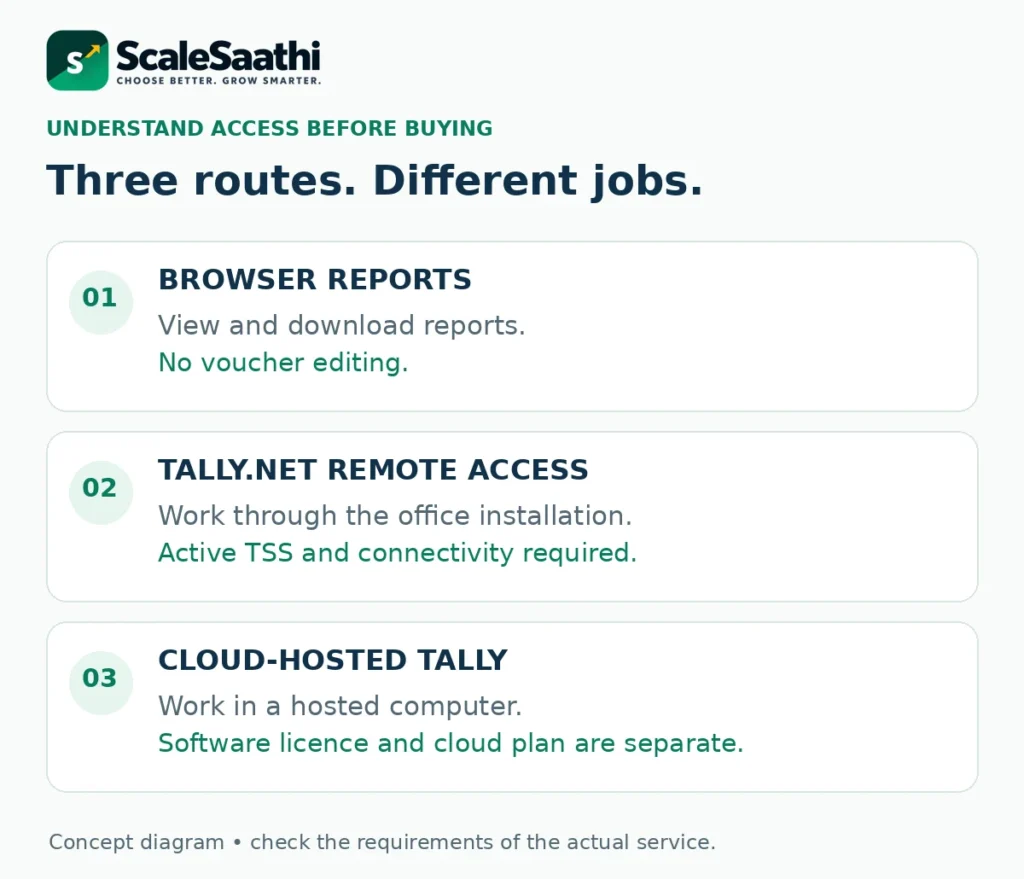
These three routes can all help someone away from the office, but they do not provide the same service. Buying the most expensive route before defining the task creates avoidable recurring cost.
Browser reports: inspect information
Use this for viewing and downloading supported reports or vouchers. Tally’s browser-report FAQ says this feature does not edit vouchers and requires active TSS. It is not the same as operating a hosted Tally desktop in a browser. Browser-report scope.
Tally.NET Remote Access: work through the office installation
The office needs a valid licence, active TSS, internet and the company connected to Tally.NET. The remote computer needs TallyPrime and internet, with the same release at both ends. The data remains on the office computer. Remote Access requirements.
Cloud hosting: work in a hosted environment
TallyPrime runs on a Virtual Computer. Tally’s own Cloud Access supports a browser connection or its client application, with licence configuration and company-data upload as part of setup. Cloud Access onboarding.
Our starting recommendation: an owner who only checks receivables should first test report access. A bookkeeper who needs daily entry without relying on the office machine should evaluate hosted access. Do not call every remote-access arrangement a cloud migration.
Official TallyPrime Cloud Access versus third-party hosting
TallyPrime Cloud Access (TPCA) is Tally’s named service. Independent hosting businesses also sell “Tally on cloud.” A similar product name or a Tally logo on a seller’s page does not make that seller the software manufacturer. Identify the company issuing the invoice and the company operating the environment.
Older quotations may say “TallyPrime powered by AWS.” Tally now documents migration of those Virtual Offices to TPCA hosted on Oracle Cloud Infrastructure. This does not establish that every existing account has already migrated, or that independent AWS hosting no longer exists. Confirm the infrastructure and support process for your actual deployment. Official migration guidance.
Ask for one written service description: who hosts the data, who supplies the software entitlement, who fixes a login problem and who helps restore company data. A hosting-support contract should not be mistaken for a bookkeeping service. Responsibility matters more than the largest cloud brand on a sales banner.
How much does Tally on cloud cost in India?
There is no single market-wide price. The examples below are published starting points, not a provider ranking or equivalent configurations. A per-user rate and a whole-VM rate cannot be compared without the paid seat count, capacity, billing commitment and inclusions.
Official Cloud Access: from ₹600 per user/month
Tally’s overview publishes this starting rate. The Customer Hub lists the Personal Pack with 18% GST extra and 3-, 6- and 12-month subscription periods. At that rate, three months of cloud access are ₹1,800 before GST or ₹2,124 including it. The software licence is separate.
TallyExperts: from ₹550 per user/month for 1–5 users
The provider labels its pricing indicative; data size, backup, migration and support affect the final quote. Do not assume tax, a Tally licence or a particular prepaid term is included. Confirm each separately. Provider’s pricing guide.
TallyCloudHub: per-user and VM offers
The homepage advertises user-based plans from ₹400 per user/month and VM plans from ₹2,800/month. It explicitly excludes Tally software and licences. Its linked user-plan page also describes an annual-subscription offer; obtain the exact term and tax treatment for the rate offered to you. Provider’s published starting prices.
The official Personal Pack illustrates why a monthly label is not necessarily monthly billing. At an unchanged ₹600 rate, twelve months of cloud access total ₹7,200 before GST or ₹8,496 including 18%. This is cloud-only arithmetic, not a full first-year Tally budget or a promise of future prices. BUSY users can compare its remote option in our Tally vs Busy comparison.
Check the subscription period and complete user pack in the written quotation. A lower rate attached to four or eight paid seats can cost more overall than a higher rate for the single seat you actually need. Do not multiply an advertised entry rate into an unquoted multi-user configuration.
Build the full budget: hosting is only one line
Use six lines when comparing a Tally on cloud quotation. Mark an item “included” only when the provider says so in writing; otherwise obtain its price or mark it unresolved.
- Cloud hosting: paid users or fixed pack, billed months, resources and storage.
- TallyPrime entitlement: existing licence, new purchase, rental or a documented bundle.
- TSS and other licensing: required renewals, virtual-user entitlement and any additional software used in the environment.
- Setup and migration: moving files, configuring users, testing peripherals and training.
- Ongoing extras: backup storage, support upgrades, integrations and other agreed charges.
- Tax and exit costs: the quotation’s tax treatment, export assistance and any cancellation commitments.
Avoid double-counting. If your rental already includes TSS for the rental period, do not add a second identical TSS charge. Conversely, pre-installed Tally does not by itself prove that the hosting fee includes a usable licence. Check Tally’s licensing guidance and reconcile the seller’s invoice with it.
For Windows-based hosting, ask who covers the required operating-system and remote-access licences. Also ask about Office or other applications you actually need. This is a quotation check, not a claim that every host uses the same platform or licence arrangement.
Worked example: a three-user cloud quotation
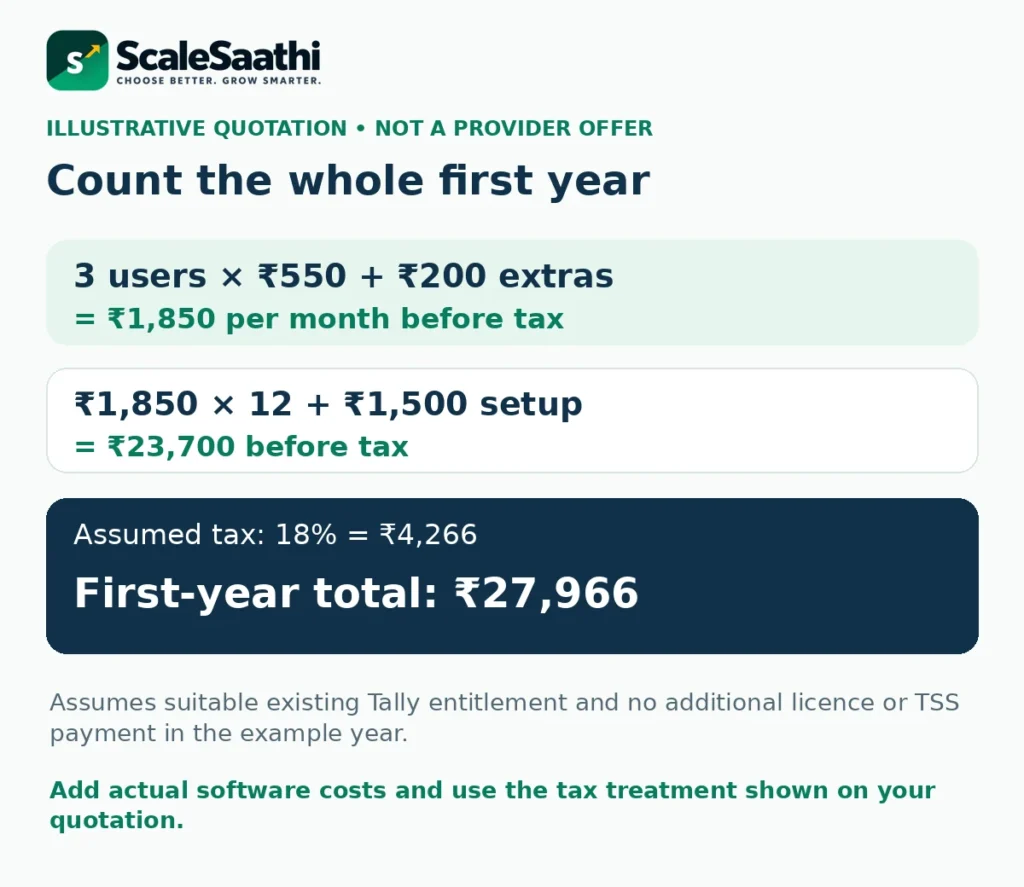
Illustrative budget, not a provider offer: assume three paid users at ₹550 each per month, ₹200 in monthly extras and a ₹1,500 one-time setup charge. Assume the business already has suitable Tally entitlement and no additional licence or TSS payment falls due in this example year. Those assumptions must not be copied into a real quote without checking.
Monthly service cost
Hosting: 3 × ₹550 = ₹1,650.
With ₹200 extras: ₹1,850 per month before tax.
First-year service budget
₹1,850 × 12 = ₹22,200.
Add ₹1,500 setup: ₹23,700 before tax.
With an assumed 18% tax
Tax: ₹23,700 × 18% = ₹4,266.
First-year cash outlay: ₹27,966.
With a three-month initial billing term, service charges plus setup would be ₹1,850 × 3 + ₹1,500 = ₹7,050 before tax, or ₹8,319 under the same assumption. The upfront payment and the first-year budget are different numbers. A new licence, TSS due during the year or other charges would increase the relevant totals.
The calculation applies one illustrative tax rate to every modelled charge. Your actual invoices may have different treatment. It makes no assumption about input tax credit, eligibility or accounting treatment, and keeps rates unchanged only for comparison.
Match the software licence, cloud seats and actual users
Keep three counts separate: people who need accounts, people who will work at the same time, and the paid capacity of the chosen hosting pack. Tally’s user-management example allows more registered accounts than simultaneously active users; creating an account does not necessarily buy another active seat. How active-user limits work.
The software entitlement is a separate check. Tally’s licensing guidance treats virtual access, geography and the licensed business entity as relevant. Do not assume a large hosting user allowance permits one licence to be shared across unrelated clients. Ask Tally or an authorised partner to confirm branch, accountant, multi-entity or cross-border arrangements in writing. Licence and virtual-access conditions.
A practical brief is more useful than “we need five users”: “Two staff will enter vouchers together; the owner needs reports; the accountant needs periodic review.” Let the supplier map that workload to the appropriate licence and hosting pack before accepting the bill.
Test performance with your books and your connection
Do not choose only by RAM or an “unlimited users” badge. Ask which resources are shared, which are allocated to your environment, whether quoted storage includes backups and what happens when either limit is reached. A server specification cannot show how your largest reports or customisations behave.
Run the trial from the locations where the team will actually work. Use your ordinary internet connection, the intended operating systems and the actual printer or export workflow. Test several simultaneous sessions and a long report; a login demonstration is not a workload test.
Include TDL customisations, local application integrations, document export and any required signing hardware in the acceptance checklist. Do not assume that browser access supports every peripheral exactly like the local installation. The Cloud Access FAQ distinguishes environment features and limitations; the supplier should demonstrate the parts your business needs.
Cloud hosting still needs a usable connection at the user’s end. It is not an offline synchronisation system merely because the server stays online. Agree what staff should do after an interrupted session and how to avoid entering a transaction twice when reconnecting.
Check the backup trigger, restoration and independent copy
Ask more than “Are backups included?” Establish when a backup is taken, what it contains, how many versions are retained, who can restore and whether an authorised owner can download a usable copy without support intervention.
Tally’s Cloud Access documentation describes an automatic backup on the first Virtual Computer start of the day, plus manual backups. Downloaded backups are password-protected. That is more specific than assuming continuous backup simply because a page says “daily.” Confirm the schedule for your environment. Backup and restore details.
A company-data backup and a whole Virtual Computer backup are not interchangeable. The latter may include other folders and configuration. Tally’s FAQ also notes that older backups can be removed when backup capacity is exceeded. Backup scope and space limits. Keep the restore procedure and any required password with the business, not only with the vendor.
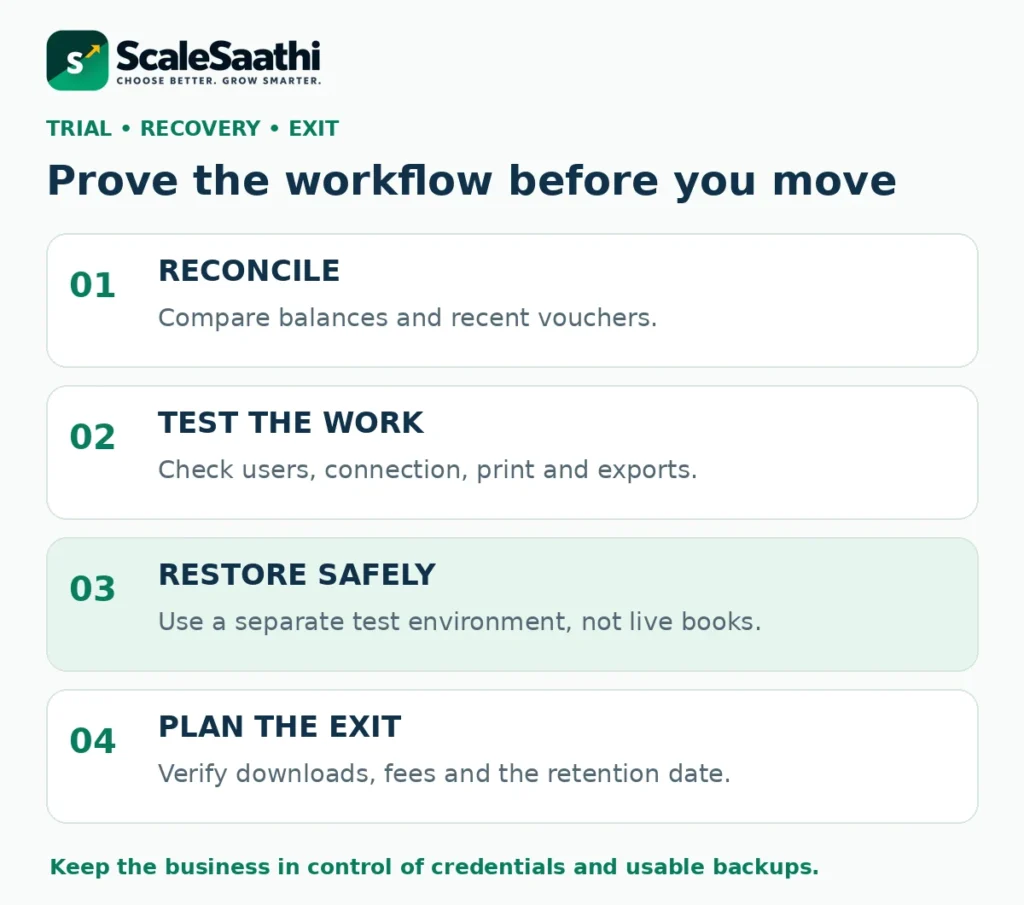
During the trial, obtain a backup and have the authorised accountant or administrator restore it in a separate test environment. Compare a trial balance, an outstanding balance and a recent voucher. Do not perform an experimental restore over the live books. Record whether any promised recovery step depends on provider support.
Security and account ownership: ask for evidence, not a slogan
A provider’s “100% secure” promise is not a security test. Ask for individual accounts, appropriate authentication, access removal, administrator permissions and the procedure for temporary support access. Tally’s own Cloud Access uses a Tally.NET identity and Secure PIN; do not infer that every independent host implements the same controls. Official access model.
Your business should control its billing and recovery contacts and know where primary data and backups are stored. Ask whether the support team can access data, how such access is approved and logged, and how deletion is handled after exit. Request evidence for any certification claim rather than treating a logo as sufficient.
Treat exported ledgers and downloaded backups as sensitive records. Use a controlled business storage location, restrict access and remove accounts when staff leave. The hosting decision changes who runs the computer; it does not remove your responsibility for users and financial information.
A practical migration and trial checklist
This is an acceptance plan to follow with your accountant and provider, not a claim that ScaleSaathi has performed your migration. Define a cutover window and agree which copy is authoritative before anyone moves files.
- Record the starting position. Note the Tally release, company data, customisations, users, licence ownership and essential reports. Save an independent backup.
- Prepare a test environment. Follow the selected provider’s licence and upload procedure. Do not overwrite the original data while trialling the service.
- Reconcile the copy. Check balances, outstanding invoices, stock where relevant and a small sample of recent vouchers against the original.
- Test complete work. Create a clearly labelled test entry, review permissions, print or export a document, reconnect after a dropped session and run a large report.
- Test recovery and exit. Download a backup, verify a separate restore, note retention deadlines and obtain any export charges.
- Approve the cutover. Stop entries in the old copy, migrate the agreed final data, reconcile again and keep the old records read-only for reference.
Tally’s getting-started instructions describe its own Virtual Computer, licence and shared-data setup. Independent hosts may use different paths and controls. Get written approval for a procedure that changes where the active licence or company data lives; do not treat generic internet instructions as your migration plan.
What happens when the cloud subscription expires?
A lifetime Tally licence does not mean lifetime hosting. Tally’s Cloud Access subscription documentation explains that failure to renew can restrict portal access and lead to deprovisioning of the Virtual Computer. This is a different issue from retaining the underlying software entitlement. Cloud subscription expiry.
Backup availability after cancellation or expiry is time-limited and can depend on the deprovisioning date. Check the actual date shown in the account and the applicable retention terms; do not assume one universal grace period. Download and verify the required data before cancellation. Retention conditions.
For any provider, put the exit process in the quotation: export format, licence transfer assistance, download window, cancellation notice, refunds and deletion confirmation. This is worth checking before the first payment, while choosing another provider is still easy.
When to choose cloud hosting—and when not to
An established Tally workflow with regular remote entry
Evaluate hosted Tally when keeping Tally’s existing process matters and authorised staff need daily access without depending on the office machine. Trial the agreed licence, user pack, data and peripherals together.
One reliable office and occasional outside access
Test Tally’s report or Remote Access route first. Moving to a recurring hosting bill is not automatically an improvement if the present workflow already solves the problem.
A new business that mainly wants browser-native accounting
Compare the workflow rather than assuming Tally must be hosted. ScaleSaathi’s accounting and invoicing software guide helps separate invoicing, complete books and an accountant-led process.
Unreliable internet, untested integrations, unclear licence entitlement or an unproven restore process are reasons to delay migration. Ask for a revised proposal or a longer trial rather than trying to solve those gaps after paying for a year. Use our accounting-software selection checklist to document the work and records that must survive the change.
Use the downloadable planner before accepting a quote
The workbook has six sheets: instructions, your budget, the worked example, published price evidence, a trial checklist and sources. Blue input cells accept your values. Select per-user or fixed-pack pricing, enter the billing term and add only the licence, annual and setup charges that actually apply. In fixed-pack mode, the rate is charged once—not multiplied by the user count.
The model shows initial cash outlay and a twelve-month budget at unchanged rates. It does not discover a missing licence, verify a discount, calculate seat compatibility or certify tax treatment. Its blank budget asks you to resolve the licence position before displaying a complete estimate. The worked example is clearly separate from your quotation.
For a wider purchase process across your other subscriptions, use the business-software buying guide. Retain the provider’s quotation, final invoice and agreed renewal dates alongside the spreadsheet.
What users commonly report
These themes summarise public discussion of remote and hosted Tally access drawn from TallyPrime reviews on Capterra and Software Advice, plus Reddit threads on cloud hosting. Dedicated directory reviews that isolate official Cloud Access alone are thin, so wording stays cautious and focuses on recurring desktop-versus-remote themes.
- Core books still work once you are connected: users who already know Tally still praise GST entries and familiar reports when they can reach the same company data remotely.
- Anywhere access is the main ask: reviewers repeatedly want to leave pure on-premise desktop limits behind for work-from-home and multi-location teams.
- Hosted or Virtual User access is treated as a bridge: public talk often frames Cloud Access / TVU-style setups as a way to keep Tally, not as a full rewrite into SaaS.
- Concurrent-user and hosting questions recur: buyers ask about Virtual User limits and whether the experience matches true browser cloud products—volume of Cloud Access–only reviews is limited.
- Third-party hosting talk is mixed: Reddit-style threads discuss cheap AWS or RDP-style hosting as a workaround; that is about hosting method, not a large scored sample of official Cloud Access quality.
- Backups and recoverability matter more remotely: rare but serious data-corruption stories reinforce planning restores, not only remote login.
Final decision: buy a recoverable workflow, not just remote login
Choose Tally on cloud when the hosted setup improves a real access problem, preserves the accounting workflow and passes a practical trial. Confirm the software licence, paid capacity, full first-year cost and support responsibilities as separate items.
Before committing, require three demonstrated outcomes: the right users can do the work, the books reconcile after migration, and the business can retrieve a usable copy before leaving. The cheapest login price is only useful when those conditions also hold.
Frequently asked questions
What is Tally on cloud?
It is a setup in which TallyPrime and company data run on a hosted computer that you access over the internet. The hosting service and the TallyPrime licence are separate unless the quotation explicitly includes both.
Is TallyPrime Cloud Access the same as a third-party Tally cloud plan?
No. Cloud Access is Tally’s own named service. Independent providers sell hosting under similar descriptions. Confirm the contracting company, software entitlement, infrastructure, backup procedure and support responsibilities for the exact offer.
How much does Tally on cloud cost?
Tally’s published entry rate is ₹600 per user per month plus GST, with prepaid subscription periods. Independent providers use per-user and fixed-pack pricing. Compare the complete user pack, commitment, licence, setup, extras and tax rather than assuming all starting rates buy the same service.
Does a Tally cloud subscription include the TallyPrime licence?
Not automatically. Tally states that its Cloud Access hosting and product licence are separate. Some independent sellers may bundle licensing, but pre-installed software is not proof of entitlement. Obtain the licence details and business ownership in writing.
Can I edit Tally vouchers in a browser?
A browser connection to a hosted Tally environment can let you operate the product. Tally’s separate Reports in Browser feature is for viewing and downloading, not voucher editing. Confirm which service the seller is demonstrating.
Does Tally on cloud work without internet?
The remote session needs connectivity. A hosted computer remaining online does not give your disconnected device an offline working copy. Establish a connection-loss procedure and test recovery before moving the live books.
Is cloud hosting included in a lifetime Tally licence?
No. Software ownership and a cloud-hosting subscription are different. Hosting can expire even while you retain a software licence. Keep licence, TSS and hosting renewal obligations separate in the budget.
Are automatic backups enough?
Check the trigger, scope, retention and restore permissions. In Tally Cloud Access, the documented daily backup is tied to the first Virtual Computer start of the day. Obtain a usable independent copy and verify restoration in a separate environment instead of relying on a backup badge.
Can an accountant use one cloud licence for every client?
Do not assume that. Cloud user accounts are not a licence to share Tally across unrelated businesses. Ask Tally or an authorised partner to confirm the correct arrangement for the entities, locations and users involved.
What should I obtain before cancelling hosting?
Download the required company data and other files, verify a recoverable backup, preserve credentials and any backup password, and confirm licence transfer and the retention deadline. Export or assistance charges and cancellation terms should be agreed before expiry.
Sources and further reading
- Tally Solutions: Cloud Access overview and starting rate
- Tally Customer Hub: Personal Pack, GST and subscription periods
- Tally Solutions: licence, Cloud Access and browser-access FAQs
- TallyHelp: getting started with TallyPrime Cloud Access
- TallyHelp: Remote Access requirements and permissions
- TallyHelp: browser reports are viewing and downloading, not voucher editing
- TallyHelp: licensing best practices and virtual users
- TallyHelp: Cloud Access backups, downloads, restoration and retention
- TallyHelp: Cloud Access renewal and deprovisioning
- TallyHelp: Cloud Access user-account and active-user limits
- TallyHelp: Cloud Access FAQ and backup scope
- TallyHelp: migration from TallyPrime powered by AWS to Oracle-hosted Cloud Access
- TallyExperts: indicative per-user cloud-hosting price bands
- TallyCloudHub: per-user and VM starting prices; software-licence exclusion
Product names and logos are trademarks of their respective owners. They are shown only to identify the products compared in this guide, and their use does not imply endorsement by or affiliation with ScaleSaathi.