The simplest way to make sense of Razorpay charges is to follow one payment: what your customer pays, what Razorpay keeps, and what lands in your bank. And the amount shown as a successful payment isn’t always money you can spend that same day.
Last updated: 28 October 2026 · . Prices checked on 28 October 2026 on Razorpay’s India pricing page (which itself says “Last updated: May 2026”).
Below, you can check what your payment method costs, whether a welcome offer applies to you, what refunds cost and how long the money takes to arrive. There’s also a free Excel calculator where you can swap our examples for your own rates. It keeps fees, money you’ve refunded and money still waiting to be settled in separate columns, so they don’t get mixed up.
Everything here is about the online Payment Gateway. These percentages don’t apply to RazorpayX payouts, card machines, payroll or Razorpay’s other services. For a broader shortlist, read our payment gateway guide for small businesses. If you are weighing Razorpay against Cashfree, our Cashfree vs Razorpay comparison puts both on the same three-year cost.
Is Razorpay good for a small business? Our verdict
A sensible fit if you sell online in India and most of your customers pay by UPI, debit card, netbanking or an ordinary credit card. The prices are out in the open: 2% per payment (2.36% with GST), ₹0 setup and ₹0 annual fee. If you’re a new merchant activated on or after 1 July 2026, you may also get 0% platform fee on your first ₹5,00,000 of payments or 90 days, whichever comes first. That offer leaves out corporate cards, Amex, Diners and EMI, among others.
Get quotes first if a lot of your customers pay with Amex, Diners, EMI or international cards. Here’s the odd bit: Razorpay’s own pages don’t agree. The main pricing page says 2% for Amex, Diners and EMI, but its payments-app page says 3% (3.54% with GST). It’s also worth asking for a quote if you need UPI AutoPay or e-mandates, if you sell more than about ₹5 lakh a month (Razorpay does custom pricing at that size), or if you want to know the chargeback fee, because Razorpay doesn’t publish it for India.
Plan your cash flow: money normally reaches you T+2 working days after a payment. Want it sooner? You pay for that: same-day settlement costs 0.15%–0.20% and on-demand instant settlement 0.20%–0.30% of the amount. Normal refunds have no processing fee, but instant refunds cost ₹7.99 to ₹14.99 each. To sign up you’ll need your PAN and a bank account check. Registered businesses also need GST or Udyam plus one more business document.
How we judged this: we went through Razorpay’s official pages on 28 October 2026. We have not opened a test account or measured support times, so we can’t speak to those yet. Weighing up other options? Our Razorpay vs PayU comparison puts the two side by side.
In this guide
Razorpay charges: start with the right payment method
The headline rate is a starting point. Read the fee schedule for the method your customer actually uses. An ordinary bank-account UPI payment and a credit-card payment made through UPI are different categories.
Standard online payments
Public starting rate: 2% plus GST. Use your merchant fee schedule for the actual card, wallet, netbanking or bank-account UPI transaction.
Premium payment methods
Published reference: 3% plus GST. Razorpay’s payments-app page lists Amex, Diners, international cards, EMI and corporate credit cards in this category.
Credit card on UPI
The main pricing page (checked 25 October 2026) lists 2% for RuPay credit card on UPI. It lists 2.15% for corporate or business credit cards. Do not classify these as ordinary bank-account UPI payments.
Confirm how the transaction is labelled in your account.
Setup and ongoing extras
Standard setup and annual maintenance: ₹0 on the public rate card.
Optional faster services and offer-specific onboarding charges need separate checks. Website development is not the same as gateway setup.
The main pricing FAQ uses broad 2% wording, while other official product pages identify higher-rate methods. Treat the method-specific notes as an important check, not an assumption that everything costs 2%. Ask Razorpay to confirm any category that is unclear in your commercial agreement.
The calculations below assume ordinary paid pricing. They do not automatically apply a temporary offer, negotiated rate, international currency conversion or any separate service charge.
Razorpay charges by payment method (India, checked 25 October 2026)
Every fee below is before GST. Razorpay adds 18% GST on the fee, not on your whole sale. Source: Razorpay pricing, India rate card.
| Payment method | Fee per successful payment | Note |
|---|---|---|
| UPI (bank account) | Zero MDR, but 2% platform fee | Zero MDR does not mean zero fee |
| RuPay debit card | 2% | |
| RuPay credit card on UPI | 2% | Treated separately from bank-account UPI |
| Debit and credit cards (Visa, Mastercard) | 2% | |
| Amex and Diners cards | 2% on the pricing page | Razorpay’s payments-app page lists these at 3% |
| Netbanking | 2% | |
| Wallets | 2% | |
| Pay Later | 2% | |
| EMI (card) and cardless EMI | 2% on the pricing page | The payments-app page lists EMI at 3% |
| Corporate or business credit cards | 2.15% on the pricing page | The payments-app page lists these at 3% |
| International cards | Up to 3% | Separate cross-border pricing |
| UPI QR codes | 0.99% | QR Codes product |
| Smart Collect (NEFT, RTGS, IMPS, UPI into virtual accounts) | 1% or ₹10, whichever is lower | |
| Instant refund | ₹7.99 (up to ₹1,000), ₹11.99 (₹1,000–₹25,000), ₹14.99 (above ₹25,000) | Normal refunds: ₹0 processing fee |
| Setup fee and annual maintenance | ₹0 |
Razorpay’s own pages do not all agree. The main pricing page lists most domestic methods at 2%. Razorpay’s payments-app and e-commerce pages put Amex, Diners, international cards, EMI and corporate cards at 3% (3.54% with GST). Until you see your rate, budget for the higher figure on these methods. Your Razorpay Dashboard shows the rate that actually applies to your account.
Worked example: ₹100 and ₹1,000 payments
| Payment | Fee rate | Razorpay fee | 18% GST on fee | Total deducted | Settled to you |
|---|---|---|---|---|---|
| ₹100 | 2% | ₹2.00 | ₹0.36 | ₹2.36 | ₹97.64 |
| ₹1,000 | 2% | ₹20.00 | ₹3.60 | ₹23.60 | ₹976.40 |
| ₹1,000 | 3% (premium methods) | ₹30.00 | ₹5.40 | ₹35.40 | ₹964.60 |
How the ₹1,000 line works: 2% of ₹1,000 is ₹20. GST of 18% on ₹20 is ₹3.60. Razorpay deducts ₹23.60 in total, so ₹976.40 reaches your bank before any refunds, chargebacks or other adjustments. At 2% plus GST the effective cost is 2.36% of the payment; at 3% it is 3.54%.
A ₹10,000 payment: fee, GST and money left
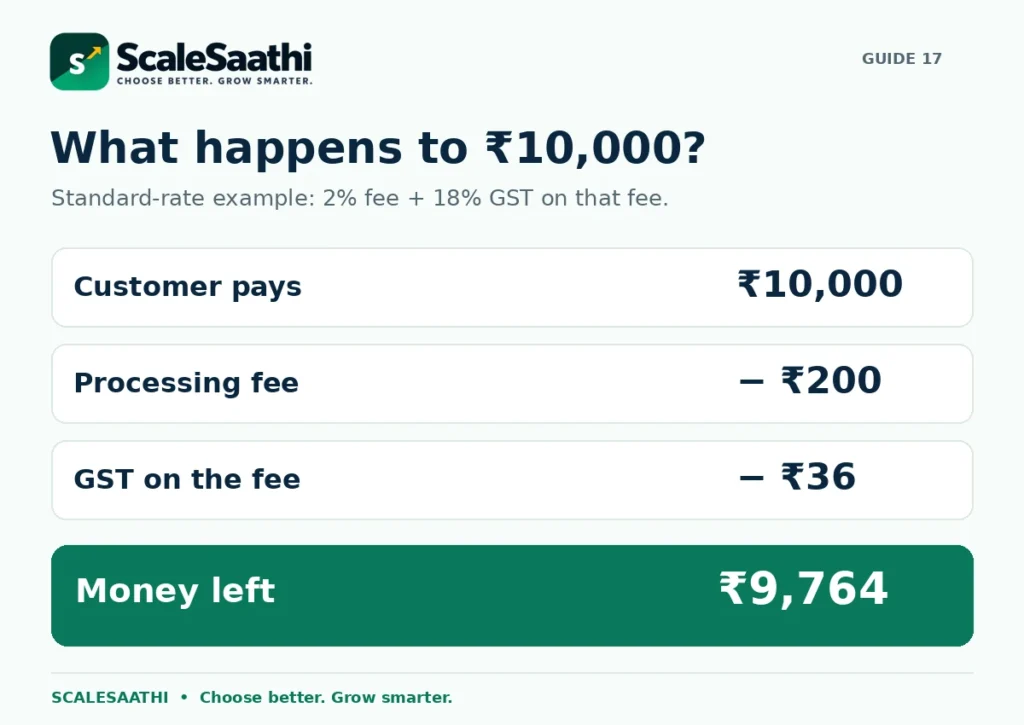
Suppose the full amount successfully collected from a customer is ₹10,000, and your applicable rate is 2% before GST. The calculation is:
Customer pays: ₹10,000
Processing fee: ₹10,000 × 2% = ₹200
GST on the fee: ₹200 × 18% = ₹36
Total gateway deduction: ₹200 + ₹36 = ₹236
Amount left: ₹10,000 − ₹236 = ₹9,764
Razorpay’s GST explanation applies the 18% to its fee, not as another 18% deduction from the whole customer payment. GST on what your business sells is a separate matter. Do not mix the two taxes together.
The combined deduction in this example is 2.36% of the collected amount. For comparison, a 3% fee with the same GST assumption becomes 3.54%; on ₹10,000, that is ₹354, leaving ₹9,646. A 2.15% fee becomes 2.537%, or ₹253.70 on ₹10,000.
Start from the actual payment amount. For example, if a ₹10,000 item plus tax and delivery produces an ₹11,800 customer payment, do not automatically calculate the gateway fee on ₹10,000. Check the chargeable base on the payment record.
These are cash-deduction examples, not profit calculations. Product cost, delivery, your own taxes and other business costs still exist. The calculator does not decide whether you can claim input tax credit.
Razorpay products and prices (checked 28 October 2026)
These are the prices Razorpay shows on its official pages. One thing that trips people up: the 18% GST is charged on Razorpay’s fee, not on your sale. Where you see “Not published”, Razorpay only shares that price if you ask. We took these from Razorpay pricing, instant settlements and payments app.
| Product or service | Price before GST | With 18% GST | Checked | Note |
|---|---|---|---|---|
| Payment Gateway, Standard plan (UPI, RuPay debit, cards, netbanking, wallets, Pay Later, EMI) | 2% per payment | 2.36% | 28 Oct 2026 | Zero MDR on UPI and RuPay debit, but the 2% platform fee still applies |
| Corporate or business credit cards | 2.15% | 2.537% | 28 Oct 2026 | |
| Amex, Diners, EMI | 2% or 3% (Razorpay pages differ) | 2.36% or 3.54% | 28 Oct 2026 | Confirm on your own rate card |
| International cards | Up to 3% | Up to 3.54% | 28 Oct 2026 | FIRC/eFIRC included |
| Multi-currency account | 1% | 1.18% | 28 Oct 2026 | 0% FX markup |
| Setup, annual maintenance, integration | ₹0 | ₹0 | 28 Oct 2026 | |
| Same-day settlement | 0.15%–0.20% | 0.177%–0.236% | 28 Oct 2026 | Optional |
| Instant (on-demand) settlement | 0.20%–0.30% | 0.236%–0.354% | 28 Oct 2026 | Minimum ₹100; not for international payments |
| Normal refund | ₹0 | ₹0 | 28 Oct 2026 | Original payment fee is not returned |
| Instant refund | ₹7.99 (up to ₹1,000) · ₹11.99 (₹1,000–₹25,000) · ₹14.99 (above ₹25,000) | Plus GST where it applies | 28 Oct 2026 | |
| Subscriptions on cards | 0.9% + platform fee | Plus 18% GST | 28 Oct 2026 | |
| UPI QR | 0.99% | 1.1682% | 28 Oct 2026 | |
| Bharat QR (cards) | 2% | 2.36% | 28 Oct 2026 | |
| Smart Collect | 1% or ₹10, whichever is lower | Plus 18% GST | 28 Oct 2026 | |
| Payment Pages / Payment Buttons | 0.2% + gateway fee | Plus 18% GST | 28 Oct 2026 | |
| Route (split payments) | 0.1% + gateway fees | Plus 18% GST | 28 Oct 2026 | |
| RazorpayX Payouts plans (per quarter) | Core ₹2,476 · Pro ₹14,866 · Pro+API ₹24,778 · Vendor Payments ₹34,688 | Plus GST | 28 Oct 2026 | |
| UPI AutoPay, NACH, e-mandate | Not published | Not published | 28 Oct 2026 | Ask Razorpay for a quote |
| Chargeback fee (India) | Not published | Not published | 28 Oct 2026 | Ask Razorpay for a quote |
| Enterprise pricing | Not published (custom) | Not published | 28 Oct 2026 | For larger volumes, about ₹5 lakh+ a month |
Does UPI mean there are no Razorpay charges?
Not necessarily. Razorpay’s UPI pricing explanation distinguishes zero bank-level MDR from its platform or technology fee. MDR means merchant discount rate: a payment-acceptance charge. A zero-MDR label does not, by itself, mean the gateway service has no cost.
Ask one simple question: “For this payment route, what will you deduct from ₹1,000 collected?” Ask for the fee and tax separately. That gives you a clearer answer than comparing labels such as free UPI, zero MDR or free integration.
Also check whether you need a website checkout, payment link, reconciliation reports or only a direct bank-payment arrangement. Those are not identical services. Compare the workflow and written charges you actually need, rather than assuming every QR or UPI setup costs the same.
The 90-day offer: check the limits, not just 0%
Razorpay’s published welcome-offer terms cover eligible new merchants completing onboarding and activation on or after 1 July 2026. The platform-fee benefit ends after 90 days or ₹5,00,000 of cumulative eligible transaction value, whichever comes first.
It is for domestic gateway transactions, with exclusions including prepaid cards, corporate credit cards, Amex, Diners and EMI. Existing merchants who transacted before that date are excluded. The terms also allow a ₹199 KYC processing fee plus applicable tax and say statutory levies are not waived.
Other conditions include one redemption per PAN/bank account and fair-use rules: credit-card volume above 90% can trigger withdrawal of the offer. Read the complete conditions and check the credits actually shown in your account. Do not estimate a tax waiver from the 0% headline.
Budget twice: once for the confirmed offer window and once for normal paid operation. A short promotion can reduce launch costs, but it cannot tell you the cost of running the business for a full year.
When does the money reach your bank?
Settlement means Razorpay transfers the available money to your registered bank account. Captured means the payment has moved into the collected stage; it is not merely an attempted or authorised payment.
The official settlement documentation describes domestic standard settlement as T+2 working days, where T is the capture date. The main pricing page, however, refers to “typically T+1 or Instant”. Check your own Dashboard schedule instead of promising one universal timeline.
A working-day cycle is not a simple hour countdown. Bank holidays and the account’s schedule matter. International settlements have their own conditions; a domestic example is not a promise for an overseas payment.
Payment recorded
Check the payment status and amount collected. A screenshot of a customer’s debit is not a substitute for the merchant payment record.
Money available
Check the settlement balance after relevant fees, refunds and adjustments. Not all recent collections must be available together.
Transfer scheduled
Read the account’s settlement details and any hold or failed-transfer message.
Bank credit received
Match the transfer with the bank entry. Keep the settlement reference with the supporting payment records.
Razorpay’s settlement dashboard guidance covers the breakdown, reports and holds. Use that record when a credit is late or smaller than expected; do not assume the difference is another percentage fee.
Faster settlement can add another cost
Instant settlement is an optional way to move available funds earlier. It is separate from the original payment-processing charge and is subject to account availability and limits. Official Instant Settlements guidance.
The public Instant Settlements page gives a 0.20%–0.30% on-demand range and a 0.15%–0.20% same-day range. Check the amount and applicable tax displayed for your account before confirming; do not automatically add either range to every payment.
For a simple example, assume you choose to settle ₹50,000 early at a quoted 0.25% before GST. The extra fee is ₹125. At 18% GST on that fee, the extra cash cost is ₹147.50. This uses the requested settlement amount as the fee base, not the month’s entire sales.
Paying that amount may be useful when it solves a specific cash shortage. When the normal schedule already works, leave the optional cost out. Do not turn a feature you sometimes use into an unexplained permanent deduction.
To see how Razorpay’s terms sit next to Cashfree, PayU and Easebuzz, compare instant settlement across gateways.
Refunds: returning the sale does not return every fee
Razorpay’s normal-refund documentation says there is no separate processing charge for a normal refund. It also says the original transaction fee and GST charged at capture are not reversed. Those are two different statements.
Return to the ₹10,000 example. After ₹236 in gateway deductions, ₹9,764 remains. If you give the customer a full ₹10,000 normal refund, the ₹236 original deduction is still a cost to your business. The timing of the refund and any balance you need to fund it are separate account questions.
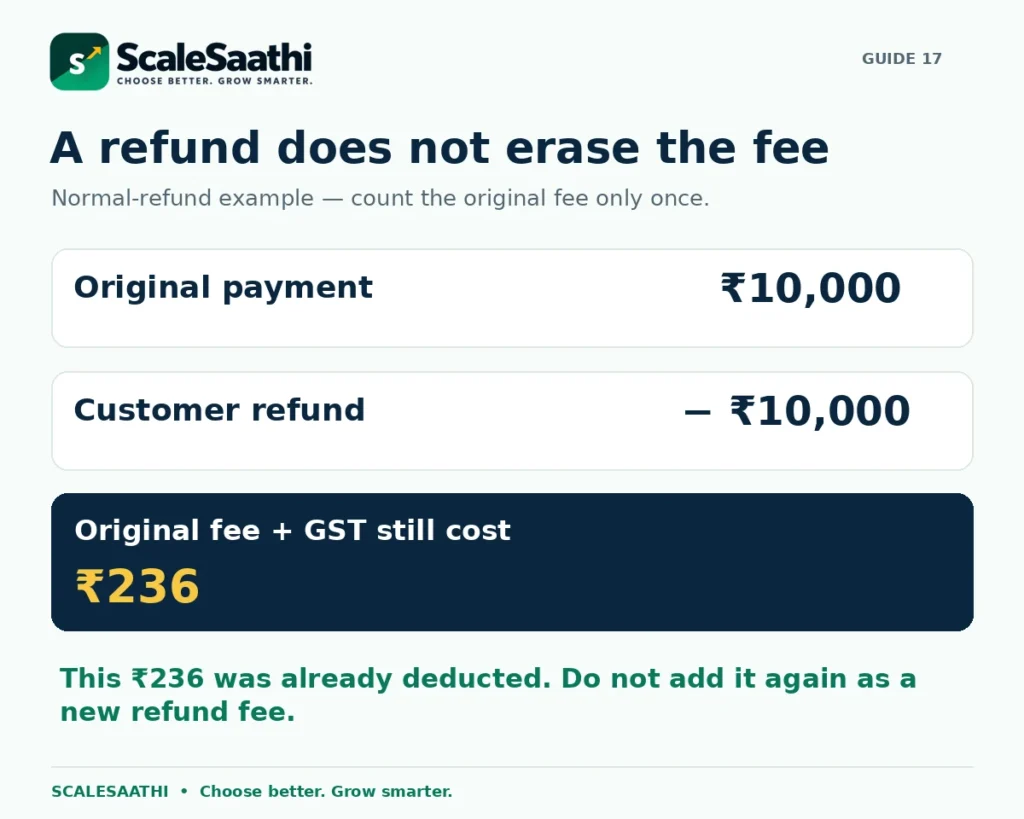
Do not count that ₹236 twice. It was already included in the payment fee. You do not add another ₹236 just because the order is refunded. A report can identify the fee attached to refunded sales, but it must not add that same cost to the total again.
For a ₹4,000 partial refund from the same payment, the simple remaining cash is ₹10,000 − ₹236 − ₹4,000 = ₹5,764, before other adjustments. Do not assume the original fee automatically reduces in proportion to the refund.
An instant refund is a different, paid service. Check its separate fee and whether the refund uses normal or instant speed. The refund FAQ confirms this distinction.
Keep a customer refund separate from a gateway fee refund. One sends back the purchase money; the other would credit a service charge. Enter a fee credit only when it is actually confirmed on your account.
A monthly example with different payment methods
Suppose your business collects ₹2,00,000 in one planning month: ₹1,50,000 at a 2% fee and ₹50,000 at a 3% fee. All amounts are successfully captured, the rates remain unchanged, and GST on fees is 18%. No welcome offer applies in this example.
Standard-rate fees: ₹1,50,000 × 2% = ₹3,000
Higher-rate fees: ₹50,000 × 3% = ₹1,500
Total processing fees: ₹4,500
GST on fees: ₹4,500 × 18% = ₹810
Money left after gateway deductions: ₹1,94,690
Less ₹10,000 of customer refunds: ₹1,84,690
The effective gateway deduction is 2.655% of the original ₹2,00,000 collected. That is higher than 2.36% because part of the month uses the higher rate.
The ₹10,000 refund reduces cash retained, but it is not another ₹10,000 processing fee. Original fees remain in the ₹5,310 total; there is no extra “retained-fee” line to add.
If you also use the earlier ₹147.50 faster-settlement example, the simplified remaining cash becomes ₹1,84,542.50. This is a planning balance, not a promise about the bank credit for a calendar month. Opening balances, settlement cut-offs, holds and later refunds can move cash between periods.
The workbook calculates by payment group. Small rounding differences can arise when the provider rounds individual transactions. Use actual reports, not rounded planning totals, to close your accounts.
Your website platform may charge separately
A store subscription does not always include every payment cost. Shopify’s third-party transaction-fee guidance says its applicable fee is additional to the processor’s charge. It also says that fee is not returned when an order is refunded.
For illustration, suppose a store platform charges another 2% on the same ₹10,000 fee base. That adds ₹200 before tax on the platform service. It does not replace Razorpay’s processing charge. The platform may bill it separately rather than taking it from the Razorpay settlement.
Our Shopify pricing guide explains the plan side. For hosting, apps, setup and delivery-related budgeting, use the ecommerce website cost guide.
In the calculator, keep separately billed store costs outside the settlement-match sheet. That sheet should explain actual gateway balance movements, not every expense involved in running the shop.
How to check a settlement against your bank account
Start with one settlement or one clearly defined report period. Download the relevant settlement details and match them to the bank credit. Do not compare all orders placed this month with one transfer received today.
Use this control: opening unsettled funds + captured payments + confirmed credits − customer refunds − chargeback debits − fees including tax − closing unsettled funds = expected bank transfers. The opening and closing figures must use the same basis.
If your report’s opening and closing balances already have certain fees removed, do not remove those fees again. The workbook’s Match Settlement sheet requires gross-basis opening and closing funds for its full-period bridge; it is a manual control, not an automatic import of Razorpay’s balance display.
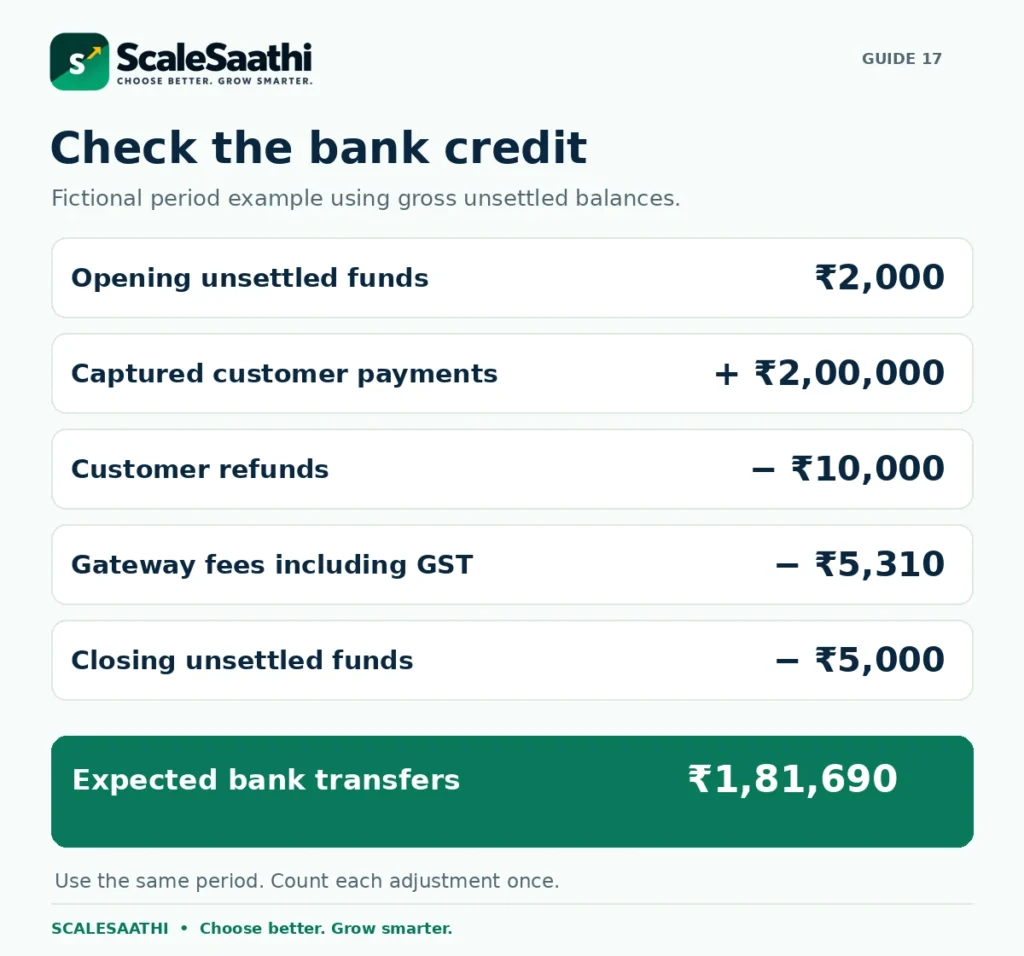
Example: take ₹2,000 of opening unsettled funds, ₹2,00,000 of captured payments, ₹10,000 refunds, ₹5,310 fees including tax, and ₹5,000 still unsettled at the end. With no other adjustments, expected bank transfers are ₹1,81,690. A bank total of ₹1,81,190 leaves a ₹500 shortfall to investigate—not an instruction to invent an expense entry.
Razorpay’s merchant terms provide monthly fee invoices in the Dashboard and require prompt reporting of differences. They state three days for settlement discrepancies and ten days from a fee invoice for an invoice dispute. Check your applicable terms and act promptly. Fee-invoice and reconciliation terms.
Keep the fee invoice, settlement report and customer invoice as different records. Check the business GSTIN and address before the fee invoice is generated. Ask your accountant about tax-credit treatment; the amount withheld from settlement is not automatically the final accounting expense.
Chargebacks and holds are not ordinary fees
A chargeback is a payment dispute raised through the customer’s bank or payment system. It is not the same as a refund you approve. Razorpay’s dispute guidance explains the notification and response process.
A disputed payment amount, an additional service charge and money temporarily held back are three different things. Keep each separately labelled. Request the applicable charges and evidence deadline for your case; do not budget a universal flat charge copied from another merchant.
If a settlement is on hold, read the stated reason and use the official support route. Preserve order details, delivery evidence, refund records and the conversation needed to explain the transaction. Do not mark a held amount as permanently lost just because it has not reached the bank yet.
What users commonly report
These themes summarise public merchant reviews on sites such as Trustpilot, the App Store and Reddit. Complaint-focused sites tend to attract unhappy users, so read them as patterns to plan for rather than a verdict.
- Easy integration: merchants commonly praise how simply Razorpay connects to websites, Shopify stores and apps.
- Wide payment-method choice: UPI, cards, net banking and wallets in one checkout is a frequent positive.
- Smooth routine settlements: established accounts often describe everyday settlements as working well.
- Settlement holds after reviews: the strongest complaint is funds held or accounts restricted after a risk or compliance check, sometimes soon after going live, with vague reasons given.
- Repeated document requests and slow support: merchants report long or repeated verification, template replies and no easy route to a person.
- International payments: some users report difficulty getting international card payments enabled.
Download the Razorpay fee and settlement calculator
Free Excel workbook
Check one payment, a month with mixed rates, a refund and a settlement difference.
Download the Razorpay charges calculator (.xlsx)
Includes a source sheet and an account-check checklist. No macros or account login are required.
Blue cells are for your inputs. Green cells calculate the result. Enter percentages as 2% or 18%, not 2 or 18. Choose whether the rate already includes GST on the One Payment sheet; this avoids adding the same tax twice.
Use the Monthly Plan sheet for pre-tax rates by payment group. A zero amount means that group is deliberately unused; a positive volume needs a valid rate. Optional costs start at an explicit zero assumption. Replace that with a confirmed amount whenever a service applies.
The Refund Check sheet shows the effect on cash, including a negative result when fees remain after a full refund. The Match Settlement sheet compares your expected bank transfers with what you actually received. Neither sheet decides refund rights, tax eligibility, merchant approval or an arrival date.
Save an unchanged master copy. Use a fresh copy for each reporting period and keep the provider’s records alongside it.
Before you start: ask for five clear answers
- Which rate applies? Confirm each payment method and whether GST is extra.
- What does the offer cover? Check your eligibility, cap, end date and any onboarding charge.
- When can you spend the money? Confirm the normal schedule, limits and optional faster-settlement price.
- What happens after a refund? Separate the purchase amount, original fee and any instant-refund charge.
- Can you explain the bank credit? Find the settlement breakdown, fee invoice and any adjustments.
Use a permitted test setup to check the checkout and order status before launch. After your first genuine customer payments, compare the payment records with the bank credits and fee invoice. That gives you a small, manageable check before payment volumes grow.
Our recommendation: judge Razorpay by the complete cost and the payment process your business needs. A clear fee schedule, an affordable settlement cycle and records you can match are more useful than choosing from a single headline percentage.
Frequently asked questions
How much does Razorpay charge on ₹1,000?
At the standard 2% fee plus 18% GST on that fee, Razorpay keeps ₹23.60 and you’re left with ₹976.40, before any refunds or adjustments. Your payment method, an offer or your own agreed rate can change that.
Is Razorpay’s 2% charge inclusive of GST?
No, it’s 2% plus GST. Once you add 18% GST on the fee, you’re paying 2.36% of the payment.
Are UPI payments free on Razorpay?
Not quite. Banks charge no MDR on UPI, but Razorpay still charges its own platform fee: 2% (2.36% with GST) on the Standard plan, according to its pricing page. A credit card used through UPI is priced as its own category. Your Dashboard shows your actual rate and any credits you have.
Does Razorpay return its fee when I refund an order?
No. A normal refund costs nothing extra, but Razorpay keeps the fee and GST it took on the original payment. Just make sure you count that kept fee once in your costs, not twice.
Are instant refunds and instant settlements the same?
No. An instant refund sends money back to your customer quickly. An instant settlement gets money into your own bank account sooner. They’re separate features, each with its own fee and rules.
Does every Razorpay merchant receive money in T+1?
No. Razorpay’s settlement documentation gives T+2 working days as the standard for domestic payments, counted from the day the payment is captured, and bank holidays don’t count. The pricing page says “typically T+1 or Instant”, so the two pages don’t match. Razorpay also says your cycle can vary with your business type and risk checks. Your Dashboard shows the schedule you’re actually on.
Why is my bank credit smaller than the successful-payment total?
Usually it’s fees, GST on those fees, refunds, adjustments, or money that hasn’t been settled yet. Compare the same payments over the same report period before you decide you’ve been charged extra.
Will a 0% welcome offer make every charge zero?
No. The current offer is for new merchants activated on or after 1 July 2026. It waives the platform fee on your first ₹5,00,000 of domestic payments or for 90 days from activation, whichever ends first. It isn’t a free year. Prepaid cards, corporate credit cards, Amex, Diners and EMI are left out, GST on fees still applies, and Razorpay may charge a ₹199 KYC processing fee plus tax.
Do Shopify charges replace Razorpay charges?
No. If Shopify charges its third-party transaction fee, you pay that on top of Razorpay’s fee. Check both invoices, and don’t count Shopify’s separately billed fee again when you match your Razorpay settlement.
Can the Excel calculator predict my exact bank credit?
No, it gives you an estimate from the numbers you enter, plus a simple way to check a settlement by hand. What actually reaches your bank depends on your account rates, rounding, report cut-offs and adjustments. It doesn’t connect to Razorpay, and it can’t tell you how to treat tax.
How much does Razorpay charge on ₹100?
At the standard 2% fee, that’s ₹2 plus ₹0.36 GST, so Razorpay keeps ₹2.36 and ₹97.64 reaches your bank. If the payment method costs 3%, Razorpay keeps ₹3.54.
Does Razorpay charge for refunds?
Normal refunds are free: Razorpay’s India pricing page lists the refund processing fee as ₹0. Instant refunds cost extra: ₹7.99 for refunds up to ₹1,000, ₹11.99 from ₹1,000 to ₹25,000, and ₹14.99 above ₹25,000, plus GST where it applies. You usually don’t get back the fee on the original payment, so check how it shows up in your Dashboard.
Is Razorpay good for a small business?
For a lot of small Indian online sellers, yes. The fee is out in the open at 2% (2.36% with GST), there’s ₹0 setup and ₹0 annual fee, and money settles in T+2 working days. Get a quote first if many of your customers pay by Amex, Diners, EMI or international cards (Razorpay’s pages say 2% in one place and 3% in another), or if you need UPI AutoPay or want to know the chargeback fee upfront. We based this on Razorpay’s official pages, checked on 28 October 2026, not on a test account.
Is Razorpay safe and reliable for a small online seller?
We have not tested an account, so honestly, we can’t rate how reliable it is. Here’s what Razorpay’s official pages say: it checks who you are at sign-up (PAN, business documents and a ₹1 bank check), offers 24/7 email and phone support, has an official WooCommerce plugin, and explains how it handles disputes and chargebacks. Money normally settles in T+2 working days, and for international payments it may hold back a reserve.
Is Razorpay cheaper than PayU?
On the headline rate, they’re level: both publish 2% plus GST. Where they differ is the detail, like UPI pricing, faster settlement and instant refund fees. Our Razorpay vs PayU comparison lays them out side by side.
Sources and further reading
- Razorpay: standard gateway pricing, credit card on UPI and platform fees
- Razorpay: ecommerce pricing and GST on the processing fee
- Razorpay: published premium-payment categories and rates
- Razorpay: 90-day welcome-offer terms and exclusions
- Razorpay Docs: settlement cycles, captured payments and adjustments
- Razorpay Docs: Instant Settlements and account limits
- Razorpay: public instant and same-day settlement price ranges
- Razorpay Docs: normal refunds and retained processing fees
- Razorpay Docs: instant refunds and additional charges
- Razorpay Docs: refund questions and original-fee treatment
- Razorpay Docs: settlement details and reports
- Razorpay: merchant terms, fee invoices and reconciliation responsibilities
- Razorpay Docs: disputes and chargebacks
- Shopify: third-party transaction fees are separate from processor fees
Product names and logos are trademarks of their respective owners. They are shown only to identify the products compared in this guide, and their use does not imply endorsement by or affiliation with ScaleSaathi.