A cash book is the day-by-day record of money received and paid, starting from an opening balance and ending at a closing balance you can actually count. If you only handle notes and coins, a cash-only format is enough. If money also moves through a bank account, keep separate cash and bank columns. And when you deposit the shop’s own cash into the bank, that is a transfer, not a second sale. NCERT explains the cash-book structure.
Most cash books I am asked to fix at year end look neat and still don’t match the drawer. Usually the owner took cash home unrecorded, shop and personal money shared one box, payments had no slip, or nobody checked the bank column against the statement. The free files below (blank formats, a worked rupee example and an Excel register) are built to catch those gaps before you close.
The quick choice
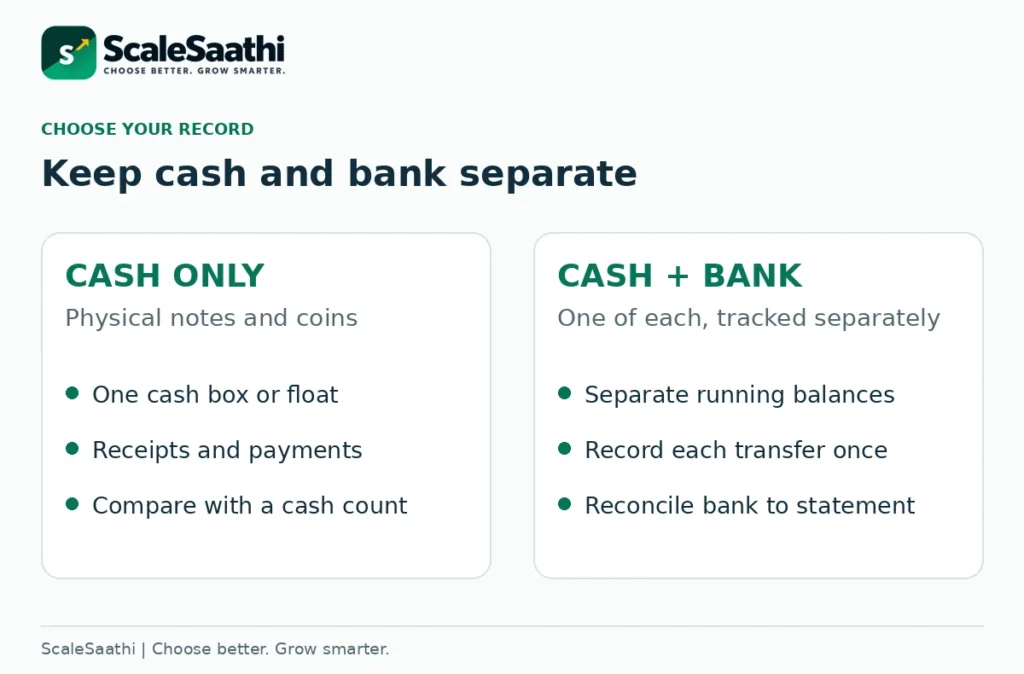
Only a cash drawer? Start with Cash Only. Cash plus one bank account? Use Cash and Bank. Several banks, payment gateways or more than one person doing the books? Use these examples to learn the entries, then move to a system with proper controls.
Money received is not profit, and a spreadsheet total does not prove the cash is in the drawer. Only a count does.
Download the cash book format in Excel, Word or PDF
Excel: entry and calculations
A cash-only register, a cash-and-bank register, a filled example and a closing/reconciliation worksheet. Download Excel (.xlsx)
Word: editable print layouts
Blank cash-only and cash-and-bank formats, a worked example and a review checklist. Word totals are manual. Download Word (.docx)
PDF: printable reference packet
The same four-page packet in a fixed layout for printing or checking the example. It is not an interactive form. Download PDF (.pdf)
These are free ScaleSaathi educational templates, not prescribed government forms or a complete accounting system. The example business, dates and references are fictional. No bank account, GSTIN, signature or proof of payment has been invented. Keep your real source documents separately.
The workbook handles INR, one physical cash box and one bank account per combined register. It does not calculate GST, prepare returns, post a full ledger or keep a locked audit trail. Once the cash book and ledgers are posted, a trial balance checks that the books balance.
In this guide
Which cash book format should you use?
Single-column cash book
One amount column on each side in the traditional layout: cash received and cash paid. Our running version places those columns together and adds a balance after each entry. Use it for physical cash only.
Cash-and-bank cash book
Two amount columns on each traditional side: cash and bank. The Excel download instead uses one chronological row per transaction, with separate calculated cash-in, cash-out, bank-in and bank-out columns.
Petty cash record
A separate record for small day-to-day payments from an identified float. Do not add its opening cash to the main cash balance twice. Keep the custodian, vouchers and replenishment process clear. Every rupee paid out should have a slip behind it; our payment voucher format includes a petty cash voucher and a float top-up sheet.
The NCERT chapter on recording transactions covers single-column, cash-and-bank and petty cash books. Whatever template you pick, read its column headings rather than its title.
For a kirana store, a clinic or a small trader, the real choice is between cash only and cash plus one bank account. We have left out the three-column cash/bank/discount book on purpose. Discounts need their own treatment; never type one in as money received just to make a customer’s account look settled.
The columns that make a cash book useful
Our format asks for a date, reference, particulars, payment movement and amount. The reference leads back to the slip, bill or UPI ID. The particulars say why money moved. “Owner capital introduced” or “Drawings – household” tells your accountant something; “received” or “cash” tells them nothing.
Give every receipt or payment its own reference, separate from the invoice number. One invoice is often paid in two or three parts, so each part gets a new receipt reference with the invoice number written in the particulars. The Excel duplicate-reference warning is there to make you look twice; two suppliers can genuinely use the same invoice number.
If you also hand customers a printed receipt, with amount in words, mode and reference, invoice applied and balance due, use the free cash receipt format guide (Excel, Word and PDF).
In the traditional book, receipts sit on the debit side and payments on the credit side. A running register shows the same thing in one line per entry. For each account the sum is always opening balance + receipts − payments = closing balance. A bank statement’s “debit” and “credit” are from the bank’s side; don’t copy them into your columns. See the traditional layout.
Carry last period’s checked closing balance forward as the new opening balance, once. Do not also enter it as a receipt, or the book will show more money than the drawer. Starting mid-year? Note the opening date and how you arrived at that figure.
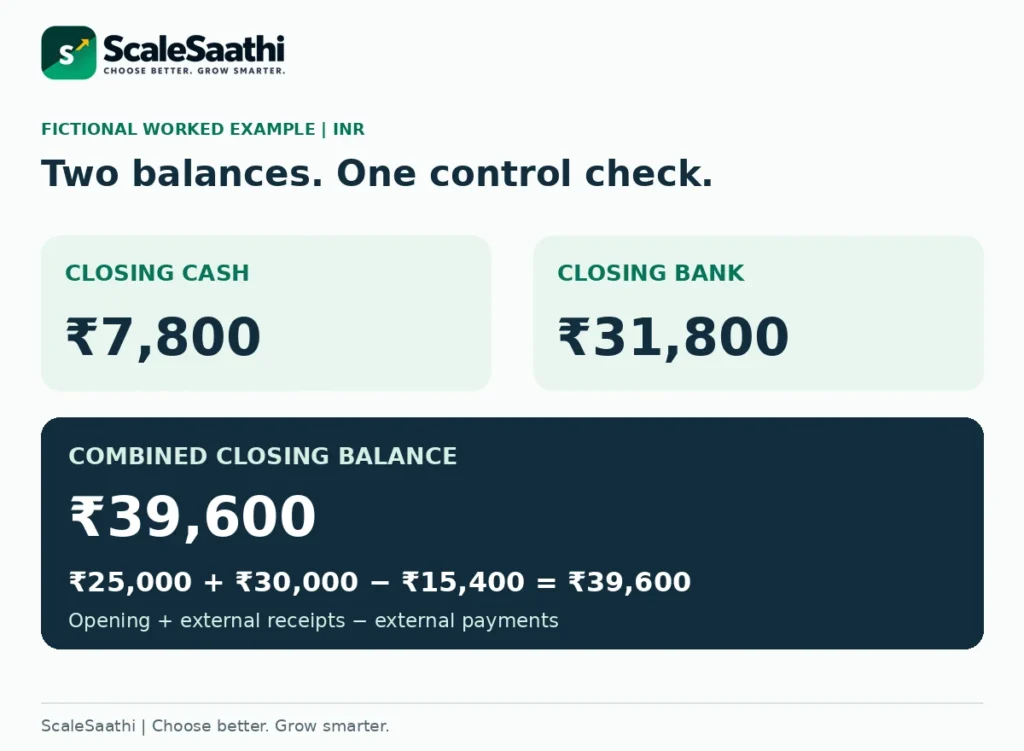
Worked example: ₹7,800 cash and ₹31,800 in the bank
Fictional example: Example Corner Store, 1–9 September 2026. The shop starts with ₹5,000 in the cash box and ₹20,000 in one bank account. The entries are the amounts actually received or paid; this is not a GST working or a profit statement.
1 September · Cash sales
Record ₹8,000 cash received. Physical cash increases from ₹5,000 to ₹13,000. Bank remains ₹20,000.
2 September · Customer pays by UPI
An earlier invoice is settled directly into the business bank account: ₹12,000 bank received. Bank rises to ₹32,000; physical cash stays ₹13,000. Do not create another sale from this collection.
3–4 September · Two payments
Pay ₹1,200 for stationery in cash and ₹9,000 to a supplier from the bank. Cash becomes ₹11,800; bank becomes ₹23,000.
5 September · Cash deposited
Move ₹6,000 from cash to bank. Cash falls to ₹5,800; bank rises to ₹29,000. The combined balance stays ₹34,800.
6 September · Office cash withdrawn
Move ₹2,000 from bank to cash. Cash rises to ₹7,800; bank falls to ₹27,000. This is another internal transfer.
7–9 September · Rent, capital and bank charge
Pay ₹5,000 rent from the bank, receive ₹10,000 owner capital into the bank and record a ₹200 bank charge. Final bank balance is ₹31,800; cash remains ₹7,800.
The cash-column check is ₹5,000 + ₹8,000 + ₹2,000 − ₹1,200 − ₹6,000 = ₹7,800. The bank-column check is ₹20,000 + ₹12,000 + ₹6,000 + ₹10,000 − ₹9,000 − ₹2,000 − ₹5,000 − ₹200 = ₹31,800. Both calculations are visible in the downloads.
There is a second useful check across both accounts: ₹25,000 opening + ₹30,000 external receipts − ₹15,400 external payments = ₹39,600 closing. That equals ₹7,800 cash plus ₹31,800 bank. The two internal transfers are excluded from the external totals because the money stayed within the same business.
Contra entries: record transfers without inventing income
A contra entry records money moving between the business’s own cash and bank. In a traditional cash-and-bank book both sides appear in the same book, usually marked “C”. The total doesn’t change. Tally’s contra-entry explanation describes the distinction.
For the ₹6,000 deposit above, record cash paid and bank received. For the ₹2,000 withdrawal for office use, record bank paid and cash received. In our Excel register you pick Cash to bank or Bank to cash, type the amount once, and the formulas fill both sides.
Be careful with what you call a transfer. A customer paying into your bank is a receipt, not a transfer. A supplier payment is a payment. And cash the owner takes home for the house is drawings, not “office withdrawal”. Unrecorded drawings are the gap I find most often when the cash count comes up short, so write them down the same day, however small.
When you need balances for each customer, supplier or expense head, not just cash and bank, use the free ledger format (Excel, Word and PDF) with a journal→ledger posting example in ₹. Entries that don’t touch cash or bank, such as credit sales or unpaid bills, go in the journal; see our journal entry format.
The combined register does not handle bank-to-bank transfers or separate main-cash and petty-cash books. Several accounts belong in a proper bookkeeping system, each kept separately. Tally’s documentation also shows how receipts, payments and contra transactions are recorded in software.
Why the closing balance is not your profit
In the example, the owner’s ₹10,000 adds to the bank but is not a sale. The ₹12,000 UPI collection settles an earlier invoice, so it is not new income for this period. On the other side, a payment can clear an old bill, buy equipment or repay a loan, none of which is a current expense. The receipts-and-payments distinction matters.
That is why the workbook’s summary says External receipts (not revenue) and External payments (not expenses). The net ₹14,600 is not your earnings, not your taxable income and not money you can safely take out.
Suppose the same fictional store issues a ₹3,000 credit invoice and hasn’t been paid. Nothing has entered the cash box or bank, so nothing goes in the cash book yet; keep it in your sales or receivables record and enter the receipt on the day the money arrives. An unpaid supplier bill works the same way: track it, but don’t show it as paid.
If you want one system that connects these records, read ScaleSaathi’s accounting-software checklist. The cash book is where your records start, not a substitute for the rest of the accounts.
UPI receipts, bank charges and pending settlements
A UPI payment that lands straight in the business bank account goes in the bank column, never the cash column, even if paid at your counter. NPCI describes UPI as a way to move money between bank accounts. Note the reference and check the bank credit. Read NPCI’s UPI FAQ.
The example assumes a simple, completed bank credit. Wallets and payment gateways may hold the money, cut a fee and settle a net amount later. Don’t plug that gap with a made-up cash receipt. Keep the collection, the provider balance and the settlement proof separate so they can be matched.
Enter a verified bank charge once, as a bank payment with its reference. In the worked example the ₹200 charge is already inside the closing ₹31,800, so taking it off again on the reconciliation sheet creates a fresh error. Refunds, failed payments and chargebacks need their own entry; deleting the original row is not a correction.
Close the cash book: two checks, not one
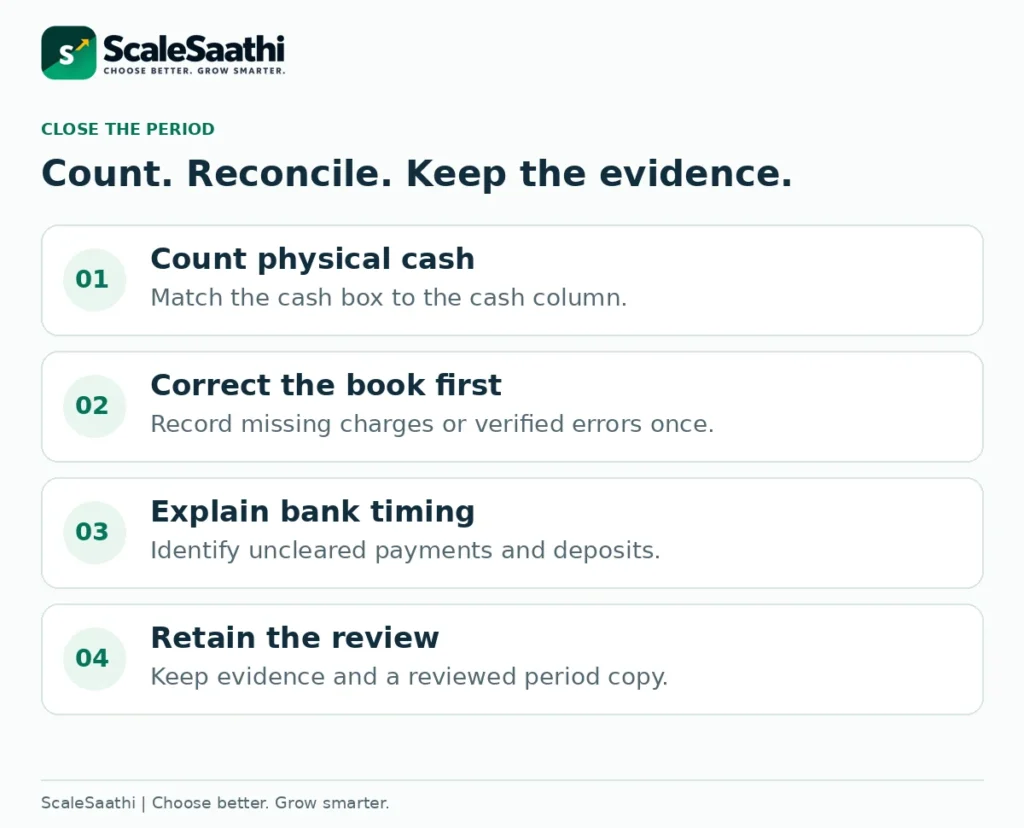
First, count the physical cash
Pick one cut-off time and count the notes and coins in the cash box. Compare the count with the book. In our example a count of ₹7,800 matches. A count of ₹7,750 gives ₹7,750 − ₹7,800 = −₹50, a shortage to trace, not a figure to quietly book as “sundry expense”.
Before you correct anything, look for a missed receipt, a payment entered twice, a wrong date, UPI typed under cash, or unrecorded drawings. A correct closing figure doesn’t prove the month was right. If the running cash balance ever goes negative, something was missed, because a cash box cannot hold less than zero. The workbook flags it.
Then reconcile the bank account
Compare your bank column with the bank statement for the same date. First add the bank-only items you missed and fix your own errors. What is left should be timing: cheques issued but not yet cleared, or deposits not yet credited. NCERT’s bank-reconciliation chapter provides the underlying method. For both BRS layouts, an overdraft case and a filled ₹ example, see our bank reconciliation statement format.
The worksheet uses a simple bridge: adjusted book bank balance + issued payments not yet cleared − deposits not yet credited = expected statement balance. Compare that with the actual statement. Each timing item should match a specific transaction.
In our worked example there are no timing items at the cut-off, so book and statement both show ₹31,800. As a separate illustration, if a checked book showed ₹31,800 with ₹1,200 of uncleared payments and ₹2,000 of deposits not yet credited, the expected statement would be ₹31,000. Only enter timing items that really exist in your records.
Petty cash: control the float, not just the total
Petty cash works when one named person handles small, repeated payments from a fixed float. Under the imprest system you top the float back up by exactly what was spent. The vouchers carry the expense; the top-up just refills the box, so don’t record the same expense twice. NCERT discusses the petty-cash approach.
As a separate fictional example, a ₹2,000 float with ₹650 of payments backed by slips leaves ₹1,350. Topping up ₹650 brings it back to ₹2,000. Don’t top up a payment that has no slip until someone explains it; in my experience that rule does more than any elaborate sheet. The download has no separate petty-cash analysis book; the Cash Only sheet can track one float, with expense heads kept separately.
How to use the Excel cash book without breaking it
Start Here explains scope and controls. Cash Only has 60 prepared entry rows. Cash and Bank has 100. Worked Example is a separate demonstration, not your opening data. Close and Reconcile compares the selected combined register with count/statement inputs. Sources records the educational basis and limitations.
Enter genuine opening figures in the labelled cells, then fill the blue input cells in date order. In the combined register, choose one of the six movement labels and enter a positive amount. In Cash Only, enter one positive receipt or one positive payment per row. Leave the other side blank or zero; do not enter both positive sides to conceal a net amount.
The workbook checks common input problems including missing details, duplicate references, non-numeric or non-positive amounts, invalid movement labels and reversed date order. Invalid rows stop the relevant totals from appearing as complete. Negative cash is displayed and flagged; a negative bank balance is retained with an overdraft-review warning. These are checks to investigate, not accounting decisions made for you.
The formulas remain visible and editable. Their green fill is not password protection. Do not overwrite calculated cells or assume the workbook can detect every edit to a formula. All prepared rows are included in totals, even when you hide or filter them. Do not type beyond the prepared capacity and assume those entries are included.
For the next period, save the reviewed file, start from a clean master and carry the closing balances forward once. Keep a separate backup. The workbook is built for desktop entry and review; use the supplied Word/PDF layouts for the checked printable version rather than squeezing thirteen spreadsheet columns onto a phone screen.
Mistakes that make a tidy cash book unreliable
A cash deposit counted as a second sale
Use one contra movement. Verify that the combined cash-and-bank balance is unchanged by the transfer.
Credit invoices entered as cash receipts
Keep receivables separately until payment occurs. A document being issued is not evidence of collection.
Opening balance entered twice
Use the opening field or the traditional balance brought down, not an additional current-period receipt.
A small unexplained difference written off immediately
Trace evidence and get the correction reviewed. Do not use an unsupported adjustment to make a spreadsheet look balanced.
Cash and bank merged into one undifferentiated balance
A combined total does not tell you what should be in the drawer. Keep the balances separate and reconcile each.
Private transactions mixed with business receipts
State the nature clearly and get the counterpart classification right. A bank narration alone is not a complete explanation.
The closing cash and bank balances become two lines of your balance sheet. Income and expenses recorded here also feed the year’s profit and loss account format, after adjustments for unpaid bills and stock. At year end, those same balances are the closing figure your cash flow statement format has to reach.
When to move beyond a spreadsheet
One careful person with a few well-documented entries can run these templates well. A spreadsheet starts to hurt when several people edit it, when you have more than one bank or branch, or when you need controlled corrections and linked receivables, stock and tax records. The trigger is how much can go wrong, not a fixed number of entries.
When you reach that point, compare ScaleSaathi’s accounting and invoicing software options, or read the free accounting software guide before paying for a plan. Try a real receipt, payment, cash deposit and reconciliation in the trial instead of choosing from a feature list.
For example, Tally documents cash/bank books and negative-cash review, while Zoho documents an account-reconciliation workflow. Those are official feature descriptions, not a claim that ScaleSaathi has tested your accounts in either product.
The routine that keeps a cash book honest: a slip behind every entry, drawings written down the same day, shop and personal money kept apart, transfers entered once, cash counted and bank reconciled at every close. Keep your full accounting, tax and record-retention requirements under separate professional review.
Frequently asked questions
What is a cash book format?
It is the layout used to record receipts and payments and calculate opening, running and closing balances. A cash-only version tracks physical cash. A combined version keeps cash and bank amounts separately. The download provides both, plus a fictional worked example.
Is a cash book the same as a bank statement?
No. The cash book is your record; the statement is the bank’s record. They can differ because of missing entries, errors or timing items. Count physical cash separately and reconcile the bank record to a same-date statement.
Where should I enter a UPI payment?
For a completed payment directly into or out of the business bank account, use the bank column. It is not physical cash. Wallet balances, credit-linked payments and net gateway settlements may require separate records outside this simple template.
What is a contra entry in a cash book?
It records an internal movement between the business’s own cash/bank accounts. A cash deposit reduces cash and increases bank. An office cash withdrawal does the reverse. The combined amount is unchanged, so it is not another sale or expense.
Can the cash balance be negative?
Physical notes and coins cannot be overdrawn. A negative running cash balance is a reason to investigate missing receipts, duplicate payments, wrong dates or misclassification. A bank balance can separately be negative where an overdraft exists; do not treat the two situations as identical.
Does the Excel file calculate profit or GST?
No. It calculates cash and bank movements, not revenue, expenses, profit, tax liability or return figures. Capital introduced, borrowing, earlier-invoice receipts and internal transfers need the appropriate treatment in your wider accounts.
Does the file include a three-column cash book?
No. It includes a cash-only register and a cash-and-bank register. It does not add a cash-discount column. Do not enter a discount as money received or paid merely to make a customer settlement match.
Can I use the template for more than one bank account?
Not by mixing all accounts into its single bank column. Keep distinct records and reconciliations for each account, or use accounting software that handles them together. Bank-to-bank transfers and multi-account consolidation are outside this workbook’s automated design.
How many transactions can the spreadsheet hold?
Cash Only has 60 prepared rows; Cash and Bank and Worked Example each have 100. The totals include all prepared rows, regardless of filtering. Entries typed outside those ranges are not included automatically; use a new clean period file or an appropriately expanded system.
Are the downloads free and ready to use as statutory books?
They are free educational downloads without a sign-up form. They are not government-prescribed forms, an audit-trail system or a guarantee of statutory compliance. Fill real records, retain evidence and confirm your business’s accounting and tax requirements with your accountant.
Sources and further reading
- NCERT: Recording of Transactions II — cash-book forms, contra entries and petty cash
- NCERT: Bank Reconciliation Statement — book and statement differences
- NPCI: UPI FAQ — bank-account payment context
- TallyHelp: Cash Book and Bank Book — software record and review functions
- TallyHelp: Payments and Receipts — payment records and receipts/payments reporting
- Tally: Contra Entry — internal transfers and external-flow distinction
- Zoho Books help: account reconciliation — general workflow, not plan or India-tax advice