A useful quotation format answers four questions before a customer agrees to buy: what is included, what will it cost, how will tax be shown, and what terms apply? Download the free Word, Excel and PDF templates below, then use the filled Indian example to check your own quote.
Fill this online (free): make your quotation online in the browser, then print or save PDF. Blank Word/Excel downloads stay below.
Want to make one now? Use our free quotation maker.
The downloads include a blank GST estimate, a fictional completed example and a layout for cases where GST is not charged. These are quotations, not tax invoices. The templates do not determine your registration status, tax classification or applicable rate.
Editable quotation template
Adapt the layout, scope and terms. Includes blank GST, filled example and no-GST-charged pages. Amounts are edited manually.
Quotation with calculations
Enter items, discounts and verified rates. Formulas calculate line values, the selected tax split, the quoted total and an optional proposed advance.
Printable quotation reference
Three printable pages matching the Word layouts. For a customer-specific PDF, finish the editable file first and export your own copy.
All sample businesses and amounts are fictional. The 18% rate in the example is an arithmetic assumption, not a recommendation for your goods or services. Confirm your actual tax treatment with your accountant.
In this guide
What is a quotation?
A quotation is a proposed price for specified goods or services, together with the conditions attached to that offer. It should help the customer understand what they would receive and what they would pay. A useful quote is more than a single total in a message: it records the scope, quantities, exclusions, validity and payment terms in one place.
For example, “website work: ₹30,000” leaves obvious questions. How many pages? Who supplies the text? Is hosting included? How many revisions are allowed? A clear quotation format resolves those questions before work starts. The same principle applies to equipment supply, repairs, printing and installation.
Quote approval and invoicing are separate stages. Zoho Books’ quote-management documentation, for example, describes sending and approving a quote before converting it into an invoice or sales order. A software conversion still needs the correct transaction details and tax treatment.
Quotation format: the fields to include
Use this as a practical preparation checklist, not a claim that every quotation has a single government-prescribed design. CGST Rule 46 prescribes tax-invoice particulars; that does not make a quotation a tax invoice. Including relevant supplier, recipient, item and tax details early can make the later invoice easier to prepare correctly.
Supplier and customer
Business names, addresses and a contact person. Include actual GSTINs where relevant, rather than borrowing the identifiers in someone else’s sample.
Reference and validity
A unique quotation reference, issue date, revision and exact expiry date. Keep the reference separate from your invoice numbering.
Scope and specifications
Descriptions, quantities, units, model or service details and HSN/SAC where relevant and verified. Identify what is included and excluded.
Price and discount
Unit prices, line discounts and net values. State whether the unit prices exclude or include tax; this workbook uses tax-exclusive prices.
Tax estimate and total
The verified tax rate and applicable split, or a clear reason GST is not charged. Show the complete quoted amount, not just a subtotal.
Commercial terms
Payment milestones, delivery trigger, revisions, warranty or support, and the method for accepting or changing the quote.
Bank details are optional at the quotation stage. Add them only when useful, and ask the customer to independently confirm any later change to payment instructions. A logo can identify the business, but it is not a substitute for an accurate name, scope or calculation.
Filled Indian quotation example: ₹53,100
This example shows a fictional website-services proposal from Example Studio to Sample Retail. For the calculation only, assume a regular GST-registered supplier, a normal domestic intra-state supply in Maharashtra and an 18% total GST rate on every line. Real classification, registration and place of supply must be checked separately.
The reference is QT-2026-001-R1, dated 26 September 2026 and valid until 10 October 2026. That validity is a chosen commercial term, not a universal legal deadline. The GSTIN fields remain placeholders so no invented registration number appears to be genuine.
Website setup
1 job × ₹30,000 = ₹30,000.
Less 10% discount: ₹3,000.
Net line value: ₹27,000.
Content entry support
1 job × ₹10,000 = ₹10,000.
Less 10% discount: ₹1,000.
Net line value: ₹9,000.
Handover training
1 job × ₹10,000 = ₹10,000.
Less 10% discount: ₹1,000.
Net line value: ₹9,000.
Quote total
Subtotal ₹50,000 − discounts ₹5,000 = ₹45,000.
Illustrative GST: ₹8,100.
Total quoted: ₹53,100.
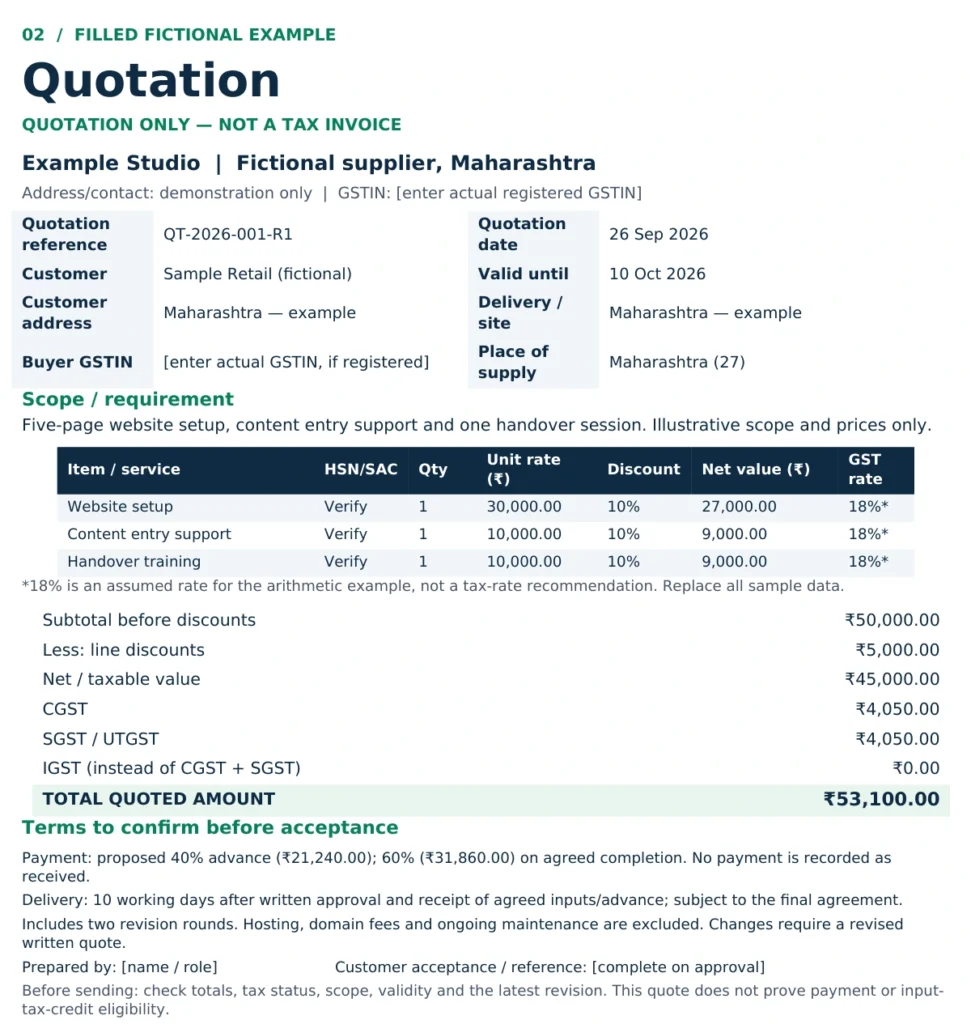
The assumed intra-state split is CGST ₹4,050 + SGST ₹4,050. For a normal inter-state version of the same arithmetic, the assumed 18% would instead appear as IGST ₹8,100. Do not add IGST on top of the CGST and SGST amounts.
A proposed 40% advance on ₹53,100 is ₹21,240, leaving ₹31,860 after that advance. This is a payment proposal, not a statement that money has been received. Receiving an advance may require separate documentation and tax handling; the quotation alone does not complete that process. See the invoice and receipt-voucher provisions in section 31 of the CGST Act.
For this example, the scope includes five website pages, content entry, one handover session and two revision rounds. Hosting, domain fees and ongoing maintenance are excluded. To organise a broader website budget before asking suppliers for quotes, use ScaleSaathi’s Website Cost Calculator; its planning estimate is not a supplier offer.
GST quotation format: choose the correct tax treatment
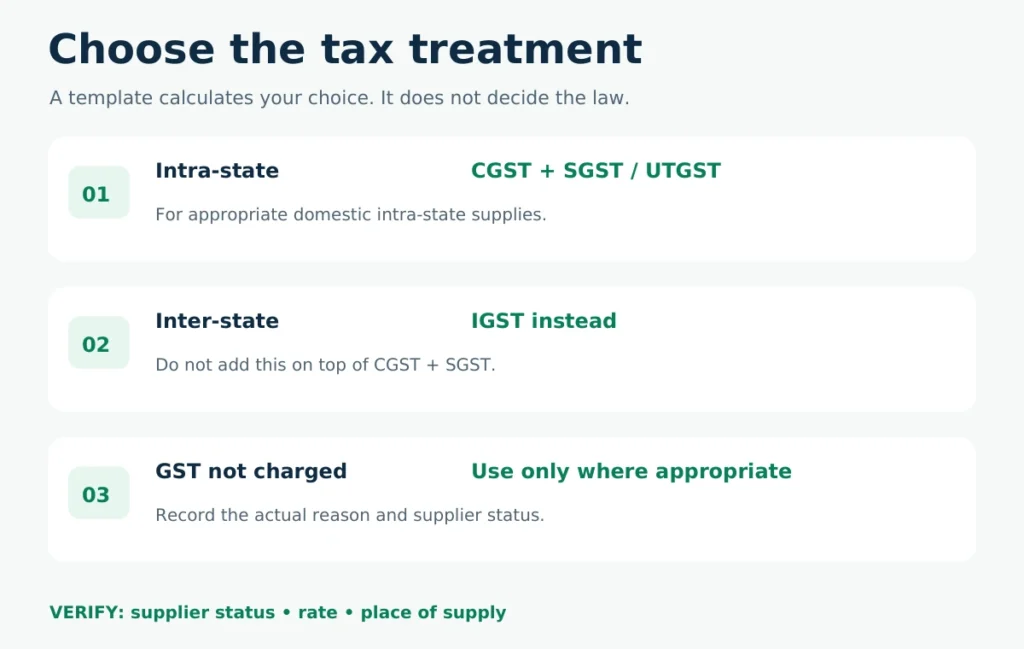
“GST quotation format” describes a template with space for tax information. It does not mean that every business should add GST or that an 18% rate applies to every item.
Regular registered supplier: show the appropriate split
For ordinary domestic supplies, the supplier’s location and the legally determined place of supply are central to choosing intra-state or inter-state treatment. Same-state supplies generally use CGST plus SGST/UTGST; inter-state supplies generally use IGST. Exceptions, including SEZ transactions, require separate care. The IGST Act, sections 7–8 and the place-of-supply provisions, explains the framework.
Do not choose the split from the customer’s phone number, delivery city alone or the state printed on an old quote. In the Excel file, the tax-mode dropdown is your instruction to the formulas; it is not an automatic legal decision.
Unregistered supplier: do not collect GST separately
Section 32 of the CGST Act prohibits an unregistered person from collecting an amount as GST. Where appropriate, use the no-GST-charged layout and state the supplier’s actual status. “GST not charged” is not the same as classifying a supply as exempt or zero-rated.
Composition taxpayer: do not use ordinary GST collection lines
A composition taxpayer cannot separately collect GST from the customer. CBIC’s composition-scheme guidance also explains the bill-of-supply distinction. Adapt the no-GST-charged quotation layout with professional advice rather than showing a normal CGST/SGST charge.
Other cases need their own calculation
The downloads are intentionally limited to straightforward, tax-exclusive domestic quotations. Cess, reverse charge, export/SEZ treatment, tax-inclusive extraction and post-supply discount adjustments are not automated. Do not use a simple template as a substitute for resolving these issues.
How to use the Word, Excel and PDF templates
Word: customise the document, then check the arithmetic
Open the Word quotation format and retain the page you need: blank GST estimate, filled example or no-GST-charged layout. Replace bracketed fields, remove unused rows and adapt the scope and terms. The Word amounts are not automatic formulas, so recalculate every total after changing a quantity, price, discount or tax rate.
Export your completed quote to PDF before sending it. Keep the editable source separately. Do not send all three template pages to a customer or leave fictional names and sample terms in the final copy.
Excel: enter the inputs, not the totals
The Excel quotation format contains four sheets: Start Here, GST Template, Filled Example and No GST Charged. Blue-text input cells are editable; formula cells calculate the result.
On the GST sheets, choose the tax mode in B8. Enter items in rows 14–21, including the quantity, tax-exclusive unit price, discount percentage and verified total GST rate. The sample’s 18% means the combined rate, not 18% in each half of an intra-state split.
Line values use quantity × unit price, less the line discount. The workbook then calculates the selected tax route and total. Its simple pre-tax discount treatment assumes the discount is properly agreed and reflected in the eventual invoice; the tax-value rules in section 15 of the CGST Act govern actual treatment.
Put any separately chargeable taxable delivery or installation item on its own line with the correct treatment. Do not add an unexplained amount below the grand total. The template does not infer whether a particular charge follows the main supply’s tax treatment.
The status row flags incomplete or out-of-range inputs. An “arithmetic ready” message means only that these checks passed; it does not certify tax compliance. Columns L–N provide calculation checks and should not be included in the customer printout. The sendable area is A1:J43; review landscape printing and fit-to-width settings in your spreadsheet application.
PDF: a reference and a stable final copy
The included PDF quotation format is printable, not an interactive form. Use it to see the layout or fill it manually. For typed customer details, edit Word or Excel and export a fresh PDF. Open that exported PDF on a phone before sending it: all columns, totals and terms should remain readable.
Write a scope and terms the customer can actually approve
A professional quotation format prevents disagreements only when its words are specific. A neat template cannot rescue an undefined scope.
For goods
Specify the item, model, grade, unit, quantity, delivery location and who pays for transport or installation. State whether substitutions need approval.
For services
Define deliverables, revision limits, client inputs, completion trigger and excluded ongoing work. “Website design” or “consultancy” alone is too broad.
Choose an exact validity date and say what happens after it: for example, “Pricing and availability must be reconfirmed after 10 October 2026.” Avoid describing a quote as valid for 15 days without also making the issue date clear.
Give delivery a starting event. “Ten working days after written approval and receipt of agreed inputs” is more useful than “delivery in ten days.” Identify dependencies such as site access, artwork approval or materials that the customer must supply.
For payment, specify percentages or amounts and the milestones that make them due. Keep “advance proposed” separate from “advance received.” For revisions, identify which changes require a new written quotation and make sure both parties refer to the same revision.
Do not paste a “non-refundable advance” or unlimited warranty clause into every quote. Important commercial terms should reflect the actual agreement and receive professional review where necessary. For the wider client process, ScaleSaathi’s freelancer workflow guide connects proposals, delivery and billing.
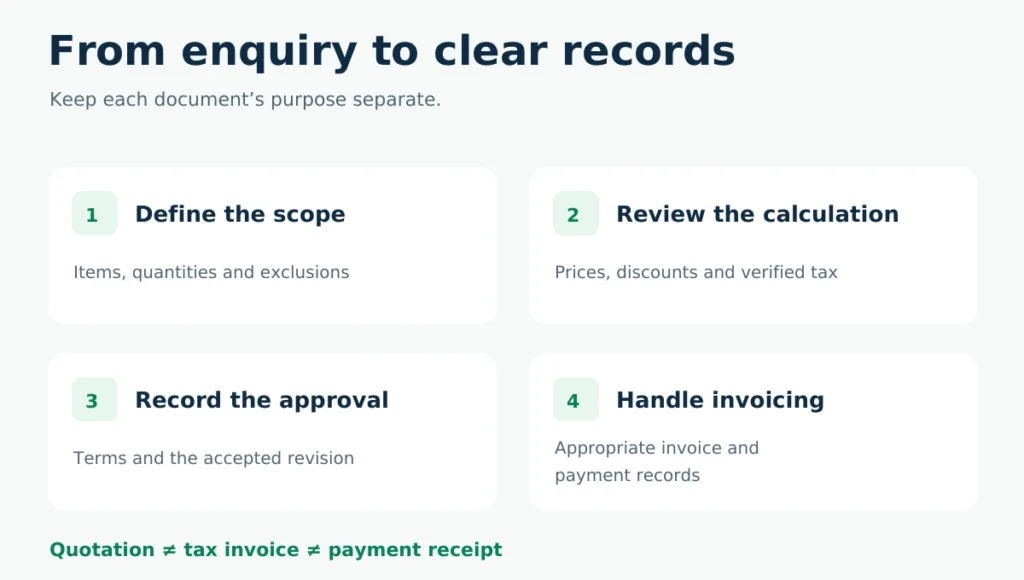
Quotation, estimate, proforma and invoice: keep the purpose clear
Quotation
A proposed price for a defined scope and set of terms. Use it for the customer’s purchasing decision and keep the accepted revision.
Estimate
A planning amount when some inputs remain uncertain. Explain the assumptions and what may change, rather than presenting it as a fixed commitment.
Proforma document
A preliminary transaction document often used before final invoicing. Do not treat its title as proof that a compliant tax invoice has been issued.
Tax invoice
A document for the actual taxable supply, subject to the applicable timing and particulars. A quotation is not a substitute merely because it displays tax.
For input tax credit, section 16 of the CGST Act requires the relevant tax document and other conditions. A quotation alone does not establish entitlement to credit. Keep the quote, approval, eventual invoice and payment record as distinct parts of the transaction.
For a ready template and the GST rules, see our proforma invoice format.
Send the quote and control revisions
Save the document with a recognisable reference, such as QT-2026-001-R1.pdf. The reference is an organisational example, not a prescribed quotation numbering rule. When the scope or price changes, create R2, identify what changed and mark the earlier version as superseded in your own records.
You can adapt this message:
Subject: Quotation [reference] for [goods/service]
Dear [customer],
Please find our quotation for [scope]. The total quoted amount is ₹[amount], with the tax treatment and inclusions shown in the document. The quote is valid until [date].
Please confirm the scope, delivery conditions and payment terms, or send the changes required. We will confirm the accepted revision before proceeding.
Regards,
[name and business]
Before attaching the file, confirm that it belongs to the correct customer. Share an editable workbook only when there is a reason to collaborate on it; otherwise send the reviewed PDF and retain your calculation file.
Once the customer accepts, they usually send a purchase order.
When a template is enough—and when software helps
A reusable quotation format works well when one person prepares a manageable number of quotes and can reliably track references, revisions and acceptance. It becomes harder when several staff edit prices, orders change frequently or accepted quotes must be re-entered into invoices.
Test the whole workflow before buying software: create a quote, revise one line, record the customer’s approval, produce the correct invoice and open an export. Zoho Books’ customer-portal documentation describes quote acceptance and separate invoice-payment functions. Treat that as an example of available functionality, not a recommendation to subscribe without checking the exact plan.
For a shortlist, read ScaleSaathi’s accounting and invoicing software guide. For selection criteria, use the accounting-software checklist. When budget is the main constraint, compare the limitations in our free accounting software guide instead of assuming that a free edition covers every workflow.
Final quotation checklist
Before using any quotation format with a real customer, check that the business identities are correct, the scope is specific, quantities and rates reconcile, discounts are explained and the tax treatment is appropriate. Confirm the full total, validity date, delivery trigger, exclusions and payment milestones.
Then open the final PDF, verify that no placeholders or sample details remain, and save the accepted revision separately. A useful quote makes the customer’s decision clear without pretending to be an invoice, receipt or tax-compliance certificate.
These free resources provide general document guidance. They do not replace advice on a particular contract, GST classification, registration obligation or transaction.
Frequently asked questions
What is a quotation format?
It is the layout for proposing goods or services, prices and terms before the customer approves the transaction. Include the parties, reference, scope, quantities, discounts, appropriate tax treatment, total, validity and payment or delivery terms.
Can I download a free quotation format in Word, Excel and PDF?
Yes. The Word and PDF files include a blank GST estimate, a fictional completed example and a no-GST-charged layout. The Excel file adds input cells, line calculations and selectable tax treatment for straightforward domestic quotations.
Is a GST quotation the same as a tax invoice?
No. A quotation proposes the transaction. The actual supply requires the appropriate invoice or other document under the applicable rules. A quotation alone is not a document establishing input-tax-credit entitlement.
Should every quotation use 18% GST?
No. The 18% in the example is an arithmetic assumption only. Verify the applicable rate, classification, supplier status and place of supply for the real transaction. The blank workbook does not supply a default tax rate.
Can an unregistered supplier add GST to a quotation?
An unregistered supplier must not collect an amount as GST. Where appropriate, use the no-GST-charged layout and state the actual status. That wording does not classify the supply as exempt or zero-rated.
Does the Excel file calculate CGST, SGST and IGST automatically?
It calculates the route you select in B8. Intra-state uses CGST plus SGST/UTGST; Inter-state uses IGST instead. No GST sets the tax charged to zero. You must decide the correct treatment; the spreadsheet cannot determine place of supply.
How long should a quotation remain valid?
Choose a period appropriate to the offer and show an exact expiry date. The example uses 10 October 2026 as a chosen term, not a universal legal rule. State whether price and availability must be reconfirmed after expiry.
Can I edit the PDF template directly?
The supplied PDF is a printable reference, not an interactive form. Edit the Word or Excel source, replace the sample information and export your own PDF before sending it.
Does the template calculate advance payments as money received?
No. The advance field calculates a proposed milestone only. It does not record a receipt. Handle actual payments, invoices and any advance documentation separately.
What happens when a customer asks for a change?
Create a new revision, recalculate the total and state what changed. Keep the accepted version and the approval reference. Do not silently overwrite the original quote or change an existing tax invoice by editing a quotation.
Sources and further reading
- CBIC — CGST Act: sections 15, 31 and 32 (value, tax documents and unauthorised tax collection)
- CBIC Tax Information Portal — CGST Rule 46: tax-invoice particulars
- CBIC — IGST Act: sections 7–8 and place-of-supply provisions
- CBIC — composition-scheme invoicing and tax-collection guidance
- CBIC Tax Information Portal — section 16: input-tax-credit conditions
- Zoho Books India — quote management and conversion to invoices or sales orders
- Zoho Books India — customer portal, quote acceptance and invoice payments