A GST invoice format needs the prescribed supplier, recipient, invoice, supply-value and tax particulars—not one compulsory visual design. Use the free Word, Excel and PDF resources below for ordinary domestic forward-charge supplies, then check the fields and conditional requirements under CGST Rule 46. A downloaded template is not a GST e-invoice registration tool.
Fill this online (free): make your GST invoice online with CGST/SGST/IGST worked out, then print or save PDF. Blank Word/Excel downloads stay below.
The practical task is to produce a document that your customer and accountant can trace: what was supplied, which registered business supplied it, how the taxable value was calculated, and which tax was charged. Start with those details before adding a logo or payment instructions.
The details that trip up most GST invoices
- Number: consecutive, unique for the financial year and no more than 16 characters (letters, numerals, hyphen/dash and slash), e.g. DEMO/26-27/001.
- Unregistered buyer: recipient and delivery details with State name and code are required when the taxable value is ₹50,000 or more.
- HSN digits: four if your aggregate turnover was up to ₹5 crore in the preceding financial year, six above ₹5 crore.
- Tax split: CGST + SGST/UTGST within the State, IGST for inter-State. Never both on the same ordinary supply.
- Mistake after issue: don’t edit the invoice or overwrite the file. Correct it with a credit or debit note.
Need to work out the tax first? Use our free GST calculator to add or remove GST and get the CGST, SGST or IGST split.
Scope: this is general information and an editable resource, not transaction-specific tax advice or a government-approved form. The downloads do not cover reverse charge, exports/SEZ, cess, special or retail-sale-price-based valuation, composition supplies or exempt supplies. Have a qualified accountant review those cases and any uncertain classification.
Download the GST invoice format in Word, Excel or PDF
Word: customise the layout
Download the editable Word template (.docx)
A four-page packet: blank format, fictional intra-State example, fictional inter-State example and an issue checklist. Edit only the page you need.
Excel: calculate the tax breakup
Download the formula-based Excel template (.xlsx)
Six worksheets, eight line-item slots, a selected tax split, on-invoice discounts and separate payment tracking. Blank inputs have no default GST rate.
PDF: print or inspect a sample
Download the printable PDF packet (.pdf)
The same blank layout, two arithmetic examples and checklist. This is a printable PDF, not an interactive fillable form or signed e-invoice.
All examples are labelled fictional. GSTINs, classification codes and signatures are intentionally not invented. Replace the placeholders with verified details before creating an actual invoice. The Excel file is a calculation aid; it is neither GSTR-1 upload data nor the structured JSON accepted by an Invoice Registration Portal.
In this guide
First choose the right document
Use a tax invoice for the relevant taxable supply by a registered regular supplier. Composition taxpayers and suppliers making exempt supplies generally issue a bill of supply instead; they should not simply keep the tax columns and collect GST. CBIC’s invoice and bill-of-supply explanation sets out this distinction.
Tax invoice
Records the supply and applicable tax particulars. This article and its calculation template focus on ordinary domestic forward-charge invoicing.
Bill of supply
The different document used for relevant exempt or composition supplies. Do not relabel this taxable calculation template and assume the result is appropriate.
Quotation or proforma
A commercial proposal or preliminary document. It should not be mistaken for the final tax invoice merely because the proposed price includes a tax estimate.
Resolve registration status and the actual nature of the transaction first. A new business should not treat a “GST invoice” heading as permission to collect GST. Likewise, the customer asking for a particular format does not settle what the law requires for that supply.
If the buyer only needs a price for approval or an advance, send a proforma invoice format (not a tax invoice). Buyers confirming an order use a purchase order format, not an invoice.
GST invoice format: the fields to check
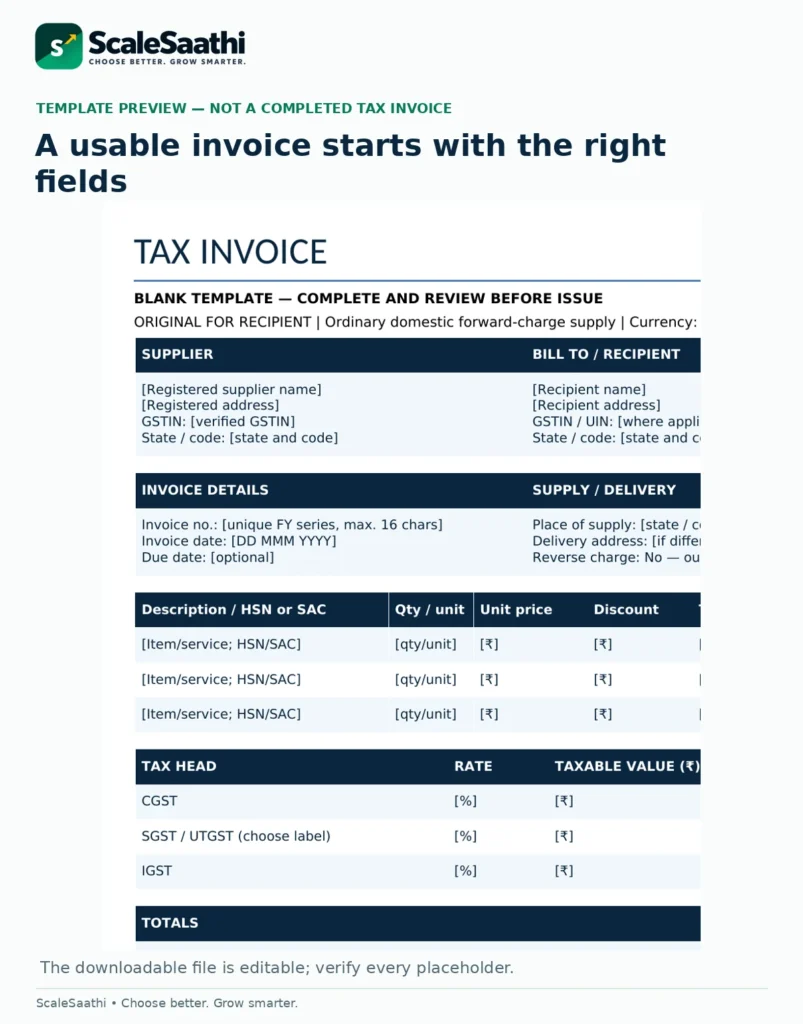
For an ordinary invoice, organise the particulars into the groups below. Some apply only to specific recipients or transactions, and special sectors have additional rules. The detailed reference is Rule 46, subject to Rule 54; the layout can be adapted without deleting relevant information.
Supplier and recipient
Supplier name, address and GSTIN; recipient name, address and GSTIN/UIN when registered. Check the separate rules for unregistered recipients below.
Invoice identity
A consecutive serial number, no more than 16 characters, unique for the financial year, and the date of issue.
What was supplied
Description and applicable HSN/SAC. For goods, quantity and unit or UQC. Make descriptions specific enough to identify the actual supply.
Value and tax
Supply value, taxable value after applicable discounts/abatement, and each applicable tax rate and amount, including cess where relevant.
Supply and delivery particulars
Place of supply with the State name for inter-State supplies, and delivery address when different from the place of supply.
Charge and authentication
Reverse-charge indication, required signature or digital signature subject to the electronic-invoice exception, and IRN-linked QR or declarations where applicable.
A logo, bank details, purchase-order reference, due date and amount in words can make the invoice easier to use. They are not all universal Rule 46 requirements. Keep optional commercial fields distinct from legally required particulars. The templates mark several of these optional fields so a missing logo is not confused with a missing supplier identity.
Invoice numbering: keep the financial-year trail intact
Rule 46 permits alphabets, numerals, hyphen/dash and slash in the invoice series, with a maximum of 16 characters. A sample such as DEMO/26-27/001 fits that length; it is an example, not a prescribed numbering system. Do not assume every punctuation mark accepted by a spreadsheet is permitted in the invoice number. Invoice-number requirements.
Choose a series that your business can control. When two people prepare invoices, allocate responsibility or controlled series rather than letting both start at 001. Record the number, issue date, recipient, value and status in your invoice register. Renaming a saved file does not change the number already printed inside it.
Keep draft filenames separate from issued documents. After issue, preserve the document and assess the appropriate correction process rather than overwriting the original with a different value under the same name. This also helps your accountant explain cancelled or corrected records.
Don’t edit an issued invoice; correct it with a credit or debit note (see our credit note format).
B2B, B2C and HSN: avoid blanket rules
When is an unregistered customer’s address needed?
For an unregistered recipient, Rule 46 requires recipient and delivery details with State name and code when the taxable supply value is ₹50,000 or more. Below that value, the rule covers these details when the recipient requests them. There are additional recipient-State requirements for specified online-service cases, so this is not a universal permission to omit customer details below ₹50,000. Read the recipient-detail clauses and provisos.
Ask whether the customer is registered before finalising a B2B invoice. Request the correct registered billing details instead of copying a GSTIN from an unrelated branch or an old purchase order. Do not create a dummy GSTIN for an unregistered buyer. Retain only the information your invoicing and accounting process actually needs.
How many HSN digits are required?
Notification 78/2020–Central Tax specifies four digits for aggregate turnover up to ₹5 crore in the preceding financial year and six digits above ₹5 crore, effective from 1 April 2021. Its proviso allows the up-to-₹5-crore group to omit the specified HSN digits on invoices to unregistered persons. Check any other applicable classification requirements as well.
That turnover rule does not identify the correct code or rate for your item. Enter the verified HSN for goods or applicable service classification/SAC; do not add arbitrary digits to satisfy a cell length. The downloads intentionally leave the code as a placeholder rather than attach a plausible-looking code to a made-up product.
CGST plus SGST/UTGST, or IGST?
For an ordinary domestic supply, the supplier’s location and the legally determined place of supply guide the tax treatment. Special cases need separate review; this template is not intended for SEZ supplies. CBIC’s place-of-supply explanation should not be reduced to “use the customer’s postal address in every case.”
The template offers two calculation modes: Intra-State splits the entered combined rate into CGST and State tax; Inter-State calculates IGST. Select SGST or UTGST as appropriate. These are inputs you choose after checking the transaction, not a legal decision made by Excel. Do not charge both sets on the same ordinary supply.
For inter-State invoices, show the place of supply and State name; Circular 90/09/2019-GST specifically addresses that requirement. Bill-to/ship-to arrangements, property-related services and other special cases need their own place-of-supply review. Exports and SEZ transactions are outside the downloadable calculator’s scope.
Worked GST invoice example: ₹53,100 total
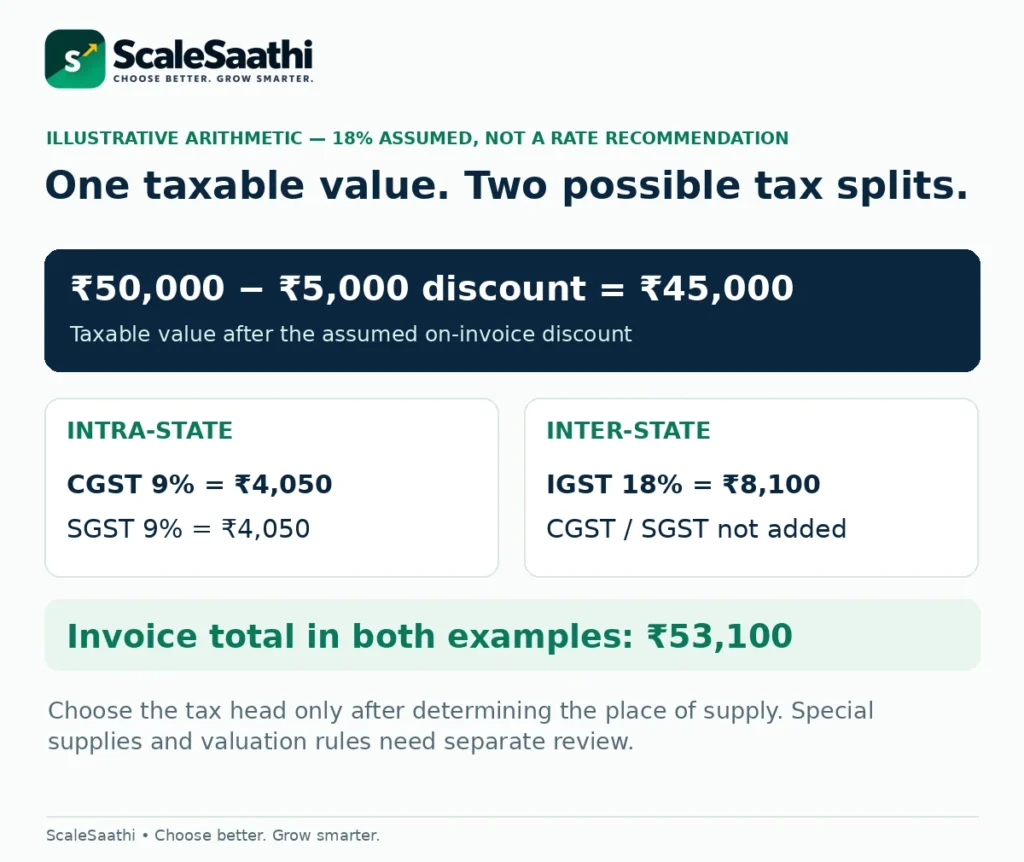
Illustrative assumptions: one ordinary taxable domestic supply, ₹50,000 before an on-invoice discount of ₹5,000, a hypothetical combined GST rate of 18%, no cess and no other charges. This does not prescribe 18% for any real goods or service. The parties and classification details in the sample are deliberately fictional or blank.
1. Taxable value
₹50,000 − ₹5,000 = ₹45,000.
The example assumes a discount eligible to reduce taxable value and recorded on the invoice.
2. Intra-State tax
CGST: ₹45,000 × 9% = ₹4,050.
SGST: ₹45,000 × 9% = ₹4,050.
Total GST = ₹8,100.
3. Inter-State alternative
IGST: ₹45,000 × 18% = ₹8,100.
Do not add CGST and SGST again.
4. Invoice total
₹45,000 taxable value + ₹8,100 GST = ₹53,100 in either illustrative tax split.
The discount assumption matters. Section 15(3)(a) of the CGST Act addresses discounts given before or at supply and recorded in the invoice. Freight, packing and other charges can affect taxable value; the calculator does not decide their treatment. Do not use it unchanged for special valuation or assume every post-sale discount can be deducted the same way.
If ₹10,000 has already been received against this example, the balance to collect is ₹43,100. The invoice still totals ₹53,100. A payment is not another discount. The workbook keeps this optional payment line separate and does not determine advance-tax timing, TDS or GST-TDS treatment.
How to use the Excel GST invoice format
Open Start Here, then make a copy of Invoice Template. The two Example sheets are for checking the arithmetic, not for sending to a customer. The other tabs are a human-review Checklist and a Sources sheet. Save the blank original separately so it is not gradually overwritten with past customers’ details.
Complete the inputs, not the formula cells
Enter verified party and invoice details, choose the tax treatment, and fill the pale-blue line inputs: description, HSN/SAC, quantity, unit, unit price, discount amount and combined GST rate. Enter a percentage such as 18%, not the whole number 18. The discount column is a rupee amount, not a percentage. An unused line should remain entirely blank.
The dark-text formula cells calculate taxable value and the line-by-line tax breakup. A status message flags several arithmetic input problems, such as a discount exceeding the line amount, a missing rate or an invalid payment. “Calculations OK” does not validate GSTINs, invoice uniqueness, classification, taxability or compliance. The workbook makes that limitation explicit.
Check rounding and the final print area
The workbook rounds taxable values and each line’s tax components to two decimal places. Review any difference against the method used by your accountant or invoicing system; do not force a total by altering a tax cell. After changing or adding rows, recheck formulas. Eight prepared line slots are included; complex invoices may be better maintained in billing software.
Print only the needed invoice sheet and use an appropriate landscape/fit-to-width setting, checking legibility before saving the final PDF. The Word/PDF packet provides a more compact portrait layout. Do not send the whole workbook with another customer’s data or hidden working sheets. Keep the original calculations with your own records.
A PDF is not automatically a GST e-invoice
GST e-invoicing requires covered invoice data to be registered through an authorised Invoice Registration Portal (IRP). The process returns an IRN and signed QR data; merely saving this template as a PDF does not perform it. The IRP’s explanation of the mandate describes the distinction.
The notified threshold was reduced to aggregate turnover exceeding ₹5 crore, effective 1 August 2023, for the covered class and transactions. Applicability examines preceding financial years from 2017–18 onward and includes notified exemptions. Check the taxpayer and transaction—not just today’s turnover or whether a customer is registered. Notification 10/2023–Central Tax and IRP applicability guidance.
For covered taxpayers with AATO of ₹10 crore or more, the IRP’s 30-day reporting restriction applies from 1 April 2025. It covers invoices and relevant credit/debit notes; older documents are blocked from IRN generation. This reporting window does not extend the underlying legal deadline for issuing an invoice. Read the official IRP reporting restriction.
Do not paste a decorative QR code, payment QR or fabricated IRN into the sample. Different B2C QR requirements can also apply to specified businesses. Use the appropriate registered workflow where required. Rule 48 also distinguishes invoices prepared under its e-invoicing mechanism from other invoices; our downloadable files do not replace that mechanism.
When to issue, how many copies, and whether to sign
For ordinary goods supplies, invoice timing is tied to removal or delivery/making the goods available, depending on the supply. Taxable service invoices generally have a 30-day issue period, with a 45-day rule for specified financial/insurance suppliers and other special provisions. Continuous supplies and other special cases need separate review. See CBIC’s goods-invoice explanation and the service-invoice timing rules.
The normal Rule 48 copy framework is triplicate for goods and duplicate for services. That framework does not apply in the same way to invoices issued under Rule 48(4). The blank document starts with “Original for recipient”; change copy labels only where your issuing process requires it. Invoice-copy provisions.
Rule 46 includes signature/digital-signature requirements and an exception for electronic invoices issued in accordance with the Information Technology Act. Do not assume the words “computer generated” automatically establish that exception. Keep the signatory field unless your compliant electronic process and advice establish otherwise. Signature and electronic-invoice provisions.
Mistakes a good-looking invoice can still contain
Mixing price and payment
Keep an on-invoice discount distinct from a receipt, retention or withholding. The customer’s outstanding balance and the taxable invoice value are different records.
Using an old master record
Check the correct branch/GSTIN, current address, classification and rate instead of blindly duplicating last month’s invoice.
Treating every case as the example
The 18% rate, single line and place-of-supply assumptions are only for the illustration. Special valuation, cess or reverse charge need a different setup.
Silently replacing an issued invoice
Preserve the original. Have the accountant decide the appropriate correction, amendment or credit/debit-note process and reporting.
The CGST Act’s credit/debit-note provisions address relevant corrections to value or tax and other specified situations. Renaming a Word file is not a substitute for that process. Nor should a buyer treat a downloaded invoice layout alone as proof of input tax credit eligibility; the wider statutory conditions still have to be satisfied.
When a template is enough—and when software is safer
A template is practical when the volume is manageable, one person controls the number series, and the accountant can review the resulting documents. It can also help you agree a layout before configuring a billing system. The decision is about control of records, not whether a document was made in Word or in an app.
Consider an invoicing/accounting workflow when multiple staff create bills, you need IRP integration, several rates or locations complicate documents, or reconciliation and corrections become difficult. Test one normal invoice, a payment and a correction before migrating. A “GST-ready” badge by itself does not establish that a particular plan handles your required process.
ScaleSaathi’s accounting and invoicing software guide separates billing from complete bookkeeping. For a low-cost starting point, compare the scope and limits in our free accounting software guide. Choose the smallest system that supports the work your accountant actually needs.
For the broader tool-selection decision, the ScaleSaathi free tools library can help organise a shortlist. It does not decide your tax treatment. Keep the business’s login, backups and source records under its own control regardless of the software chosen.
GST collected on invoices shows up as GST payable in the balance sheet format.
Final GST invoice checklist before sending
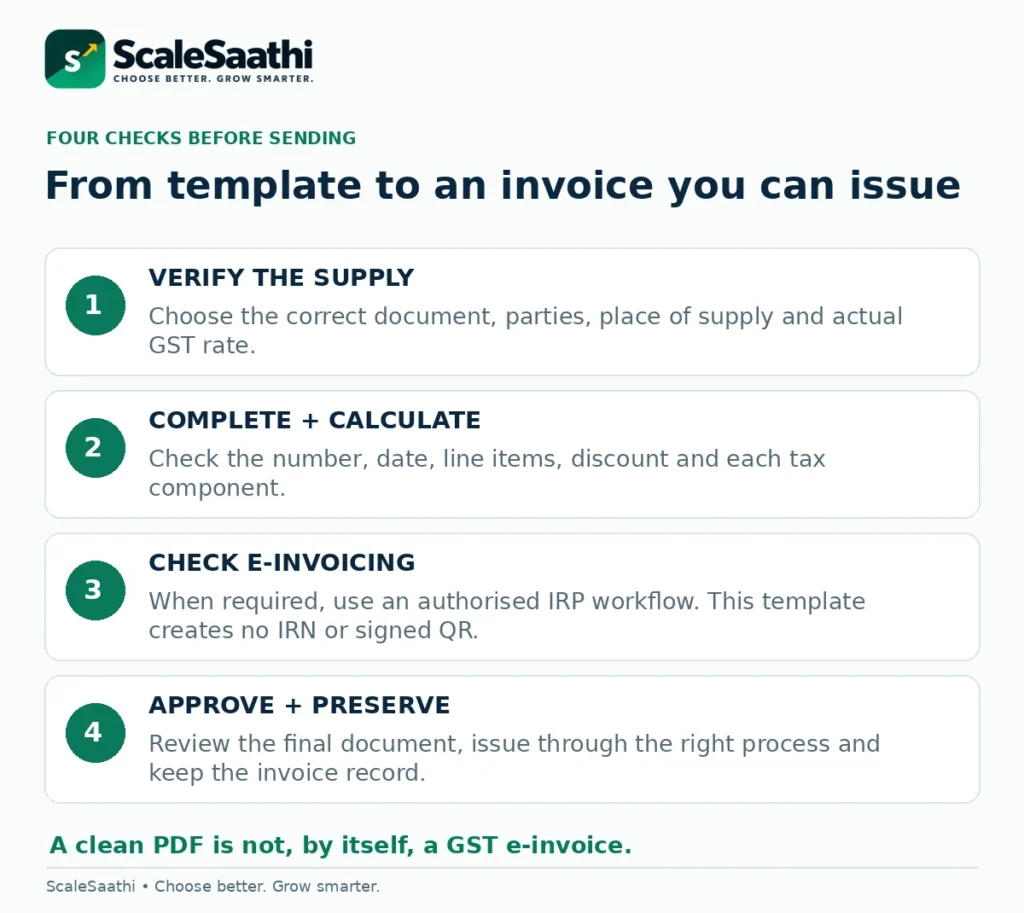
Confirm the document type, supplier and recipient identities, invoice series and date, actual supply description, HSN/SAC, applicable rate, taxable value, tax split and total. Then check conditional requirements: recipient particulars, authentication, IRN/signed QR or other declarations, copies and any sector-specific rule. Finally, preserve the approved issued version and update the register.
The useful result is not merely an attractive invoice. It is a document that agrees with the supply, its tax treatment and the records behind it. Use the editable files to organise that information, and stop for professional review when the transaction falls outside their stated scope.
Frequently asked questions
Is there one compulsory GST invoice layout?
Rule 46 specifies particulars rather than one universal visual design for ordinary invoices. Your layout must contain applicable details, and special sectors or transactions may have additional requirements. These templates are educational resources, not government-approved forms.
Can I make a GST invoice in Excel or Word?
These tools can help prepare an invoice, provided the applicable requirements and issuing process are satisfied. Where e-invoicing is mandatory, a Word, Excel or PDF document alone does not complete registration with an IRP.
Should I use CGST and SGST or IGST?
Determine the supplier location and legal place of supply first. The workbook calculates either the ordinary intra-State split or IGST according to your input; it does not decide place of supply. Special cases such as SEZ supplies need separate review.
Is 18% the rate for every GST invoice?
No. It is only the assumed combined rate in the fictional calculation. Identify the correct classification, rate, exemption and valuation treatment for the actual supply before completing your invoice.
Does the Excel download create an IRN or signed QR code?
No. It is an invoice calculation aid, not an authorised IRP utility or GST return schema. Use a supported e-invoicing workflow when the mandate applies, then use the genuine returned IRN and QR data.
Can a composition taxpayer use this tax-invoice template?
Not unchanged. Composition supplies generally require a bill of supply, not a tax invoice collecting GST. The downloadable calculator is expressly limited to ordinary domestic forward-charge taxable supplies.
How long can a GST invoice number be?
Rule 46 limits the serial number to 16 characters, permits the specified letters, numerals, hyphen/dash and slash combinations, and requires a unique financial-year series. Keep a controlled register rather than relying on filenames.
Is the ₹50,000 recipient-detail test the e-invoicing threshold?
No. It concerns specified recipient particulars on ordinary invoices to unregistered recipients. E-invoicing applies under a different turnover-and-transaction framework, with exemptions. Do not mix the two tests.
Does an advance or part-payment reduce taxable value?
The optional payment field only reduces the displayed balance to collect. It is not a discount and does not decide advance-tax timing or withholding treatment. In the example, a ₹10,000 receipt leaves ₹43,100 due on the ₹53,100 invoice.
What should I do after finding an error in an issued invoice?
Keep the original and have the accountant identify the appropriate correction and reporting process, including a credit/debit note where applicable. Do not silently overwrite an issued document and assume the audit trail or tax reporting is fixed.
Sources and further reading
- CBIC: CGST Rule 46 — particulars of a tax invoice and conditional requirements
- CBIC: invoice rules — service-invoice timing and bill-of-supply framework
- CBIC sectoral FAQs — tax invoice, bill of supply and timing (relevant invoice questions only)
- Notification 78/2020–Central Tax: HSN digit requirements from 1 April 2021
- CBIC FAQs: place of supply and ordinary CGST/SGST versus IGST treatment (Q85)
- GST Council: Circular 90/09/2019-GST — place of supply on inter-State invoices
- CBIC: CGST Act Section 15 — value of supply and on-invoice discounts
- Notification 10/2023–Central Tax: e-invoice threshold amendment effective 1 August 2023
- GSTN-authorised IRP 6: e-invoice mandate, scope and exemptions
- GSTN-authorised IRP 6: 30-day reporting restriction for AATO of ₹10 crore and above
- CBIC: CGST Rule 48 — invoice copies and e-invoice validity
- CBIC: CGST Act Section 34 — credit and debit notes