The Gmail business email price in India starts at ₹99 per user/month on Google Workspace Business Base with a one-year commitment, or ₹120 on flexible billing, before tax. Business Starter is listed at ₹270 or ₹325 respectively. These are India storefront rates; your account’s eligibility and final order determine what you pay.
Last updated: 25 October 2026 · . Prices checked on 25 October 2026 on Google’s India Workspace pages.
Quick answer (India, 25 October 2026):
- Business Base: ₹99 per user/month with a one-year commitment, or ₹120 flexible. With 18% GST: ₹116.82 or ₹141.60.
- Business Starter: ₹270 annual or ₹325 flexible. With 18% GST: ₹318.60 or ₹383.50.
- Business Standard: ₹1,080 annual or ₹1,300 flexible (a new-customer offer of ₹864 / ₹1,040 applies to the first 20 users for 12 months).
- Business Plus: ₹1,700 annual or ₹2,050 flexible. Enterprise: price on request from Google.
All Google figures are per user/month before tax, from Google’s India pages. GST figures are our calculation at 18%. Your sign-up screen shows the final price.
For a small team that mainly needs email at its own domain, check Base first. Choose Starter when you need its Gmail AI features or more than 20 users. Look at Standard when large shared files or meeting recording justify the extra cost.
Google Workspace pricing in India is charged by paid user—not simply by the number of email addresses. Below, compare the rates, calculate a team budget and check what happens after an offer ends.
Gmail business email price in India: plan comparison
All figures are per user/month before tax. The annual column requires a one-year commitment, even when billed monthly. The flexible column has no annual commitment.
| Plan | Annual commitment | Flexible |
|---|---|---|
| Base | ₹99 | ₹120 |
| Starter | ₹270 | ₹325 |
| Standard offer | ₹864 | ₹1,040 |
| Standard regular | ₹1,080 | ₹1,300 |
Standard’s offer is temporary: Google limits it to eligible new customers’ first 20 users for 12 months. Its listed regular rates then apply. The table is based on Google’s India storefront; confirm the price and renewal terms shown for your subscription before paying.
See the five-user budget · Annual or flexible? · GST and signup requirements
What do you get for the difference?
Base: custom-domain Gmail, everyday collaboration tools and 20 GB pooled storage per user, for up to 20 users. It is the first option to assess for a small email-focused team. Business Base limits and features.
Starter: 30 GB pooled storage per user, up to 300 users and Gemini assistance in Gmail. Moving from 20 GB to 30 GB per user is a modest storage increase; it may not solve a file-heavy workflow.
Standard: 2 TB pooled storage per user, recorded Meet calls with up to 150 participants and Gemini in more Workspace apps. Pay the difference when those capabilities solve an actual constraint. Compare edition capabilities.
Business Plus and Enterprise: start with the required controls
Google’s general billing reference lists Business Plus at ₹1,700 annual-commitment or ₹2,050 flexible, per user/month. Plus includes 5 TB pooled storage per user and, for domain-verified organisations, Vault retention and eDiscovery. Enterprise uses sales-led pricing. Billing reference and edition capabilities.
The India landing page does not always display Plus alongside its main cards. Confirm its purchase or upgrade route for your account. Buy advanced controls because someone has identified, configured and will manage them; a higher subscription alone does not establish a compliant records policy.
Why you may see different Google Workspace prices
Google’s general billing documentation lists Starter’s INR reference rates as ₹540 annual-commitment and ₹650 flexible, which differ from the lower India storefront figures above. The documentation also explains that country-specific new-customer discounts can apply. Do not assume either figure automatically establishes an existing account’s renewal price. Google’s payment-plan reference.
When comparing a website, reseller quotation or existing invoice, record:
- The exact edition and number of paid licences.
- Whether the price needs a commitment.
- Whether it is a country offer, introductory offer or ordinary reference rate.
- How long the offer applies and which users qualify.
- The next charge and the rate after any offer ends.
- Whether tax, setup and migration are included.
An older screenshot, a different country page and a new-customer offer are not interchangeable quotes. Keep a copy of the final order terms for the account you are actually buying.
Count paid users before multiplying the price
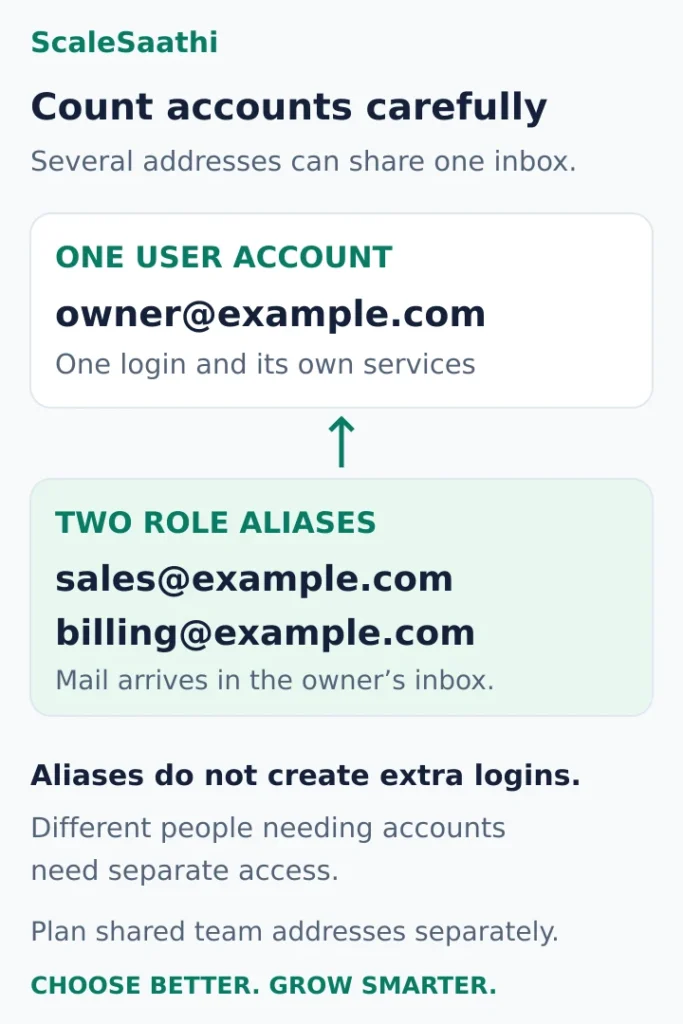
Start with the people who need independent access. Then list role addresses such as sales@your-domain and billing@your-domain and decide who handles them.
A useful distinction is:
- User account: an individual login with its own services and mailbox.
- Alias: an additional address delivering to an existing user’s inbox.
- Shared work address: a team workflow that needs an appropriate group, delegation or shared-inbox arrangement.
Google allows up to 30 aliases per user at no extra charge. An alias does not provide another login or a separate Drive account. It is useful when one person handles several roles. Google’s alias guidance.
For example, one owner could receive messages for enquiries and billing in the owner’s mailbox through aliases. That does not create two additional employees. Conversely, three people who need their own accounts should not share one password to make a one-user budget appear sufficient. Google advises against sharing accounts among users. Account-sharing guidance.
For a support address handled by several staff, decide how messages are assigned and who can reply. A list of addresses is not yet a working support process. Confirm any extra mailbox or licence needed for the chosen arrangement before calculating the total.
Google Workspace price in India with 18% GST
Google lists Workspace prices before tax. The table below adds 18% GST so you can see the amount closer to what leaves your bank account each month. Business Plus is listed on Google’s India business plans page; Base appears on the India home page.
| Plan | Annual plan, before tax | Annual plan, with 18% GST | Flexible, before tax | Flexible, with 18% GST | Limits / note |
|---|---|---|---|---|---|
| Business Base | ₹99 | ₹116.82 | ₹120 | ₹141.60 | Up to 20 users; 20 GB per user |
| Business Starter | ₹270 | ₹318.60 | ₹325 | ₹383.50 | Up to 300 users; 30 GB per user |
| Business Standard (intro offer*) | ₹864 | ₹1,019.52 | ₹1,040 | ₹1,227.20 | First 20 users, first 12 months, new customers |
| Business Standard (regular) | ₹1,080 | ₹1,274.40 | ₹1,300 | ₹1,534 | Up to 300 users; 2 TB per user |
| Business Plus | ₹1,700 | ₹2,006 | ₹2,050 | ₹2,419 | Up to 300 users; 5 TB per user |
*Google’s note: the Standard introductory price is for new Google Workspace customers only, for the first 20 users added, for 12 months; regular pricing applies after that. Google also says the actual price per user may vary by about 0.01% because of rounding, and that the final price is shown before you complete sign-up.
Google Workspace Price Calculator India (with 18% GST)
Use this Google Workspace price calculator to see what your team pays in India each month and each year, with and without 18% GST. Enter the number of people, pick a plan and a billing type, and compare all four plans side by side. It uses the rupee prices in the table above.
Your team’s Google Workspace cost
Work out what your team would pay each month and each year, before and after 18% GST. Prices checked 25 October 2026 on Google’s India Workspace pages; per user/month before tax. Your sign-up screen shows the final price.
Role addresses like sales@ can be free aliases (up to 30 per user) – they don’t need a paid user.
Adding people later? (optional)
On an annual commitment you can add licences any time, but you can usually reduce them only at renewal. Don’t buy seats now just because you might hire later.
Compare every plan for your team
| Plan | Per user / month | Monthly | 12 months |
|---|
Highlighted: the cheapest plan that fits your team size and the needs you ticked. Same billing and tax settings as above. Meeting recording is listed for Standard in the guide.
This is arithmetic on Google’s advertised India storefront rates at an unchanged rate, not a checkout quote. Annual-plan rates need a one-year commitment. Standard’s introductory price is for new customers only, for the first 20 users, for 12 months. Google says the price per user may vary by about 0.01% from rounding. GSTINs are mandatory for new Business-account signups, per Google’s India tax guidance.
Per user per year, with 18% GST
Multiply the monthly rate by 12, then add 18% GST. The flexible column assumes you keep the user for all 12 months.
| Plan | Annual plan, before tax | Annual plan, with 18% GST | Flexible for 12 months, with 18% GST |
|---|---|---|---|
| Business Base | ₹1,188 | ₹1,401.84 | ₹1,699.20 |
| Business Starter | ₹3,240 | ₹3,823.20 | ₹4,602 |
| Business Standard (intro offer*) | ₹10,368 | ₹12,234.24 | ₹14,726.40 |
| Business Standard (regular) | ₹12,960 | ₹15,292.80 | ₹18,408 |
| Business Plus | ₹20,400 | ₹24,072 | ₹29,028 |
Paying annually instead of flexibly saves ₹21 a month per user on Base and ₹55 on Starter, before tax.
What each plan includes: storage, users and Meet
| Plan | Pooled storage per user | Maximum users | Google Meet participants |
|---|---|---|---|
| Business Base | 20 GB | 20 | 100 |
| Business Starter | 30 GB | 300 | 100 |
| Business Standard | 2 TB | 300 | 150 (with recording) |
| Business Plus | 5 TB | 300 | 500 |
| Enterprise | 5 TB, more on request | No minimum or maximum | 1,000 |
Storage is pooled across your organisation, so one heavy user can use space that a light user does not need. Base is listed on Google’s India home page only.
Google’s India business plans page was also showing a lower introductory Business Starter price for new customers on 25 October 2026 (₹160.65 annual / ₹193.38 flexible, before tax). Because Google’s two India pages showed different Starter figures on the same day, we have kept ₹270 / ₹325 in the tables. If you see the lower price at sign-up, check how long it lasts and what the renewal rate is.
Annual-plan prices need a one-year commitment even when you pay monthly. Google says the annual plan saves about 16% compared with flexible billing. Whether your business can claim input tax credit depends on your GST registration; ask your accountant.
What would a five-person team actually pay?
Use this formula for a fixed headcount and unchanged monthly rate:
Annual subscription before tax = paid users × monthly rate per user × 12.
| Plan | Before tax | With assumed 18% GST |
|---|---|---|
| Base | ₹5,940 | ₹7,009.20 |
| Starter | ₹16,200 | ₹19,116 |
| Standard offer | ₹51,840 | ₹61,171.20 |
| Standard regular | ₹64,800 | ₹76,464 |
Costs for 5, 10 and 25 users, with 18% GST
Base is left out for 25 users because it allows up to 20. Standard is shown at the regular rate, since the introductory price covers only the first 20 users for 12 months.
| Plan | Users | Annual plan, per month | Annual plan, per year | Flexible, per month | Flexible, 12 months |
|---|---|---|---|---|---|
| Business Base | 5 | ₹584.10 | ₹7,009.20 | ₹708 | ₹8,496 |
| Business Base | 10 | ₹1,168.20 | ₹14,018.40 | ₹1,416 | ₹16,992 |
| Business Starter | 5 | ₹1,593 | ₹19,116 | ₹1,917.50 | ₹23,010 |
| Business Starter | 10 | ₹3,186 | ₹38,232 | ₹3,835 | ₹46,020 |
| Business Starter | 25 | ₹7,965 | ₹95,580 | ₹9,587.50 | ₹115,050 |
| Business Standard (regular) | 5 | ₹6,372 | ₹76,464 | ₹7,670 | ₹92,040 |
| Business Standard (regular) | 10 | ₹12,744 | ₹152,928 | ₹15,340 | ₹184,080 |
| Business Standard (regular) | 25 | ₹31,860 | ₹382,320 | ₹38,350 | ₹460,200 |
| Business Plus | 5 | ₹10,030 | ₹120,360 | ₹12,095 | ₹145,140 |
| Business Plus | 10 | ₹20,060 | ₹240,720 | ₹24,190 | ₹290,280 |
| Business Plus | 25 | ₹50,150 | ₹601,800 | ₹60,475 | ₹725,700 |
These are calculated examples for five paid users at unchanged rates, not checkout quotes. They exclude domain registration, migration and add-ons. Standard’s offer row assumes all five users qualify for the full introductory year.
Our recommendation: if Base covers the team’s storage, headcount and required features, Starter would add ₹10,260 a year before tax for five people at these rates. Name the feature you need before paying that difference.
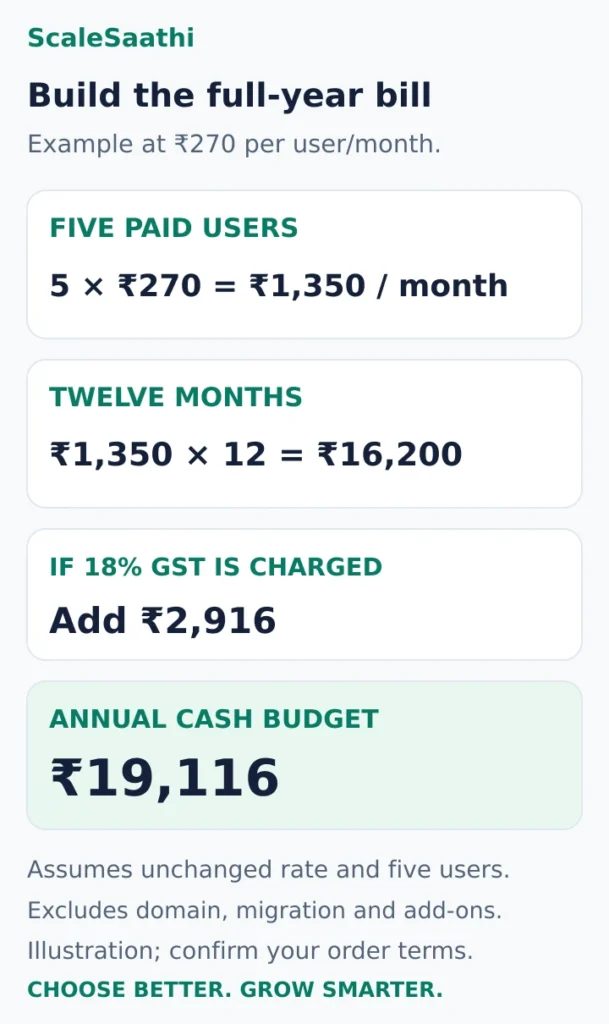
As a worked example, suppose your order confirms the ₹270 Starter annual-commitment rate for five users for a full year:
- Monthly subscription: 5 × ₹270 = ₹1,350.
- Twelve months: ₹1,350 × 12 = ₹16,200.
- If 18% GST is charged: ₹2,916.
- Total including that assumed GST: ₹19,116.
This is arithmetic using the advertised India rate, not a checkout quote. It assumes all five users remain for the year, with no rate change, extra service or additional discount. It excludes the domain, paid migration, external support and other add-ons.
For a quick tax-inclusive budgeting shortcut under that same assumption, ₹1,350 × 1.18 = ₹1,593 per month. The invoice schedule and rounding remain those of your subscription.
Enter the team’s total monthly email cost, rather than just the per-user price, into the ScaleSaathi SaaS Cost Calculator. Choose its tax setting to match your inputs so tax is not counted twice. Use it to see the effect on your wider software budget.
Annual versus flexible: compare the commitment too
Flexible billing lets you add or remove accounts as needed and cancel without a commitment penalty under Google’s standard plan rules. This can suit a changing or short-lived team. Payment-plan comparison.
Annual/fixed-term billing commits you to a licence quantity for the term. Paying monthly does not remove that commitment: reducing the purchased quantity generally waits until renewal, and early cancellation leaves the remaining contract balance payable. Annual/fixed-term terms.
Consider a six-month project with five users, using the displayed Starter rates and excluding tax:
- Flexible for six months: 5 × ₹325 × 6 = ₹9,750.
- A full-year commitment: 5 × ₹270 × 12 = ₹16,200.
In this scenario the higher monthly rate produces the smaller total because the service is needed for fewer months. For twelve months with the same five users, flexible would instead total ₹19,500 before tax.
These are equal-feature, unchanged-rate examples, not a promise that every account qualifies for both prices. Use the rates offered to your business and the period it can realistically commit to. Do not purchase speculative annual seats merely because you might recruit later.
GST and billing details to check before signup
Google’s India tax guidance states that integrated tax on its services is 18%, with central and state tax together around the same rate. Treatment depends on the billing entity and account details. Use the tax shown for your order rather than assuming every invoice has identical treatment. Google’s India tax guidance.
Check eligibility early: that guidance also says GSTINs are mandatory for new Business-account signups. If you do not have a GSTIN, confirm the available purchase route with Google or the proposed reseller before committing or moving email. Do not enter someone else’s tax details or assume this signup requirement determines your legal duty to register for GST.
Make sure the legal name, billing address and relevant GST information are accurate before the first invoice. The ₹19,116 example above is a cash-budget illustration, not a calculation of input-tax-credit entitlement.
Costs that the Workspace subscription may not cover
Your domain. A custom email address uses a domain your organisation controls. Keep registration and renewal in the budget and retain access to DNS settings. Our domain registrar comparison explains the account and renewal checks.
Migration and setup help. Moving historical email, contacts and calendars can be more work than creating fresh accounts. Ask exactly what will be moved, what may need manual attention and how completion will be checked. Get a separate quote if someone will do the work for you.
Administration and handover. Decide who handles staff joins, departures, account recovery, billing and file ownership. These responsibilities exist whether an employee or outside provider performs them.
Optional services. Ask which extras are genuinely required and which are already included in your edition. Request separate line items for paid add-ons and support packages.
Overlapping subscriptions. If you already pay for email, file storage or meeting software, identify what the team will continue using. A new bundle saves money only when it replaces a cost you can actually stop paying.
Treat email as a recurring business service within your small-business website budget, alongside the website and other operating tools. Avoid hiding it inside a one-time “website package” with no stated renewal arrangement.
Choose by the work your team does
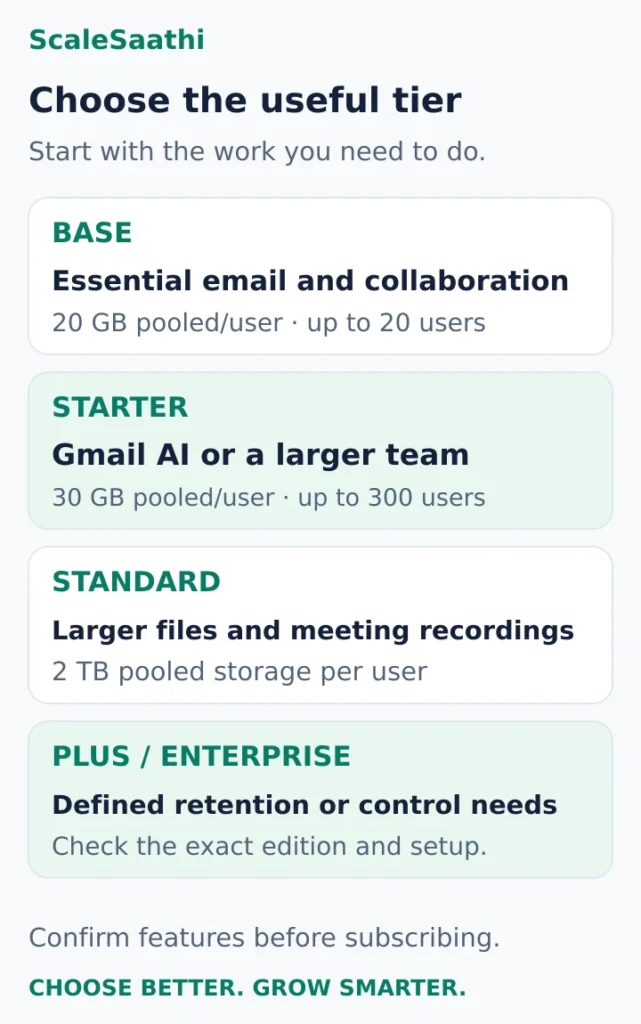
Mostly email and ordinary documents, with a small stable team: test whether Base covers your actual requirements. Ask a colleague to send a client reply, share a file and join a meeting using the proposed setup.
Gmail AI assistance or a larger user count matters: compare Starter against Base. Decide which tasks justify the higher recurring bill. If you are also thinking about a separate AI subscription, our ChatGPT vs Gemini comparison explains when the Gemini already in Workspace is enough.
Large shared files or meeting recordings are routine: examine Standard’s storage and meeting features. Inspect the size of the data you will migrate before deciding that a smaller plan is enough.
Retention, investigation or device controls are a defined requirement: assess Plus or Enterprise with the person responsible for operating those controls. Write down the required feature and test its configuration.
Google describes storage as pooled across the organisation. Check both total capacity and the way your administrator will allocate or manage it; do not treat every storage headline as an isolated mailbox quota.
Use the ScaleSaathi Business Email Provider Finder if you are still deciding whether you need Google’s suite or a different email setup. It provides a starting shortlist; verify each provider’s current terms. For a direct comparison of office suites, use our Microsoft 365 and Google Workspace pricing comparison when evaluating the wider software choice.
What users commonly report
These themes summarise public reviews on sites such as Capterra, Software Advice, Trustpilot and Reddit. They are paraphrased, mostly global rather than India-specific, and worth weighing alongside your own trial.
- Familiar and easy to set up: reviewers often say the Gmail interface feels familiar, so teams get going quickly.
- Strong collaboration: Docs, Drive and Meet are widely praised for shared work.
- Reliable email: day-to-day email is generally described as dependable.
- Price increases: users discuss per-user price rises and how to manage them, and some mention paying extra for more storage.
- Billing and support frustrations: on consumer review sites, complaints centre on billing, cancellation, unexpected charges and difficulty reaching a person.
Before you move business email
A subscription purchase does not by itself finish email setup. Follow Google’s account-specific instructions rather than copying DNS values from an unrelated tutorial.
- Control the domain and administration. Confirm access to the registrar, DNS and Workspace administrator account, with a documented recovery route.
- Create the required accounts first. Google’s activation guide puts user creation before redirecting incoming email. Gmail activation steps.
- Plan the old-data transfer. Identify the email, contacts, calendars and files the team must retain. Keep the old service available until you have checked the agreed migration and delivery tests.
- Verify the domain and route incoming mail. Follow Google’s MX setup instructions. Changing mail routing should be a planned change; preserve unrelated website DNS records.
- Authenticate outgoing mail. Set up SPF and DKIM, then introduce DMARC in line with Google’s guidance. Include other legitimate sending services in the plan.
- Test real journeys. Check inbound and outbound messages, replies from role addresses, mobile access, file sharing and recovery. Assign someone to deal with problems after the switch.
Before paying a reseller, get the edition, licence count, full-term cost, renewal rate and any setup or support fee in writing. Keep administrator access under your organisation’s control, and agree how data and billing will be handed over if you leave.
Frequently asked questions
What is the Gmail business email price in India?
Google’s India storefront lists Business Base at ₹99 per user/month with an annual commitment or ₹120 flexible, before tax and temporary discounts. Other editions cost more. Confirm the plan, eligible users, commitment and renewal rate in your order; a general reference rate and a country offer can differ.
Is Business Starter the cheapest Google Workspace plan in India?
Compare Business Base too. Google documents it as an India-only edition for up to 20 users with 20 GB pooled storage per user. Check whether it meets your requirements before selecting a higher edition.
Does a sales or billing email address need another paid user?
If one person handles those addresses, aliases may send the messages to that person’s existing inbox without extra alias charges. An alias does not provide another login. Separate people and shared team workflows need an appropriate account or shared-address arrangement.
Can I cancel an annual plan because I pay monthly?
Monthly payments do not remove an annual commitment. Google’s fixed-term rules require payment of the remaining contract balance if you cancel early. Check your order and renewal terms before buying.
Do I need a GSTIN to buy Google Workspace in India?
Google’s India tax guidance states that new Business-account signups require a GSTIN. If you do not have one, confirm the purchase route with Google or your proposed reseller before committing. This product signup requirement does not determine your legal obligation to register for GST.
Does Google Workspace include my domain registration?
Keep domain purchase and renewal as a separate budget item unless your order explicitly includes them. Control of the domain and DNS is needed to configure custom business email.
What should an existing customer use to estimate renewal?
Use the edition, licence quantity, billing plan and next renewal terms shown for the existing subscription in the Admin console or confirmed by the reseller. Do not apply a public new-customer offer automatically.
How much is Google Workspace in India including GST?
At 18% GST, Business Base costs ₹116.82 per user/month on the annual plan and ₹141.60 on flexible billing. Business Starter costs ₹318.60 annual or ₹383.50 flexible. Business Standard costs ₹1,274.40 annual or ₹1,534 flexible at regular rates. These are our calculations from Google’s pre-tax India prices checked on 25 October 2026.
Is there a free trial of Google Workspace in India?
Google’s India pages offer a 14-day trial. Check the plan, the number of users and the price you will move to before the trial ends.
How much does Google Workspace Business Base cost in India?
Google’s India home page lists Business Base at ₹99 per user/month with a one-year commitment, or ₹120 on flexible billing, before tax. With 18% GST that is ₹116.82 or ₹141.60. Base allows up to 20 users and includes 20 GB of pooled storage per user.
What is the price of Google Workspace Enterprise in India?
Google does not publish an Enterprise price on its India pages; it asks you to contact sales. Enterprise plans have no minimum or maximum user limit, so the quote depends on your users and requirements.
How many users can I add to a Business plan?
Google says Business Starter, Standard and Plus can be bought for up to 300 users. Business Base allows up to 20 users. For more than 300 users, Google points you to Enterprise plans.
Can I buy Google Workspace through a partner in India?
Yes. Google’s site has a “Find the right partner” directory of Google Workspace partners, who can also help with migration. Google’s pages do not state partner prices, so compare the partner’s quote, billing terms and support with the prices on Google’s own India pages before you sign.
How do I calculate the Google Workspace cost for my team in India?
Multiply the per-user monthly price of your plan by the number of paid users, add 18% GST if you cannot claim it back, and multiply by 12 for the year. The calculator on this page does that for any team size from 1 to 500 and compares all four plans. Remember that an annual plan is a one-year commitment even when you pay monthly.
Sources and further reading
- Google Workspace India — storefront prices and plan overview
- Google Workspace India — pricing and introductory offer terms
- Google Workspace Help — Business Base edition
- Google Workspace Help — choose an edition
- Google Workspace Help — payment plans and reference rates
- Google Workspace Help — annual/fixed-term commitment
- Google Workspace Help — India tax and billing requirements
- Google Workspace Help — alternate email addresses and aliases
- Google Workspace Help — avoid sharing user accounts
- Google Workspace Help — activate Gmail
- Google Workspace Help — MX records
- Google Workspace Help — SPF
- Google Workspace Help — DKIM
- Google Workspace Help — DMARC
Product names and logos are trademarks of their respective owners. They are shown only to identify the products compared in this guide, and their use does not imply endorsement by or affiliation with ScaleSaathi.