Last updated 30 October 2026
Tally vs Zoho Books is mainly a choice about how your accounts are run. Does one person work from an office computer? Or do the owner, bookkeeper and sales team need to work from different places? Answer that before comparing the price.
Three-year sums and the checks that matter
| Small office | Tally Silver lifetime ₹31,500 | Zoho Standard ₹26,964 |
| Bigger team | Tally Gold lifetime ₹94,500 | Zoho Professional ₹53,964 |
- Lifetime still means TSS each year: ₹4,500 (Silver) or ₹13,500 (Gold). Rental is ₹8,100 or ₹24,300 a year.
- Zoho’s ₹749 Standard rate is billed annually (₹8,988 a year); month to month it is ₹899. Zoho Standard includes three users; Tally Silver allows one active user.
- “Offline” Tally still needs the internet for connected services and periodic licence checks, and a Gold licence does not include unlimited cloud access.
- “Inventory included” on Zoho may not cover batches, serial numbers or warehouses; ask whether your tier needs advanced inventory.
- Zoho’s export is a CSV archive, not a backup you can restore. Agree opening balances with your CA before you move.
Three-year totals before GST. Prices seen 30 October 2026 on the providers’ own pages.
Our starting recommendation: shortlist TallyPrime when local working, detailed stock records and an established Tally process matter most. Shortlist Zoho Books when shared online access and day-to-day customer follow-up matter most. Choose the edition that handles your real work—not just the lowest advertised price.
This comparison is for Indian small businesses choosing or replacing their accounting software. “Tally” below means TallyPrime, not an old Tally.ERP 9 quotation. We compare official product features and licence terms, then show simple cost and transaction examples.
Need a wider starting point? Use our accounting software selection checklist. This page focuses on the choice between these two products, rather than repeating every plan or every tax rule. Also considering BUSY? Read Tally vs Busy.
In this comparison
Tally vs Zoho Books: start with your daily work
One office and an experienced operator
Start by checking TallyPrime. Preserve a working process when it already produces correct bills, stock records and accounts.
Ask what actually needs fixing: remote access (Tally on cloud can solve this without switching), missing reports, training or a complete change of system. A new brand may not solve a poor handover.
A small team working in different places
Start by checking Zoho Books. Its browser-based approach can suit an owner, bookkeeper and other authorised users sharing one online organisation.
Confirm each person’s permission, your connection quality and the exact plan limits. See Zoho’s India product overview.
A shop with stock, returns or production steps
Give both vendors your hardest stock example. For Tally, ask for the required stock and reporting setup. For Zoho, ask whether the chosen tier needs advanced inventory.
Do not assume “inventory included” covers batches, serial numbers, warehouses or manufacturing. Tally inventory overview; Zoho feature comparison.
A very small business with basic records
Check whether a free product is sufficient before paying. Zoho Books has an eligibility-limited Free plan; its user and transaction caps matter.
Our free accounting software guide explains the wider options.
These are starting points, not product rankings. A remote agency can have complicated accounts, and a shop can need cloud access. Your actual documents should settle the choice.
Offline, online and remote access are different
TallyPrime is installed software. Local work can continue offline within its licence rules. Internet access is still needed for connected services and periodic licence checks. Do not read “offline” as “never needs the internet.” Read the licence rules.
Zoho Books is a cloud service. Plan for a reliable connection for shared work and syncing. A mobile app does not by itself establish a full offline replacement for the online accounts. Try your actual phone, computer and connection before moving records.
Working from home with Tally
Tally.NET Remote Access is not the same as turning your office data into a browser-only service. Tally’s instructions require a connected office company, active TSS, internet access and matching TallyPrime releases at both ends. Authorised remote users can record transactions, not just read reports. Check the remote-access setup.
Cloud hosting is another route, with its own service and licence conditions. Get a written quotation that explains what runs where, how many people can connect, who handles backups and which costs are extra. Do not assume a Gold licence includes unlimited cloud access. Tally’s cost guide separates Cloud Access.
Count the people who need to work at the same time
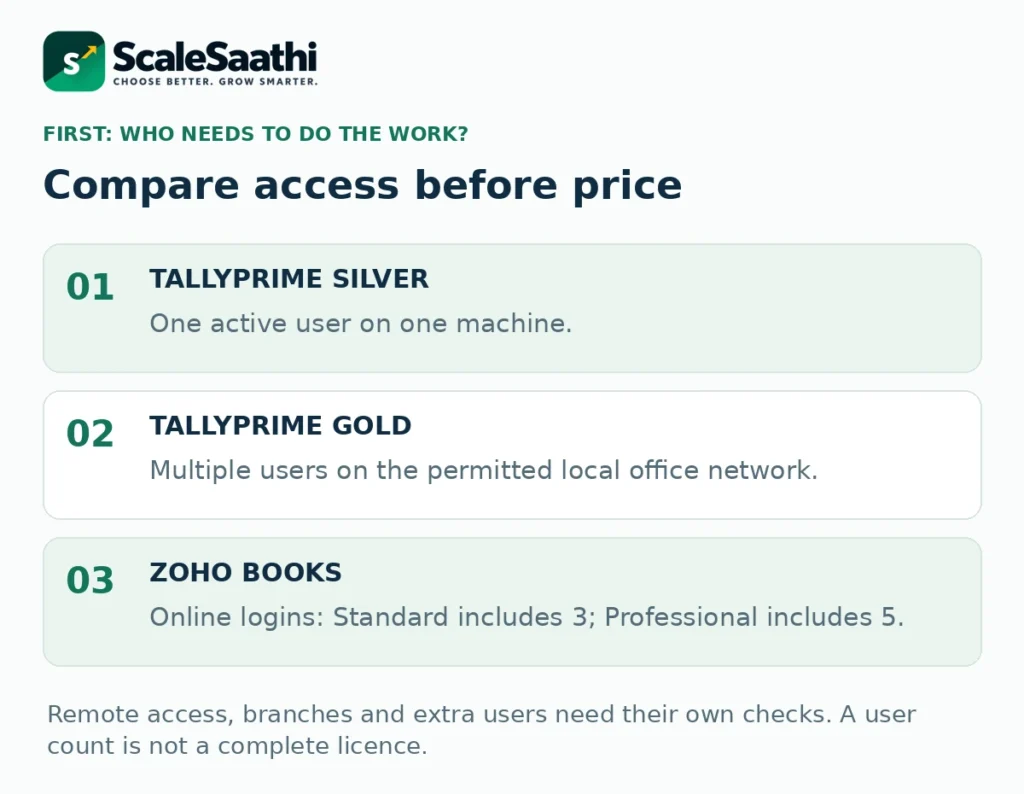
TallyPrime Silver is for one active user on one machine. Gold supports multiple users on the permitted local office network. Branches, separate businesses and virtual access need their own licensing checks. A multi-user label is not permission to share one licence everywhere. Official Silver and Gold scope.
Zoho Books Standard includes three users; Professional includes five. These are users within the paid organisation, not separate subscriptions for every invoice. Additional users can cost extra. Compare included users.
Write down the people who must enter or approve records: the owner, bookkeeper, sales operator and outside accountant. Then check what each person needs to do. A customer opening a portal is not the same role as an employee editing the books.
Use separate authorised logins rather than passing around one password. Ask the vendor to demonstrate that the sales user cannot change settings or view records that should remain restricted.
What are the main prices in India?
Use the following published before-tax references as a starting point. A final order can differ because of discounts, billing terms and optional services. Compare the amount due now as well as what you must pay later.
TallyPrime Silver
Lifetime licence: ₹22,500. The published twelve-month rental offer is ₹8,100. These are alternative purchase routes, not charges to add together.
Silver is a single-active-user option. Check Tally’s India purchase page.
TallyPrime Gold
Lifetime licence: ₹67,500. The published twelve-month rental offer is ₹24,300.
Confirm the local-network and remote-access scope in your quote. Official licence-price corroboration.
Zoho Books Standard
₹749 per organisation per month, billed annually: ₹8,988 for a full year. The monthly-billed rate is ₹899.
Three users are included. Check current India billing options.
Zoho Books Professional
₹1,499 per organisation per month, billed annually: ₹17,988 for a full year. The monthly-billed rate is ₹1,799.
Five users are included. Check current India billing options.
Zoho’s higher tiers may be needed for advanced stock operations or other specific features. Do not choose Standard or Professional simply because they appear in this cost example. First establish which plan supports the work.
Both vendors list taxes separately. The workbook has an editable tax assumption for budgeting. It does not decide tax treatment or whether your business can claim a credit.
TSS renewal is not another lifetime licence purchase
TSS means Tally Software Services. It covers updates and connected services. A new regular TallyPrime licence includes the first twelve months; rental includes TSS during its paid rental period. The published one-year TSS renewal references are ₹4,500 for Silver and ₹13,500 for Gold, before GST. See TSS rates and terms.
If TSS expires on a lifetime licence, that is different from a rental licence expiring. Tally’s documentation says the lifetime software and existing data remain usable, while updates and connected services need renewed entitlement. Read the licence-and-services distinction.
Do not budget a separate TSS renewal during a rental period that already includes it. Equally, do not assume a lifetime purchase includes every future update and online service at no further cost.
Zoho Books uses an ongoing subscription for paid plans. Annual billing is a payment commitment, not a lifetime purchase. Compare both the initial term and future renewal terms before moving business records.
Compare three years, not just the first payment
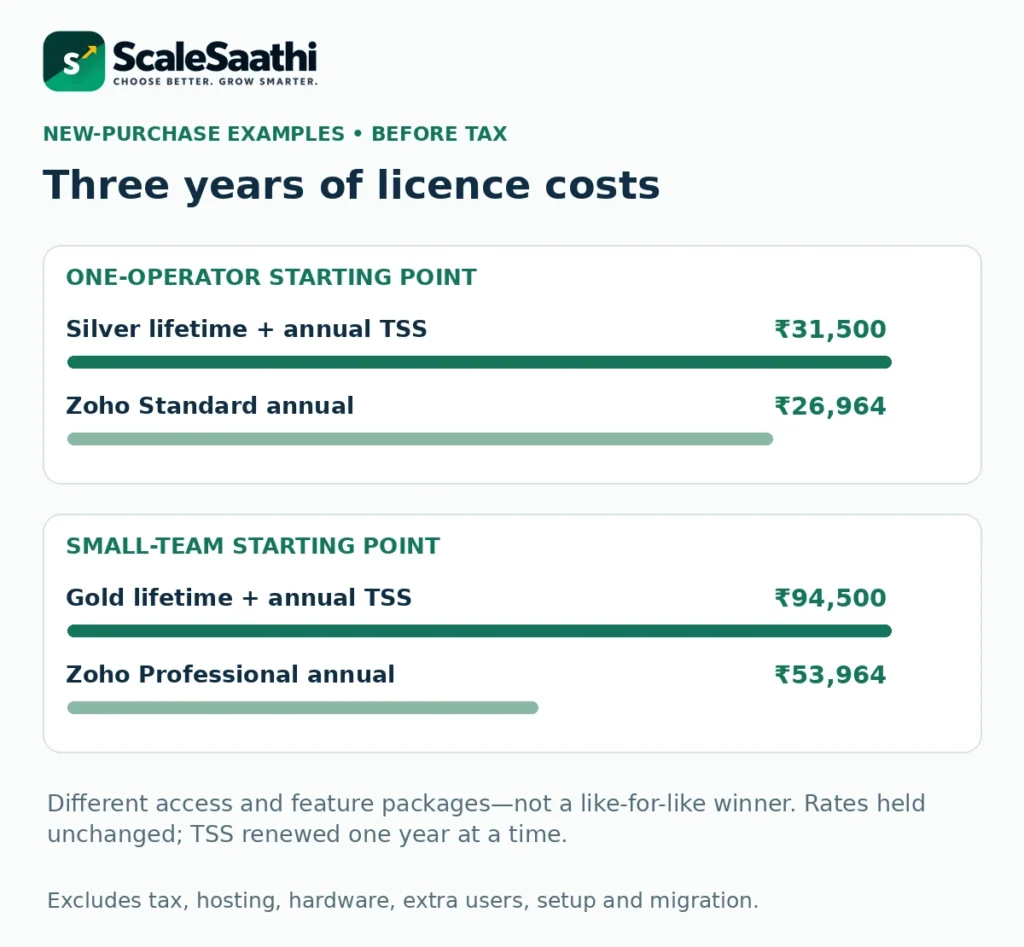
Here are new-purchase examples using the published references above. Prices stay unchanged for three years in this calculation. Tally TSS is renewed one year at a time after the included first year. Taxes, hosting, hardware, extra users, setup and migration are excluded.
One-operator starting point
TallyPrime Silver lifetime: ₹22,500 + ₹4,500 + ₹4,500 = ₹31,500.
Zoho Books Standard annual billing: ₹8,988 × 3 = ₹26,964.
Zoho includes three users here; Silver allows one active user. The totals are not proof that the packages are equivalent.
Small-team starting point
TallyPrime Gold lifetime: ₹67,500 + ₹13,500 + ₹13,500 = ₹94,500.
Zoho Books Professional annual billing: ₹17,988 × 3 = ₹53,964.
Five online users and a permitted local-network licence solve different access needs. Match features before choosing.
At unchanged annual rental rates, three Silver terms would total ₹24,300 and three Gold terms ₹72,900 before tax. This shows why it is wrong to claim that a lifetime licence must always be the cheapest over three years.
A two-year TSS offer can change the lifetime calculation. The published two-year references are ₹8,100 for Silver and ₹24,300 for Gold. Using those for years two and three would give ₹30,600 and ₹91,800 respectively. The graphic deliberately uses separate one-year renewals; it does not claim the lowest available offer. Compare TSS billing periods.
Already own Tally? Do not count the old purchase again as new spending. Compare the future cash needed to keep it with the future cost of switching. Put migration and any overlap between subscriptions into the same budget.
When a bigger plan, extra users or Cloud Access changes the sum
The three-year sums above use the entry tiers. Three limits push many offices off them, and each one costs money you should add before comparing. Figures from the Zoho Books India pricing page and the Tally buy page, seen 30 October 2026, before 18% GST.
| Zoho Books plan | Billed annually, per organisation | Month to month | Users included | Invoices a year |
|---|---|---|---|---|
| Free | ₹0 (revenue up to ₹25 lakh) | ₹0 | 1 + 1 accountant | 1,000 |
| Standard | ₹749/month | ₹899 | 3 | 5,000 |
| Professional | ₹1,499/month | ₹1,799 | 5 | 10,000 |
| Premium | ₹2,999/month | ₹3,599 | 10 | 25,000 |
| Elite | ₹4,999/month | ₹5,999 | 15 | 1,00,000 |
| Ultimate | ₹7,999/month | ₹9,599 | 25 | 1,00,000 |
Extra Zoho users. Each user beyond the plan’s count is ₹150 a month billed annually, or ₹180 month to month. A five-person team on Standard pays for two add-on users: ₹3,600 a year on annual billing, which takes Standard to ₹12,588 a year against ₹17,988 for Professional. Even four add-on users (₹16,188 a year) cost less than Professional, so move up for what Professional adds or for its higher invoice limit, not for seats alone.
Invoice volume. The annual invoice cap is a hard planning limit for a busy counter. A shop issuing 25 invoices a day for 300 days raises 7,500 a year, which is over Standard’s 5,000. Count last year’s sales vouchers in Tally before you pick a Zoho tier.
Batches, serials and warehouses. Zoho lists warehouses, batch and serial tracking and composite items from Elite. If your stock records rely on these today, compare Tally with Elite at ₹59,988 a year, not with Standard.
Tally from outside the office. TallyPrime Cloud Access is an add-on on top of the licence or rental: the buy page shows it at ₹1,800 for three months. Tally says it runs on Oracle Cloud Infrastructure and opens through a browser or a client. Rental itself is ₹750 a month for Silver or ₹2,250 for Gold if you need Tally only for a short period, such as an audit backlog.
Bills, stock and customer follow-up: compare the actual task
Invoices and payments
A usable invoice screen is only the start. Check part-payments, credit notes, overdue amounts and customer statements. Ask the person who will use the software to correct a mistake, not just create a fresh bill.
Zoho’s customer portal lets customers review documents, accept quotes and make payments through supported arrangements. That may suit a service business that regularly chases approvals. Payment-provider charges are separate from the accounting subscription. See the portal workflow.
Basic stock versus advanced stock
Do not rely on old comparisons saying Zoho Standard has no inventory. The current India matrix includes basic stock tracking in lower tiers, while warehouse management, serial numbers, batch tracking and composite items sit in the advanced inventory section. Check the exact feature row.
For Tally, demonstrate your required item units, stock locations and any production process using your own example. For either product, a quantity on an invoice does not prove that the full purchase, return and stock-valuation process fits your business. Tally’s inventory capabilities.
Services, projects and payroll
A consultant may care more about hours worked and project billing than warehouse bins. Zoho’s Professional tier adds project and timesheet functions. Its current India matrix also shows payroll entitlements in higher tiers, so “Zoho Books never includes payroll” is too broad. Check the selected plan and employee allowance. Review project and payroll entitlements.
List payroll, production, job work or export documents as separate requirements only when you need them. Have the accountant confirm the setup and output before calling either package sufficient.
Bank matching and GST need more than a feature badge
Bank reconciliation means matching the transactions in your books with the bank statement. Both products provide help for this work. Tally documents automatic reconciliation; Zoho documents feeds, statement imports and matching. The bank and supported file format still matter. Tally reconciliation; Zoho banking.
Bring a short sample statement to the trial. Include a customer payment, a bank fee and a transaction already entered in the accounts. Check that importing the statement does not create duplicate income.
For GST, ask the vendor to show the documents, reports and filing steps your accountant requires. If your business needs e-invoicing or e-way bills, include those exact tasks. Check the plan, connected-service entitlement and any extra charges.
Keep the buying decision separate from deciding tax rates or filing obligations. A product can support a task without making every entry or return correct. The owner and accountant still need a clear review process.
GST returns, e-invoices and e-way bills in practice
E-invoicing is mandatory from 1 August 2023 once aggregate turnover reaches ₹5 crore, as Zoho’s e-invoicing page notes. Both products generate the IRN, but the setup differs, and it is worth doing once during the trial with your real GSTIN.
Zoho Books. Zoho is a recognised GST Suvidha Provider, so invoices go straight to the IRP from inside the books with no separate GSP account. The India pricing page lists e-invoicing and GST filing from Standard upward.
TallyPrime. Tally’s e-invoice help has you register on the IRP and create an API user with Tally (India) Pvt Ltd as the GSP before the first upload. After that the IRN and QR code come back into the voucher. The Tally buy page lists e-invoicing and e-way bills in both Silver and Gold, and connected services like these need active TSS or a current rental.
What to test. Raise one B2B invoice with different bill-to and ship-to addresses, cancel it inside the allowed window, and generate the e-way bill for a goods movement. Then hand your accountant the GSTR-1 data from each product and ask which one needed less correction.
Run this same sale-and-return test in both products
Use a fictional item and keep all test records separate from real invoices. This example is before tax and assumes returned goods are fit to sell again.
- Start with 40 units and record a purchase of 20 units. Stock should become 60.
- Sell 10 units at ₹1,000 each. The bill is ₹10,000 and stock becomes 50.
- Record a ₹5,000 customer payment. The customer now owes ₹5,000.
- Accept a return of two units and record a ₹2,000 credit against the bill. Stock becomes 52 and the customer owes ₹3,000.
- Open the stock report and customer statement. Both must agree with those figures.
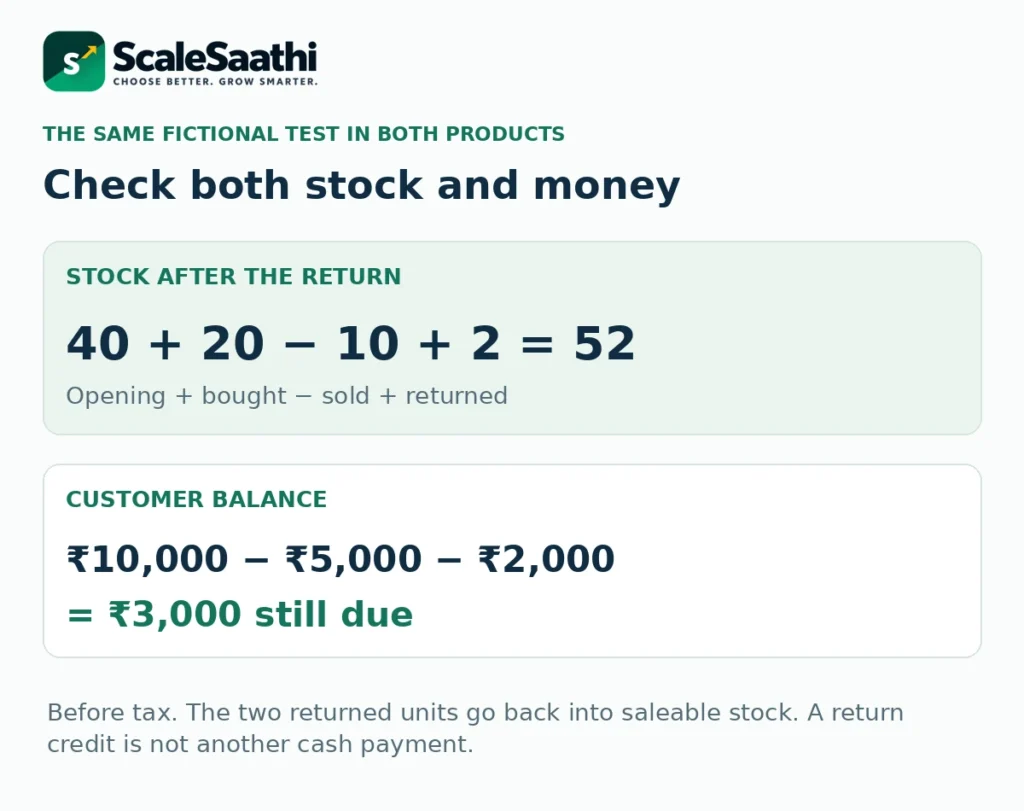
A return credit is not another cash payment. Your bank should still show only the ₹5,000 actually received, unless a separate refund or payment occurs. Ask the operator to explain each record in simple words.
Then try one difficult case from your own work: a part-delivery, damaged return, multiple units, fee deducted from a receipt or an invoice corrected after month-end. Record what required extra setup or another paid feature.
Check who can change records—and how you find the change
An audit trail is a history of who changed a record and when. Ask the vendor to show a created, edited and deleted test transaction. Then ask what happens if an administrator changes settings.
Tally distinguishes the dedicated TallyPrime Edit Log product, where the log cannot be disabled, from TallyPrime’s optional log setting. Zoho Books documents its activity history and transaction versions. These product features need to be matched to your business’s actual recordkeeping requirements. Tally’s Edit Log distinction; Zoho’s audit-trail explanation.
Ask your accountant which edition and controls are required. Do not treat a comparison article as a compliance certificate. Keep administrator recovery details with the business, and give each person only the access needed for their work.
Backups and exports: know how you would leave
For Tally, test a backup and restore it into a separate test location. Its current backup guidance covers local storage and TallyDrive. Confirm the release, storage entitlement and permissions in your setup. Read the backup and restore guide.
Zoho Books provides a compressed archive of module data in CSV files—spreadsheets containing records. Attached documents have a separate backup process. An exported archive is useful, but do not assume it is a one-click restoration of the whole online system. Data export guide; Attached-document backup.
Before buying, ask what can be downloaded, who can download it and whether the next accountant can use it. Open sample files. A button labelled “Export” is less useful if the file misses receipts or does not identify the related invoice.
Also confirm what happens after cancellation or expiry. Keep your own copies of required records and important account details before changing any subscription.
Move only after the opening balances agree
Do not switch halfway through an ordinary working day without a cut-off plan. Decide whether the new system needs full transaction history or just verified opening balances and the current period.
Zoho’s India migration guide explains exporting Tally records, setting up accounts and items, bringing in customers and suppliers, and checking opening balances. It is a sequence, not a guarantee that every custom field or historic attachment will move automatically. Use the official migration guide.
Ask the accountant to compare five totals before the first live invoice: bank, cash, customer balances, supplier balances and stock. Agree how old reports and attachments will remain available. Keep a recoverable copy of the old system.
For any migration quotation, specify who fixes mismatches and what counts as completion. “Import included” is not a clear promise to reconcile the books. Use our business-software buying process to record responsibilities and acceptance checks.
Download the Tally vs Zoho Books comparison workbook
The free Excel file keeps public licence examples separate from your actual quotations. It contains seven worksheets: instructions, reference rates, cost comparison, your quotations, the sale-and-return example, trial checks and sources.
Editable comparison and trial planner
Compare one to ten full years, add your own setup and recurring costs, and record the tasks that must pass.
Download the Excel comparison workbook
Macro-free. No connection to your accounts or bank. Keep a clean copy before changing formulas.
In “My Quotes”, leave unknown amounts blank. Enter zero only when you have confirmed there is no charge. A missing quote should not make one product appear cheaper. The tax input is only a budgeting assumption; use a separate calculation for mixed-tax or tax-inclusive quotations.
The trial sheet is not a scoring contest. A required task needs a recorded Pass and an evidence note. A lower cost cannot compensate for software that fails a task your business must complete.
What users commonly report
These themes come from public review pages, read on 1 November 2026. For TallyPrime, Capterra showed 4.4 out of 5 from 230 reviews, and Software Advice showed the same 230-review pool. For Zoho Books, Capterra showed 4.4 from 683 reviews, G2 4.4 from 329 and TrustRadius 8.8 out of 10 from 198. The points below paraphrase recurring themes on those pages; counts change as new reviews arrive.
- Tally wins on everyday accounting and GST work: reviewers on Capterra praise voucher entry, ledgers, bank reconciliation and GST reporting, and many say it is easy to learn.
- Zoho Books wins on cloud ease and stack fit: invoicing automation, the dashboard and links with other Zoho apps are repeated positives on G2 and TrustRadius for teams that want browser access.
- Tally still feels desktop-bound: some reviewers say the software is still desktop based and hard to use away from the office computer; remote work needs Tally’s cloud access option or a similar setup.
- Zoho Books bank feeds can stall: on Capterra, bank connectivity is one of the most criticised topics, with complaints about delayed or missing transactions; TrustRadius reviewers also list banking integration as a weak point.
- Zoho Books support draws mixed reviews: some reviewers praise quick help, while Capterra shows slow or unresolved support as a frequent complaint. Tally’s customer-service scores on Software Advice are lower than its ease-of-use scores, so test the support route your partner offers before you renew.
- Choose by workflow, not brand loyalty: Tally suits offices already trained on it; Zoho Books suits multi-user cloud books—neither product suits every firm, so test your own month-end tasks before you decide.
Our final buying rule
Keep or choose TallyPrime when the local workflow is effective, your operator can manage the records and the required access is affordable. Explore a supported remote setup before abandoning a system that otherwise works.
Choose Zoho Books when shared online work, customer follow-up and the selected tier’s features fit better. Include any advanced inventory, payroll, extra users and migration costs instead of assuming the entry price buys the whole requirement.
Delay the purchase when the trial has not resolved an essential task, the licence quote is unclear or opening balances do not agree. Those are useful reasons to wait—not reasons to choose the larger discount.
For other options, see our accounting and invoicing software shortlist. The best decision is the smallest suitable setup that your team can operate, check and maintain.
Next step
- TallyPrime price: Silver, Gold and TSS, covering licence, renewal and rental options in rupees.
- Zoho Books plans and prices, free and paid plans with GST and add-on costs.
- Not sure either fits? Try the selector for a starting shortlist based on how you work.
- Use Tally from anywhere, with costs and setup for remote access.
Frequently asked questions
Which is better: Tally or Zoho Books?
Choose by the work and access you need. TallyPrime suits a supported local setup and established Tally workflow. Zoho Books suits shared online working when its selected plan covers your tasks. Use the same sample transactions and a complete cost quotation before choosing.
Is TallyPrime a one-time purchase or a subscription?
Both routes are available. A lifetime licence is a one-time software purchase, with later TSS renewals for updates and connected services. Rental is a subscription and includes TSS during the paid rental period. Do not add both purchase routes to one budget.
Does TallyPrime Gold include unlimited access from every branch?
No. Its multi-user scope is tied to the permitted local-network setup. Separate branches, businesses and remote or virtual access need a licensing check. Obtain written confirmation rather than treating the word multi-user as unlimited access everywhere.
Can Zoho Books be used for free in India?
There is a Free plan subject to eligibility and usage limits. The current India page sets financial-year revenue eligibility at no more than ₹25 lakh. It includes one user plus one accountant, with separate annual transaction caps. This is a product condition, not a tax-registration threshold.
Does Zoho Books Standard include inventory?
The current India comparison includes basic stock tracking in lower tiers, including Standard. Advanced warehouse, batch, serial-number and composite-item work sits in higher-tier inventory features. Check the exact feature row instead of relying on an old comparison.
Is Zoho Books charged separately for every included user?
The base plans are priced per organisation and include a stated number of users. Standard includes three and Professional five. Extra users or other add-ons can increase the bill. Do not multiply the base organisation price by the included user count.
Can I work away from the office using Tally?
Tally provides supported remote-access and cloud-access routes. Tally.NET Remote Access depends on a connected office company, active TSS, matching releases and internet access. A separate cloud service has its own charges and licence conditions.
Will changing software move every old record automatically?
Do not assume so. Agree the data scope, cut-off date, imports, attachments, custom fields and balance checks. Keep the old records available until the accountant has reconciled the new books. Test a small migration before committing.
Does either product remove the need for an accountant?
Software can help produce records and reports. Someone still needs to check the entries, resolve mismatches and decide the correct tax and accounting treatment. Agree those responsibilities before buying.
What does the three-year comparison leave out?
It excludes tax, hardware, cloud access, additional users, setup, training and migration. It assumes unchanged rates and separate one-year TSS renewals after the included first year. Use My Quotes for your actual costs and any different renewal offer.
Can both products generate GST e-invoices?
Yes. Zoho Books uploads directly to the IRP as a recognised GST Suvidha Provider. TallyPrime uploads through Tally (India) Pvt Ltd as the GSP after you create an API user on the IRP, and needs active TSS or rental for that connected service.
What does an extra Zoho Books user cost?
₹150 a month per user on annual billing, or ₹180 month to month, before GST, as listed on Zoho’s India pricing page on 30 October 2026.
How many invoices does Zoho Books Standard allow?
Up to 5,000 invoices a year. Professional allows 10,000, Premium 25,000, and Elite and Ultimate 1,00,000. The Free plan allows 1,000.
What does TallyPrime Cloud Access cost?
The Tally buy page shows it as an add-on at ₹1,800 for three months, plus GST, on top of the licence or rental. It is not included in Silver or Gold.
Sources and further reading
Prices seen 30 October 2026 on the providers’ own pages.
- Tally lifetime and rental pricing — Public India price references; GST extra. Rental offers can change.
- Tally inventory pricing corroboration — Silver ₹22,500; Gold ₹67,500; local-network scope.
- Tally TSS published rates — Silver ₹4,500; Gold ₹13,500 per year; first 12 months included in new licence.
- Tally cost-of-ownership guide — TSS and optional Cloud Access; public official indexed evidence.
- Tally licensing rules — Single machine vs local network; internet validation; branch/remote scope.
- Tally remote access — Office connection, active TSS and matching releases required.
- Zoho India prices — Monthly vs annual; per organisation; extra users; local taxes excluded.
- Zoho plan comparison — Included users, invoice caps, stock and advanced inventory features.
- Zoho India product overview — Cloud access and 14-day trial; not a performance measurement.
- Zoho customer portal — Quotes, invoices and customer access.
- Tally bank reconciliation — Auto-reconciliation of statement transactions.
- Zoho banking — Supported feeds, import and reconciliation; confirm your bank.
- Tally Edit Log — TallyPrime Edit Log versus the switchable standard product feature.
- Zoho audit trail — Transaction changes and versions; no compliance certification.
- Tally backups — Local/TallyDrive backups and restoration.
- Zoho exports — CSV module archive; separate from restoring a complete installed system.
- Zoho attachment backup — Attachments have a separate backup workflow.
- Tally to Zoho migration — India migration process, opening balances and transaction imports.
- Zoho e-invoicing — Direct IRP upload as a recognised GSP; ₹5 crore mandate from 1 August 2023. Seen 30 October 2026.
- Tally e-invoice help — IRP registration and API user with Tally as GSP. Seen 30 October 2026.
- TallyPrime Cloud Access — Oracle Cloud hosting, browser access. Seen 30 October 2026.
Product names and logos are trademarks of their respective owners. They are shown only to identify the products compared in this comparison, and their use does not imply endorsement by or affiliation with ScaleSaathi.