Restaurant billing software should make the busy part of the day easier: take an order, send it to the kitchen, make the bill, accept payment, and close the shift without confusion. The best choice depends on whether you run a small café, a dine-in restaurant, a cloud kitchen or several outlets.
Start with the workflow, not the brand name. Make a shortlist of two or three products and ask each seller to show your real billing, KOT, payment, stock and closing process. Then compare the full first-year cost.
This guide compares five practical options available to Indian restaurants: Petpooja, Restroworks, GOFRUGAL, PosBytz and Vyapar. It does not give one universal winner because a single-counter café and a multi-outlet restaurant chain need very different systems.
In this guide
Restaurant billing software: the simple answer
A small restaurant may only need fast billing, KOT printing, simple menu changes, payment handling and basic reports. A cloud kitchen may care more about Swiggy/Zomato order flow, multi-brand menus and delivery operations. A restaurant chain may need central menu control, outlet-wise reports, stock transfers and permission controls.
That is why the cheapest monthly figure is not enough. The real cost can include software, printers, POS hardware, extra terminals, kitchen display screens, aggregator connectors, QR ordering, loyalty, setup, training and support.
What should restaurant billing software handle?
Before looking at products, write down the tasks your team must complete. For most restaurants, the important areas are billing, KOT or kitchen display, table or order management, payments, menu control, inventory, reports and user permissions.
Quick bills, discounts, split bills, multiple payment modes and clean receipts.
KOT printing or KDS, modifiers, table/order number and reprints.
Dine-in, takeaway, delivery and aggregator orders if you use them.
Ingredients, purchases, wastage and stock movement when these matter to you.
Sales, payment, item and outlet reports that the owner can actually understand.
Who can cancel a bill, change a price or give a discount.
GST settings also matter, but the correct restaurant tax treatment depends on the type of supply and your circumstances. Ask your accountant to confirm the setup instead of choosing a POS only because its website says “GST ready.”
Take orders on WhatsApp with a WhatsApp chatbot.
Start with your restaurant type
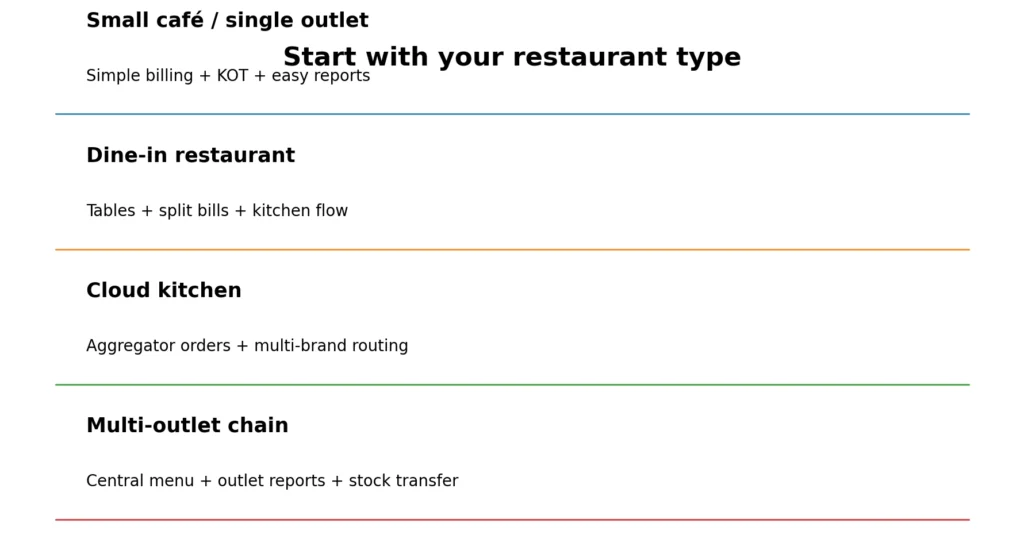
Small café or single outlet: keep the system simple. Fast billing, KOT, menu changes and a clear daily closing report may matter more than advanced chain features.
Dine-in restaurant: test table handling, split bills, item modifiers, kitchen routing and payment combinations.
Cloud kitchen: test online-order flow, multi-brand menus, KOT/KDS routing and aggregator integration. Manual re-entry from several tablets can become a major operational problem.
Multi-outlet restaurant: test central menu control, outlet-level permissions, stock transfers, consolidated reports and how new outlets are added to the subscription.
Petpooja: broad restaurant operations and add-ons
Petpooja is designed specifically around restaurant operations. Its current pricing page shows cloud billing, reporting, CRM, menu management and restaurant-focused modules. Higher plans and add-ons cover areas such as inventory, central kitchen, multi-terminal billing, KDS, captain ordering, loyalty and QR ordering.
Petpooja does not present one fixed India price that applies everywhere on its public page. It says local pricing can vary by region and currency, so treat the seller quotation as the real price. Ask for the cost for your exact outlet count, terminals and add-ons.
Shortlist Petpooja if: you want a restaurant-first product and expect to add restaurant-specific modules. Before buying: make sure the quotation lists each add-on separately.
Restroworks: stronger fit for larger and multi-outlet operations
Restroworks is a more natural shortlist for restaurants with larger or more complex operations. Its pricing is built around the software modules you need, the restaurant size and terminal count, and any hardware requirement.
That approach can make sense for a chain because a chain may need front-of-house, kitchen, inventory, analytics, customer-facing tools and integrations together. The trade-off is that you cannot compare it fairly using a single public monthly number. You need an estimate for your actual setup.
Shortlist Restroworks if: multi-outlet control, kitchen operations and integrations are central to the project. Ask the seller to separate software, hardware and implementation in the quote.
GOFRUGAL: POS plus accounting and inventory depth
GOFRUGAL is worth considering when you want restaurant billing together with deeper inventory, purchases and accounting. Its POS material says the product supports restaurant businesses, and its cloud POS offers recurring subscriptions.
GOFRUGAL also publishes a Starter reference of ₹18,000 per year on its main POS page. Treat that as a public POS starting reference, not a guaranteed restaurant quotation. Confirm which restaurant edition, users, terminals, modules, onboarding and GST treatment are included in the current offer.
The pricing page also says extra training and implementation can cost more, and onsite work can add travel, boarding and lodging. Those items belong in your full budget, not in a footnote you discover after purchase.
PosBytz: cloud POS for cafés, cloud kitchens and multi-outlet brands
PosBytz is a cloud-based restaurant POS aimed at restaurants, cafés, cloud kitchens and multi-outlet brands. Its product pages cover billing, online ordering, recipe and ingredient inventory, CRM, accounting, QR ordering and reports. It also supports Windows, Android and iPad, with offline working described on its restaurant POS page.
For cloud kitchens, PosBytz describes multi-channel order management, kitchen displays/printers and multi-brand operations, including Swiggy and Zomato integration. Its current pricing page uses tailored pricing based on modules, outlets or terminals and hardware rather than one fixed public amount. It offers a 14-day free trial.
Shortlist PosBytz if: cloud access, multi-brand delivery or several order channels are important. Use the trial to test the exact aggregator and kitchen flow you need.
Vyapar: a simpler starting point for small restaurants
Vyapar is a simpler option to inspect for smaller restaurants and cafés. Its restaurant POS pages describe billing, dine-in, takeaway and delivery orders, KOT, inventory, menu management and multiple payment methods.
For a single outlet that does not need a large restaurant-management stack, a simpler tool can be easier to learn and cheaper to run. But do not assume a small-business product will automatically handle every chain, central-kitchen or aggregator workflow. Ask for a demo based on your actual operation.
How much does restaurant billing software cost?
The best way to compare price is to ask every seller for the same list of costs. Include the software subscription, setup, POS terminal or computer, receipt printer, KOT printer or KDS, extra terminals, online-order connectors, QR ordering, loyalty, central-kitchen modules, training and support.
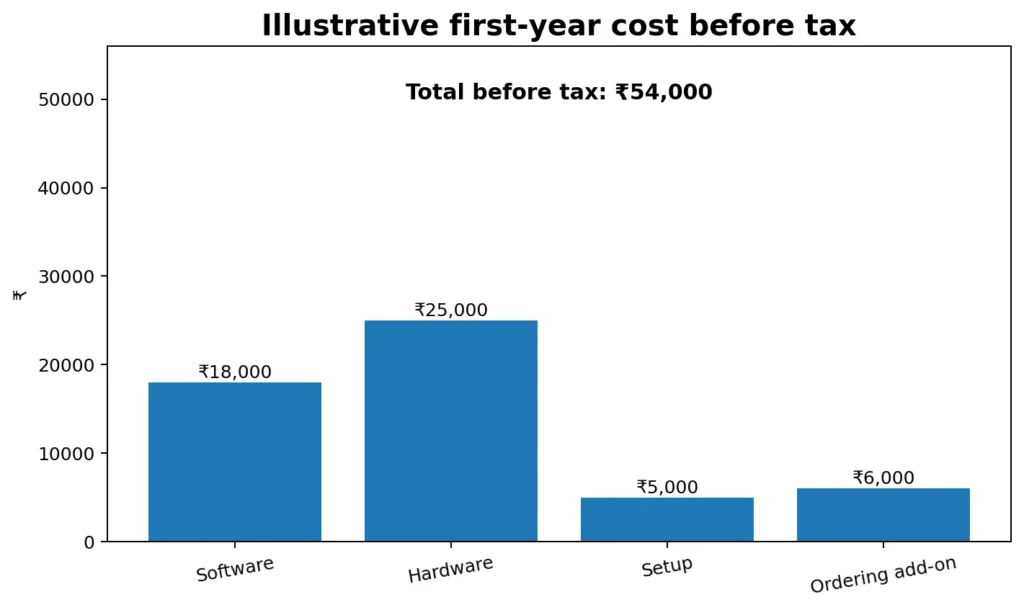
The fictional example uses ₹18,000 for software, ₹25,000 for hardware, ₹5,000 for setup and training, and ₹6,000 for an ordering add-on. That is ₹54,000 before tax. With an illustrative 18% tax assumption on all lines, it becomes ₹63,720. Your real tax treatment and quote may be different.
Do not compare one vendor’s software-only amount with another vendor’s software-plus-hardware package. Put every quotation into the same cost sheet first.
Run a rush-hour test before buying
A demo should not be a presentation where the salesperson clicks through perfect screens. Ask your staff to run the jobs they will do when the restaurant is busy.
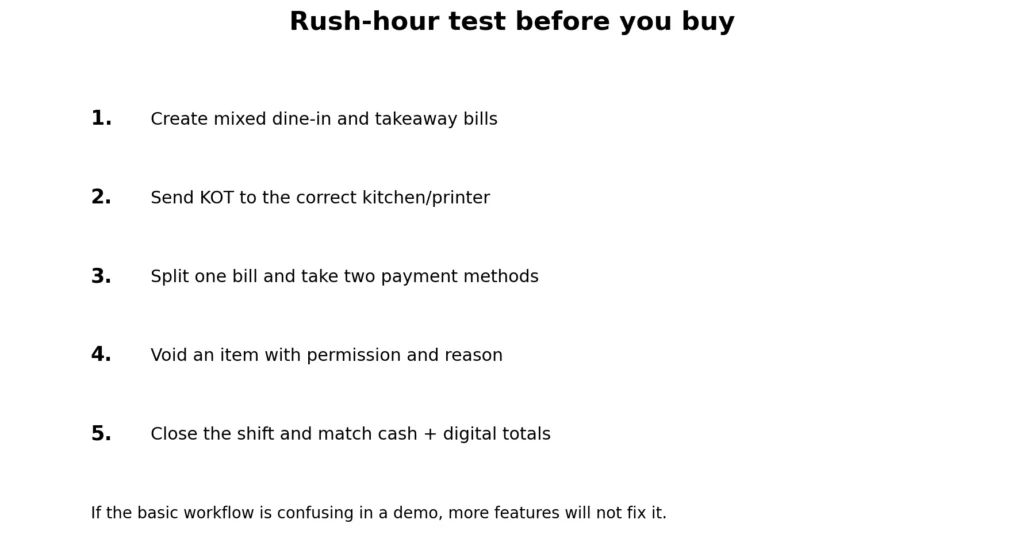
At minimum, create mixed dine-in and takeaway bills, send KOTs to the right printer or kitchen display, split a bill, use two payment modes, void an item with the correct permission, change a menu price safely and close a shift by matching cash and digital payments.
If you use food aggregators, add a Swiggy or Zomato order to the test. If internet reliability is a concern, ask the seller to demonstrate what happens when the connection drops and how the system syncs afterwards. If you operate more than one outlet, test a menu change and stock transfer between outlets.
Download the restaurant billing comparison workbook
The free workbook gives you one place to record each quotation, compare the full first-year cost, list your required features and record evidence from the demo. It also contains a rush-hour test so a feature is not treated as “ready” only because it appeared in a brochure.
Download the restaurant billing software comparison workbook (Excel)
Start with blank quotation cells. Enter zero only when the seller has confirmed there is no charge for that line. That prevents an unknown cost from silently looking free.
Our final buying rule
Choose the system that makes your busiest hour easier. For a small outlet, simple billing and KOT may be enough. For a cloud kitchen, aggregator and multi-brand flow may decide the choice. For a chain, central control and outlet reporting may matter more than the cheapest subscription.
Before paying, get a written quotation, run the rush-hour test with your staff, check the full first-year cost, confirm who owns the data and account, and make sure you can export the records you may need later.
For broader software decisions, see ScaleSaathi’s business software selection guide, accounting software selection guide and small-business accounting software guide.
What users commonly report
These themes summarise public reviews of Vyapar on Google Play, Capterra and Software Advice—the simpler GST billing option this guide shortlists for small restaurants. Dedicated review files for Petpooja, Restroworks, GOFRUGAL and PosBytz were not available for this draft, so their themes are not invented here.
- Easy GST billing for small outlets: reviewers commonly say Vyapar is quick to learn for daily bills, stock and collections.
- WhatsApp invoices and reminders: sharing bills and payment reminders are repeated positives for shop-style workflows.
- Good value on a free-to-paid path: many users find the pricing approach suitable for a single small business.
- Support quality is mixed: some report helpful executives; others say responses slowed after they became paying users.
- Sync errors and hangs: update failures, data mismatches and the app hanging during busy hours are recurring complaints.
- Not built for complex restaurant ops: limited customisation, print options and accounting depth mean it is a starting point, not a full POS suite.
Frequently asked questions
What is restaurant billing software?
It is a POS and operations system used to take orders, create bills, send KOTs to the kitchen, accept payments and produce restaurant reports. Many products also add inventory, online ordering, loyalty and multi-outlet tools.
Which restaurant billing software is best in India?
There is no single best option for every restaurant. Petpooja, Restroworks, GOFRUGAL, PosBytz and Vyapar suit different sizes and workflows. Shortlist by restaurant type, run the same demo tasks and compare the full first-year cost.
What should a small café look for?
Prioritise fast billing, KOT, easy menu changes, payment handling, simple reports and a price your outlet can sustain. Avoid paying for complex chain features you will not use.
What should a cloud kitchen look for?
Check aggregator order integration, multi-brand menu control, KOT or KDS routing, delivery workflow, inventory and brand-wise reports. Test the actual Swiggy/Zomato flow if those channels matter to you.
Do I need inventory in restaurant POS software?
It depends on how closely you want to track ingredients, purchases, wastage and food cost. A small outlet may start with simpler stock control, while a larger kitchen may need recipe-level inventory and central stock management.
Should restaurant POS work without internet?
If your connection is unreliable, offline continuity can be important. Ask the seller to show exactly what still works offline, what stops working and how data syncs after the connection returns.
How much does restaurant billing software cost?
The full cost can include software, hardware, printers, extra terminals, setup, training and add-ons such as aggregator integration, QR ordering, loyalty or KDS. Ask every seller for an all-in first-year quotation.
Does Petpooja publish one fixed India price?
Its public pricing page says local pricing may vary by region and currency. Use the current written quotation for your outlet count, plan and add-ons rather than assuming one universal price.
Can restaurant billing software manage Swiggy and Zomato orders?
Some restaurant POS systems support aggregator integration, but the exact channels, menu sync, order flow and charges can differ. Ask for a live demonstration using the channels your restaurant actually uses.
What should I test in a restaurant POS demo?
Create several bills, send KOTs, split a bill, take mixed payments, void an item with permission, change a menu price safely and close a shift. Add aggregator, offline and multi-outlet tests when those workflows are important.
Sources and further reading
- Petpooja pricing — restaurant plans, modules, add-ons and localised quote note
- Restroworks pricing — software requirements, size/terminals and hardware-based estimates
- GOFRUGAL POS — restaurant support and public Starter reference
- GOFRUGAL pricing — recurring Cloud POS model, onboarding and service notes
- PosBytz restaurant POS — cloud/offline POS, KOT/KDS, inventory and devices
- PosBytz pricing — tailored pricing and 14-day free trial
- PosBytz cloud kitchen — multi-channel orders, multi-brand workflow and aggregator integration
- PosBytz multi-outlet POS — central control and outlet management features
- Vyapar restaurant POS — billing, KOT, menu, inventory and payment workflow
Product names and logos are trademarks of their respective owners. They are shown only to identify the products compared in this guide, and their use does not imply endorsement by or affiliation with ScaleSaathi.