
Zoho One pricing starts with a simple question: are you buying access for every employee, or only for the people who need the full bundle? Count both groups before comparing prices. The cheaper rate per person can still produce the bigger company bill.
Last updated: 25 October 2026 · . Prices checked on 25 October 2026 on Zoho’s official Zoho One pricing page for India (INR).
The practical answer: compare the Standard all-employee option with Standard flexible-user pricing using your whole team’s cost. Then check whether you need a large app bundle at all. A business that only needs email or invoicing may be better served by a smaller product.
India price reference: Zoho’s published annual-billing announcement lists all-employee pricing from ₹1,250 per employee per month and flexible pricing at ₹3,500 per user per month. The dated source and the limits of these reference figures are explained below.
The headcount rule, annual payment, optional costs and everyday checks are explained below in plain English. Use the downloadable Excel planner to replace the reference amounts with your own written quotation.
In this guide
Zoho One pricing in India: understand the price label
The rupee figures here come from Zoho’s own India announcement of 19 November 2025. They are published annual-rate references, not a guaranteed quotation for a new purchase today. Check the current pricing page or obtain a written India quote before paying. Do not convert a dollar price and treat it as an Indian list price.
Standard: all employees
Published annual reference: from ₹1,250 per employee per month.
One employee for a year: ₹1,250 × 12 = ₹15,000 before tax.
What you count: all employees covered by the all-employee commitment, not only the people who log in every day.
Standard: selected users
Published annual reference: ₹3,500 per full-suite user per month.
One full-suite user for a year: ₹3,500 × 12 = ₹42,000 before tax.
What you count: the people for whom you buy full Zoho One access under flexible-user pricing.
Monthly billing and Essentials
Monthly subscriptions and an Essentials edition appear in Zoho’s documentation.
Get a current INR quote: a direct monthly or Essentials rupee price was not established from the accessible official pages. Those cells stay blank in the planner until you enter a quote.
Ask for the edition, billing period, covered users and included apps in the same quotation.
“₹1,250 per month, billed annually” means a monthly equivalent of a larger annual payment. It does not mean you can buy that annual offer by paying ₹1,250 each month. Zoho’s refund policy describes annual billing as an upfront commitment. Read the subscription payment and renewal terms.
Zoho One price in India: plan table (INR)
These are the prices on Zoho’s Zoho One pricing page for India on 25 October 2026. Zoho shows them “+ taxes”. Annual billing is the price per month when you pay for the year.
| Option | Unit | Billed annually | Billed monthly | Who must be counted |
|---|---|---|---|---|
| All-employee pricing (Standard) | per employee/month | ₹1,250 | ₹2,500 | Every employee in the business must be licensed |
| Flexible-user pricing (Standard) | per user/month | ₹3,500 | ₹4,000 | License only the people who need the full suite |
Paying monthly instead of annually doubles the all-employee price, from ₹1,250 to ₹2,500 per employee. For flexible users, monthly billing costs ₹500 more per user.
Zoho’s page also lists an Essentials option, but we could not see an India rupee price for it on 25 October 2026. Ask Zoho for a written quote if you are considering it.
Zoho One price with 18% GST
| Option | Annual billing, before tax | Annual billing, with 18% GST | Monthly billing, before tax | Monthly billing, with 18% GST |
|---|---|---|---|---|
| All-employee pricing (Standard) | ₹1,250 | ₹1,475 | ₹2,500 | ₹2,950 |
| Flexible-user pricing (Standard) | ₹3,500 | ₹4,130 | ₹4,000 | ₹4,720 |
GST is added on your invoice. Whether you can claim it back as input tax credit depends on your GST registration; ask your accountant.
All employees or selected users: who must be counted?
Under all-employee pricing, Zoho’s terms require an accurate employee count and additional licences for new employees who join during the subscription. That is why an owner should not submit only the sales team’s headcount. Read the employee-count terms.
Under flexible-user pricing, you can buy the full suite for selected people. Zoho’s pricing FAQ also permits separate Zoho apps for other employees under that model. For example, you could seek a quote for full-suite office users and a separate email arrangement for other staff. Keep both costs in the comparison. See the licensing FAQ.
What about factory staff, contractors or an outside accountant?
Prepare a list of roles, employment arrangements and required access. Zoho directs businesses with employees who do not use digital devices to its sales team. Get the agreed treatment in writing; do not assume that a person may be excluded simply because they do not use a computer.
The FAQ says there is no minimum licence count for the two Standard pricing models, so a one-person business can also evaluate them. But a low minimum does not make a large bundle the right purchase for one person.
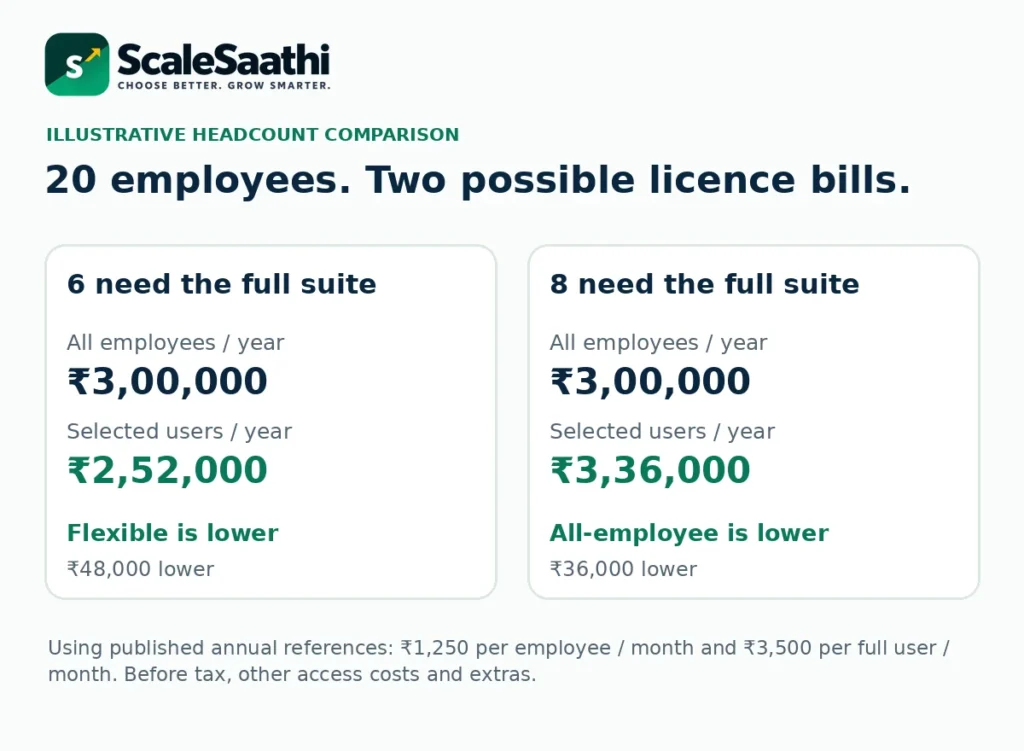
A 20-person business: two different answers
These examples use the published annual reference rates above, unchanged for twelve months. They exclude tax, add-ons and setup. The company has 20 employees; only the number needing the full suite changes.
Only 6 people need the full suite
All employees: 20 × ₹1,250 × 12 = ₹3,00,000 a year.
Flexible users: 6 × ₹3,500 × 12 = ₹2,52,000 a year.
Flexible pricing is ₹48,000 lower before any separate services for the remaining staff. Add those services before making a final choice.
8 people need the full suite
All employees: 20 × ₹1,250 × 12 = ₹3,00,000 a year.
Flexible users: 8 × ₹3,500 × 12 = ₹3,36,000 a year.
All-employee pricing is ₹36,000 lower for these full-suite licence charges. You still buy all 20 licences; the unused ones are not free seats.
The comparison is arithmetic, not a claim that every business should choose the lower number. The written licensing arrangement, required apps and costs outside the bundle still have to fit.
A simple way to find the cheaper licence total
Multiply total employees × all-employee rate. Separately, multiply full-suite users × flexible rate. Use rates for the same billing period and tax basis.
At the reference rates, ₹1,250 ÷ ₹3,500 is about 35.7%. This means the all-employee licence total becomes lower when the share needing full-suite access is above that percentage. For 20 employees, seven flexible users cost ₹24,500 per month equivalent; eight cost ₹28,000. The all-employee equivalent is ₹25,000, so the first whole-user crossover is eight.
This percentage is not a Zoho eligibility rule. It changes when your quoted rates change. It also ignores extra apps needed by unlicensed staff, Lite add-ons, one-time charges and different support arrangements. Use it as a first comparison, then build the full budget.
Essentials, Standard and Lite users are not the same thing
Zoho’s global pricing overview describes Essentials as a smaller starting bundle and Standard as a broader suite. Standard then has the all-employee and flexible-user buying choices. An edition describes the bundle; a pricing model describes whom you must pay for.
Do not assume a lower Essentials quote includes the same apps and limits as Standard. In particular, check the exact sales tool and accounting access you need. Ask for an India-specific app list attached to the quote rather than relying on the name alone.
Lite users have restricted access
Zoho’s Lite-user guide describes separate recurring add-ons such as Books-only accountant access, Mail-Only access and a collaboration option. Availability differs by pricing model, and Lite users cannot hold Zoho One organisation-level administrator roles.
Ask which add-on your account supports, what it costs and how it fits the all-employee agreement. A Lite add-on is not automatically permission to leave payroll employees out of that agreement. The planner does not guess Lite-user prices or approve eligibility.
What is included—and what can cost extra?
Zoho One brings business apps into one subscription and administration layer. That can help when sales, accounts, support and internal work need to connect. However, “One” does not mean every Zoho product, every top edition or unlimited usage. Check the application FAQ.
Check the exact edition
Zoho’s FAQ says CRM Ultimate is not the standard included CRM level; it is available as an add-on.
List the functions you need, not just the app names. A feature in a standalone top plan may not be included in the bundle.
Check limits and exclusions
The app-by-app details specify limits for storage, records, sending, automation and other work.
Paid Marketplace extensions and domain registration are outside the standard bundle. The FAQ also lists products outside Zoho One, including Zoho ERP and FSM.
Check external access separately
A customer or supplier using a portal is not necessarily the same as a staff user.
For example, Zoho Learn documents separate custom-portal and external-user charges. Ask about the particular app and audience you need.
Use Zoho One’s plan-details page for the allowance in each app and the relevant portal terms for external access. Do not add allowances together unless Zoho says they combine. Ask for a written answer when a required feature is unclear.
Support: included help and paid upgrades
The Zoho One support page lists Classic support as included. Premium costs 20% of the organisation’s licence fee. Enterprise is listed at 25%, with a 75-user minimum and annual subscription. These are separate support choices, not new app editions.
Classic’s listed chat and phone hours are eight hours on weekdays; Premium extends them to 24 hours on weekdays, and Enterprise lists seven-day coverage. Confirm the relevant service hours and timezone. A published response target is not a promise that every problem will be solved within that time.
On a hypothetical ₹3,00,000 annual licence bill, a 20% Premium support charge adds ₹60,000 before tax. It is not included in the worked full budget below. Add a quoted support cost only when you actually need that service, and check what a partner’s separate support agreement covers.
Build the full first-year budget
Begin with the licence total, then add the work around it. Setup means configuring the apps. Migration means moving your old records. Training means showing each role how to do its work. None is automatically free just because several apps share one subscription.
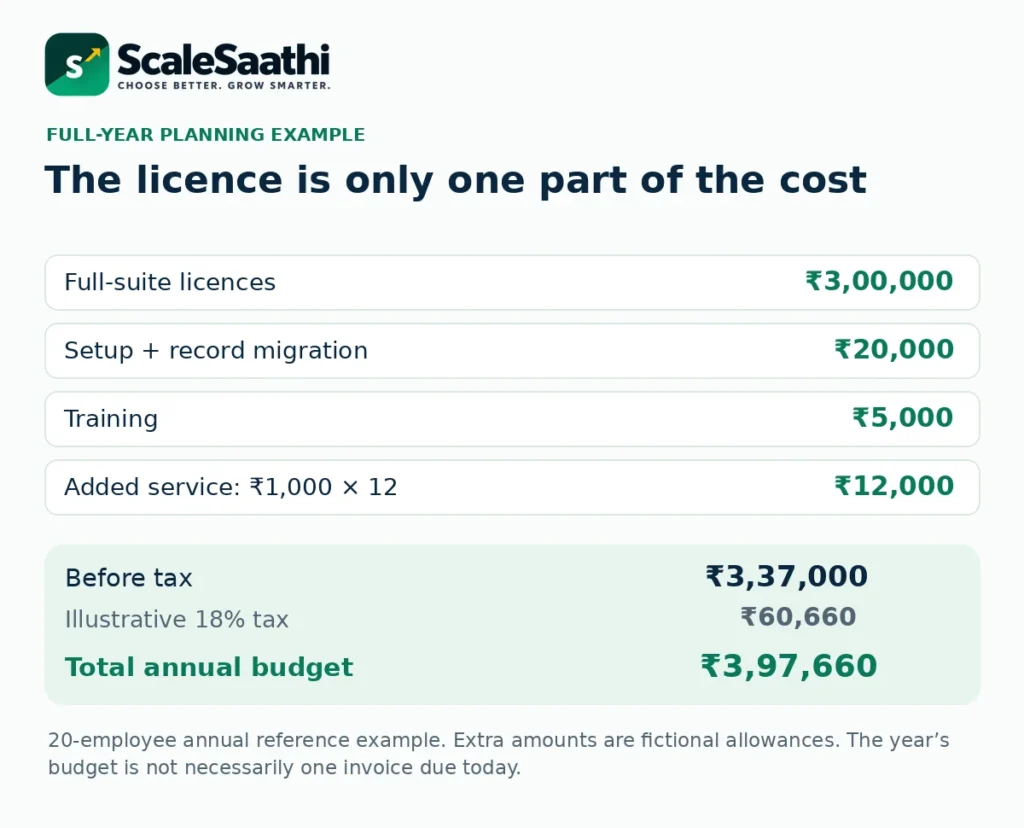
Here is an illustrative budget for the 20-employee all-employee example. The licence uses the published annual reference. The other amounts are fictional planning allowances, not partner quotations.
One year, with example setup costs
Full-suite licences: ₹3,00,000
Setup and record migration: ₹20,000
Training: ₹5,000
Additional service: ₹1,000 × 12 = ₹12,000
Total before tax: ₹3,37,000
Illustrative 18% tax on all these lines: ₹60,660
Total planning amount: ₹3,97,660
The tax rate is a changeable budgeting assumption. Use the tax treatment on each actual invoice; do not add tax again to a tax-inclusive quote. The planner does not decide input-tax-credit eligibility. If different charges have different tax treatment, calculate those separately and enter a properly reconciled budget.
With the assumed tax and the annual licence paid upfront, the licence payment alone is ₹3,54,000. The full ₹3,97,660 is a year’s budget, not necessarily one bill due today. Ask when setup, training and additional services are payable. Renewal-year costs may differ, so do not copy the first year unchanged.
When separate apps may be the better choice
A bundle saves money only against tools you would otherwise need and pay for. Do not create a saving by adding up 50 apps that your business never intended to buy.
Write down each job: follow up enquiries, send invoices, keep accounts, manage files or handle staff leave. Then put actual users beside each job. Compare a small set of separate subscriptions with the whole Zoho One bill.
Keep charging units straight. A per-user quote is multiplied by people. A per-organisation quote is multiplied by the number of organisations or packages—not automatically by every employee. Also check whether quoted plans cover the same tasks. A cheaper plan missing an essential function is not a like-for-like alternative.
For an email-only team or a small business with one main tool, a narrower purchase may be enough. For several departments sharing customer and financial records, the bundle may be worth evaluating. Our guide to a lean business software setup helps keep the comparison focused on work rather than app count.
For sales-only requirements, begin with the small-business CRM selection guide. For accounting-only work, use our accounting and invoicing comparison before committing to a full suite.
If HR is your main need, see our HRMS options compared.
Break-even: Zoho One versus buying Zoho apps separately
This table adds up Zoho’s own India annual-billing prices for separate apps, per user per month, before tax. It compares that total with Zoho One. We have only used apps whose India price we could check on Zoho’s pricing pages on 25 October 2026: CRM Standard ₹800, Mail Lite ₹59 (yearly billing), Desk Standard ₹800, Projects Premium ₹280 and People Essential HR ₹48. Zoho Books is not included because we could not check its India price that day.
| Apps each person needs | Separate apps total | If every employee needs these apps (vs ₹1,250 all-employee) | All-employee wins if at least this share of staff need the full stack* | vs Flexible user (₹3,500 per user) |
|---|---|---|---|---|
| Zoho CRM Standard + Zoho Mail Lite | ₹859 | Separate apps are cheaper | Never (separate apps cost less than ₹1,250) | Separate apps are cheaper |
| + Zoho Desk Standard | ₹1,659 | Zoho One all-employee is cheaper | 75.3% of staff or more | Separate apps are cheaper |
| + Zoho Projects Premium | ₹1,939 | Zoho One all-employee is cheaper | 64.5% of staff or more | Separate apps are cheaper |
| + Zoho People Essential HR | ₹1,987 | Zoho One all-employee is cheaper | 62.9% of staff or more | Separate apps are cheaper |
*All-employee pricing charges ₹1,250 for every employee, including people who would not use the apps. Example: with CRM, Mail, Desk and Projects (₹1,939 per person), a 20-person business where 12 people need those apps pays ₹23,268 a month separately (12 × ₹1,939), against ₹25,000 for Zoho One all-employee (20 × ₹1,250). With 13 people, separate apps cost ₹25,207, so Zoho One becomes cheaper. This ignores app limits, add-ons and staff who need only email; use the planner below with your own quote.
Flexible-user pricing at ₹3,500 is higher than every stack in this table. It makes sense only when a person needs many more apps than these, or needs apps that are not sold separately at a lower price.
What users commonly report
These themes summarise public reviews on sites such as G2, Capterra and TrustRadius, plus Zoho’s own community forum. They are paraphrased, and India-specific feedback is limited.
- Strong value: reviewers commonly say the bundle is good value compared with buying separate tools.
- Connected apps: data shared across apps is praised for cutting double entry and letting a business run from one place.
- Steep learning curve: with so many apps to choose and configure, setup time is a repeated theme.
- Uneven experience across apps: users note interfaces, terminology and depth that differ between modules.
- Inconsistent support: slow or patchy help is reported, especially for complex setup or integration problems.
- Occasional bugs and slow loading: mentioned regularly, though as a secondary concern.
Use the trial to follow one job from start to finish
Zoho advertises a 30-day trial without card details. Instead of opening every app, choose one useful journey. For a small distributor, that might be an enquiry, quotation, order, invoice, customer payment and support question.
Use clearly labelled sample data. Have the sales person create a lead, the accounts person review an invoice and the owner check the resulting report. Confirm what transfers automatically and what still needs to be entered. Check the exact paid edition you will keep after the trial.
Also try an export and an access change. Can the business retrieve usable records? Can a staff member see only the information required for their role? Who controls billing and account recovery? Record each answer before paying annually.
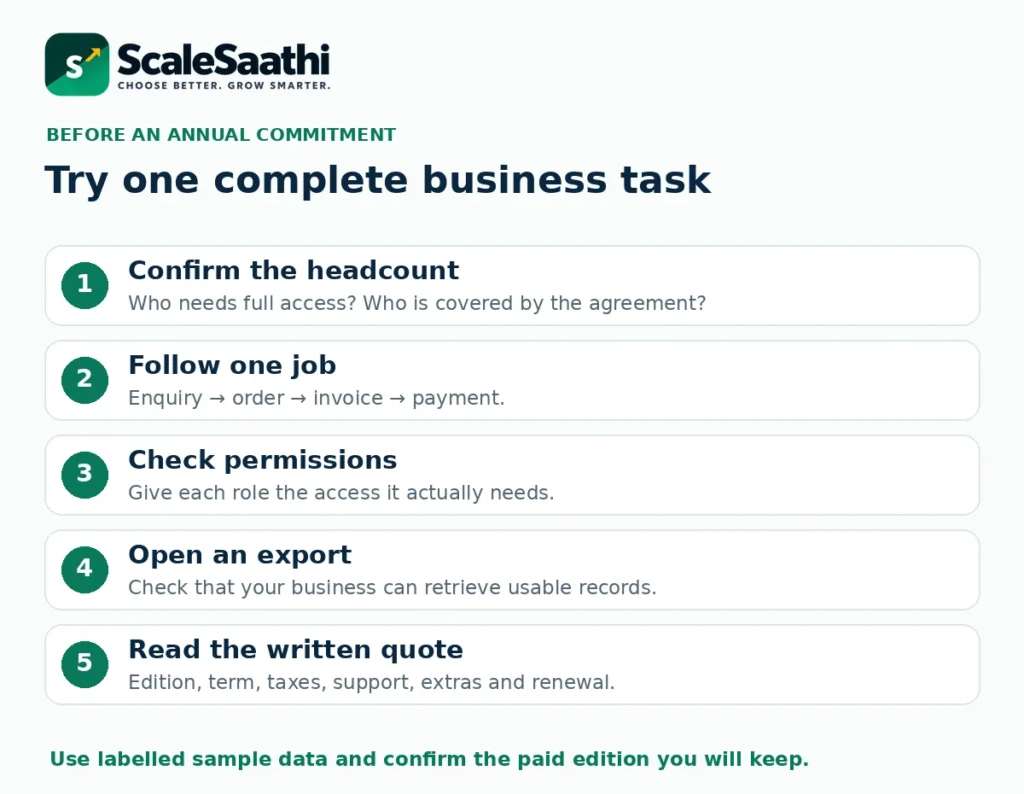
The workbook’s trial sheet marks required tasks as unfinished until they have a pass result and a note of the evidence. It is a checklist for your team, not a product score. For a wider buying process, read how to choose business software.
Already paying for Zoho apps? Avoid overlapping bills
Zoho’s pricing FAQ describes this upgrade order: start a Zoho One trial, add the applications you already use, then upgrade. It says eligible billing adjustments are applied during that process. Review the adjusted payment and subscription dates before cancelling anything yourself. See the existing-customer upgrade guidance.
Keep the old records until the new setup is checked. Agree who will confirm opening balances, user access, saved files and important integrations. Do not assume that a paid third-party extension or a partner service has been cancelled just because the main Zoho bill is consolidated.
Removing access is not the same as reducing the bill
When someone leaves, review access, record ownership and purchased licences as separate tasks. Zoho’s Lite-user guidance explicitly says that deactivation does not reduce the organisation’s purchased licence count. Review the subscription separately, while continuing to meet the relevant all-employee rules. Read the billing note on deactivated users.
Zoho’s general refund policy also treats partial annual downgrades differently from a simple cash refund: it describes credits through an extension for remaining active licences. Its subscriptions auto-renew until cancelled. Confirm the amount, timing and treatment of any credit before planning savings. Check the applicable renewal and downgrade policy.
Download the Zoho One team-cost planner
Excel workbook: headcount, costs and trial checks
Compare all-employee and flexible-user totals, find the whole-user crossover, add setup costs and build a separate-app quotation list.
Download the Zoho One cost planner (.xlsx)
Blue cells are inputs. Green results use formulas. Current monthly and Essentials INR rates are left unfilled; enter a written quote rather than guessing.
The example begins with 20 employees and eight full-suite users. Change eight to six to see the result reverse. Then replace the annual reference rates with your own quote and set the tax assumption. The Full Budget sheet supports the Standard options; Essentials and special Lite arrangements need their own itemised quote.
The workbook flags missing or invalid inputs, unknown billing periods, more selected users than employees and incomplete required trial tasks. It does not confirm licensing eligibility, connect to Zoho, place orders or calculate refunds. Keep a saved copy of the quote beside it.
Our recommendation: buy the setup your team will use
Start with Standard flexible-user pricing when only a small part of your team needs the full suite. Compare Standard all-employee pricing when several departments will use it and the whole-company commitment fits. Count all covered employees properly before judging which total is lower.
Consider a smaller edition or separate apps when the requirement is narrow. Do not replace a working system merely to collect more included tools. Compare the first-year cash budget, the required tasks and the effort to move.
Before payment, obtain one clear document stating the edition, pricing model, employee and user counts, billing period, taxes, support, extra charges and renewal terms. That is more useful than a screenshot of a low monthly number.
Next step
- Zoho Books pricing in India, if you mainly need accounting and GST invoicing.
- Zoho CRM pricing in India, if sales follow-up is the main need.
- Zoho Mail plans and costs, if you mainly need business email.
- Work out your full software cost, to compare one suite with separate apps over a year.
Frequently asked questions
What is the Zoho One price in India?
Zoho’s 19 November 2025 India announcement lists annual-billing references from ₹1,250 per employee per month for all-employee pricing and ₹3,500 per user per month for flexible pricing. Confirm the current India quote, taxes and billing period; these are published references, not a locked checkout price.
Do I have to buy Zoho One for every employee?
That is the commitment under all-employee pricing. Flexible-user pricing permits selected full-suite users. Have Zoho confirm unusual workforce arrangements rather than excluding people on your own.
Can a one-person business buy Zoho One?
Zoho’s pricing FAQ says the two Standard pricing models have no minimum licence count. A one-person business should still compare the cost with the one or two individual apps it actually needs.
Is annual billing the same as paying every month?
No. A monthly equivalent describes the annual price divided by twelve. Annual billing involves an upfront commitment. Get the separate monthly-billed quote before comparing cash due now.
Does Zoho One include every Zoho app and top edition?
No. Zoho publishes exclusions and app-specific limits. Its application FAQ says CRM Ultimate needs an add-on, while domain registration and paid Marketplace extensions are not in the standard bundle.
Can Lite users replace all full licences?
No. Lite users have restricted app access and role limits. Availability varies by add-on and pricing model. Ask Zoho how a proposed Lite arrangement fits your account and all-employee commitment.
Does the subscription include setup and migration?
Do not assume a complete business rollout is included. Ask which onboarding help is covered and obtain separate written scope and costs for data migration, configuration, training and partner services.
How long is the Zoho One free trial?
Zoho advertises a 30-day trial without card details. Use it for the apps, roles and daily tasks you intend to keep, then check the exact paid plan before moving live records.
Will removing a staff member automatically lower the bill?
Treat access removal and purchased licences as separate checks. Review the subscription after changing access, keep the licensing commitment satisfied, and confirm when a reduction or credit takes effect.
What does the Excel planner calculate?
It compares Standard full-suite licence totals, the first whole-user crossover, an annual cost budget and user-entered separate-app quotes. It uses your assumptions; it does not determine tax, licensing eligibility, current account-specific prices or refund rights.
What is the Zoho One price with GST in India?
With 18% GST added, all-employee pricing is ₹1,475 per employee/month on annual billing or ₹2,950 on monthly billing. Flexible-user pricing is ₹4,130 per user/month on annual billing or ₹4,720 monthly. These are our calculations from Zoho’s pre-tax India prices checked on 25 October 2026.
Is monthly billing for Zoho One more expensive?
Yes. On Zoho’s India pricing page, all-employee pricing is ₹1,250 per employee/month when billed annually and ₹2,500 when billed monthly. Flexible-user pricing is ₹3,500 annually and ₹4,000 monthly.
Sources and further reading
- Zoho: India annual-price announcement (19 November 2025)
- Zoho One: current plan and licensing overview
- Zoho One: pricing, headcount, migration and payment FAQs
- Zoho One: all-employee licensing terms and usage limits
- Zoho One: application inclusions, exclusions and editions
- Zoho One: app-by-app plan details and limits
- Zoho One: Classic, Premium and Enterprise support plans
- Zoho One: 30-day trial and no-card requirement
- Zoho: subscription renewal, refund and partial-downgrade policy
- Zoho One: Lite-user add-ons, availability and role restrictions
- Zoho One: Lite-user deactivation and purchased licence count
- Zoho Learn: separate custom-portal and external-user charges
Product names and logos are trademarks of their respective owners. They are shown only to identify the products compared in this guide, and their use does not imply endorsement by or affiliation with ScaleSaathi.