Cloud web hosting in India can give a growing website more room and a clearer upgrade path. But the word cloud does not tell you who maintains the server, whether capacity grows automatically, or what happens when your application fails.
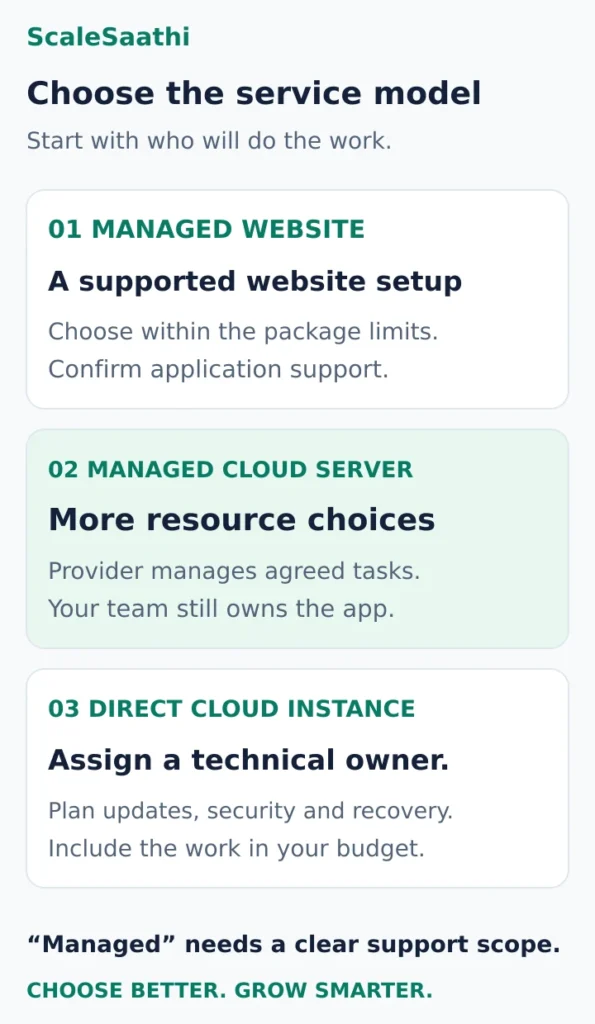
Choose the operating model before the provider. A managed website package suits an owner who wants hosting support without server administration. A managed cloud server gives a technical team more configuration choices. A direct cloud instance makes sense when someone can own maintenance, security and recovery.
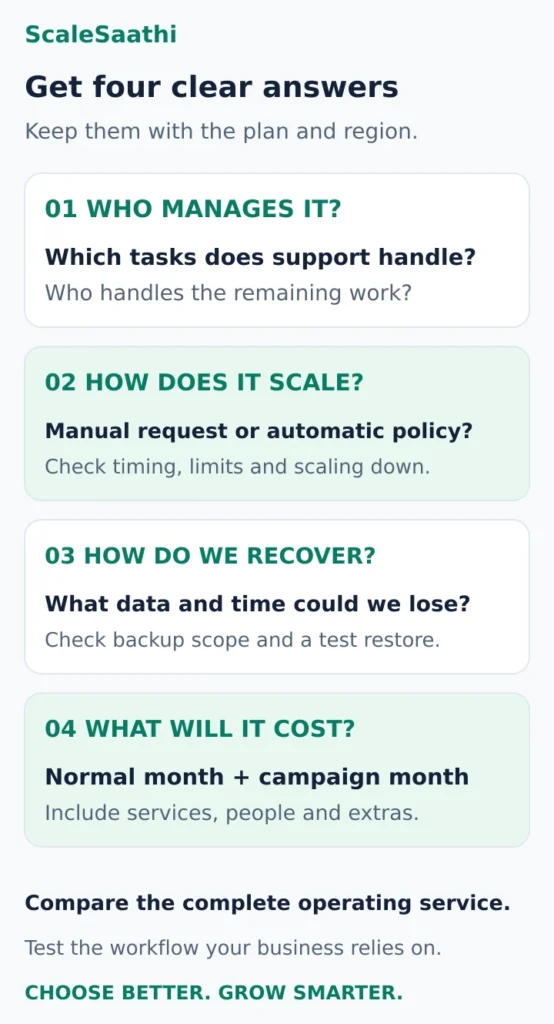
Ask these before paying for “cloud”
- Who looks after the server? A managed package (e.g. Hostinger Cloud Startup), a managed cloud server (e.g. Cloudways Flexible) or a bare instance (e.g. AWS Lightsail). On the bare option you patch the operating system, apps and firewall yourself.
- Does it grow by itself? Usually not. Cloudways Flexible lists vertical scaling; autoscaling belongs to its separate Autonomous product. Ask what triggers an upgrade, how long it takes, the ceiling, and whether you can scale back down.
- Will more capacity fix the actual problem? If checkout is waiting on slow database queries, more web-server memory may change nothing. There is no reliable “visitors per month” number that tells you to move.
- What happens when something breaks? A backup doesn’t keep checkout running, and a second server doesn’t undo a deletion. A full WordPress restore needs both files and the database. Ask for a test restore.
- Is it really in India? An India CDN location doesn’t mean your site and database run in India. Cloudways lists Bangalore for DigitalOcean. On AWS Lightsail, Mumbai bundles get half the advertised transfer allowance.
- What will the bill do? Cloudways Flexible charges last month’s usage in US dollars. DigitalOcean keeps billing for a powered-off Droplet. Ask for a normal-month and a campaign-month estimate.
Disclosure: Some links on this page are affiliate links. If you buy through them, ScaleSaathi may earn a commission at no extra cost to you. This never affects our rankings or recommendations. Read our affiliate disclosure.
The sections below work through those choices and the questions that separate a useful upgrade from an expensive change of label. For the wider buying checklist, start with our guide to choosing web hosting in India.
What cloud hosting actually means
Cloud hosting uses computing resources supplied through cloud infrastructure. In the NIST cloud definition, resources come from a shared pool and can be provisioned or released as needed; measured usage and elasticity are central ideas. In that definition, elasticity is automatic only in some cases.
A retail hosting package can put a simpler service on top of that infrastructure. You might receive a website dashboard and fixed resource allowance, a managed virtual server, or direct access to infrastructure that your team configures.
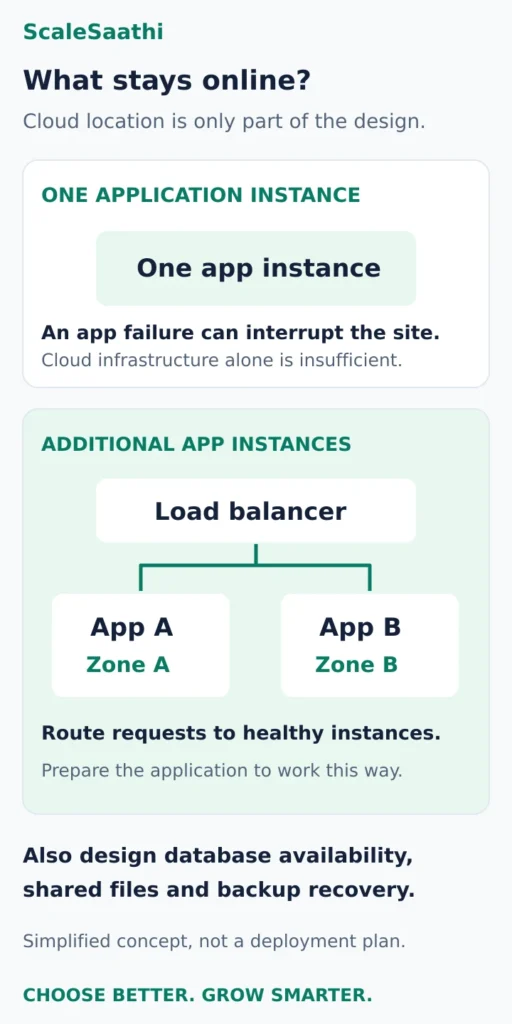
Your website may still run on one application instance. The provider's wider cloud network does not establish that your site runs across several locations, has a second working database, or can survive every failure without interruption.
Three ways to buy cloud web hosting in India
These are service-model examples, not a speed ranking. The relevant question is which responsibilities and controls you need.
Managed website package: keep routine hosting work simple
Best fit: an owner-operated WordPress site or store whose main requirement is a supported website environment.
Hostinger Cloud Startup illustrates this approach: the cloud plan bundles managed website hosting with a dashboard, CDN and support. Its advertised monthly equivalent depends on the selected prepaid term, with a separate renewal price.
Trade-off: you choose within the package's limits and supported software. “Managed” still needs definition: ask who handles a broken plugin, malware cleanup and a failed restore, rather than assuming every application problem is included.
Before choosing: get the renewal commitment and support scope in writing. A familiar panel matters more than infrastructure terminology if nobody on your team administers servers.
Managed cloud server: more choices with a management layer
Best fit: an agency, developer-supported business or growing application that needs control over server resources without taking on every infrastructure task.
Cloudways Flexible combines cloud-provider and server-size choices with managed hosting for applications including WordPress, Magento and Laravel. It lists vertical scaling as a feature. Cloudways Autonomous is a separate WordPress product with autoscaling; do not transfer that promise to a Flexible quote.
Trade-off: your team still needs to understand application performance and what support covers. The management service and underlying server are parts of one buying decision, but their responsibilities are not identical.
Before choosing: ask exactly how an upgrade works, whether reducing capacity requires migration, and which backup or other services add to the bill.
Direct cloud instance: assign a technical owner
Best fit: a team that needs infrastructure control and has someone accountable for keeping it running.
AWS Lightsail offers instance bundles alongside separately priced services such as databases and load balancers. A server bundle is a starting component; it is not a complete website operations service.
For the general infrastructure-as-a-service responsibility split, AWS uses EC2 as an example: customers manage the guest operating system, installed applications and firewall configuration. Check the responsibilities for each service you actually select.
Trade-off: a low instance price can hide administration time and additional components.
Before choosing: name the person who will apply updates, review alerts, recover data and respond outside office hours. If that answer is unclear, price managed help before committing.
Scaling up, scaling out and autoscaling are different
Scaling up means moving to a larger resource allocation, such as more CPU or memory for a server. Scaling out means adding application instances and distributing work between them. Neither term says the change happens automatically.
Autoscaling adds an agreed response to demand. For example, EC2 Auto Scaling uses configured groups, minimum and maximum instance counts, and policies that can launch or terminate instances. That is a configured service, not a benefit inferred from buying any cloud server.
Before a sale campaign, ask the host:
- Trigger: does someone request an upgrade, or does a configured policy respond to load?
- Timing: how long does new capacity take to become usable, and is there an interruption?
- Ceiling: what is the largest permitted size or instance count?
- Return path: can capacity and cost fall afterwards, and what work is required?
More capacity is useful only when it addresses the constraint. If checkout is waiting on slow database queries or an external service, adding web-server memory may leave the delay intact. Use monitoring and the guide to hosting resource limits to identify which limit you are actually reaching.
There is no reliable universal “visitors per month” threshold for moving to cloud. A cached article and a logged-in checkout place different demands on a server. Test representative pages and concurrent activity, especially the actions that earn revenue.
Reliability: separate availability from recovery
Availability concerns keeping the service reachable. Recovery concerns restoring a usable service and its data after something goes wrong. A backup does not keep checkout running during an outage; a second server does not necessarily undo an accidental deletion.
AWS's Lightsail load-balancer guidance describes distributing traffic to healthy instances and using instances in multiple Availability Zones for higher availability. It also explains that applications need preparation, including a shared database and potentially shared media storage. The database needs its own availability design.
Treat this as an architecture choice, not a mandatory shopping list for every small website. Ask the provider which failures your selected service handles and which still require a restore or intervention. A platform uptime promise and successful customer checkout are different measurements.
For backups, establish what is captured, how often, how long copies remain available, and who performs a restore. WordPress's backup guidance confirms that a full restoration needs both files and the database.
Set two business limits: how much recent work could you afford to lose, and how long could the site stay unavailable? A brochure site updated occasionally and a store taking orders throughout the day can need very different recovery arrangements. Ask for a test restore into a separate environment before relying on the promise.
What the India location changes—and what it does not
Check the origin region, where the application runs, separately from the CDN, which can serve cached copies nearer visitors. Cloudflare's cache documentation explains this distributed-copy model. An India CDN location alone does not establish that your application or database is hosted in India.
For an Indian audience, shortlist appropriate nearby origins and test the pages that must reach them. A fast cached homepage is insufficient evidence for checkout, account access or an uncached search.
There are concrete regional details to check. Cloudways lists Bangalore among its DigitalOcean locations. AWS Lightsail's pricing notes say Mumbai instance bundles have half the transfer allowance shown for the standard advertised bundles. Check the selected region's actual allowance before comparing two apparently identical server sizes.
Location also raises questions beyond page speed: where are databases and backups stored, which regions support the needed services, and who can answer a support request during your working hours? Do not infer data-location guarantees from an India-facing sales page.
Compare the running service cost
A prepaid managed package, a usage-billed managed server and a direct instance have different cost structures. Compare the same working setup over the same period.
Use four lines in your quote request:
- Base capacity: selected region, server or package size, billing term and renewal commitment.
- Necessary services: backups, database, storage, CDN, monitoring or load balancing where your design needs them.
- People: included support, optional management and the work your own team must do.
- Variable charges: transfer overages, temporary capacity, applicable taxes and currency-conversion charges.
Cloudways's billing guidance describes Flexible invoicing for previous-month usage and USD payments. A rupee budget therefore needs the actual converted charge, not an assumed permanent exchange rate.
Pay-as-you-go also does not always mean that powering off a server ends its cost. DigitalOcean's bundled CPU Droplet documentation says powered-off Droplets remain billable because resources stay reserved. Ask what cancels each charge, including retained storage and backups; export what you need before deleting anything.
Request a normal-month estimate and a campaign-month estimate. Ask whether a spending setting only sends an alert or enforces a limit, and what reaching that limit does to the site. For current plan prices and commitment calculations, use the web hosting cost guide.
Is cloud hosting the right next move?
Stay with your present category when important pages perform acceptably, recovery is dependable and there is no measured capacity or control problem. “Cloud” alone is not a reason to migrate.
Consider a managed cloud package when you want an upgrade within a supported website environment and its documented limits fit your workload.
Consider a managed cloud server when a technical owner needs resource and provider choices and can manage the application responsibilities that remain.
Consider direct infrastructure when your team needs the control, can maintain the system and has priced recovery and support alongside the instance.
If you are still choosing a category, use the ScaleSaathi Hosting Plan Finder as a starting point. Its general guidance does not replace workload testing. Once the service model is clear, our web hosting company comparison helps narrow the provider shortlist.
Before you move a working website
Write down the present problem and an acceptance condition: for example, checkout must complete reliably during representative peak activity. Record current performance so the new plan has something concrete to improve upon.
Test a copy of the site on the proposed service with the required software, scheduled tasks, email delivery, forms and payment flow. Confirm who manages the move, which changes need coordination and how you return to the old service if the new one fails the checks. Our website migration guide covers that process in more detail.
Before committing, keep a written record of the selected region, management boundaries, scaling process, restore arrangements and full billing terms. Those answers tell you what the cloud plan will do for your business.
Frequently asked questions
Is cloud hosting better than shared hosting for a small website?
It depends on the service and the problem you need to solve. A small site with acceptable performance, suitable support and dependable recovery may gain little from switching categories. Compare actual limits and management responsibilities, then test the workload that matters to your business.
Does cloud hosting scale automatically when traffic increases?
Only when the selected service includes an appropriate automatic scaling arrangement. A manual upgrade option is different. Ask what triggers the change, how long it takes, the maximum capacity, how capacity decreases afterwards and how each change affects the bill.
Can I manage cloud hosting without technical skills?
A managed website package can be suitable if its dashboard and support cover your needs. Direct infrastructure needs a technical owner. Before buying any managed service, confirm who handles server updates, application faults, security incidents and restores; the word managed is not a complete support agreement.
Does a cloud plan remove the need for backups?
No. Availability features and backups address different failures. Decide how much recent work you can afford to lose and how long recovery can take. Check backup scope, retention, access and restore responsibility, then verify that a separate test restoration produces a usable site.
Must I choose an Indian server location?
Use audience location and measured application performance to shortlist suitable regions. Check the origin separately from CDN locations, and confirm where the database and backups reside when that matters to your requirements. Test important uncached pages; a country label alone does not establish performance or data-location guarantees.
What should a cloud hosting budget include?
Include the chosen capacity, necessary storage and backup services, management or team time, and variable charges. Ask for ordinary and peak-demand estimates, renewal terms where relevant, and the actual tax and currency treatment. Confirm which charges continue when resources are stopped or retained.
Sources and further reading
- NIST — cloud computing definition and elasticity
- Hostinger India — cloud package features and term-based pricing
- Cloudways — Flexible, Autonomous, scaling features and locations
- AWS — Lightsail services, pricing and regional transfer allowances
- AWS — shared responsibility and the EC2 customer example
- AWS — configured EC2 Auto Scaling groups and policies
- AWS — Lightsail load balancing and application preparation
- WordPress — files, database and backup restoration
- Cloudflare — cached copies and the origin server
- Cloudways — Flexible billing, USD payments and usage notifications
- DigitalOcean — billing for powered-off bundled CPU Droplets