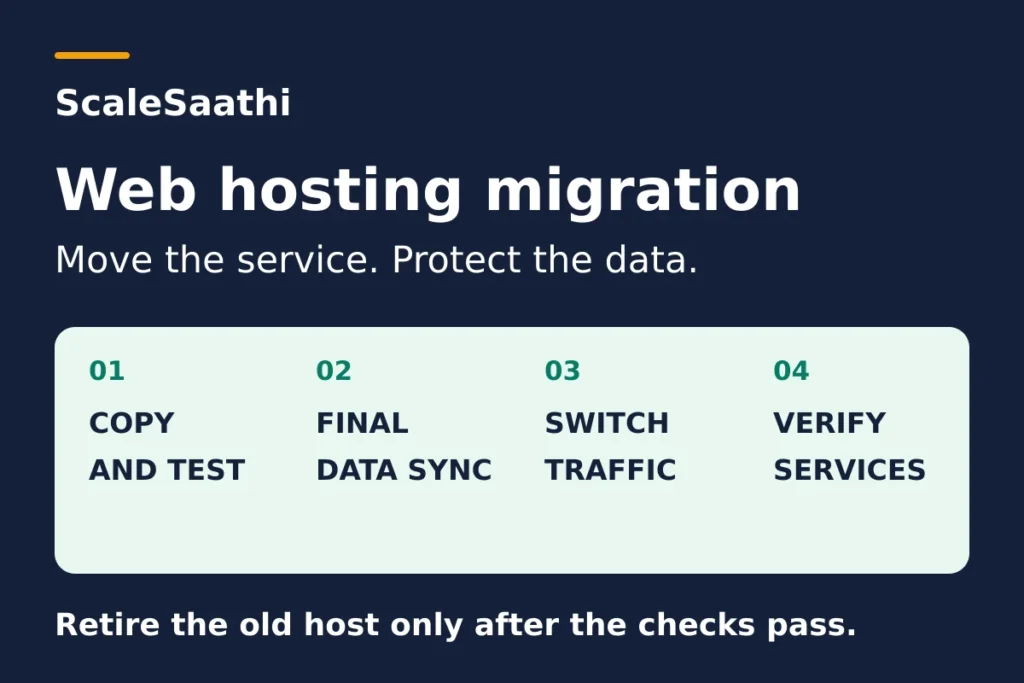
The most expensive hosting mistake I see is cancelling the old plan first. Do it the other way round: get a working copy running at the new host, test it, change only the DNS records you need, and switch off the old account last. Until then, the old one is your rollback.
For a simple information website, this can keep the existing site available while the copy is prepared. A shop, booking system or membership site needs extra control over new records. A short, planned pause may be preferable to accepting orders into two disconnected copies. No general checklist can guarantee zero downtime for every application.
The order that keeps your old site as the safety net
- Work out who controls each part: domain registration, DNS, website hosting and email. Moving one does not move the others.
- Get the move’s scope in writing. “Free migration” may not mean everything: Hostinger’s, for example, leaves out email, cron jobs, DNS records, custom SSL configuration and FTP accounts.
- Back up the files and the database somewhere outside the site you are moving, and save a copy of the whole DNS zone.
- Lower the website records’ TTL well before the switch. Cloudflare suggests allowing 24–48 hours, or longer to match the old TTL.
- Test the copy on the real domain name before changing DNS: login, enquiry form, checkout. A homepage screenshot is not a test.
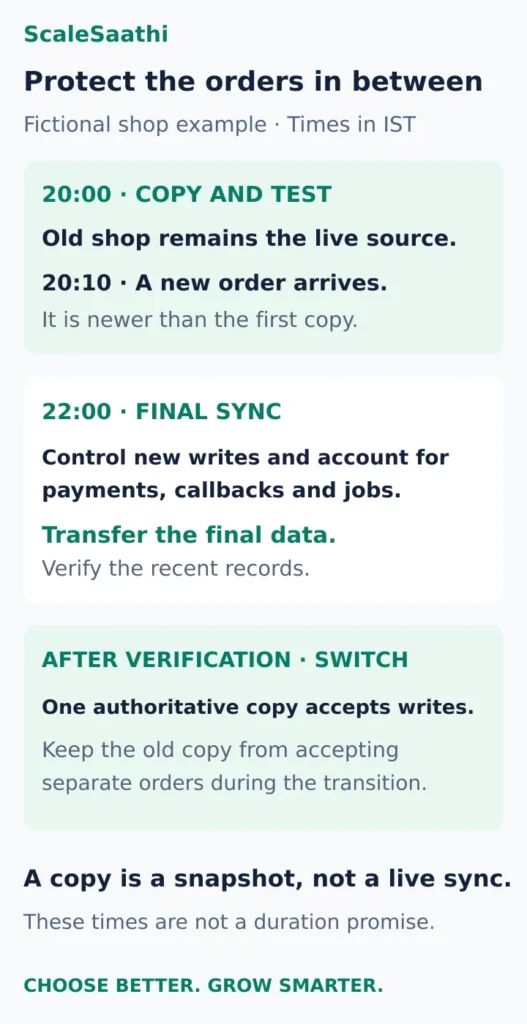
- Shops: an order that arrives after your first copy (say 20:10, after a 20:00 copy) must go into the final sync. Only one copy may take orders at a time.
- Change only the records the plan needs: the A and AAAA records for the main domain and the www name. Keep MX, SPF, DKIM and DMARC. Changing MX does not move old emails.
- Cancel the old account last, after the checks pass. “Wait 24/48 hours” is not a cancellation rule.
Disclosure: Some links on this page are affiliate links. If you buy through them, ScaleSaathi may earn a commission at no extra cost to you. This never affects our rankings or recommendations. Read our affiliate disclosure.
This page assumes you keep the same domain and page paths. It is based on official documentation and ScaleSaathi’s operational analysis, and the timed example is fictional.
Planning the whole hosting move? This checklist covers the service switch: DNS, email, new orders and recovery. If you only need to choose a tool to copy a WordPress site, start with our WordPress migration plugin comparison, then return here before directing visitors to the new host.
Start by deciding what is actually moving
Four services can sit behind one website address. They may be sold together, but moving one does not necessarily move the others.
| Service | What to establish before the move |
|---|---|
| Domain registration | Who renews the domain and controls the registrar account? |
| DNS | Where are the records that direct website and email traffic managed? |
| Website hosting | Where are the files, database and application settings? |
| Who stores the mailboxes and handles incoming and outgoing messages? |
Our recommendation for an ordinary website-only move is to retain working registration, DNS and email arrangements where possible. Check that they will remain active after the old hosting subscription ends. A bundled mailbox or DNS service may still depend on that account.
If you do not know which company controls each part, use our hosting and account identification guide before requesting a transfer. If the new hosting type is still undecided, our shared hosting versus VPS comparison can help establish the required resources and operating responsibility.
Avoid combining a host change with a redesign, new domain and new URL structure unless there is a separate plan for those changes. Keeping the scope small makes it easier to identify why something stopped working.
Get the migration scope in writing
Ask the receiving host to state whether it transfers files, databases, mailboxes, scheduled jobs, certificates, DNS records and configuration. “Free migration” does not establish that every service is included.
For example, Hostinger's migration documentation lists website files and databases while excluding items including email migration, cron jobs, DNS records, custom SSL configuration and FTP accounts. Its scope is a provider-specific example, not a rule for every host. Hostinger migration guidance.
Name the person doing the move and the person accepting the result. Keep a written record of the old DNS values, new destination and rollback contact. Budget for overlapping service periods and any paid work; our hosting cost guide explains how to include those costs.
Web hosting migration checklist: prepare before switching
Make a recovery copy and check the destination
Create a current backup outside the installation being moved, and confirm that it contains the necessary data. For WordPress, the files and database are separate parts of a normal full recovery. WordPress backup guidance.
Record the backup time and confirm who can restore it. Keep access details in a secure account-sharing or password-management process, not in the public migration checklist.
The new environment must support the actual application: runtime and database versions, storage, uploads, scheduled tasks and any required extensions. Copying files cannot make an unsupported application compatible. Have the host or developer verify those requirements before starting the final transfer.
For WordPress-specific transfer methods, use our WordPress migration plugin comparison. The sequence here still applies whether a plugin, a control-panel tool or a migration team copies the site.
Prepare DNS without changing the destination yet
Save the current DNS zone or record all relevant entries. Check the main domain, www, subdomains, email and service-verification records.
Where the DNS service allows it, lower the website records' TTL ahead of the move. TTL is a cache lifetime. Cloudflare's migration preparation guide recommends allowing 24–48 hours, or longer to match the previous TTL; it is preparation guidance, not a guaranteed completion period. DNS preparation guidance.
Illustrative cache example: if a resolver has already stored the old answer for 24 hours, changing the authoritative TTL to five minutes just before the switch does not erase that cached answer. Allow for the earlier cache lifetime in the schedule.
Cloudflare-proxied records use an automatic 300-second TTL that cannot be edited. That does not promise every user will see a change in five minutes. Cloudflare TTL rules.
Test the copy using the intended domain
Ask the host for a supported preview method. A technician can use a local hosts-file override to send the real hostname to the new server on the testing computer while public DNS still points elsewhere. cPanel's preview instructions.
A temporary URL can help, but may behave differently for redirects, logins and HTTPS. Confirm that the tester is reaching the new server; do not accept an unchanged view of the old site as proof that the copy works.
Use an access-controlled preview where it contains real customer information. Keep copied payment systems, outgoing notifications and scheduled jobs from performing real work during testing. Use the integration's supported test mode or another arrangement agreed with the operator.
Test a representative page, image and download, then the actions that matter: login, enquiry delivery, search, booking or checkout. A screenshot of the homepage is not enough. We cannot independently verify your site's compatibility or migration outcome; those checks must be completed on the actual destination.
Arrange HTTPS before the public switch
Ask the new host how it will issue or install a certificate for every public hostname. Let's Encrypt's HTTP validation uses the public domain, while DNS validation can work without exposing the new web server. A local hosts-file override does not redirect the certificate authority's checks. Certificate validation methods.
If Cloudflare protects the site, verify the intended proxy-to-origin configuration with the host. A Cloudflare Origin CA certificate is not generally trusted by browsers connecting directly, so a direct-origin preview can differ from the intended public route. Do not make disabling certificate validation the solution. Origin certificate guidance.
Protect the records created after the first copy
An initial backup is a snapshot, not an ongoing connection between the old and new sites. A store may create orders, accounts and stock changes while that copy is being tested. WooCommerce's documentation, for example, identifies products and orders as database data; copying a theme or upload folder alone does not transfer them. WooCommerce data and backup guidance.
For a site that accepts new information, agree a final-sync method with the operator. The practical aim is one authoritative place accepting business writes at a time.
For a modest site, that may mean temporarily pausing checkout, bookings or other changing functions, completing a final data copy, and reopening them on the verified destination. A busier service may need a documented forwarding or replication arrangement managed by a specialist. A visible maintenance page by itself may not stop background jobs, API requests or payment callbacks.
Ask the operator to account for browser submissions, scheduled imports, webhooks and queued work. Decide which requests are paused, forwarded, queued or reconciled using the application's supported method. Do not let both copies independently send customer emails, alter stock or process the same scheduled task.
A fictional shop's switch window
These times are an example in IST, not an estimate of how long your migration will take.
| Example event | Required decision |
|---|---|
| 20:00 — initial copy | The old shop remains the live source while the new copy is tested. |
| 20:10 — another order arrives | This order is newer than the first copy and must be included in the final sync. |
| 22:00 — agreed write pause | The operator accounts for in-flight payments, callbacks and jobs, then takes the final data copy. |
| After final verification — switch | The new environment becomes the active writer. The old copy cannot keep accepting separate orders. |
Record a usable checkpoint such as the latest order timestamp and identifiers, with whatever additional records the application needs. Do not rely on an order count alone: an existing order's payment state or a customer's details may have changed without creating a new order.
Some migration systems provide their own forwarding mechanisms. cPanel's Live Transfer can redirect certain web and mail services during transfers between cPanel & WHM servers. Its documented restrictions and DNS/mail behaviour need checking; it is not a universal feature of every migration. cPanel Transfer Tool.
Change only the DNS records the plan requires
For a website-only move with the same DNS provider, use the new host's supplied values for the relevant website records. A records point to IPv4 addresses; AAAA records point to IPv6 addresses. Check both the main domain and www, including any CNAME destination. DNS record types.
An old website AAAA record should not be left pointing at the previous server accidentally. Update or remove it according to the receiving host's IPv6 instructions. Do not paste an IPv4 value into an AAAA record or delete unrelated entries. Changing an origin address.
If you already use Cloudflare's proxy, a public lookup normally shows its proxy addresses. Confirm the configured origin and which server handles real requests; the public DNS answer alone may not prove the origin has changed.
If nameservers are changing too
Compare the complete new DNS zone with the saved original before the switch. Preserve mail-routing priorities, SPF, DKIM, DMARC and verification records for services that are staying. Automatic record discovery is not a substitute for that comparison. DKIM may use TXT or CNAME records depending on the email provider. Microsoft's external DNS record reference.
If DNSSEC is enabled, follow the receiving DNS provider's migration procedure. An obsolete DS record at the registrar can break validation after a nameserver change. The required waiting periods depend on the relevant TTLs. An ordinary website A/AAAA edit at the existing DNS provider is not, by itself, a reason to disable DNSSEC. Cloudflare DNSSEC migration guidance.
If mailboxes are moving, treat that as a separate transfer. Changing MX routes new incoming mail; it does not move historic messages. Microsoft's domain-connection instructions, for example, require preparing users and mailboxes before changing mail routing. Use your actual email provider's procedure and record values. Microsoft mail-routing instructions.
Also test email sent by the website: the new server may need its SMTP settings or authorised SPF sender updated even when the mailbox provider stays the same. Follow the mail provider's instructions when updating the existing SPF record; do not add a second competing SPF record.
Verify the live replacement—and know when to roll back
Remove any local hosts-file override before checking normal public routing. Test through more than one connection where possible, such as office broadband and mobile data, and inspect the old and new server logs with the operator.
Use a written acceptance list:
- The intended hostname loads over valid HTTPS, including the correct
wwwor non-wwwredirect. - Important pages, images and downloads work; no preview hostname appears in normal links.
- A controlled enquiry or transaction reaches the right system, with expected confirmation and notification behaviour.
- Email sends and receives through the intended service; required old messages and mailboxes remain available.
- Only the intended environment runs scheduled jobs and accepts business writes; recent records are reconciled.
- Backups, monitoring and the named support owner cover the new environment.
For search visibility, preserve the intended URLs, canonical addresses and Search Console verification. Remove temporary crawl/indexing blocks from the live copy, and check that its firewall allows the required crawler access. Monitor access and crawling after the move. Google's hosting-change guidance covers this same-URL situation; it does not promise a ranking increase.
Before the new site has accepted changes, returning traffic to the intact old environment may be a practical recovery option. DNS caching still prevents an instant universal reversal, so keep write control in place.
After the new site has accepted orders or other records, do not blindly restore an older backup or point everyone back. Pause the affected writes, preserve the new records, and have the operator reconcile the data before deciding which copy becomes authoritative. Otherwise, a visually successful rollback can hide missing orders.
If payment status is uncertain, reconcile it with the payment provider's records before retrying or fulfilling an order. The aim is to recover both the website and the business transaction, not merely make the homepage load.
Retire the old account only after the checks pass
Keep the old service paid and available during the transition. Do not turn “wait 24/48 hours” into an automatic cancellation rule. Review residual traffic, mail, jobs, DNS dependencies and the recovery plan. Retain an independent final backup and any records needed for reconciliation.
Google recommends shutting down the old infrastructure only when users and Googlebot are receiving the new site correctly and the old infrastructure is no longer being used. Apply the same evidence-based approach to the other services in the account.
Confirm separately that domain renewal, DNS and email will continue. Then remove migration access that is no longer needed and close the old subscription under its cancellation terms. The move is complete when the intended services and data work on the new arrangement—not when the first file copy finishes.
Frequently asked questions
Do I need to transfer my domain registration when moving hosting?
Usually you can keep the domain at its current registrar and change the website destination through DNS. Check whether DNS or email depends on the old hosting subscription before cancelling it. A registrar transfer is separate work.
How long does web hosting migration take?
There is no reliable universal duration. Copy size, database activity, testing, email migration, certificate preparation and DNS caching all affect the plan. Agree a schedule and completion checks with the operator instead of treating a TTL value as a migration deadline.
Will changing MX records move my old emails?
No. MX changes direct new incoming mail. Historical messages, mailboxes, aliases and forwarding need their own transfer and verification plan if the email service is changing.
Do I need new redirects if my domain and page paths stay the same?
A hosting-only move with identical public URLs does not by itself require redirects from each page to a different address. Preserve existing redirects, canonicals and HTTPS behaviour. A domain or URL-path change needs a separate redirect and search-migration plan.
Sources and further reading
- Hostinger — website migration scope and exclusions
- WordPress — files, database and backups
- Cloudflare — DNS migration preparation and TTL lead time
- Cloudflare — DNS TTL and proxy defaults
- cPanel — preview a website before pointing DNS
- Let’s Encrypt — HTTP and DNS certificate validation
- Cloudflare — Origin CA certificate trust
- WooCommerce — store data, staging and backup preparation
- cPanel — Transfer Tool and Live Transfer limits
- Cloudflare — DNS record types
- Cloudflare — update an origin IP address
- Microsoft — external DNS and email-authentication records
- Cloudflare — DNSSEC migration
- Microsoft — mailboxes, MX changes and domain connection
- Google Search Central — hosting changes without URL changes