Last updated: 25 October 2026. Prices were re-checked on each provider’s official page on this date and exclude 18% GST unless stated.
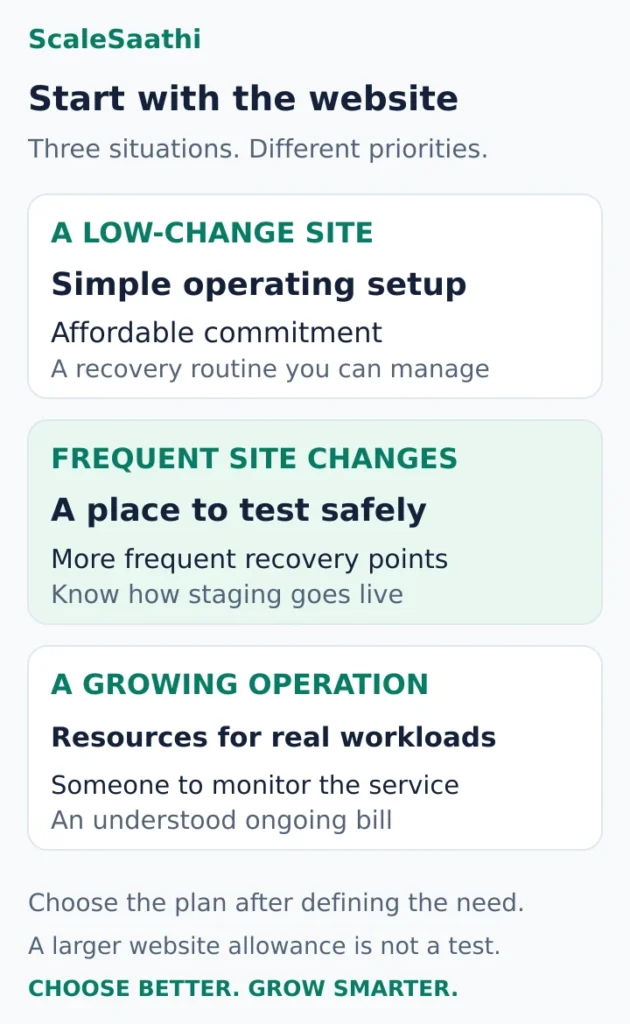
The best WordPress hosting in India depends on what your site needs you to manage. For a small blog or service website with infrequent changes, Hostinger Premium is our starting shortlist choice if the long prepayment suits your budget. Bluehost Starter is worth comparing when built-in staging matters. Cloudways Flexible suits a growing site with someone available to manage its server choices and spending.
For a business that changes its site frequently, compare Hostinger Unlimited against Premium before buying. Its stronger recovery package can matter more than saving on the opening invoice.
Match the plan to how often your site changes (prices before 18% GST, checked 25 Oct 2026)
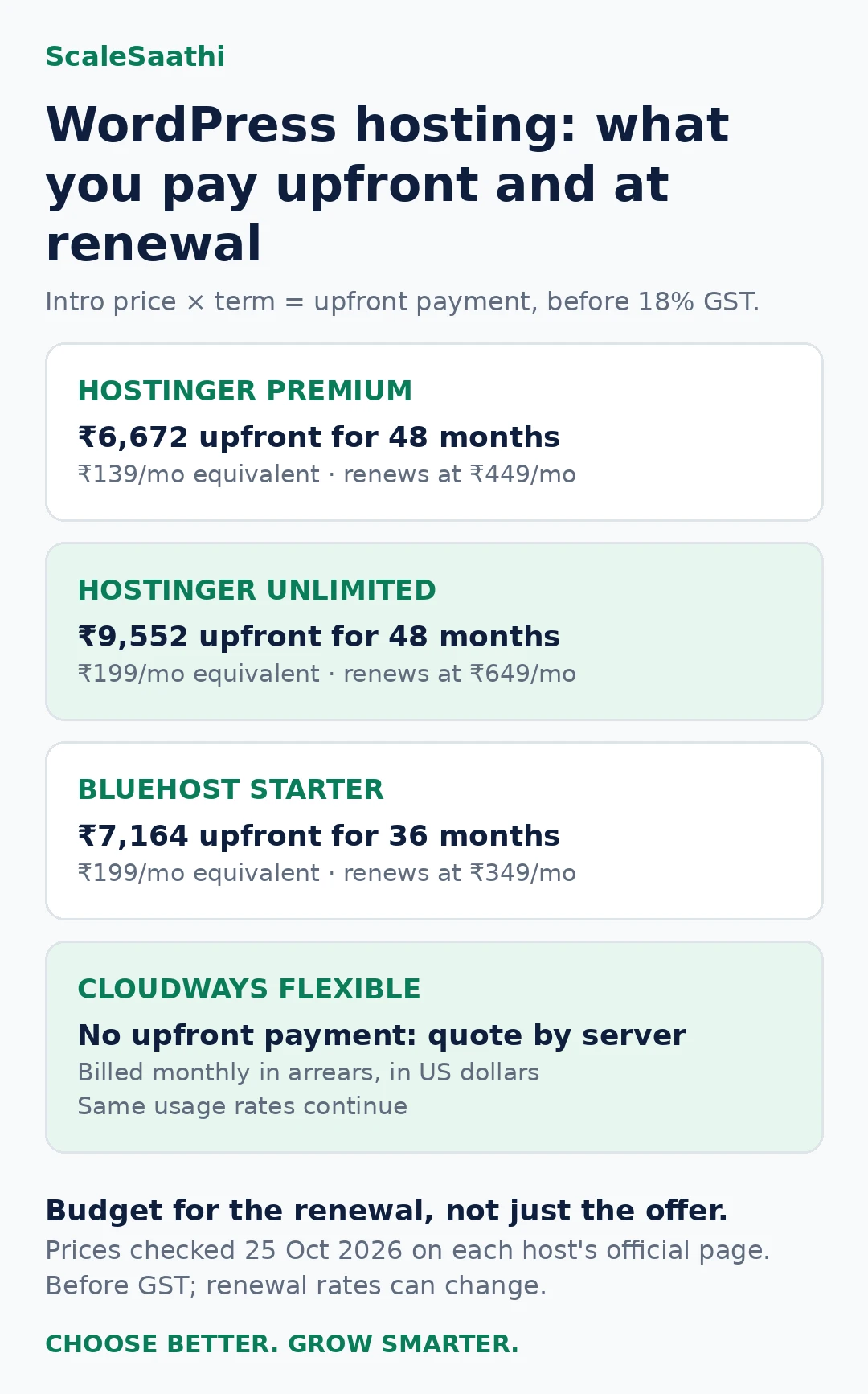
- Small site, rarely edited: Hostinger Premium, ₹6,672 upfront for 48 months, renews at ₹449/mo. Weekly backups only, and no built-in staging on this tier.
- Edited every week: Hostinger Unlimited, ₹9,552 upfront for 48 months, renews at ₹649/mo, with daily backups and 50 GB NVMe.
- You test changes before they go live: Bluehost Starter, ₹7,164 for 36 months, renews at ₹349/mo, staging included. Its ten sites share 10 GB, which averages just 1 GB each. Chat support only, no phone.
- Growing store with someone to run the server: Cloudways Flexible bills last month’s usage in US dollars. Stopping a DigitalOcean, Linode or Vultr server does not stop its billing.
- Renewal shock: every shared plan here renews at two to three times its introductory rate.
- Staging on a shop: publishing Hostinger’s staging copy replaces the live files and database, so orders placed since the copy was made can be lost.
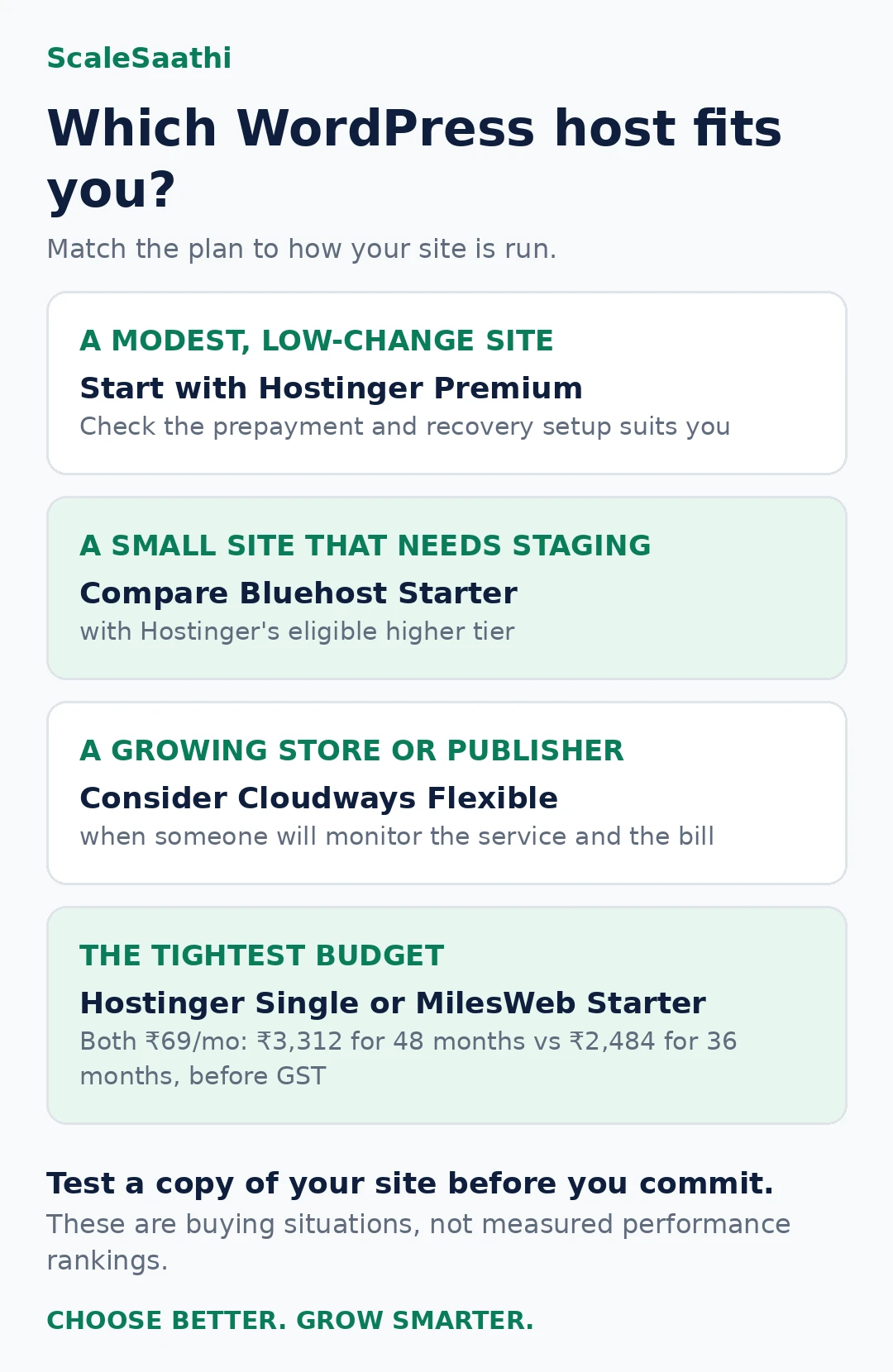
- The two ₹69 plans are not the same buy: Hostinger Single is ₹3,312 for 48 months (renews ₹289/mo); MilesWeb Starter is ₹2,484 for 36 months, and its own pages disagree on renewal (“same price” vs ₹179/mo). Get it in writing.
These are recommendations by use case, based on published plans and documentation. We have not run identical-site speed tests or purchased every plan. Some links on this page are affiliate links marked as sponsored. If you buy through them, ScaleSaathi may earn a commission at no extra cost to you. This never affects our rankings. Read our affiliate disclosure.
New to WordPress hosting? Read what WordPress hosting is and what WordPress needs first, then use the getting-started checklist once you have bought a plan.
How we chose this WordPress hosting shortlist
We prioritised five buying questions: does the plan fit a real website, can its owner recover from a mistake, can changes be tested safely, is support appropriate, and is the ongoing bill understandable?
The shortlist covers three operating situations: a modest site with a packaged plan, small installations needing a staging workflow, and a growing operation needing cloud configuration choices. It is a focused selection, not an exhaustive ranking of every provider serving India. A host omitted here is not automatically a poor choice.
We have not assigned speed scores, claimed a fastest host or treated advertised visitor estimates as capacity guarantees. Server location, caching and storage specifications help form a shortlist; they do not establish how your particular theme, plugins and database will perform.
Quick comparison: the three picks side by side
Entry plans as shown on each official page on 25 October 2026. Rupee prices exclude 18% GST. “Upfront” is the base payment for the whole introductory term, which is what you actually pay at checkout before tax.
| Plan | Intro price | Term | Upfront (before GST) | Renews at | Sites / storage | Backups | Staging | India server |
|---|---|---|---|---|---|---|---|---|
| Hostinger Premium | ₹139/mo | 48 months | ₹6,672 | ₹449/mo | 3 sites / 20 GB SSD | Weekly | No (Business or higher) | India listed as a selectable location |
| Hostinger Unlimited | ₹199/mo | 48 months | ₹9,552 | ₹649/mo | Unlimited sites / 50 GB NVMe | Daily | Confirm in order | India listed as a selectable location |
| Bluehost Starter | ₹199/mo | 36 months | ₹7,164 | ₹349/mo | 10 sites / 10 GB NVMe | Weekly | Yes | Not stated on the plan page |
| Cloudways Flexible | Quote by server | Monthly, billed in arrears | None (usage billed in USD) | Same usage rates | Depends on server | Configurable; offsite storage US$0.033/GB | Yes | Bangalore (DigitalOcean) |
Two things this table makes obvious: the cheapest-looking monthly rate is not the smallest cheque, and every shared plan here renews at two to three times its introductory rate. Budget for the renewal, not only the first term.
Best WordPress hosting in India: our picks
Hostinger Premium: our starting pick for a modest site
Best for: A blogger, consultant or local service business with a small site and a manageable backup routine.
Published offer: ₹139/month equivalent for 48 months, or ₹6,672 upfront before GST, with an advertised renewal equivalent of ₹449/month. Premium lists three websites, 20 GB SSD storage and weekly backups. Its domain and two mailboxes per website are first-year offers. Check Hostinger’s WordPress plans.
Why we would shortlist it: It gives a small operation room to grow without immediately taking on cloud-server configuration. The case for buying is strongest when you expect to keep the site for several years and can afford the initial payment without cutting your content or maintenance budget.
Where we would pause: Weekly recovery points can leave too much work to recreate on a frequently changing site. Premium also does not qualify for Hostinger’s built-in staging tool; the documentation places that at Business or higher. Hostinger staging eligibility and workflow.
The upgrade worth comparing: Unlimited was advertised at ₹199/month equivalent for 48 months (₹9,552 upfront before GST), renewing at ₹649/month, with daily backups and 50 GB NVMe storage (checked 25 Oct 2026). Those rates are on the official plan page linked above. Hostinger’s limits document explains that Business is now sold as Unlimited on most pages. Check the exact order’s staging entitlement when the names differ. Plan naming and resource limits.
Our decision: Choose Premium for a low-change site when its recovery arrangements are adequate. Compare Unlimited first when regular editing, plugin work or the cost of downtime makes daily recovery and a testing environment useful. Do not upgrade simply because a plan advertises more websites.
Bluehost Starter: worth comparing for staging and small installations
Best for: An owner or freelancer who wants to test WordPress changes before applying them to a live site.
Published offer: ₹199/month equivalent on a 36-month term, or ₹7,164 upfront before GST, renewing at an advertised ₹349/month equivalent. Starter lists ten websites sharing 10 GB NVMe storage, weekly backups, WordPress staging, managed updates, SSH and WP-CLI. Support is 24/7 chat; phone is excluded. Pro Email is a trial. Check Bluehost’s Starter plan (US site).
Why we would shortlist it: Staging makes the entry plan worth investigating if you routinely change layouts or plugins. You may prefer that workflow to arranging a separate staging solution yourself. Developers can assess the included command-line tools; a beginner does not need to use them just to publish a normal site.
Where we would pause: The site count can distract from the shared storage allowance. As simple arithmetic, ten equally sized sites would average just 1 GB each before any other counted usage; that is not a promised allocation per site. Ask what staging copies and retained data count towards the limit.
Weekly backups still require a deliberate recovery plan, and a phone-first buyer should look beyond Starter. Do not treat a higher-priced Bluehost tier as proof of daily backups: verify the specific backup frequency on that tier.
Our decision: Consider Starter when staging is useful and the combined sites are genuinely small. We would not choose it for ten substantial client websites merely because ten installations are allowed.
Cloudways Flexible: for a growing site with an operational owner
Best for: A growing publisher, agency or WooCommerce operation that needs infrastructure choices and has someone to oversee them.
Cloudways Flexible offers cloud-provider selection, server scaling, staging and backup/restore controls. Its WordPress page lists DigitalOcean’s Bangalore region. These are reasons to investigate a suitable configuration, not evidence that the smallest server will handle your store. Cloudways WordPress hosting and workflows.
Price approach: Get a quote for the selected provider, region and server size. Cloudways’ public pricing page displays inconsistent entry-card monthly and hourly figures, so we have not attached one verified server specification to a headline “from” rate. The same page lists offsite backup storage at US$0.033/GB per server and separate email, CDN and support add-ons. Cloudways configuration pricing and extras.
Flexible invoices cover the previous month’s usage and transactions are processed in US dollars. The payment guide also warns that stopping a DigitalOcean, Linode or Vultr server does not stop its billing. Cloudways payment and billing guide.
Why we would shortlist it: A team with actual resource requirements can evaluate a server configuration and adjust its operating setup. This is more useful than choosing another shared plan solely for a larger advertised visitor allowance.
Where we would pause: Someone must review usage, backups, paid extras and the invoice. If the business owner expects one fixed rupee bundle and no infrastructure decisions, Flexible may add unnecessary work. Also ask which application problems are included in standard support and which require a paid tier or your own developer.
Our decision: Consider it after identifying a resource or workflow requirement your present plan cannot meet. Do not move a quiet brochure site to cloud hosting just because the category sounds more advanced. Our guide to managed WordPress hosting explains what to ask a provider to manage.
Compare the invoice, renewal and recovery costs
The advertised monthly figures above are not directly comparable payment schedules. Hostinger’s illustrated offer covers four years; Bluehost’s covers three; Cloudways uses ongoing billing. A shorter commitment may also carry a different rate.
For the India plan examples, budget for GST in addition to the displayed base amount and confirm the final invoice. Cloudways requires its own tax and currency check. A rupee conversion calculated today is not a promise of what your card will charge next month.
Use the following questions to make two shortlisted offers comparable:
- What leaves the bank account now? Record the selected plan, term, tax and compulsory extras.
- When does each service renew? Hosting, the domain and email can have different renewal dates.
- What will the next hosting term cost? A displayed monthly renewal equivalent does not tell you how many months will be collected together.
- What must be added to meet your recovery needs? Include any backup storage, restore service or maintenance help you actually require.
- What happens if you leave early? Read cancellation and refund conditions for each item before paying.
For the fuller calculation, use our web hosting cost and renewal guide. If the lowest feasible spend is your main constraint, the budget options section below compares the two ₹69 plans.
The practical trade-off is cash versus flexibility. Prepaying for years can be reasonable for an established site with a clear operating plan. It is harder to justify for a short experiment if it leaves no budget for the work needed to make the site useful.
Backups and staging: what to check before committing
A plan has to protect the work you cannot afford to recreate. A five-page brochure updated once a month and a shop taking orders all day have different recovery needs.
WordPress identifies both files and the database as necessary parts of a complete backup. Keep copies outside the hosting account, and practise restoring a backup to a separate test environment. WordPress backup guidance.
Ask these questions in a support conversation before you rely on a plan:
- How often are backups taken, and how many recovery points are retained?
- Can I restore the full site if WordPress Admin is unavailable?
- Do I need support to restore it, and is there a charge?
- Can I download a complete copy for storage elsewhere?
- What happens to backups if my account is suspended or cancelled?
Daily is not automatically enough for every store. Decide how many hours of new orders, registrations or content you could tolerate losing, then choose a backup process around that requirement. Do not count an untested backup as a completed recovery plan.
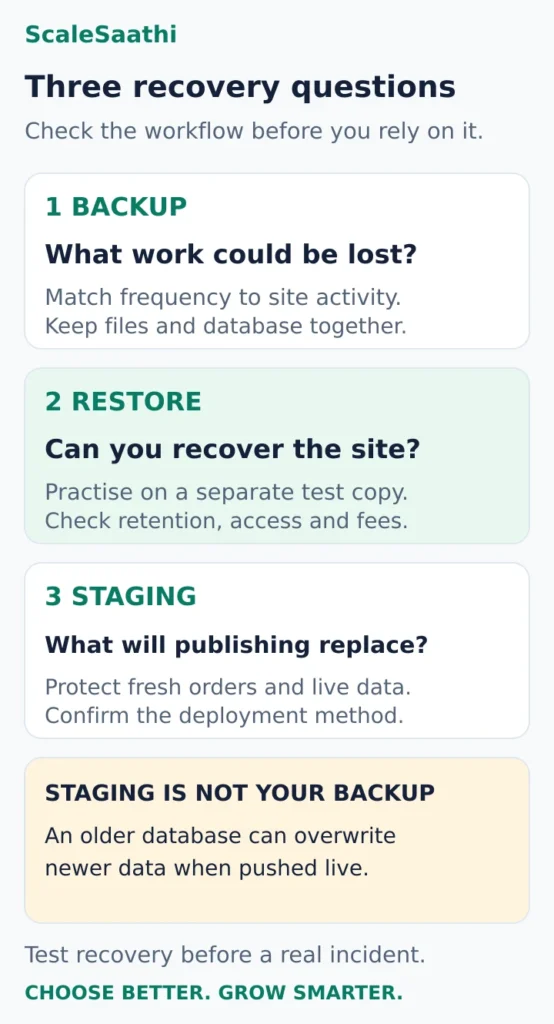
Staging also needs care. Hostinger explicitly warns that publishing a staging copy replaces the live files and database, overwriting changes made since the copy was created. A store can therefore lose newer order data if someone pushes an old database without planning the deployment. See the Hostinger staging guide linked in its profile.
For a trading site, ask your developer or host how to deploy the intended changes while preserving fresh live data. A staging badge is useful only when the publishing process is understood.
What changes the decision for an Indian audience?
Server region helps, but test the whole site
Hostinger lists India for web and cloud hosting, subject to what is available during setup. Cloudways lists Bangalore for DigitalOcean. Confirm the selected location for the exact product; the presence of an Indian sales page does not establish where a website runs. Hostinger’s server-location documentation.
Use a representative site to test pages, forms and WordPress Admin, including the functions visitors actually use. A cached article page and a logged-in checkout can behave differently. Keep the theme, plugins, content and test conditions consistent when comparing hosts; an empty demo proves very little.
Resource limits matter more than website counts
Check storage, database and file-count limits, plus the resources available for concurrent work. Hostinger’s published limits, for example, list CPU, memory and PHP workers separately from website count. A generous site allowance does not remove those constraints. Use our guide to hosting plan limits to work through them.
For an existing site, collect storage use, database size and evidence of repeated slowdowns or resource-limit events. Ask the prospective host to explain which part of the proposed plan addresses the problem. Upgrading without that connection can preserve the problem at a higher price.
Billing and communication need to fit your business
Confirm that your intended payment method works for the purchase and subsequent charges. Put the billing account, domain access and recovery contacts under the business’s control. Record email renewal separately from hosting and test form delivery to an external inbox.
If the domain is moving too, establish which DNS and email records must remain intact. A successful website migration does not by itself prove that enquiry emails or order messages still arrive.
Which option should you choose?
For a modest, low-change site: Start with Premium and decide whether the prepayment and recovery setup are acceptable. If they are not, compare another billing term or a plan with the missing recovery features before purchasing.
For a small site that needs staging: Compare Bluehost Starter with Hostinger’s eligible higher tier. Price the full arrangement, including any backup or maintenance work you would otherwise have to arrange.
For a growing store or publishing operation: Define the workload and recovery requirement first. Consider Cloudways Flexible when its configuration choices solve a specific need and someone will monitor the service and bill.
If you are unsure which hosting category fits, try the ScaleSaathi Hosting Plan Finder. Use its result to narrow the category, then check the provider’s exact plan rather than treating the tool as a live quotation.
Before committing a live site, test a representative copy, contact support with a real question and verify the recovery process. When switching providers, use our WordPress migration guide and keep the old service available until the new site, DNS and email have been checked.
Budget options: the cheapest WordPress hosting
If the smallest possible opening payment is the main constraint, two entry plans both advertise ₹69 a month. They are not the same purchase.
| Plan | Intro price | Paid term | Base payment (before GST) | Renewal as published | Includes |
|---|---|---|---|---|---|
| Hostinger Single | ₹69/mo | 48 months | ₹3,312 | ₹289/mo | 1 website, 10 GB SSD, weekly backups |
| MilesWeb Starter | ₹69/mo | 36 months (+3 bonus months advertised) | ₹2,484 | Web-hosting page: “same price at renewal”; its WordPress price page lists ₹179/mo | 1 website, 10 GB NVMe, daily backups, 1 email account |
The base payments differ by ₹828 because they buy different lengths of service, so this is not a like-for-like saving. MilesWeb’s own pages disagree on renewal, so get the renewal amount in writing from the order screen before relying on either figure. Do not count bonus months as paid months.
What if you have ₹3,000 available today?
MilesWeb states that displayed prices exclude 18% GST. On that basis:
- Hosting base: ₹69 × 36 = ₹2,484.
- GST on that base: ₹2,484 × 18% = ₹447.12.
- Calculated payment before any extras: ₹2,931.12, leaving ₹68.88 from ₹3,000.
Hostinger’s ₹3,312 base payment already exceeds ₹3,000 before tax. A shorter-term quote may differ; do not assume the same discounted rate applies. And remember that a hosting subscription does not fund the domain renewal, future hosting renewals or paid help.
Which extras can overturn the cheap-plan decision?
Domain: Check your chosen extension, registration price and renewal separately. A free-domain offer may exclude the name you want. Already owning a domain can change which bundle is cheapest. Use our domain registrar comparison to check ownership and recurring costs.
Email: Decide whether the site needs one address or several mailboxes, and whether they must retain substantial messages. A trial is different from an ongoing inclusion. Test website-generated mail separately from the ability to log into a mailbox.
Recovery and maintenance: A free backup plugin still needs configuration, suitable storage and a restoration process. If you will pay someone to maintain the site, include that cost when comparing a minimal plan with a more complete package.
Cancellation: A money-back headline does not necessarily cover domains, add-ons or every purchase term. Hostinger publishes product-specific exclusions, so read the conditions for the exact items in your order. Hostinger refund policy.
Avoid adding premium themes, multiple security subscriptions or optimisation tools before identifying a specific need. Keep the initial WordPress setup small enough that you understand what each paid item does.
WordPress hosting basics: what you are actually buying
WordPress.org or WordPress.com?
The free WordPress software from WordPress.org is installed on hosting you rent; WordPress.com is a hosted service run by Automattic. Everything on this page is about the first route, where you choose the host and control the files, plugins and themes.
| WordPress.org on your own hosting | WordPress.com | |
|---|---|---|
| Who runs the server | The hosting company you choose | Automattic |
| Plugins and themes | Any you install | Depends on the WordPress.com plan |
| What you pay for | Hosting, domain and any paid plugins | A WordPress.com plan |
| Moving later | Copy files and database to another host | Export your content |
Do you need special “WordPress hosting”?
No. WordPress runs on ordinary shared hosting that meets its requirements, and at some companies the two products are the same plan under different names; Bluehost’s India site, for example, presents web hosting and WordPress hosting together. What a WordPress-labelled plan usually adds is a one-click installer, automatic updates, caching and, on some tiers, staging. Compare those features, not the label.
What WordPress needs from a host
WordPress.org currently recommends PHP 8.3 or greater, MySQL 8.0 or MariaDB 10.11 or greater, and HTTPS support, with Apache or Nginx as the web server. Older setups (PHP 7.4+, MySQL 5.5.5+) still run WordPress but are not recommended. Any host on this page should meet the recommendation; ask before buying elsewhere. WordPress requirements.
Which type of hosting fits which site?
| Type | Fits | Who handles the server | Watch for |
|---|---|---|---|
| Shared WordPress hosting | Blogs, portfolios, local-business sites | Host | Resource limits shared with other accounts; renewal jump |
| Managed WordPress | Sites where the owner wants updates, caching and backups handled | Host, including WordPress-level tasks | What “managed” actually covers on that tier |
| Managed cloud (e.g. Cloudways) | Growing stores, publishers, agencies | Platform manages the stack; you choose server size | Usage billing, add-ons, someone to watch the bill |
| VPS | Developers who want root access | You | Security patching and backups become your job |
Our managed WordPress hosting guide covers the managed tier in more depth.
Speed: what to measure
Google’s Core Web Vitals give concrete targets: Largest Contentful Paint within 2.5 seconds, Interaction to Next Paint under 200 milliseconds and Cumulative Layout Shift under 0.1. Hosting affects the first two most, but a heavy theme or plugin can miss them on any host. Test your own representative site rather than trusting a provider’s speed claim. Google on Core Web Vitals.
Getting started: the first hour after you buy
- Record the order. Save the invoice showing plan, paid term, GST and the renewal rate.
- Pick the server location closest to your visitors if the plan offers a choice (India for an Indian audience).
- Connect the domain and wait for DNS to resolve before installing anything you want to keep.
- Install WordPress with the host’s installer, using a unique admin username and a strong password.
- Turn on SSL and confirm the site loads on https:// with no browser warning.
- Set the basics: site title, time zone (Asia/Kolkata), permalinks and a privacy page.
- Add only the plugins you need: a backup plugin, a contact form and, if the host does not provide one, a cache.
- Take and test a backup stored outside the hosting account before you publish real content.
- Test your contact form by sending a message to an external inbox.
- Put renewal and recovery contacts on a business email you control, not a freelancer’s.
Common mistakes to avoid
- Choosing on the monthly rate without checking the upfront payment and renewal.
- Assuming weekly backups are enough for a site that changes daily.
- Publishing a staging copy over a live store and losing new orders.
- Installing many plugins “just in case”, which slows the site and adds update work.
- Leaving the domain or hosting account in a contractor’s name.
Other hosts we checked: Kinsta, SiteGround, BigRock and HostingRaja
These are not our main picks, but readers often ask about them. We read each company’s own plan page on 25 October 2026. Where a price or term was not visible, the table says so instead of guessing. None of these links earn us money.
| Host | Plan we checked | Upfront price | Renewal | GST and currency | Backups and staging | India server | Best for |
|---|---|---|---|---|---|---|---|
| Kinsta | Single 20GB (managed WordPress, 1 site) | US$35 a month billed monthly, or US$350 a year (saves US$70 against monthly) | Shown as the regular price; no separate renewal rate listed | Charged in US dollars; check whether GST is added at checkout | 14-day backup retention; one-click staging on every plan | Yes, Mumbai is one of its data centres | Business sites that want premium managed WordPress and can pay in USD |
| SiteGround | StartUp (1 site, 10 GB) | US$2.99 a month, prepaid for 12 months (US$35.88) | US$17.99 a month | Prices shown exclude tax; charged in US dollars | Daily backups on all plans; staging only from GrowBig upward | Not confirmed. Its page lists data centres in Asia without naming India | Careful buyers who value support and are fine with a big renewal jump |
| BigRock | Entry hosting plan (plan name and terms shown only at checkout) | From ₹69 a month advertised; check current price for your term | Check current price | Check at checkout whether ₹ prices include GST | Weekly backups available; it advises a paid add-on for automated backups. Staging not stated | Yes, you can choose an India data centre | Buyers who want an India data centre and phone support in business hours |
| HostingRaja | Managed WordPress (10 GB storage, 50 GB bandwidth) | Check current price (the page headline mentions ₹49, but plan terms were not shown) | The page says no price increases at renewal; confirm in your order | Check at checkout | Daily backups kept for 14 days; staging mentioned | Not stated on the plan page | Price-sensitive WordPress sites that want daily backups included |
- Kinsta and SiteGround bill in US dollars, so your card may add a foreign-currency fee and the rupee cost moves with the exchange rate.
- SiteGround’s StartUp jumps from US$2.99 to US$17.99 a month at renewal, about six times the first-year price. Budget for the renewal, not the offer.
- BigRock and HostingRaja show full plan prices only inside their order pages. Note the price for your exact term, the renewal and the GST line before you pay.
- We also tried IndiaWebHost, but its website did not load when we checked, so it is left out.
Frequently asked questions
Which WordPress hosting should a beginner in India shortlist?
For a modest site, start by comparing Hostinger Premium against your commitment and recovery needs. Compare Bluehost Starter if staging is a priority. A site that changes frequently should evaluate stronger recovery features before deciding on the lowest entry price.
Is the cheapest WordPress plan necessarily the best value?
Only if it meets the actual requirement. Compare the initial payment, renewal term, required extras and the work needed to keep the site recoverable. A low monthly equivalent can still require a substantial upfront payment.
Does a plan allowing ten websites guarantee room for ten large sites?
No. Website count is one limit among several. Storage and other resources must cover the actual combined workload. Ask what staging copies and retained data count towards the allowance.
Is Cloudways Flexible a fixed-price WordPress package?
Treat it as a configured service with ongoing billing. Obtain the price for the chosen infrastructure, region and resources, then include required extras, usage charges, tax and currency costs. Have someone review the service and invoices.
Can I publish a staging site without affecting new orders?
Do not assume that. A full database replacement can overwrite data created after the staging copy. Confirm the deployment method with the host or developer and preserve fresh live data before applying changes.
Can I switch WordPress hosts later?
Yes, but plan the move and verify the result. Keep access to files, databases, the domain and DNS, arrange migration help if needed, and test the new website and email before ending the old service.
Is WordPress hosting different from normal web hosting?
Usually only in the extras. WordPress runs on any hosting that meets its requirements. WordPress-labelled plans tend to add one-click installation, automatic updates, caching and sometimes staging. At some companies the two are the same product.
Should I use WordPress.org or WordPress.com?
Use WordPress.org software on your own hosting if you want full control over plugins, themes and where the site lives. WordPress.com, run by Automattic, handles hosting for you, with features that depend on the plan you pay for.
Do I need a server in India for an Indian audience?
A nearby server usually helps response times, so choose India when the plan offers it. It is not a guarantee of speed; theme, plugins and caching matter too, so test a representative page from a mobile connection.
What do the prices on this page include?
They are introductory prices from each official page on 25 October 2026, excluding 18% GST. Most require paying the whole term upfront and renew at a higher published rate. Confirm the total on the checkout screen.
Sources and further reading
- Kinsta — pricing
- Kinsta — data centre locations
- SiteGround — web hosting plans
- BigRock — WordPress hosting plans
- HostingRaja — managed WordPress hosting
- Hostinger India — WordPress plans, introductory terms and renewals
- Hostinger — staging eligibility and effects of publishing
- Hostinger — plan names and technical resource limits
- Bluehost — Starter pricing, staging, backups and support (US site)
- Cloudways — WordPress hosting workflows and infrastructure
- Cloudways — configuration pricing and separate add-ons
- Cloudways — Flexible billing, currency and stopped-server charges
- WordPress — complete backups and restoration guidance
- Hostinger — server-region choices and availability
- WordPress.org — server requirements
- WordPress.org — WordPress.org vs WordPress.com
- Google — Core Web Vitals thresholds
- MilesWeb — Starter offer, GST note and renewal promise
- MilesWeb — WordPress price comparison (lists ₹179 renewal)
Product names and logos are trademarks of their respective owners. They are shown only to identify the products compared in this guide, and their use does not imply endorsement by or affiliation with ScaleSaathi.