
Web hosting cost in India depends on the billing term as much as the advertised monthly rate. For example, Hostinger Premium displayed ₹139/month for 48 months, with ₹6,672 paid upfront, before GST (checked 30 Oct 2026). That is a four-year hosting purchase, not a ₹139 monthly payment. Official India pricing
To set a useful budget, separate three numbers: cash due now, the cost of the service over your chosen period, and the next renewal payment. Then add anything the website needs that the plan does not cover.
Eight sums to do before you pay for hosting
- Upfront, not monthly: Hostinger Premium at ₹139 × 48 months = ₹6,672 before GST (checked 30 Oct 2026). At the ₹449 renewal, a year of hosting is ₹5,388, but that only starts after the 48 months. The free domain and mailboxes end after year one.
- If you might stop early: ₹6,672 used for six months with no refund works out to ₹1,112 for each month you actually used. Hostinger lists domain renewals as non-refundable.
- Compare the same period: in the guide’s invented example, Offer A saves ₹1,200 in year one but costs ₹10,764 over three years, against ₹7,164 for Offer B.
- Add GST: a ₹6,000 hosting invoice at 18% means ₹1,080 tax and ₹7,080 to pay.
- Bigger plans lock in more: Hostinger Cloud Startup at ₹599/month for 48 months is ₹28,752 upfront, renewing at ₹1,599/month. KVM 1 VPS is ₹599/month, renewing at ₹999/month, and running that server is your job.
- Dollar plans: Kinsta is US$35 monthly or US$350 a year. At an assumed ₹90 to the dollar that’s ₹31,500 a year, before your bank’s conversion charges and tax.
- “Unlimited” still has limits: Hostinger Unlimited lists 50 GB NVMe, 2 cores, 3 GB RAM, 600,000 inodes and 60 PHP workers. And 40 PHP workers does not mean 40 visitors.
- Switching to save: a ₹6,000 renewal against a ₹3,000 new plan + ₹1,500 migration help + ₹500 overlap saves only ₹1,000.
Disclosure: Some links on this page are affiliate links. If you buy through them, ScaleSaathi may earn a commission at no extra cost to you. This never affects our rankings or recommendations. Read our affiliate disclosure.
Every calculation below starts from a published price, and any illustration is labelled as one. If you first need to choose the type of hosting, start with our guide to choosing web hosting in India.
How much does web hosting cost in India?
The examples below show different purchasing models. They are reference points for budgeting, not a market-wide price range, a performance ranking or a recommendation to buy a particular provider.
Hosting labels can overlap: a WordPress service may run on shared or cloud infrastructure. What matters to the bill is the combination of resources, management, usage limits and commitment.
Shared hosting: a low monthly equivalent with a prepaid term
Example: Hostinger Premium — ₹139/month equivalent for 48 months; ₹6,672 upfront; advertised renewal ₹449/month (checked 30 Oct 2026). Prices exclude GST. Premium plan
For a brochure site or an early content project, start by checking whether a shared plan meets the actual requirements. There is little value in paying for spare capacity that the website will not use.
Budget question: can you afford the whole opening payment, and is the project likely to need that length of service? For a provider shortlist at the lower end of the market, use our comparison of low-cost hosting plans.
Managed cloud hosting: more capacity with a larger commitment
Example: Hostinger Cloud Startup — ₹599/month for 48 months, renewing at ₹1,599/month (checked 30 Oct 2026). Its first-term base payment is therefore ₹28,752, before taxes. Cloud pricing and upfront-payment terms
This is a managed product; compare what the provider handles with what remains your responsibility. A “cloud” label does not make every service a pay-as-you-go account.
Budget question: which measured limitation or required capability makes this additional capacity worthwhile? If you cannot identify one, investigate the existing site before increasing the recurring commitment.
Self-managed VPS: include the cost of operating the server
Example: Hostinger KVM 1 advertises ₹599/month and renewal at ₹999/month for two years (checked 30 Oct 2026). The provider states that plans are prepaid and VPS management is the customer's responsibility. Confirm the introductory term and total in the cart; the renewal term alone does not establish the purchase term. VPS prices and management scope
Budget for any required control-panel licence, monitoring, backup storage and technical help. An inexpensive virtual server can have a higher operating cost than a managed bundle once those jobs are included.
Budget question: who will patch, secure and recover the server? An AI assistant or installation template is not a substitute for assigning that responsibility.
Specialist managed WordPress hosting: check currency and usage allowances
Example: Kinsta lists an entry single-site option at US$35 on monthly billing or US$350 billed annually, before tax and separate from its introductory offer. Use the annual invoice amount when comparing; a rounded monthly equivalent can obscure the exact total. Kinsta pricing
For a rupee illustration only, at an assumed ₹90 per US$1, these become ₹3,150 per monthly payment or ₹31,500 for the annual base subscription. ₹90 is an arithmetic assumption, not a live exchange rate. Use your card or bank's actual conversion and charges.
Budget question: do the management services and included allowances justify the price for your site? Check the selected plan's storage, bandwidth or visit allowance, and overage treatment.
A dedicated server needs a specification-based quote: hardware, management, licences, storage, backups and transfer can all affect the bill. Buying one is a separate operational decision, not an automatic next step after a shared plan.
Monthly equivalent, upfront payment and renewal are different numbers
Return to the Premium example above. Its advertised rate produces three different budget views:
- Opening hosting payment: ₹139 × 48 = ₹6,672, before tax.
- Twelve-month service allocation: ₹139 × 12 = ₹1,668. This spreads the prepaid cost for planning; it is not a one-year purchase offer.
- Post-promotion service allocation: ₹449 × 12 = ₹5,388 at the displayed renewal equivalent. The actual renewal invoice depends on the renewal period and applicable rate.
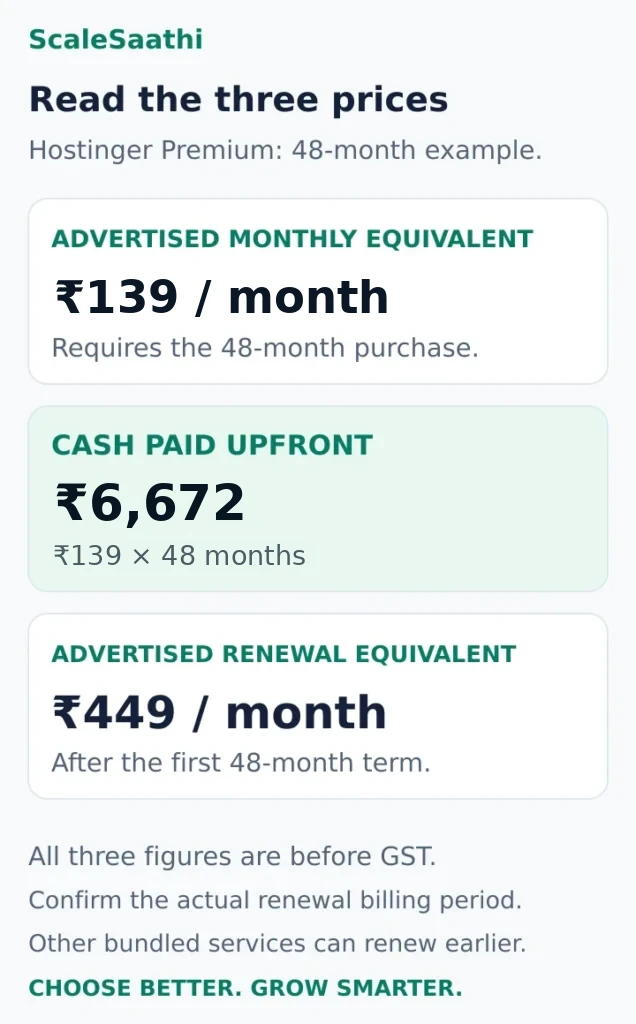
Here, the introductory hosting term lasts 48 months. The higher hosting renewal does not start in year two. A first-year domain or mailbox inclusion can expire earlier, creating a different renewal date. Premium's advertised domain and mailbox inclusions are limited to the first year. Plan inclusions
Keep a simple record for each service: amount paid, months covered, next due date and expected renewal. An annual budget and a payment calendar answer different questions; you need both if cash is tight.
What if the website may last only six months?
Suppose a four-year plan costs ₹6,672 upfront and you stop using it after six months without receiving a refund. Your hosting cash cost per month actually used is ₹1,112: ₹6,672 ÷ 6.
That does not change the provider's advertised rate. It shows why a shorter commitment can make sense for an experiment, event or temporary campaign even when its monthly price is higher.
Check cancellation and refund terms before prepaying. Hostinger's policy, for example, separates standard refund terms from product-specific restrictions and lists domain renewals as non-refundable. A hosting refund promise should not be applied automatically to every item in a bundle. Refund policy
If you want to pay one month at a time instead, read what monthly web hosting in India involves.
Compare the same period: a three-year cost example
Consider two invented offers used only to teach the calculation. Assume each is purchased one year at a time, service and features are equivalent, renewal rates stay unchanged, and taxes and extras are excluded.
Offer A: lower introductory price
- First year: ₹99/month equivalent × 12 = ₹1,188.
- Second year: ₹399 × 12 = ₹4,788.
- Third year: another ₹4,788.
- Three-year total: ₹10,764.
Offer B: the same rate each year
- Each year: ₹199/month equivalent × 12 = ₹2,388.
- Three-year total: ₹7,164.
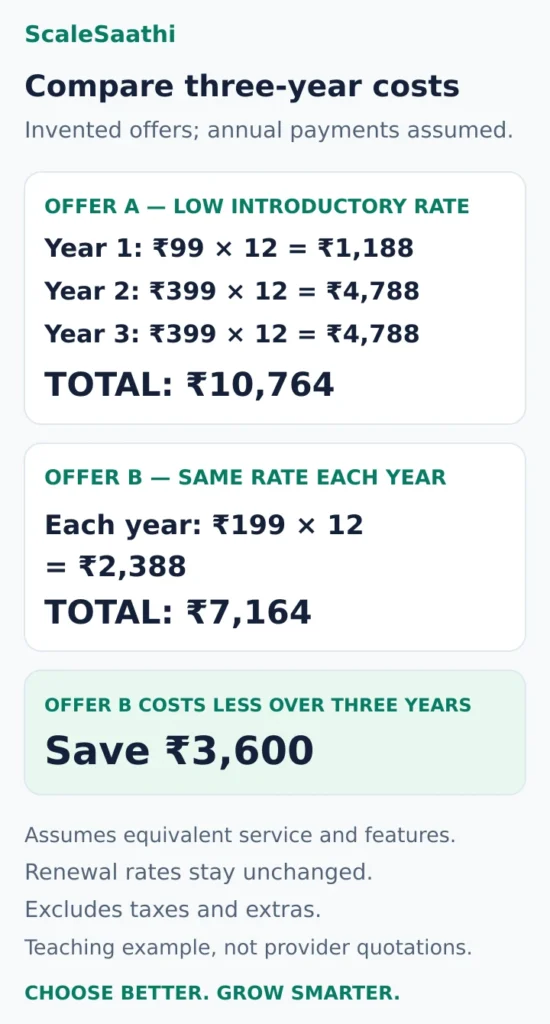
Offer A saves ₹1,200 in the first year. Offer B costs ₹3,600 less over three years under these assumptions. A first-year comparison and a three-year comparison can therefore point to different choices.
For real plans, calculate the actual payment sequence. A 48-month promotional rate does not belong in this one-year-promotion example. If one offer requires four years upfront and another allows annual payments, show that difference beside the totals.
Use this worksheet:
Comparable-period cost = payments needed to cover that period + required extras + applicable taxes and payment charges.
If a purchase also pays for months beyond the period being compared, disclose both the full cash commitment and the allocated service cost. Do not count unused future months as if the money remained in your bank account.
What else belongs in the hosting budget?
Domain registration and renewal
A custom domain is a separate service even when a hosting promotion bundles it. Check the extension, renewal price, expiry date and account owner. Our domain registrar comparison explains those purchase and renewal checks.
Keep an existing domain renewal in the budget unless you have confirmed that a particular promotion covers it. A free new registration offer does not automatically reimburse a domain you already own.
Backups and recovery
Ask what the included backup actually covers: website files, database and email; how often copies are taken; how long they remain available; and whether restoration costs extra. Set aside money for any missing recovery arrangement you need.
A weekly copy can be adequate for some rarely changed pages and insufficient for a site taking orders throughout the day. The decision should reflect the work or transactions you could lose between restore points.
Email and SSL
Count the mailboxes you will use and check whether they are permanently included or offered for an introductory period. Business email can renew separately from the website.
For HTTPS, first check whether your host includes a certificate and automatic renewal. Let's Encrypt offers free certificates, with setup depending on the hosting arrangement. A certificate's availability does not mean every provider supplies installation or ongoing support at no charge. Let's Encrypt setup guidance
Administration, migration and paid extras
Record any control-panel licence, malware cleanup service, premium backup plan or technical retainer. Ask the supplier to distinguish included server support from paid website work.
When moving, allow for overlap between the old and new hosting, any migration charge and testing time. If migration is advertised as free, confirm whether email, unusual applications and other account data are included. Our web hosting migration guide covers the transfer process in more detail.
GST and foreign-currency charges
The Hostinger India pages label their prices as excluding GST; Kinsta lists its prices in US dollars and before tax. Use the final billing details for each supplier instead of assuming the displayed price is the bank-account total. Hostinger pricing, Kinsta pricing
For a calculation example, if a ₹6,000 hosting invoice attracts 18% GST, the tax is ₹1,080 and cash payable is ₹7,080. This conditional illustration does not establish the treatment of every provider or customer. Check the invoice and any business tax treatment separately.
Read the three main hosting plan specifications
Storage: what you keep
Storage, usually advertised in GB, holds saved content. Ask whether the allowance includes website files, databases, mailboxes, staging copies and backups stored inside the account. Separate email or provider backup services may have separate quotas.
For an existing site, use the hosting dashboard’s breakdown. A download of your website folder alone may miss other usage. For example, cPanel’s Disk Usage documentation includes databases in its account usage calculation and warns that a nearly full account can cause backup failures.
Illustrative footprint: 2 GB of website files + 0.5 GB database + 3 GB email + 2 GB local backup = 7.5 GB, if all four count towards the same quota. Allow for growth and temporary working files; do not choose a limit that merely matches today’s total.
Bandwidth: what gets transferred
In hosting offers, a GB-per-month bandwidth allowance describes a quantity of data transferred. A connection advertised in Mbps describes a rate. 100 GB per month and 100 Mbps are different measurements.
Check what the provider meters: website traffic, downloads, uploads, email and other transfers may be treated differently. The cPanel bandwidth interface illustrates this distinction with service-level totals, monthly transfer and rate graphs, along with exclusions.
An allowance does not promise a particular page speed or number of visitors. “Unmetered” or “unlimited” also needs to be read alongside the hosting terms.
RAM: what is active
RAM is working memory used while software runs. It is separate from the space used to save your pages and images. Extra disk space does not increase RAM.
Also separate plan RAM from PHP memory limit. PHP’s official memory-limit definition is the maximum memory a script may allocate. That cap is not the total hosting allocation, nor a reservation of that much memory for every simultaneous request.
Estimate monthly data transfer with a worked example
Use this starting calculation for website page traffic:
Average host-metered MB per page view × page views per visit × monthly visits ÷ 1,000 = estimated GB per month.
Suppose a small business site transfers an assumed 2 MB from the host per page view, averages three page views per visit and receives 10,000 visits in a month:
2 × 3 × 10,000 = 60,000 MB, or approximately 60 GB.
This uses decimal units: 1,000 MB per GB. It is an invented workload, not a measured website or a provider’s visitor allowance. If the host-metered amount falls to 1 MB per page view, the same arithmetic gives 30 GB.
For a real site, compare the estimate with the provider’s usage meter. Browser caching, a content delivery network (CDN), third-party assets, bots, downloads and non-page transfers change what reaches the hosting account and what is counted. A browser’s total page weight is not automatically the billable transfer from your host.
Keep an allowance for variation. This calculation estimates transfer volume; it cannot establish whether a sale-day traffic burst will overwhelm the application.
Four less visible limits worth checking
CPU allocation
CPU provides processing capacity. Ask whether the figure is a core allocation, a percentage, a burst allowance or a dedicated resource. A percentage needs a defined reference: CloudLinux, for example, can express a CPU limit relative to a core. CloudLinux resource-limit documentation explains its implementation.
Do not rank different providers by a bare “2 cores” label. Ask what is allocated to your account, then evaluate your workload. A higher number alone is not a speed test.
PHP workers and concurrent requests
Worker limits concern work that can run concurrently, not a monthly audience total. Under PHP-FPM, for example, the process setting limits simultaneous requests served; other hosting stacks implement their own controls. See PHP’s process-manager documentation.
A visitor may trigger several requests, while a cached page may avoid PHP processing. Therefore, 40 PHP workers does not mean 40 visitors. Ask how workers are counted and what happens when they are busy. Raising each script’s memory cap does not create enough RAM to run every worker at that maximum.
Inodes: the number of files and folders
An inode allowance can constrain the number of files and directories even when storage remains. Many small thumbnails, cache files or logs can make this relevant. Check both counts and GB. CloudLinux’s inode explanation describes the separate quota.
Disk I/O and process limits
Disk I/O measures read/write throughput; IOPS counts operations per second. These are different from network transfer. Entry-process and total-process limits are additional controls, and their definitions depend on the platform. CloudLinux documents these distinctions.
If a comparison sheet leaves these fields blank, ask support for the exact product’s technical limits. Treat “not disclosed” as missing information rather than assuming there is no limit.
Read real hosting plans without mistaking “unlimited” for capacity
Hostinger provides a useful illustration because it publishes a technical limits table alongside its India sales page. These are specification examples, not benchmark results or a recommendation to buy either plan.
Its hosting agreement states that plans with unlimited features still have resource limits and fair-use conditions. Exceeding limits may require reducing usage or upgrading, and service can be restricted. Read what happens to your exact account before relying on the label.
The figures below come from the hosting parameters table; storage technology is specified on the India hosting page. Existing Business-plan customers may retain different limits when the newly sold plan is called Unlimited. Match the product and account details, not just a familiar plan name.
Premium: a finite multi-site allowance
- Websites: 3.
- Storage: 20 GB SSD.
- CPU and RAM: 1 core and 2 GB RAM.
- Other limits: 400,000 inodes and 40 PHP workers.
Read these together. Permission to add three websites does not establish a fresh resource allocation for each one. Confirm which allowances apply per site and which are pooled across the plan.
Unlimited: more sites, still defined resources
- Websites: advertised as unlimited.
- Storage: 50 GB NVMe.
- CPU and RAM: 2 cores and 3 GB RAM.
- Other limits: 600,000 inodes and 60 PHP workers.
The website-count label does not remove the listed storage or compute limits. NVMe identifies storage technology; it does not prove that your checkout, database or plugins will run faster in a real workload.
Usage-based cloud bills need a different calculation
Some infrastructure services charge for resources and usage rather than a fixed multi-year bundle. Check computing time, storage, backup or snapshot charges, outbound transfer and any services left running alongside the website.
DigitalOcean, for example, states that its bundled CPU Droplets continue to incur charges when powered off because resources remain reserved. It also publishes outbound-transfer overage charges. Its v5 configurations have different billing rules, including no monthly usage cap. DigitalOcean billing documentation
The practical check is what stops each charge. Turning off a virtual machine may not close the bill, and removing it may leave separately billed storage or other services. Before removing infrastructure, make sure the data you need is preserved and confirm which resources can be cancelled.
For predictable spending, set alerts, review the full resource list and identify who checks the bill. A usage-based service needs an operating budget, not just a screenshot of its smallest server price.
When is paying more for hosting worthwhile?
Start with evidence from the website and account. Hostinger's resource documentation illustrates why a plan has more limits than its website count: it publishes CPU, memory, file-count, database and PHP-worker limits. Hosting resource limits
Before upgrading, ask whether the problem is a resource limit, a missing recovery or support capability, or inefficient website software. More expensive hosting may not solve an oversized-image or plugin problem. Our guide to hosting plan limits helps interpret the plan specifications.
An upgrade is easier to justify when you can complete this sentence: “The extra ₹___ buys ___ that this website needs.” Examples include more simultaneous processing capacity, a suitable backup schedule or management work that otherwise requires paid help.
For a first shortlist by website needs, use the Hosting Plan Finder. Treat its result as a starting category; confirm the provider's actual resources and terms.
Is switching hosts cheaper than renewing?
Subtract the full moving cost from the saving. Include the replacement hosting, required extras, overlap and any paid migration help; compare the same coverage period.
For an illustration, renewing costs ₹6,000 for a year. A suitable replacement costs ₹3,000, with ₹1,500 migration help and ₹500 overlap. The immediate saving is only ₹1,000: ₹6,000 − ₹3,000 − ₹1,500 − ₹500, before any tax differences.
Compare the replacement's next renewal too. Repeatedly moving to chase a small introductory saving can consume more time than it saves. Staying can be sensible when the current service fits; moving can be sensible when the total cost or service gap is substantial.
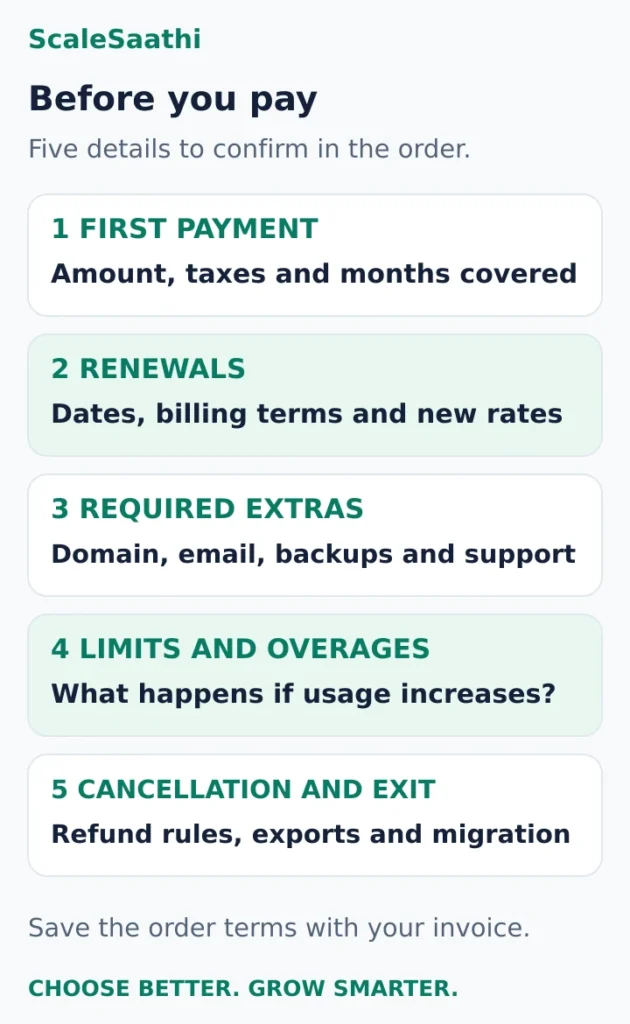
The five details to confirm before paying
- First payment: exact amount, taxes and months of service covered.
- Renewal: date, billing term and rate for hosting and each bundled service.
- Required extras: domains, mailboxes, recovery, licences and administration.
- Limits and overages: what happens when you exceed the allowance.
- Cancellation and exit: refund conditions, export access and migration scope.
Use the Website Cost Calculator when you also need to allow for the build and wider launch costs. Our small-business website budget guide connects hosting to the services and ongoing work a small business must fund.
Choose a hosting plan whose commitment you can afford, whose limits fit the website and whose renewal you can explain before buying it.
Frequently asked questions
How much does hosting cost for one website in India?
The bill depends on the plan, commitment and services included. Use the published examples in this guide as reference points, then compare the opening payment and renewal for plans that fit your website. Add taxes and required extras; an advertised monthly equivalent may require several years of prepayment.
Does a ₹139 monthly hosting rate mean I can pay ₹139 each month?
Not in the 48-month Premium example used here. It requires ₹6,672 upfront before GST. A shorter or genuinely monthly subscription can have a different price. Check the selected billing period and checkout total.
Does hosting always renew at a higher price in year two?
No. Renewal follows the purchased hosting term. A four-year introductory term normally ends after those four years, while a bundled domain or mailbox offer may expire earlier. Record the dates separately.
Are hosting prices inclusive of GST?
Check each provider’s checkout and invoice. The India hosting examples used here are advertised before GST. The 18% calculation is conditional and does not establish the treatment of every provider or customer.
Is a VPS always cheaper than managed WordPress hosting?
Compare the complete operating cost. A self-managed VPS may also need licences, backup storage and administration. A managed plan can include work or services you would otherwise arrange separately.
Do I need separate hosting for a hosted website builder?
Check what the platform subscription includes before adding another hosting bill. If storefront or website hosting is bundled, buy separate hosting only for a distinct service or application that needs it.
Can I save money by migrating before renewal?
Sometimes. Compare the renewal with replacement hosting, required extras, migration help and overlapping service. Check the replacement’s next renewal and test the migrated site before ending the old service.
Sources and further reading
- Hostinger India — shared hosting rates, prepaid terms and inclusions
- Hostinger India — managed cloud pricing and billing terms
- Hostinger India — VPS pricing and self-management responsibilities
- Kinsta — WordPress hosting prices, currency and plan allowances
- Hostinger — product-specific refund and cancellation rules
- Let’s Encrypt — certificates and hosting-provider setup
- DigitalOcean — CPU Droplet billing and data transfer charges
- Hostinger — CPU, memory, file-count and other plan limits