Reseller web hosting in India can be worthwhile if you already maintain client websites and can charge enough to cover hosting, administration and support. It is a weaker starting point if you have no committed clients or expect the hosting provider to handle every customer request.
The practical decision is whether taking responsibility for hosting improves your existing freelance service. This guide compares three published plan offers, explains their limits and works through the client numbers needed to cover a realistic cost model.
Run these numbers before you resell hosting
- MilesWeb Lite: ₹199/month on a three-year plan = ₹7,164 before taxes, renewing at ₹799/month. Five cPanel accounts share 5 GB, and WHMCS is a paid add-on.
- BigRock Essential: ₹1,759/month advertised, renewal ₹1,979/month, 25 accounts, 50 GB. The page doesn’t show the term or full upfront bill, so get a written total.
- Namecheap Nebula: US$19.88 for one month, same renewal, 25 accounts, 30 GB. WHMCS costs extra, and add your currency conversion.
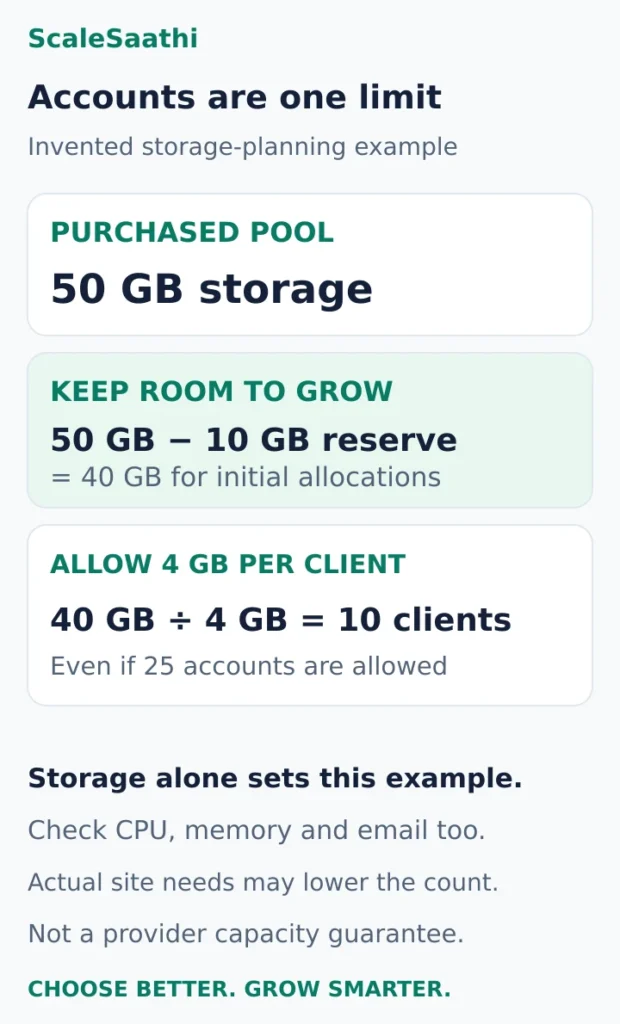
- Storage sets the real limit: 50 GB less a 10 GB growth reserve, at 4 GB per client, is 10 clients, even on a plan that allows 25 accounts.
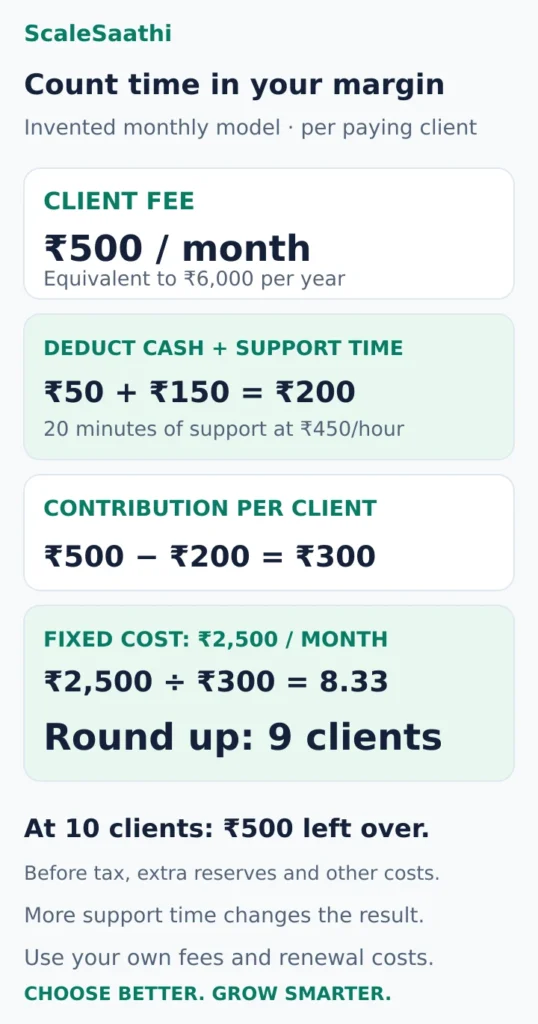
- Break-even, in the guide’s invented model: ₹500 a month per client, less ₹50 expenses and ₹150 of support time, leaves ₹300. Against ₹2,500 of fixed costs, you need nine paying clients.
- The support trap: if each client takes an hour a month (valued at ₹450), the ₹500 fee covers nothing towards fixed costs, and adding clients doesn’t fix it.
- WHM is not WHMCS: WHM manages accounts; WHMCS is billing software. You don’t need it from client one. Self-hosted Plus is US$34.95/month for up to 250 clients.
- Leave clients a way out: keep each client’s domain under their control, and never hand anyone your master reseller login.
Some links on this page are affiliate links marked as sponsored. If you buy through them, ScaleSaathi may earn a commission at no extra cost to you. This never affects our rankings. Read our affiliate disclosure.
Should you resell hosting or let clients buy their own?
Choose the arrangement before choosing a provider:
- Clients buy their own hosting: useful when you mainly build websites, have only occasional maintenance work or want clients to pay the host directly. You can still charge a separate care fee for agreed work.
- You provide reseller hosting: worth considering when clients want one contact for their website and hosting, you can manage separate accounts, and recurring fees cover your responsibilities.
- You operate a VPS: consider this when the applications need server control or resources that the reseller plan cannot provide. Price server administration and software licences as well as the VPS.
Start with the guide to choosing web hosting in India if you are still choosing the hosting model. For the client-owned route, the ScaleSaathi Hosting Plan Finder can help narrow the individual website’s requirements. It is not a reseller-profit calculator.
A useful first question: “Would these clients pay me to manage hosting even if they could buy a cheaper plan themselves?” If the answer depends entirely on hiding the underlying provider’s price, the service needs a clearer reason to exist.
What reseller hosting actually gives you
A reseller account lets you allocate a purchased pool of resources to customer accounts. In a cPanel setup, WHM manages those accounts, while cPanel provides an individual account’s website, email and related controls. Your provider determines the WHM privileges available to you; reseller access does not automatically provide full server control. cPanel’s reseller account guide.
WHMCS is different: it is billing and service-management software. A plan that includes WHM does not therefore include WHMCS.
Separate client accounts make access and handover easier to organise, but they are not separate dedicated servers. Also, “unlimited websites” does not mean unlimited independently managed client accounts. Ask how many accounts you can create and whether reselling is permitted under the exact plan you intend to buy.
Three reseller hosting plans worth comparing
These are comparisons of each provider's published offers. They have different capacities and commitments. Treat prices as references: confirm the chosen location, term, upfront payment, renewal, licences and applicable taxes before ordering.
MilesWeb: a small account pool with a long introductory term
Consider it for: a few small client sites, after checking their actual storage needs.
MilesWeb’s Lite offer displays ₹199/month for a three-year plan, with renewal at ₹799/month. It lists five cPanel accounts, 5 GB NVMe SSD storage, cPanel and WHM. The introductory base calculation is ₹199 × 36 = ₹7,164, before applicable taxes and extras; ₹199 is the monthly equivalent of that commitment.
Its FAQ identifies WHMCS as a separately purchased add-on. MilesWeb reseller plans.
Decision check: five accounts do not make 5 GB enough for five arbitrary websites. Count files, databases and hosted mail, then leave growth room. Judge affordability at renewal as well as at the introductory price.
BigRock: more accounts, but obtain a complete term-specific quote
Consider it for: comparing a larger account pool with an INR offer.
BigRock’s Essential page advertises ₹1,759/month, renewal at ₹1,979/month, 25 cPanel accounts and 50 GB NVMe SSD storage. BigRock reseller hosting.
Quote confirmation required: the advertised price alone did not establish the purchase duration or full upfront bill. The page offers India and USA location options; confirm the selected location and its price together. Do not treat ₹1,759 as a verified one-month checkout purchase.
The plan mentions WHMCS support. Confirm whether your quote includes a licence, which edition it covers and its client limit.
Decision check: request one written total covering the required term, location, renewal and billing software before comparing it with another provider’s complete bill.
Namecheap: a confirmed monthly option priced in US dollars
Consider it for: comparing a shorter initial commitment, with currency costs kept visible.
Namecheap’s Nebula plan lists US$19.88 for one month, with the same displayed monthly renewal, 25 cPanel accounts and 30 GB SSD storage. cPanel and WHM are included; WHMCS is offered as an additional purchase. Namecheap reseller plans.
Decision check: calculate the rupee cost using your actual payment assumptions, including conversion charges and applicable taxes. Confirm the available server location and test a representative client site before committing to a longer term. A monthly option reduces the initial commitment; it does not establish better performance or support.
Compare your two finalists over the same period, showing both cash payable now and cost after renewal. Our web hosting cost breakdown explains why the monthly headline and the amount you must fund can differ.
How many clients can a reseller plan support?
The account allowance is only one ceiling. Storage, resource limits and your available support time may set a lower practical limit.
Here is an invented capacity example, not a promise about any provider above:
- Purchased storage: 50 GB.
- Your chosen growth reserve: 10 GB.
- Storage available for initial client allocations: 40 GB.
- Planned allocation per client: 4 GB.
- Storage-based planning limit: 10 clients, even if the plan allows 25 accounts.
That calculation only checks storage. Traffic peaks, email requirements and other limits can reduce the suitable client count further. A brochure site and a busy shop should not automatically receive the same package.
Where CloudLinux is used, ask about CPU, memory, disk throughput, process and inode limits. These are separate controls; an ample GB allowance does not settle them. CloudLinux’s resource-limit documentation explains the categories. Use the guide to hosting plan specifications to interpret the quote before promising clients a capacity level.
Ask whether quotas are counted by allocated capacity or actual usage. cPanel’s overselling setting changes that accounting rule. It does not create more physical resources. cPanel reseller limits and privileges.
Is reseller hosting profitable? Count your support time
Use an invented monthly business model to see the difference between revenue and money left over. These figures are assumptions, not provider prices or an earnings forecast.
- Fixed costs: ₹2,500/month, made up of ₹1,800 for hosting and ₹700 for necessary tools and backup arrangements.
- Client price: ₹6,000/year, equivalent to ₹500/month.
- Variable cash expense: ₹50 per client per month.
- Average support: 20 minutes per client per month, valued at ₹450/hour, or ₹150 per client.
Each paying client contributes ₹500 − ₹50 − ₹150 = ₹300/month towards fixed costs after those allowances.
Break-even clients = fixed monthly cost ÷ contribution per client, rounded up.
For this model, ₹2,500 ÷ ₹300 = 8.33, so you need nine paying clients to cover the listed costs. At eight clients, the result is ₹100 below break-even. At ten clients, it is only ₹500 above break-even, before tax, extra reserves, acquisition costs and unplanned work.
Now change one assumption. If support averages one hour per client, its time allowance becomes ₹450. The ₹500 monthly fee then covers only ₹450 of time and ₹50 of variable expense, leaving nothing for fixed costs. Adding more clients at that unchanged price does not fix this version of the model.
Your response could be a higher fee, a narrower included service or a process that genuinely reduces support work. Do not simply remove the time allowance to make the spreadsheet look profitable.
Run this calculation with the provider’s renewal cost and a difficult support month. Include onboarding or migration labour somewhere in the client price. When a client prepays annually, set aside the money needed to deliver the remaining service months instead of treating the whole collection as immediate profit.
Do you need WHMCS from the first client?
Not necessarily. A small roster can start with an invoicing process, a reliable renewal register and manual provisioning, provided you can maintain them consistently. Automation becomes worth paying for when it solves a specific recurring task or reduces costly errors.
For scale, WHMCS self-hosted Plus lists US$34.95/month, excluding taxes, for up to 250 active clients. Host-supplied licences and WHMCS’s hosted products have different offers, so compare the exact product rather than assuming every WHMCS reference buys the same arrangement. WHMCS pricing.
Before adding it, check the licence’s client allowance, branding, payment integration and who maintains the billing installation. Add its actual cost to your model; it is not automatically covered by the reseller hosting payment.
Define what happens when a client needs help
Write a short service description before taking payment. It should answer:
- What is included? Account setup, hosting assistance, backups and restores need clear boundaries. Website edits, plugin troubleshooting and malware recovery should each be included, separately priced or explicitly excluded.
- Who responds? Establish your support hours, contact route and escalation process. A host answering your ticket is different from providing branded support directly to your client.
- What is promised? Separate a response target from a guaranteed repair time. Do not promise a service level that depends on work the provider has not agreed to deliver.
- What triggers extra charges? State storage upgrades, additional sites, restore work and out-of-scope labour before they become disputes.
- What happens at renewal or exit? Explain fees, notices, exports, migration assistance and when access ends.
For backups, confirm frequency, retention, location, coverage of files/databases/mail, and who can perform a restore. cPanel documents that a full backup cannot be automatically restored through its customer interface; the WHM restore function or provider assistance is needed. cPanel backup documentation.
Keep a suitable independent backup arrangement and test a restoration before promising recovery to clients. “Backup included” does not answer how much work a restore requires or how quickly help will arrive.
Keep client ownership and the exit route clear
As a service practice, keep the client’s domain registered under their control and document the access you need to manage DNS. Our domain registrar comparison covers registrar choice, account control and transfer checks. Avoid making a hosting cancellation unnecessarily complicated because the domain or recovery email is tied to your personal account.
Keep separate client accounts where the service supports them, use individual credentials and retain a record of the agreed package. Do not hand clients your master reseller login. Before onboarding, find out how a client account’s files, database and mail can be exported and what the receiving host can import.
Use the website migration guide when planning a move, and include DNS, email and functional checks in the handover. White-label presentation can support your brand; it is not a reason to obstruct a client’s departure or promise that the infrastructure provider can never be identified.
A small pilot before moving the whole client list
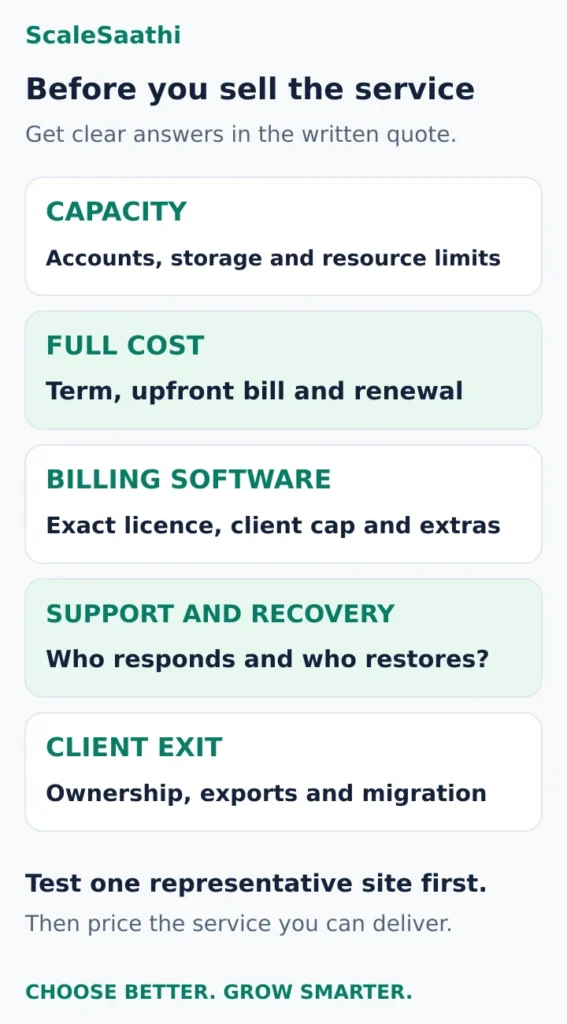
Start with a representative site you control. Create its account, configure SSL and email, test the contact form and restore a backup to a safe test location. Check the actual resource use and the provider’s answers to a specific technical question.
Then, with agreement, onboard one suitable low-risk client and record the time spent on setup, support and billing. Use that evidence to revise your fee and service description before committing the rest of your clients.
Choose reseller hosting when the client demand, capacity and service margin all work together. If the numbers only work with no support time or no renewal increase, client-owned hosting plus a clearly priced maintenance service is a more workable starting point.
Frequently asked questions
Is reseller hosting profitable for freelancers in India?
It can be when clients pay enough for a defined service and the fee covers renewal costs, tools, support time and other expenses. In this guide’s invented model, nine paying clients cover the listed costs. Your own prices and workload can produce a very different result.
Is a shared plan with unlimited websites the same as reseller hosting?
No. A website allowance does not establish separate client accounts, reseller permissions or suitable capacity. Check the account structure, resource limits and the provider’s terms for the exact plan before selling hosting to other people.
Do I need WHMCS to start reselling hosting?
Not necessarily. A small client roster can use a dependable invoicing and renewal process with manual provisioning. WHM manages hosting accounts; WHMCS is separate billing and service-management software. Confirm any included licence before paying for automation.
How many websites can I host on a reseller plan?
Check both the number of separate accounts and the resources available to each workload. Storage, CPU, memory, mail and your support capacity can become limits before the advertised account allowance is reached. There is no reliable universal website count.
Will the hosting provider support my clients directly?
Do not assume it will. Ask whether support serves you, your end clients or both, and whether any end-client service is branded and separately priced. Make your own support hours, escalation process and included work clear before onboarding.
Can a client leave and move to another host?
Plan for that from the start. Keep domain ownership and access clear, confirm available account exports and agree migration assistance and fees. Test the handover requirements for files, databases, email and DNS rather than relying on a generic free-migration promise.
Sources and further reading
- cPanel — reseller accounts and provider-controlled WHM privileges
- MilesWeb — reseller plans, renewal prices and WHMCS add-on
- BigRock — reseller account limits and advertised prices
- Namecheap — reseller monthly pricing and licence options
- CloudLinux — CPU, memory and other resource limits
- cPanel — reseller quotas and overselling settings
- WHMCS — self-hosted and hosted billing software plans
- cPanel — backup availability and full-restore limitations
Product names and logos are trademarks of their respective owners. They are shown only to identify the products compared in this guide, and their use does not imply endorsement by or affiliation with ScaleSaathi.