
The most useful Bluehost alternatives for an Indian WordPress website are Hostinger for a different budget and capacity mix, Kinsta for WordPress platform assistance and recovery tools, and Cloudways Flexible for configurable server resources. Which one deserves your money depends on what Bluehost is failing to provide.
If renewal is your only complaint, do the comparison before moving. Hostinger Premium has a lower introductory rate than Bluehost Starter, but a higher listed renewal. If your problem is lost orders or slow checkout, a cheaper hosting invoice is not the main measure of success.
Leaving Bluehost? It depends on why
- The renewal bill: Bluehost Starter is ₹7,164 for 36 months, renewing at ₹349/month. Hostinger Premium is ₹6,672 for 48 months (checked 21 Oct 2026), but renews at ₹449/month: ₹1,200 more over twelve months, before GST.
- What Premium would take away: ten websites drop to three, and built-in staging (Hostinger puts it at Business or higher). Count your live installations first.
- Only phone support is missing? Bluehost Business includes phone; Starter doesn’t. Price that plan change before moving the whole site.
- Recovery and WordPress help: Kinsta Single 20GB is US$35 a month with 10 GB storage, 20 GB bandwidth and 14 days of backups. The “20GB” is bandwidth, not disk space.
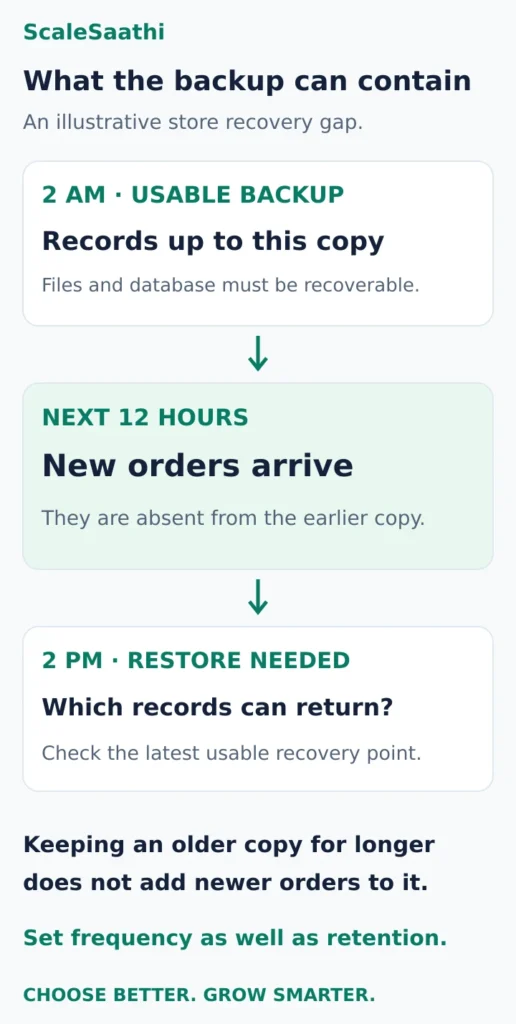
- A shop’s real risk: restore a 2 am backup at 2 pm and the 12 hours of orders in between are gone. Longer retention doesn’t bring them back.
- Hitting resource limits: Cloudways advertises servers from US$11/month, plus US$0.033/GB for offsite backups. Its standard support doesn’t cover custom code.
- Before you cancel: keep Bluehost running until the new site, recent orders, forms and email all check out.
Disclosure: Some links on this page are affiliate links. If you buy through them, ScaleSaathi may earn a commission at no extra cost to you. This never affects our rankings or recommendations. Read our affiliate disclosure.
These recommendations come from official plans and documentation. ScaleSaathi has not benchmarked these accounts or tested their support. Provider links go to official destinations.
First, identify the Bluehost service you would replace
Open your account and record the exact product, next renewal total, billing period and services you use. A legacy plan can differ from the offers sold to new customers. The comparisons below concern ordinary WordPress websites; a Bluehost Cloud account or a separately licensed commerce bundle needs its own specification check.
Our Bluehost India review helps assess whether staying makes sense. If you are unsure which hosting category you need, start with the web hosting selection guide or the Hosting Plan Finder.
Decide what a successful change would look like: a smaller total bill, a usable restore process, or enough resources to complete customer transactions reliably. Keep that requirement visible while comparing offers.
Bluehost alternatives when the renewal bill is the problem
Hostinger Premium is worth investigating for a small site whose owner accepts a long prepaid term. The introductory comparison is attractive, but it needs two separate calculations.
What you pay for the introductory term
Bluehost Starter: ₹199/month equivalent for 36 months gives ₹7,164 before GST. The plan lists ten websites and 10 GB NVMe storage. Bluehost plans (US site).
Hostinger Premium: ₹139/month equivalent for 48 months gives ₹6,672 upfront before GST (promotional price checked 21 Oct 2026; renews at ₹449/month). It lists three websites, 20 GB SSD storage and weekly backups. Hostinger India plans.
The second offer buys a longer introductory term for a similar initial payment. That can be useful for an established small website. It can be a poor commitment for an experiment you may stop running next year. Neither introductory offer establishes what an existing Bluehost customer will be offered at renewal.
What the listed renewal references tell you
Bluehost Starter lists ₹349/month at renewal; Hostinger Premium lists ₹449/month. The difference is ₹100/month, or ₹1,200 for twelve months of equivalent hosting charges, before GST.
That arithmetic compares the displayed references. It does not establish either provider's renewal billing period, future price or your account's quote. It does establish why “Hostinger is always cheaper” is an unsafe buying rule.

For a real switch, compare the next payments due over the period you intend to keep the site. Include migration help, overlapping subscriptions, retained domain and email services, and any replacement backup or plugin licences. Our hosting cost guide covers the wider budget.
Choose Hostinger when the complete quote and feature changes work for your site. Keep Bluehost in contention when your current service works and the supposed saving disappears after renewal and migration costs. The Hostinger review examines Hostinger's own limitations.
Check what the lower-priced plan would remove
A move from ten permitted websites to three is unsuitable if you actually need to move four installations onto that one plan. More total storage does not cancel a lower website allowance. Conversely, a single media-heavy website may value storage more than unused installation slots. Measure the account you have.
Staging also deserves attention. Bluehost's Bluehost WordPress plan cards (US site) list a staging site on Starter. Hostinger's staging documentation specifies Business web hosting or higher. Its sales page now uses Unlimited for a higher tier, so confirm the exact tier mapping; do not assume Premium includes the built-in staging workflow you are replacing.
You may arrange testing another way, but someone must maintain it. If you regularly change a booking plugin or WooCommerce checkout, the time spent rebuilding that workflow belongs in the switching decision.
Phone access is a separate question. Bluehost's WordPress cards exclude phone support on Starter and include it on Business. If a phone conversation is the missing feature, first compare the cost of that account change with moving the entire site. A provider's sales phone number does not establish the support channel included with hosting.
When recovery and WordPress assistance matter more than price
Kinsta is a candidate when a business can fund a higher recurring bill and wants documented help with the hosting platform. Its support scope includes assistance with backups, staging and investigation of server errors. Custom development and changes to plugin or theme functionality remain outside that responsibility.
The Single 20GB bandwidth plan lists a regular US$35 monthly price, one WordPress installation, 10 GB storage, 20 GB monthly server bandwidth and 14 days of backup retention. Those are different allowances: “20GB” in the plan name is not disk space. Kinsta pricing.
Budget from the regular recurring rate. Your rupee payment will depend on currency conversion, payment charges and applicable taxes; this is not an INR checkout quote. Ask about the exact backup frequency, restore access and additional services before purchasing. Retention describes how far back available copies extend, not how frequently new copies are created.
A shop needs to protect the orders between backups
Consider an illustrative Indian store whose latest usable backup is from 2 am. At 2 pm, a failed change requires a restore. That copy cannot contain the orders recorded during the intervening 12 hours.
Keeping that same copy for fourteen days would not make those orders appear in it. Decide how much recent data the business can afford to reconstruct, then choose a backup schedule and recovery process that meet that requirement. Payment records may help reconciliation, but they are not a substitute for the complete store database.
WordPress's backup guidance explains why a typical complete restore needs both files and database data. Keep an independent recovery copy and check that the intended restoration works.
Shortlist Kinsta for its documented platform assistance if the quoted recovery arrangement fits your business. Do not buy it expecting a developer to rebuild a broken custom checkout as part of ordinary hosting support. Our managed WordPress hosting guide explains how to divide those responsibilities.
When the site is reaching its resource limits
Cloudways Flexible is the alternative to investigate when a developer can identify a server constraint and choose a configuration that addresses it. The important change is control over the selected resources and scaling path.
Cloudways advertises managed servers from US$11/month. That is an advertised starting point, not a quote for your chosen provider, region and workload. Its pricing page lists vertical scaling and separately charges US$0.033/GB per server for off-site backup storage. Email is an optional service. Get the complete launch estimate, including the services you intend to use. Cloudways pricing.
Included Standard support covers infrastructure and the platform. Advanced and Premium add-ons extend application troubleshooting, while custom-code work remains outside the published scope. If unresolved plugin errors prompted the move, establish who will investigate and repair them. Cloudways support responsibilities.
Before selecting a larger server, ask for evidence of the bottleneck: resource-limit events, server errors or repeated slow transactions during a known workload. WordPress's performance guidance identifies hardware, configuration, caching and application behaviour as relevant factors. Moving the same problematic code does not establish that the problem is fixed.
Use our hosting resource guide to interpret the allowances. Have the developer compare the same important actions on the destination, including logged-in pages and checkout where relevant. An empty demo site's speed is weak evidence for your own store.
For Indian visitors, confirm the actual server choice
Hostinger's location documentation lists India for web and cloud hosting, with the final choices subject to availability in hPanel. Kinsta's data-centre list includes Mumbai. For Cloudways, verify the location offered for the specific infrastructure provider and configuration you select.
Location is one selection factor. Check important pages from the places your customers use the site, including mobile connections. Neither an India storefront nor a nearby server proves that a resource-intensive page will respond well.
Give the destination provider a concrete migration brief
Ask for a response to these five items before committing:
- Scope: number of sites, stored data, staging copies and any Bluehost-specific tools or licences that need replacement.
- Customer activity: how new orders, bookings and enquiries will be handled between the first copy and the final switch.
- Services: who changes website DNS, what happens to mailboxes and which domain or email subscriptions must stay active.
- Acceptance: who checks HTTPS, forms, mail delivery, logins and checkout, and who repairs a failed check.
- Exit: how to return to the old setup if necessary, what each service will cost and when cancellation is safe.
For an ordinary host change, keep the same domain and page addresses where practical. Google's hosting-move guidance recommends preparing and testing the new copy, changing DNS, monitoring both hosts and retiring the old infrastructure after traffic has moved successfully. Remove temporary indexing blocks when the destination goes live.

Our web hosting migration guide covers the fuller move. For an active store, the decision to cancel should follow verified records and working customer actions. Completing a file copy alone is not enough.
What users commonly report
This guide has no Bluehost-only review file. These themes come from public reviews of common alternatives discussed here—Hostinger (Trustpilot, Reddit) and Cloudways (Trustpilot, G2, Capterra)—so you can weigh what reviewers say about those destinations before you move.
- Hostinger value and panel: reviewers commonly report fast, affordable shared hosting with an easy control panel.
- Hostinger renewal jump: renewal pricing well above the introductory term is the most repeated complaint.
- Hostinger support quality: company-wide praise for helpful staff sits alongside Reddit reports of AI-led chat and slow replies.
- Cloudways performance: users commonly praise managed-cloud speed for WordPress and WooCommerce and a clear dashboard.
- Cloudways billing and extras: confusing bills and the need to buy email and domains elsewhere are recurring themes.
- Migrations and support on Cloudways: smooth migrations and generally responsive help are praised, with some recent notes of slower replies.
Frequently asked questions
Which Bluehost alternative should an Indian website owner choose?
Investigate Hostinger when the complete budget and capacity mix fit a modest site, Kinsta when platform assistance and the quoted recovery arrangement justify the recurring cost, or Cloudways Flexible when a developer can specify the resources needed. Keep Bluehost in contention if changing providers does not solve a material problem.
Is Hostinger necessarily cheaper than Bluehost at renewal?
No. Compare the exact plans, renewal references and account quotes over the same intended ownership period. A lower introductory rate may require a longer payment commitment and can be followed by a higher renewal. Add migration, overlapping services and replacement features before deciding.
Can I move every site from Bluehost Starter to Hostinger Premium?
Only if the destination’s actual website allowance and other resource limits cover everything you need to move. Count live installations and confirm how staging copies are treated. Unused storage does not increase a plan’s permitted number of websites.
Does a longer backup retention period protect the latest WooCommerce orders?
Retention alone does not establish that protection. A backup cannot contain records created after it was made. Check the schedule, the latest usable copy, what the restore includes and how recent orders would be reconciled before choosing a recovery arrangement.
Do I need to transfer my domain when leaving Bluehost hosting?
Treat hosting, domain registration, DNS and email as separate responsibilities. A host change can use the same domain with updated website DNS settings. Confirm which services must remain paid and where DNS and email will continue before cancelling anything.
Will changing hosting automatically make my WordPress site faster?
No. Identify whether the constraint comes from hosting resources, configuration or the application, then test the same important pages and customer actions on the destination. A nearby server or larger plan does not establish that faulty code or an inefficient workflow has been repaired.
Sources and further reading
- Bluehost — web-hosting prices, terms and plan allowances (US site)
- Hostinger India — introductory commitments, renewal and plan allowances
- Bluehost — WordPress staging and support channels (US site)
- Hostinger — WordPress staging tier requirements
- Kinsta — WordPress support responsibilities and exclusions
- Kinsta — Single bandwidth plan price and allowances
- WordPress — complete backups and recovery copies
- Cloudways — Flexible pricing, configuration and additional services
- Cloudways — included support and paid support scope
- WordPress — hosting and application performance factors
- Hostinger — server locations and final availability
- Kinsta — WordPress data-centre locations
- Google Search Central — changing hosting with unchanged URLs
Product names and logos are trademarks of their respective owners. They are shown only to identify the products compared in this guide, and their use does not imply endorsement by or affiliation with ScaleSaathi.