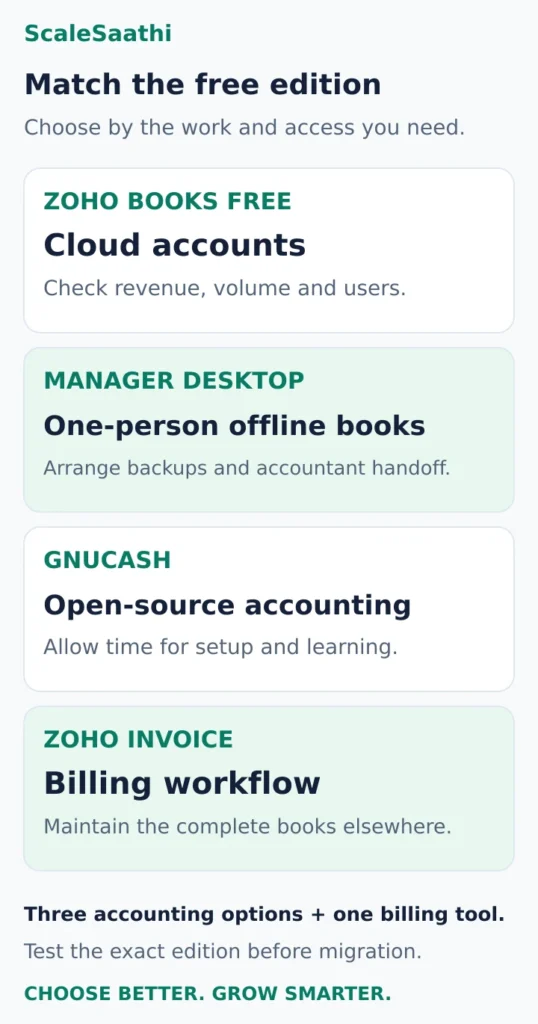
Free accounting software for small businesses in India can be enough when its limits match the work you actually do. Start with Zoho Books Free if you want cloud accounting and meet its eligibility rules. Consider Manager Desktop for one-person offline bookkeeping, or GnuCash if you prefer open-source software and are comfortable with accounting setup. Zoho Invoice is a separate option when billing is the main task and someone else maintains the complete books.
The important question is whether the free edition supports your next year of transactions, accountant access and recordkeeping—not simply whether downloading it costs ₹0. This guide compares three accounting options and one invoicing option by those requirements. Product facts come from official documentation; the recommendations are editorial judgments, not results from installed-product performance tests.
What each free option really allows
- Zoho Books Free: One user plus one accountant. Revenue must stay within ₹25 lakh a financial year. 1,000 invoices and 1,000 bills/expenses a year, counted separately. No multi-currency invoicing or third-party bank feeds.
- The ₹25 lakh rule: It is Zoho’s plan condition, not the GST registration threshold.
- Manager Desktop: Free with no time or usage limits and works offline, but no multi-user access. Backups are your job.
- GnuCash: Open-source double-entry accounts, but don’t assume a ready-made India GST filing process. Have your accountant check invoice fields and tax accounts.
- Zoho Invoice: 500 invoices a year, two users, three projects, with Zoho branding on invoices. Data can be deleted after long inactivity, so keep your own exports.
- Count the year, not the month: 90 bills/expenses a month is 1,080 a year, 80 over Zoho Books’ limit, even though 60 invoices a month (720) fit. 40 invoices a month plus 40 seasonal ones is 520, 20 over Zoho Invoice’s 500.
- Free still costs time: Two extra hours a month at ₹400 an hour is ₹9,600 a year, more than a ₹600-a-month subscription (₹7,200 a year before taxes).
First check what “free” includes
A free cloud plan usually has eligibility or usage conditions. You may be able to keep using it without a subscription, but additional users, features or transaction volume can require an upgrade.
A free desktop edition puts more responsibility on you: the computer, updates, backups and the way records reach your accountant. A downloadable application is not automatically a shared online workspace.
Open-source software lets you use software under its licence without buying a commercial subscription. It still takes time to configure accounts, learn the workflow and maintain usable records.
A free trial only lets you evaluate a paid edition for a limited period. Before entering live data, identify the exact plan you will use after the trial. Features visible during a trial may not belong to the ongoing free plan.
If you are still deciding between cloud, desktop and mobile-led accounting, ScaleSaathi’s Accounting Software Selector can help choose a starting category. Then check the actual free edition below.
Free accounting and invoicing options worth comparing
Zoho Books Free: cloud accounting for an eligible microbusiness
Best for: an owner who wants invoicing, expenses and accounts in one system, with a separate accountant login.
The India Free plan permits one user plus one accountant. Ongoing free eligibility requires financial-year revenue not to exceed ₹25 lakh. It allows 1,000 invoices annually and 1,000 bills and expenses combined annually. These are separate allowances, not one pool of 2,000 interchangeable entries. Check the India Free plan and eligibility.
The published plan includes journals, bank reconciliation, financial reports and GST-related features. The detailed comparison also shows where Free stops: multi-currency invoicing and third-party bank feeds are excluded. Statement import and reconciliation are different from an automatic bank feed. Compare the exact features by plan.
Main limit: low sales volume does not guarantee eligibility for everything you need. A business can reach its expense allowance first, need another operational user, or require a feature outside Free.
Before choosing: test the accountant login, an invoice, a purchase entry, your bank-statement format and the reports you need. Zoho’s ₹25 lakh rule is a software-plan condition; it is not the GST registration threshold.
Manager Desktop: offline accounts for one person at a time
Best for: an owner or bookkeeper who is comfortable maintaining the accounts on a computer and arranging their own backups.
Manager’s desktop software is available for Windows, macOS and Linux. Its official site states that the free edition has no time or usage limits and can work offline. See the free Desktop Edition.
The official guides cover sales and purchase invoices, bank reconciliation, inventory, journals and reports. They also make the access distinction explicit: Desktop does not support multi-user access. Its free licence should not be mistaken for free simultaneous access by the owner, accountant and assistant. Read the edition differences.
Main limit: you own the continuity process. Decide which file is authoritative, who can edit it, how the accountant receives it and who creates a recoverable backup. If two people need to work in the same books together, evaluate a supported shared arrangement.
Before choosing: give the accountant a sample file and ask them to review the invoice format, tax setup and reports. Manager Cloud is a separate paid service; its trial does not turn it into a permanently free cloud plan. Compare the Cloud Edition.
GnuCash: open-source accounting for someone willing to learn it
Best for: a small business with a person who understands bookkeeping, or is prepared to learn the account structure and maintain the desktop records.
GnuCash is freely licensed under the GNU GPL and supports Windows, macOS and Linux. Its documentation describes double-entry accounting, customer and supplier records, invoicing, bills, bank reconciliation and financial reports. See GnuCash’s official overview and business accounting features.
Main limit: a broad accounting feature set does not establish a ready-made India GST filing process. Have your accountant check the required invoice fields, tax accounts and reporting workflow. Do not assume that a report mentioning “GST” is automatically the particular Indian return or export your business needs.
The learning commitment matters. Someone must understand why a customer invoice, a receipt and an expense affect different accounts. If the owner wants an assisted cloud onboarding process with a separate accountant login, this may be the wrong starting point.
Before choosing: create a small sample book, review the reports and reopen a backup. For the usual XML-file workflow, GnuCash distinguishes complete backup files from transaction logs; a log is not a complete backup. Read the backup and recovery guidance.
Zoho Invoice: free billing when the books are maintained elsewhere
Best for: a service business that needs organised client billing and has an agreed bookkeeping process outside this tool.
Zoho Invoice’s India pricing page lists 500 invoices per year, two users and three projects. Invoices carry Zoho Invoice branding. Its inactivity policy also matters: the FAQ describes deletion of associated data after prolonged inactivity, with notification. Keep independent exports and review that policy before using it for occasional or seasonal work. Read the free limits and retention terms.
Main limit: invoicing is only part of the accounting process. Decide who records supplier bills, reconciles the bank and prepares the complete books. Do not choose Zoho Invoice merely because its user allowance differs from Zoho Books; the products serve different scopes.
Before choosing: ask the accountant to accept a sample handoff containing the invoice, receipt, supporting expense documents and customer balance. Confirm how missing or corrected records will be handled without re-entering everything.
Estimate a full year before committing to a free plan
Count invoices, purchase bills, expense entries, users and projects separately. Include busy seasons and the work you expect to add. Use the provider’s definition of each limit rather than assuming that every allowance resets at the same time.
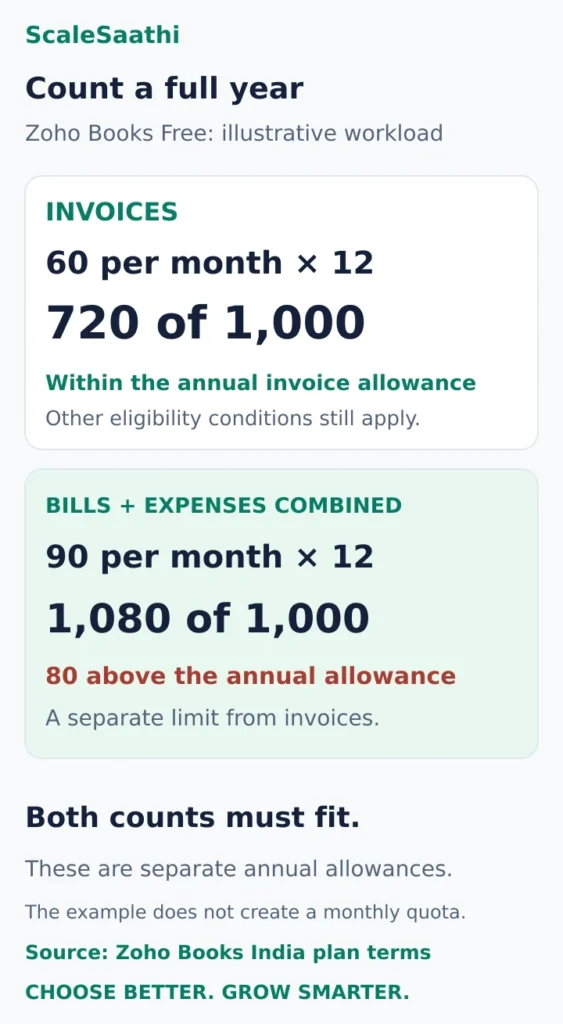
Example 1: expenses can be the first constraint. Suppose you expect 60 invoices and 90 combined bill/expense entries each month. Over twelve months, that is:
- 60 × 12 = 720 invoices: within Zoho Books Free’s 1,000-invoice allowance.
- 90 × 12 = 1,080 bill/expense entries: 80 above its separate 1,000-entry allowance.
The projected invoice count fits, but the expense count does not. This is an illustrative workload, not a product test. Revenue eligibility, users and required features must also fit.
Example 2: leave room for seasonal billing. At 40 invoices a month, you would send 480 invoices in a year. Another 40 seasonal invoices brings the total to 520, exceeding Zoho Invoice’s 500-invoice allowance by 20. A normal month alone would hide the problem.
Neither example is a monthly quota: the published allowances are annual. Track actual usage in the account and check how the provider counts cancelled, recurring or other special records if those are common in your business.
Review the plan before taking on a new requirement: a second person entering transactions, a foreign-currency client, stock that needs more detailed tracking or a larger annual workload. If the free edition no longer fits, compare the next workable option rather than splitting one business’s records across unrelated accounts to avoid a limit.
Check the India workflow beyond a GST badge
A business may need to produce an invoice, prepare tax reports, transfer data to its accountant and complete a filing process. Those are separate steps. Ask the vendor which are supported in the exact free edition and which require another product, an export, a paid feature or professional work.
For a freelancer, our GST guide for freelancers explains the tax questions to resolve before configuring an invoice template. Have an accountant confirm your actual treatment. This article does not decide registration liability or promise that any listed software guarantees compliance.
For a shop or a business selling physical items, also test purchases, sales returns, stock quantities and the reports the accountant needs. An app that can list products on an invoice has not necessarily demonstrated the inventory workflow you require.
Online payment collection deserves its own check. A free software subscription does not mean every connected payment service is free. Confirm eligible integrations, processing charges and settlement records; our payment gateway guide for small businesses covers that separate decision.
Run a free-edition handoff and recovery check
Use a clearly labelled sample business or test records, kept separate from live invoices and filings. These are checks to perform before migration; we are not claiming to have run them in each product.
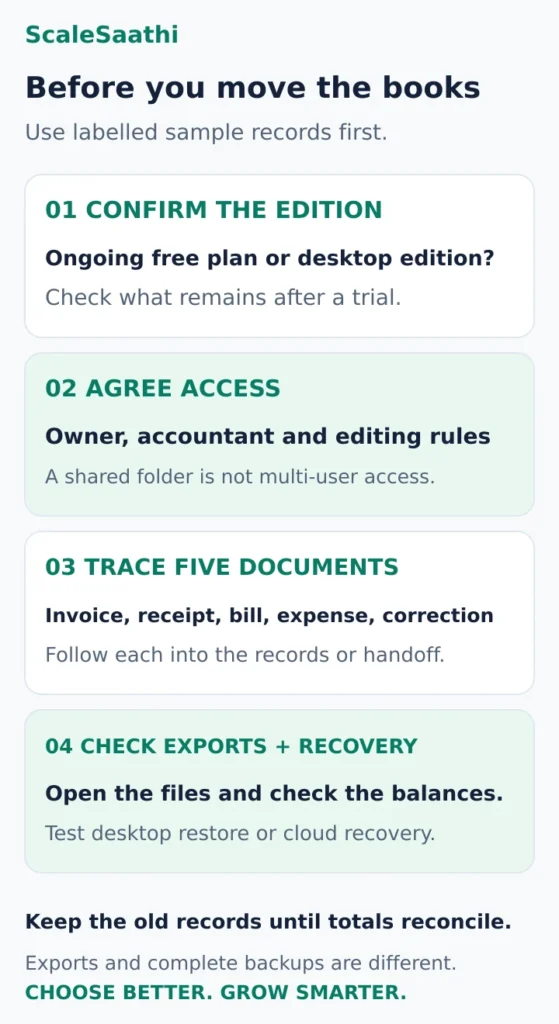
1. Confirm the ongoing free edition
Check the plan shown in the account or the desktop edition you installed. If you started a trial, verify which features remain available when it ends. Record any condition that would force you to pay or move.
2. Check who can do the monthly work
Have the owner and accountant demonstrate their respective access. For a single-user desktop workflow, agree who edits the main file and when it is handed over. A file copied into a shared folder is not, by itself, a supported way for two people to edit the same books simultaneously.
3. Trace five documents through the records
Choose an invoice, a customer receipt, a supplier bill, an expense and a correction relevant to your business. Ask the accountant to trace each from its source document to the resulting record or report. For an invoicing-only tool, trace the handoff into the accountant’s full books instead.
When importing a bank statement, check whether a receipt is matched to an existing invoice payment or accidentally recorded again. Ask the person doing the reconciliation to show how they resolve the difference.
4. Open the exports and test recovery
Open a sample export of customers, transactions and reports. Check dates, descriptions, invoice numbers and balances. Verify separately whether attachments and custom fields are included. A PDF report can help review the books but does not automatically provide the data needed to migrate them.
For desktop software, create a backup and restore it as a separate test copy without overwriting the live file. Manager’s documentation assigns manual backup responsibility to Desktop users and describes importing a business from backup. Read Manager’s business-file guidance.
For cloud software, distinguish the provider’s service backup from the exports you can obtain yourself. Ask what you can recover after losing access or closing the account, and what the provider must restore for you.
A ₹0 subscription can still take time and money
List the costs around the software: opening-balance setup, bookkeeping, training, payment collection, backup storage and any essential add-on. An accountant’s fee does not disappear because the app is free.
Illustrative time-cost check: two extra hours of manual work each month, valued by you at ₹400 an hour, represent 2 × ₹400 × 12 = ₹9,600 a year. A hypothetical ₹600-per-month subscription is ₹7,200 a year before taxes and extras. Those numbers justify investigating whether an alternative actually saves the work; they do not prove that paying will save two hours, or that your time valuation is cash you will recover.
Use ScaleSaathi’s SaaS Cost Calculator to organise recurring software charges, and add setup and your own time estimate separately. For a broader paid-and-free shortlist, see our accounting and invoicing software comparison.
Which option should you try first?
Choose Zoho Books Free for a trial of the workflow when you meet the revenue and usage conditions and want cloud accounts with accountant access. Test any requirement that could force an upgrade before moving your live books.
Start with Manager Desktop when one person will maintain the accounts and reliable offline access matters. Agree the backup and accountant handoff before relying on the file.
Consider GnuCash when open-source software and control of your records are priorities, and somebody can take responsibility for the accounting setup and learning.
Use Zoho Invoice for the billing part when its limits fit and the complete bookkeeping process is already covered elsewhere.
If none passes your access, reporting and recovery checks, the right answer may be a paid plan or a better accountant-led process. For the broader controls and migration decision, use our accounting software selection guide. Keep the existing records available until the new balances reconcile, and preserve the business owner’s access and recovery details.
Most of these tools produce a balance sheet automatically; see our balance sheet format to check what it should contain.
Frequently asked questions
Which free accounting software should a small Indian business try first?
Start with Zoho Books Free if you meet its eligibility and usage conditions and want cloud accounting with an accountant login. Compare Manager Desktop for one-person offline bookkeeping, or GnuCash when open-source software and accounting control suit your skills. Test the actual free edition and the accountant handoff before moving live records.
Is Zoho Books Free available without a time limit?
The India pricing page says the Free plan remains available while financial-year revenue does not exceed ₹25 lakh. Users, transaction allowances and feature restrictions still apply. Treat this as a product eligibility condition, not a GST registration threshold, and check the current terms before committing.
Is Zoho Invoice a replacement for complete accounting software?
Treat it as a billing workflow. Agree who maintains the complete books, reconciles the bank and reviews the records. Its free user, project and invoice limits must be checked separately from Zoho Books because the products serve different scopes.
Can an owner and accountant use Manager Desktop simultaneously?
Manager’s official guides say Desktop does not support multi-user access. Arrange a controlled file handoff for one-person use or evaluate a supported shared edition. Putting a file in a shared folder does not by itself create safe simultaneous editing.
Does free accounting software automatically handle Indian GST compliance?
No product label establishes the correct tax treatment or complete filing process for your business. Have your accountant check required invoices, tax accounts, reports, exports and any filing or e-invoicing workflow in the exact edition you will use.
What should I save before changing accounting software?
Keep the original records and obtain usable exports of parties, transactions and reports, checking attachments separately. Test a recoverable desktop backup or establish the cloud export and recovery process. Reconcile balances with your accountant before retiring the old system.
Sources and further reading
- Zoho Books — India Free-plan eligibility, allowances and included features
- Zoho Books — plan comparison, combined expense limits and excluded features
- Manager — free Desktop Edition and offline operation
- Manager — edition differences and Desktop multi-user limitation
- Manager Cloud — separate paid cloud service and trial
- Manager — business files, manual backups and import from backup
- GnuCash — free licence and supported desktop platforms
- GnuCash — accounting, invoicing, reconciliation and reports
- GnuCash — XML-file backup and recovery, including log-file limits
- Zoho Invoice — India free limits, branding and inactivity policy
Product names and logos are trademarks of their respective owners. They are shown only to identify the products compared in this guide, and their use does not imply endorsement by or affiliation with ScaleSaathi.