Zoho CRM pricing in India starts at ₹800 per user per month on annual billing for Standard. Professional is ₹1,400, Enterprise ₹2,400 and Ultimate ₹2,600 on the same basis. Those are monthly equivalents of annual subscriptions, before local taxes—not a single fee for the whole team. See Zoho’s official plan overview.
Start with the people who need access and the sales process they must complete. A five-person team that only needs dependable follow-ups has a different buying decision from one that needs controlled quotation stages, territory rules or a separate testing environment. The cheapest edition is useful only when it supports that work.
Our starting recommendation
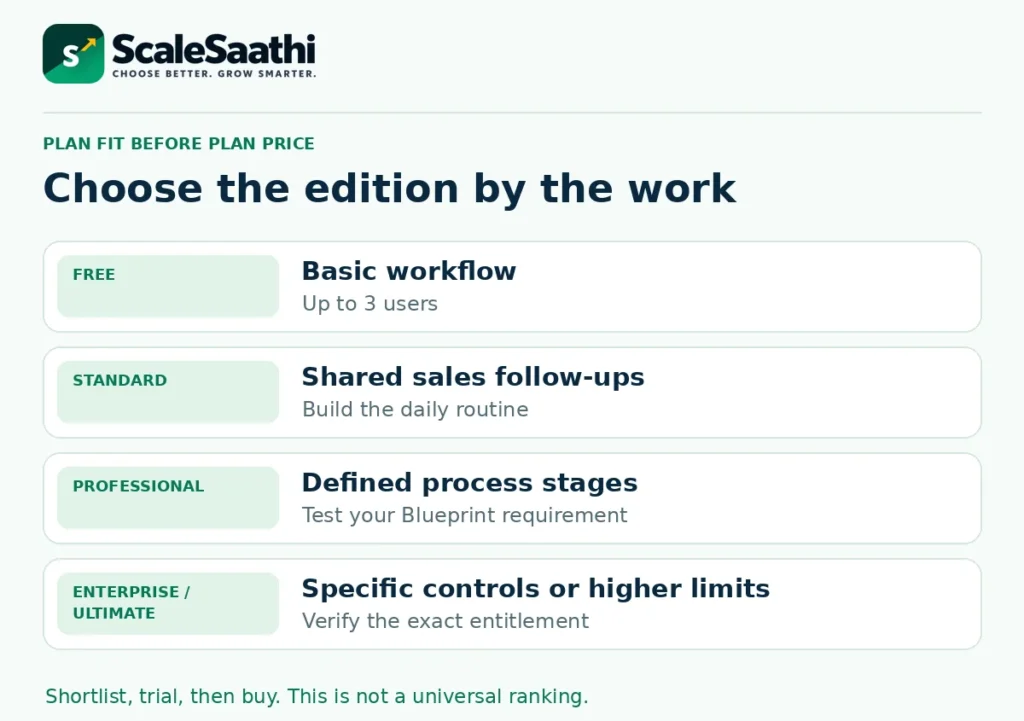
Try the ongoing Free edition for a very small, basic workflow; evaluate Standard for a shared sales pipeline; and move to Professional when a demonstrated process requirement justifies it. Treat Enterprise and Ultimate as feature-and-limit decisions, not automatic upgrades for a larger headcount.
Prices and capabilities below come from official Zoho pages. Cost examples and plan-fit judgments are ScaleSaathi analysis. We have not completed your checkout, implemented your CRM or tested a vendor’s support service. No tracked affiliate links are included.
Download the Zoho CRM team-cost planner (.xlsx). It includes edition-linked prices, a first-year budget, optional quoted team licences and a monthly-versus-annual comparison. Replace reference rates with your actual quotation when needed.
In this guide
Zoho CRM pricing: compare the actual billing terms
Use the figures below for the standalone CRM product. Each paid price is for one regular user. The annual payment shown is calculated as twelve times the annual-billing rate; it excludes implementation and local taxes. Check the edition, currency and billing term on your order. Official price and feature comparison.
Standard
Annual billing: ₹800/user/month equivalent.
Subscription year: ₹9,600/user paid annually.
Monthly billing: ₹1,300/user/month.
Professional
Annual billing: ₹1,400/user/month equivalent.
Subscription year: ₹16,800/user paid annually.
Monthly billing: ₹2,100/user/month.
Enterprise
Annual billing: ₹2,400/user/month equivalent.
Subscription year: ₹28,800/user paid annually.
Monthly billing: ₹3,000/user/month.
Ultimate
Annual billing: ₹2,600/user/month equivalent.
Subscription year: ₹31,200/user paid annually.
Monthly billing: ₹3,200/user/month.
Do not multiply an annual payment by twelve again, and do not treat an annual-equivalent label as permission to pay that amount each month. Ask the seller to state the amount due now, licensed-user count, service period and next renewal separately. Save the quotation rather than relying on a promotional screenshot.
Is the Free edition enough for your business?
The ongoing Zoho CRM Free edition supports up to three users with core contact, lead, deal and task management. It is separate from a temporary trial of a paid edition. A paid trial can demonstrate capabilities that disappear when you return to Free; test the edition you intend to keep.
See other free CRM plans compared, including HubSpot, Bitrix24 and Odoo.
A sensible Free trial is a small operational test: can each enquiry have an owner, a next action and a visible outcome? If three people can run that process without an essential missing feature, there is no need to buy a higher edition simply to look more established.
Conversely, do not assume that Free is adequate because the business has only two employees. Automation, reporting, permissions or integration needs can matter before headcount. Our small-business CRM selection guide helps define that requirement before comparing licences.
Which paid edition earns its extra cost?
Zoho’s edition-and-role guide distinguishes follow-up automation, process enforcement, inventory and deeper controls. Use those differences to shortlist a trial; then confirm the exact feature and allowance in the account. Do not treat “AI included” or “advanced” as a complete specification.
Standard: establish the sales routine
Standard is the first paid candidate when a team needs a shared pipeline, follow-ups and reports. The plan overview includes workflows and sales forecasting. Our practical test is simpler: can a salesperson capture an enquiry, schedule the next action and let the manager see overdue work without maintaining a second spreadsheet?
Before upgrading for sophisticated automation, agree the stages and mandatory information. Paying more does not solve a pipeline that nobody updates or a manager who never reviews it. An owner plus four sales staff needs a budget for five regular users if all five require that access.
Professional: enforce a process, not just a reminder
Blueprint is available from Professional onwards. It guides records through defined process stages. That is a different requirement from sending a reminder when a date arrives. The edition guide also places inventory management and configure-price-quote functionality at Professional and above.
For example, a supplier might require quotation details before a deal can move to the next stage. Demonstrate that exact sequence in the trial, including what happens when someone enters incomplete information. Do not buy a process-control feature merely because the demo looks organised.
For five users, Professional’s annual base cost is ₹36,000 above Standard: 5 × (₹1,400 − ₹800) × 12. Ask what required capability earns that difference. This is a cost comparison, not a promise that automation will save ₹36,000.
Enterprise and Ultimate: identify the specific control or limit
Enterprise’s published capabilities include territory management and custom functions. A separate sandbox environment can matter when changes must be tested away from production. Zoho documents different sandbox allowances for Enterprise and Ultimate, with conditions on the full-data option.
Ultimate may be worth examining when a particular higher allowance solves a real problem. For five users its annual licence premium over Enterprise is ₹12,000 before tax. That modest-looking difference is not a reason to buy it automatically: write down the exact allowance, eligibility and expected use first.
Advanced features may depend on edition, account availability or usage conditions. Have the administrator demonstrate the required action with the intended user role. A feature visible to the trial administrator is not proof that every licensed colleague can use it.
What do five or ten regular users cost?
With a fixed headcount for the whole year, multiply the annual-equivalent rate by users and twelve. Here are the annual licence subtotals before tax and extras; these are arithmetic examples, not negotiated quotations.
Standard
5 users: ₹48,000/year.
10 users: ₹96,000/year.
Professional
5 users: ₹84,000/year.
10 users: ₹168,000/year.
Enterprise
5 users: ₹144,000/year.
10 users: ₹288,000/year.
Ultimate
5 users: ₹156,000/year.
10 users: ₹312,000/year.
A five-user Professional example is ₹1,400 × 5 × 12 = ₹84,000. At an illustrative 18% tax assumption, tax adds ₹15,120 and the annual licence cash outlay becomes ₹99,120. The official page says local taxes are additional; your invoice determines the applicable treatment. This guide does not decide GST eligibility or input-tax credit.
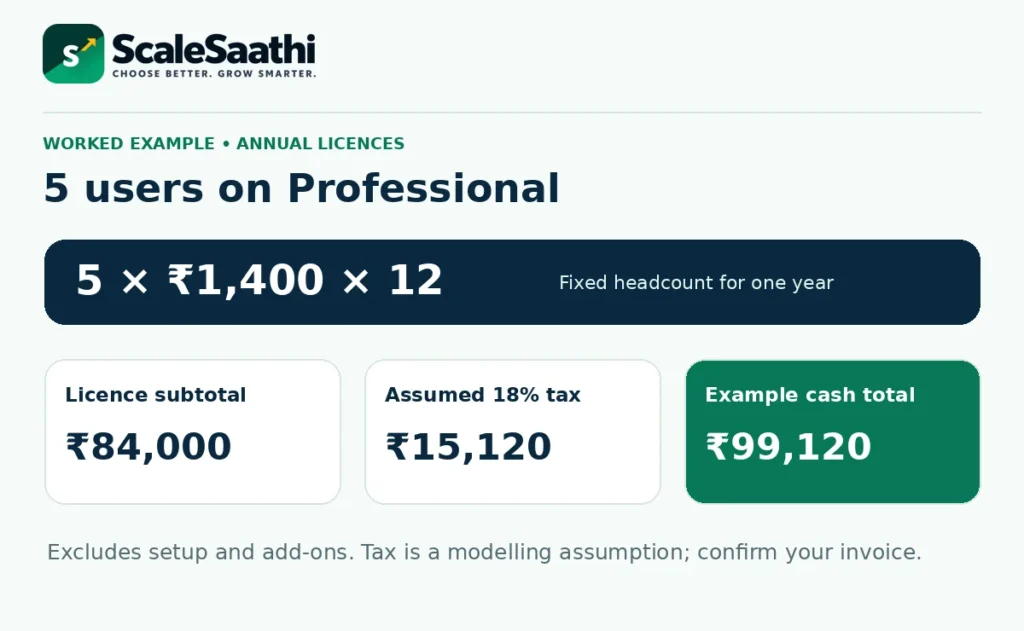
The planner keeps the licence subtotal, optional recurring services, one-time setup and assumed tax visible as separate lines. Its “already included” option is for an entered tax-inclusive quotation, not for treating Zoho’s published pre-tax rates as tax-inclusive. Mid-term additions, discounts and credits need the actual account invoice.
Annual versus monthly: a discount is also a commitment
At the published Professional rates, five users paying monthly for twelve months cost ₹1,26,000 before tax. Annual billing costs ₹84,000 for the same users and year, a ₹42,000 difference. That calculation assumes the rates and headcount stay unchanged.
For a three-month pilot, however, five monthly licences cost ₹31,500 before tax. Buying the annual subscription commits ₹84,000 upfront even if you stop needing it after three months. The annual price only looks smaller when you spread it over a year you actually intend to use.
On these Professional rates, eight monthly payments equal one annual payment; annual billing becomes strictly cheaper at the ninth month. Standard reaches that point in month eight, while Enterprise and Ultimate reach it in month ten. These are simple licence-only comparisons, not refund calculations.
Choose annual billing after the intended users have demonstrated the required workflow and the budget can absorb the commitment. Use monthly billing for a short uncertain deployment when its smaller commitment matters more than the twelve-month saving. Do not assume cancellation returns all unused annual fees.
Count regular users, team users and Lite users separately
One CRM organisation uses one edition for its regular users. You cannot ordinarily price the same organisation as five Standard users and two Enterprise users. The three-user Free edition is also not three free licences that you subtract from a paid team.
Zoho separately documents team-user licences for restricted organisation-level access and work in team modules. They are supported on paid CRM editions, but are not a cheaper substitute for salespeople who need full access. Their abilities differ from regular-user permissions; check the actual tasks, not only the job title.
There is also separate Lite-user documentation, which specifies Enterprise or Ultimate and at least 25 regular licences. Do not interchange “team user” and “Lite user”. Ask which licence type your account can buy and what each person can create, own, export and report on.
The official help pages retrieved for restricted-user pricing showed dollar amounts rather than a confirmed India quotation. The calculator therefore leaves the optional team-user price at zero and requires a positive quoted rate when you add those seats. It does not convert USD into an invented INR offer or calculate Lite-user eligibility.
The licence price is not the complete implementation budget
Ask for a separate scope for data cleaning, migration, configuration, training and ongoing administration. Zoho explicitly distinguishes support-led guidance from paid implementation: an onboarding specialist or technical account manager does not automatically build the CRM for you. Read the support and implementation boundaries.
People and setup
Identify who will map fields, remove duplicates, configure permissions and train staff. Request deliverables and acceptance criteria, not just “CRM setup”.
Connected services
Check telephone usage, messaging, extensions, storage and any separate app subscriptions in the actual proposal. A listed integration does not establish that the connected service is free.
For example, Zoho’s Analytics integration documentation requires an active Analytics licence for access to its advanced reports. Confirm what any bundle includes before adding a second subscription. Do not assume every CRM plan includes every application carrying the Zoho name.
Likewise, quotations and invoice-related records in CRM do not settle the whole bookkeeping workflow. Agree where accounts, payments and reconciliation will be maintained. ScaleSaathi’s accounting and invoicing software guide covers that separate decision.
Support plans: check the service, not just the edition name
Classic Support comes with paid CRM subscriptions. The CRM support page lists Premium Support at 20% of the subscription fee. That would add ₹16,800 to an ₹84,000 eligible annual subscription before tax, if the quoted fee base is the same. It is an optional budget line, not a default licence charge.
Enterprise Support is a service plan, not the Enterprise software edition. Its minimum-user wording is inconsistent across the official pages retrieved: the CRM support-plan page says 50 user licences, while the general support FAQ says 25 or more for CRM. Confirm eligibility and the fee base in writing rather than relying on either threshold as guaranteed.
Also distinguish an initial response target from resolution. Before paying for a support upgrade, ask who handles implementation defects, third-party connectors and problems in custom code. A faster response does not mean those tasks are included.
Avoid paying for unused licences at renewal
Deactivating a user stops access; it does not cancel the paid licence. Zoho states that the licence remains available for reassignment and billing continues unless the purchased licence count is reduced. Official user-deactivation guidance.
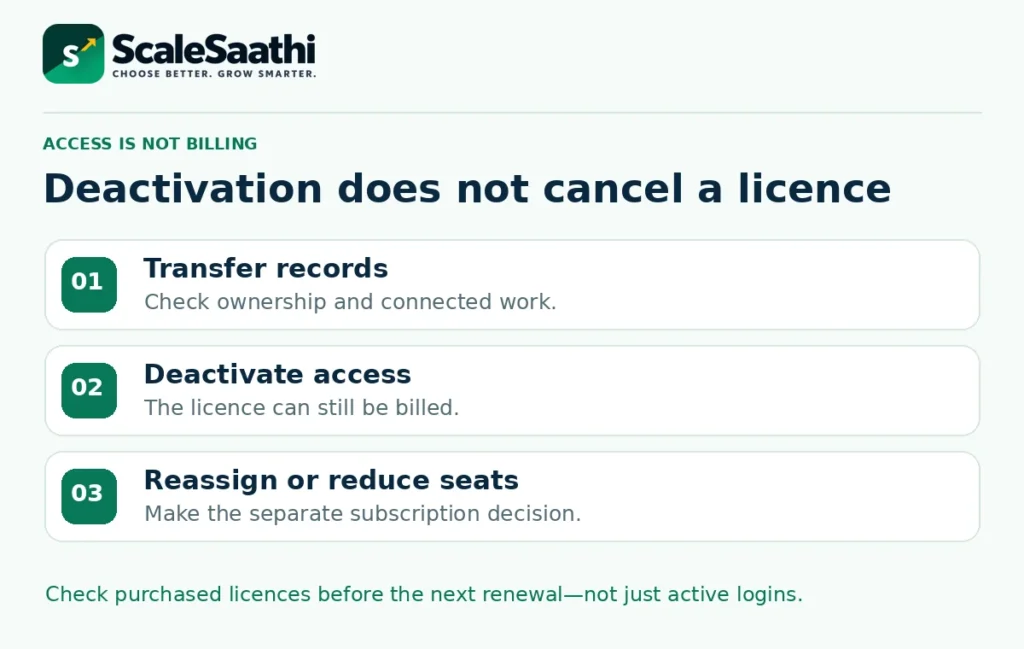
When a colleague leaves, first transfer relevant records and check integrations. Then revoke access and decide whether to reassign that seat or reduce the subscription. Keep an owner for both access management and billing so these do not become disconnected tasks.
Use subscription management to review the edition, purchased licences and add-ons. Zoho’s refund policy says subscriptions auto-renew and describes separate conditions for refunds and annual partial downgrades. Partial downgrades can involve subscription-extension credits rather than a simple cash refund. Read the current policy and your purchase terms before changing the account.
Set a review before renewal to compare active usage with paid seats, verify the next charge and check whether required integrations still work. The planner assumes unchanged rates for comparisons; it is not a promise of future renewal pricing.
Zoho CRM, Bigin, CRM Plus and Zoho One are different choices
The official edition-and-role guide separates the standalone CRM from related products and bundles. Bigin addresses a simpler pipeline need; CRM Plus combines customer-facing applications; Zoho One is a broader business suite (see how Zoho One is priced in India). They are not higher editions that you can price using the four CRM rates above.
Request a like-for-like quote covering the people and applications you actually need. A bundle can reduce overlapping subscriptions, but unused applications or a different licensing model can change the economics. Our lean business software stack guide explains how to assign each tool a purpose, owner and exit route.
Run a small trial before buying for the whole team
Zoho provides a 15-day CRM trial; its administrator quick-start guide warns that some capabilities depend on the final edition. Use a representative sample rather than importing the entire business on day one. The purpose is to test the workflow and handover, not produce a polished demonstration.
- Capture and assign: add a labelled sample enquiry, identify its source, assign an owner and set a next action.
- Move the deal: check required information, reminders and any process-control rule you intend to buy.
- Use the real roles: repeat the task as an ordinary user and, when relevant, a restricted team user.
- Review and retrieve: have the manager find overdue work and export a sample of the records you would need if leaving.
- Price the working setup: record the edition, seats, integrations, paid assistance and billing term that passed the test.
Record any missing capability, who must configure it and whether it needs another subscription. If the team cannot maintain accurate records during the pilot, adding annual seats is not yet the answer. Fix the process or narrow the rollout first.
What users commonly report
These themes summarise public reviews on sites such as G2 and Capterra. They are paraphrased, cover the product as a whole rather than only the free edition, and India-specific feedback is mixed into a global pool.
- Strong value and deep customisation: reviewers commonly praise modules, fields and workflows that can be shaped without paying big-CRM prices.
- One place for pipeline work: leads, deals, follow-ups and email in a single system are a repeated positive.
- Works well with other Zoho apps: users already on Books, Desk or Campaigns often value the connected setup.
- Steep learning curve: many settings feel overwhelming for non-technical teams, and setup time is a common theme.
- Cluttered or dated interface: some reviewers find the screens busy compared with newer CRMs.
- Slower support on lower tiers: response times are a repeated complaint when the plan is free or entry-level.
- Occasional bugs and free-plan limits: glitches and limits on users, storage and advanced features come up regularly.
Final decision: buy the lowest edition that passes your test
For a small team, begin by comparing Free or Standard against a clear list of essential tasks. Professional deserves a trial when process enforcement or quotation-related work is genuinely required. Move higher only for a specific control, allowance or tested requirement—not a general hope that more features will increase sales.
Before paying, your written decision should name the edition, regular and restricted users, annual cash commitment, tax treatment, implementation owner and renewal date. That turns Zoho CRM pricing from a small per-user headline into a cost your business can understand and control.
Frequently asked questions
What is Zoho CRM pricing in India?
The official INR comparison lists annual-billing monthly equivalents of ₹800 for Standard, ₹1,400 for Professional, ₹2,400 for Enterprise and ₹2,600 for Ultimate, per regular user. Monthly billing is ₹1,300, ₹2,100, ₹3,000 and ₹3,200 respectively. Local taxes and additional services are separate.
How much is Zoho CRM Professional for five users?
At the published annual rate, five regular users cost 5 × ₹1,400 × 12 = ₹84,000 before taxes and extras. Applying an illustrative 18% tax produces ₹99,120. Use your actual invoice or quotation for tax treatment, discounts and implementation charges.
Are the first three users free on a paid Zoho CRM plan?
No. The ongoing Free edition supports up to three users. It is a separate edition, not three free seats deducted from a paid subscription. Budget for all regular licences needed in the paid organisation.
Is GST included in the listed prices?
Zoho states that local taxes are additional to its listed prices. The article and workbook use 18% only as an editable budgeting illustration. Confirm the applicable treatment on your invoice; the planner does not determine tax eligibility or input-tax credit.
Can I put some regular users on Standard and others on Enterprise?
Zoho’s specifications say one organisation chooses one edition for its regular users. Restricted team-user licences are a separate arrangement with different permissions. They do not create a mixed-edition organisation.
Are team users and Lite users the same?
Do not assume so. Zoho documents team-user licences for paid CRM editions and separate Lite-user rules requiring Enterprise or Ultimate with at least 25 regular licences. Confirm the type, permissions and India price for your account before budgeting.
Does deactivating a user reduce my bill?
Not by itself. The person loses access, but the purchased licence remains and can be reassigned. To stop paying for an unneeded seat, review and reduce the purchased licence count through subscription management, subject to the billing terms.
Is annual billing always the cheaper choice?
It costs less for a full year at the listed rates, but it requires an annual commitment. For five Professional users, three monthly payments total ₹31,500 before tax, compared with ₹84,000 for an annual purchase. Compare the period you actually need, not only the twelve-month discount.
Does paying for support include implementation?
Not automatically. Zoho distinguishes support and onboarding guidance from implementing or customising your CRM. Obtain a separate written scope for setup, data migration, integrations and training, even when a paid support plan is included.
Can I downgrade or cancel later?
Zoho provides subscription-management options and publishes refund and partial-downgrade conditions. Do not assume unused annual fees will be returned in cash. Review access to data, exports, integrations and the current purchase and refund terms before changing plans.
Sources and further reading
- Zoho CRM: official edition comparison and INR monthly/annual prices
- Zoho CRM: official plan overview and tax disclosure
- Zoho CRM: Free edition and three-user limit
- Zoho CRM: choosing an edition and role
- Zoho CRM: Blueprint availability and process management
- Zoho CRM: sandbox types, limits and conditions
- Zoho CRM: one edition per organisation and user licensing
- Zoho CRM: team-user licensing and restrictions
- Zoho CRM: separate Lite-user eligibility and restrictions
- Zoho CRM: deactivating a user does not cancel the licence
- Zoho CRM: support plans, fees and implementation boundaries
- Zoho: general support policy and Enterprise Support eligibility
- Zoho CRM: managing subscriptions, licences and add-ons
- Zoho: refund, partial downgrade and automatic-renewal policy
- Zoho CRM: first setup, trial and feature availability
- Zoho CRM: Analytics integration and separate licence requirement
Product names and logos are trademarks of their respective owners. They are shown only to identify the products compared in this guide, and their use does not imply endorsement by or affiliation with ScaleSaathi.