The best website builder in India depends on what you need to publish and maintain. Our starting choices are Wix for a visual service website, Hostinger Website Builder for a modest bundled launch, WordPress.com for a site that will grow through articles, and Shopify when selling products is the main job.
Choose the builder by the hardest task your website must handle: an appointment, a long article, an Indian payment method or a product with several delivery conditions. A good-looking homepage alone does not settle that decision.
This shortlist uses official product and support documentation. We have not purchased every plan or run a controlled usability or speed test. Recommendations reflect the documented features and the checks we would complete before buying. Some links on this page are affiliate links marked as sponsored. If you buy through them, ScaleSaathi may earn a commission at no extra cost to you. This never affects our rankings. Read our affiliate disclosure.
Choose a website builder or web hosting first
Choose a hosted website builder when one provider’s editor, hosting and business workflow suit the site you need to operate. Wix, Hostinger Website Builder, WordPress.com and Shopify each include hosting for their own sites, so buying a separate hosting plan is usually unnecessary.
Choose web hosting instead when you need self-hosted WordPress, want to move an existing WordPress site, or need a developer to choose and manage the hosting arrangement separately. For that route, read our best web hosting for small business in India.
If you want one bill for the builder, hosting and domain, see what a website builder with hosting costs in year one and at renewal.
Best website builder in India: which option fits?
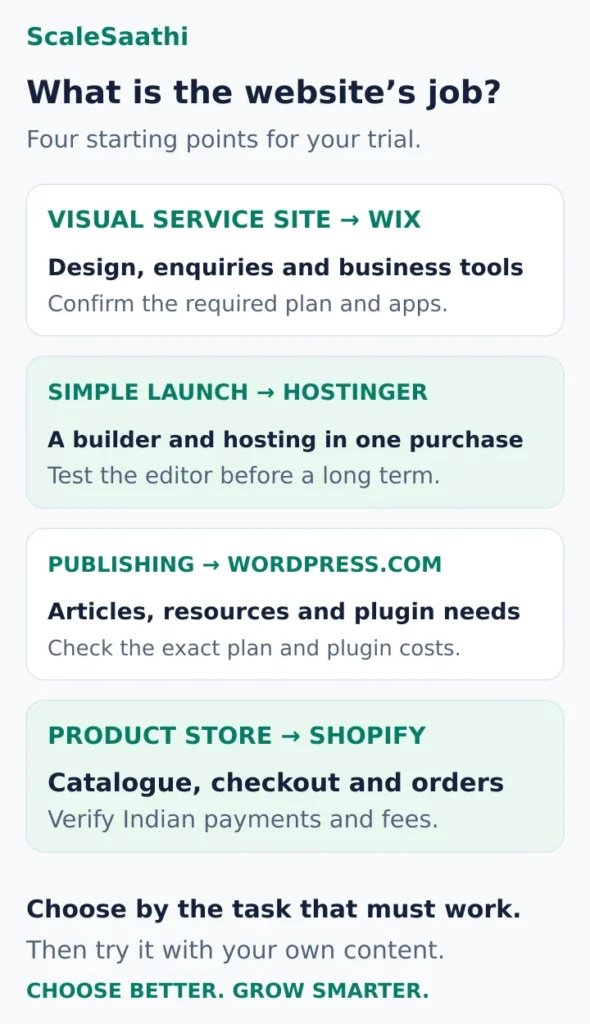
If you are unsure whether you need a hosted builder, WordPress or a store platform, try the ScaleSaathi Website Platform Selector. Use its recommendation to narrow the type of service, then test the specific product below.
Wix: for a visual service site or portfolio
Start here when: You want to arrange the design yourself and combine informative pages with contact, booking or other business features. For graphics and social posts, see Canva Pro price in India.
Wix provides a drag-and-drop editor and a free plan for evaluation. Compare Light for a straightforward brochure or portfolio, and Core or higher when you need the listed payment and commerce features. Hosting is included. A paid plan is required to connect your own domain. Wix plans and included features.
Price approach: Obtain the quote for your Indian billing details, chosen term and required apps. Wix states that prices and currencies vary by location and that annual subscriptions are paid upfront. Use the final purchase screen to compare the amount payable and the next renewal.
Why we would shortlist it: A service business can test the design and the required customer journey in one ecosystem. Build a representative service page and try changing it yourself before paying for a full year.
The decision that needs care: Wix documents that its sites must run on Wix infrastructure. You own your content, but cannot move the assembled Wix site unchanged to another web host. Consider the cost of rebuilding before committing heavily to its design and connected tools. Wix hosting and portability.
Our call: Shortlist Wix when visual control and its available business features suit the site. Confirm the exact booking, payment and app requirements before upgrading; a general feature label does not prove your complete workflow is included.
Hostinger Website Builder: for a modest bundled launch
Start here when: You need a brochure, portfolio or small service website and want the editor and hosting in one purchase.
Premium was listed at ₹139/month equivalent for 48 months, or ₹6,672 upfront before GST, renewing at ₹449/month (promotional price checked 21 Oct 2026). It lists up to three websites, hosting, a first-year domain and specified first-year mailbox benefits. Unlimited was listed at ₹199/month over 48 months, or ₹9,552 upfront before GST, renewing at ₹649/month, with integrated ecommerce listed (checked 21 Oct 2026). Hostinger Website Builder plans.
Why we would shortlist it: The package is worth comparing for a simple launch whose owner is comfortable with the long prepayment. Evaluate the required pages, form and navigation before choosing the term.
The decision that needs care: Website Builder and WordPress are different editing systems. Do not assume a WordPress plugin, staging feature or backup workflow described on another hosting page applies to a builder site. Verify the builder-specific capability you need.
If a form must feed a particular CRM, or a shop must use a particular Indian gateway, treat that integration as a purchase condition. A larger plan will not fix an unsupported workflow merely by providing more capacity.
Our call: Start by testing Premium for a straightforward site. Compare Unlimited for an identified commerce requirement after confirming the payment and operating features. Avoid a four-year commitment until the editor works for the person who will maintain the pages.
WordPress.com: for a site built around regular publishing
Start here when: Articles, resource pages and organised publishing will be central to the website.
WordPress.com is a hosted WordPress service. It differs from downloading the WordPress software and arranging your own hosting. Its current paid plans, including Personal, allow plugin installation; a Business subscription is no longer a blanket requirement simply to add plugins. Business lists additional features including real-time backups and one-click restores. WordPress.com plans · Hosted and self-hosted WordPress explained.
Price approach: Compare the full checkout total, billing currency and term for Personal against the specific higher-tier feature you need. For an Indian purchase, confirm the checkout’s currency and tax-inclusive total before comparing it with rupee-priced offers.
Why we would shortlist it: It is worth testing when the site needs a repeatable publishing structure and WordPress functionality with hosting included. Try creating a category, a long article and a reusable page layout.
The decision that needs care: A plugin can introduce its own price, setup and maintenance work. Check compatibility and the features available in its free or paid version. Plugin access does not establish that every desired integration is included in the subscription.
Our call: Compare Personal for the required publishing and plugin work; choose a higher tier for a demonstrated need. If you prefer to choose your own host and take on that responsibility, start with our WordPress hosting beginner’s guide.
Shopify: for a website whose main job is selling products
Start here when: A product catalogue, orders and a repeatable checkout process matter more than creating a general brochure site.
Basic advertises ₹1,499/month equivalent when paid yearly, or ₹17,988 for the subscription year, before taxes and extras. Its India pricing page lists a 2% third-party payment-provider fee on Basic. Hosting is included for the store. Shopify India plans.
Why we would shortlist it: A seller can assess the product, cart and order-management workflow in a platform designed around commerce. Build one realistic product with the options and delivery rules you actually need.
The decision that needs care: India is absent from Shopify Payments’ supported-country list, so an India-based merchant needs to assess compatible external providers. Shopify’s applicable transaction fee is additional to the gateway’s processing charge. Shopify Payments availability · Third-party transaction-fee rules.
Our call: Shortlist Shopify for a genuine store requirement. A business that mainly needs opening hours and enquiries may get little value from its commerce subscription. Our Shopify pricing guide covers the subscription, staff access, apps and payment-fee calculations in detail.
India-specific checks before choosing a builder
Verify the actual payment route
An ecommerce label does not confirm that your preferred payment method works for your merchant account, business type and transaction flow.
Wix’s India provider list includes Razorpay, PayU India and Cashfree, among other options. That is a useful starting shortlist, not merchant approval or proof that every payment feature is available through every connection. Wix payment providers by country.
For any builder, check three separate things:
- Merchant eligibility: Can the provider onboard your business with the required account and documents?
- Customer payment: Does the integration support the method you need, including UPI if that is important to your audience?
- Operating workflow: Can you handle confirmation, refunds, reconciliation and any recurring payments you intend to offer?
Use the platform’s supported test process. Check both the customer confirmation and the record visible to the business. For a booking site, confirm the appointment is created as well as the payment record. Our ecommerce website-builder comparison takes the comparison further for businesses choosing primarily to sell online.
Separate your domain from the included hosting
These are hosted options; do not buy another hosting package for the same builder site without a separate reason. A custom domain and staff email still have their own purchase or renewal conditions.
Keep the domain account and its recovery contacts under business control. Ask whether the included domain benefit is for a new registration, a limited period or the extension you actually want. Use our domain registrar comparison before accepting a domain bundle.
Test the language and layout your customers will see
If the site needs Hindi or a regional language, add real sample text before choosing. Check navigation labels, mixed-script headings, forms and mobile line breaks. A template that looks tidy with short English placeholders may need a different layout for your content.
For several languages, decide who will translate and maintain each version. Confirm whether the required multilingual tool is included, an extra subscription or unsuitable for the chosen workflow. The useful test is whether your own editor can keep both versions accurate.
Compare the full commitment, including renewal and extras
The two published rupee examples above cover very different periods: Hostinger’s featured offers use 48 months, while Shopify’s illustrated Basic purchase covers a year. Comparing their monthly figures alone hides both the commitment and the difference in purpose.
Ask each finalist for two totals: the money required to launch and the expected recurring cost after introductory benefits end. Include only the services you need, but include all of them:
- The builder subscription, billing period and taxes.
- Domain renewal and any staff mailboxes.
- Required booking, form, translation, newsletter or other app subscriptions.
- Payment-related charges if the site takes money.
- Any design, content entry or ongoing assistance you will pay for.
For example, an included first-year domain does not make its later renewal free. A plugin-enabled plan does not pay for a premium plugin licence. A domain email address can also require a separate mailbox service.
Keep unconfirmed local prices as questions to resolve at checkout. For the wider launch budget, use our small-business website cost guide.
Check what you can take with you later
Treat content, design and business records as separate things. Ask for a sample export or a clear description of what can leave the platform and what must be rebuilt.
Wix’s hosting restriction, explained in its profile, means moving the finished site to another host is not a normal hosting transfer. WordPress.com’s standard content export includes posts, pages and comments, but excludes the theme design, customisations and plugins. Its documentation points to a separate migration-plugin route for a more complete move. WordPress.com export guidance.

For every shortlisted builder, record:
- Whether pages, posts and media can be exported in usable formats.
- What happens to the layout, forms and third-party app configuration.
- How to retrieve products, customers, submissions or bookings where relevant.
- How existing URLs and redirects will be handled if you rebuild elsewhere.
A saved spreadsheet of products is useful, but it does not recreate the shop’s design or every connected workflow. Test the export before your dependence on the platform grows. Keep copies of your original text, images and other materials outside the builder account.
Run a practical trial before a long subscription
Give the person who will maintain the site a small, realistic brief. Use the free plan, trial or eligible refund period available for the chosen product; read its terms before paying.
Build one complete customer journey
Create the hardest representative page and connect it to the next action. For a consultant, that might be a service page, an enquiry form and a reply. For a publication, it could be a long article, a related category and a subscription form. For a seller, use a product, cart and supported test checkout.
Check the journey on a phone as well as a computer. Use real-length headings and descriptions, not tidy placeholder text. Verify that the important buttons remain visible and easy to use.
Ask the actual editor to make changes
Have them replace an image, update a price or date, publish an article and change a menu item. Note which jobs require help and whether that help will create a recurring cost.
Also try correcting a mistake. Establish what undo, history, backup or restore options apply to the specific product and plan. Do not import assumptions from another product sold by the same company.
Check a few publishing controls
Confirm how to edit a page title and description, add image ALT text, control the page address and set a redirect where needed. For an existing site, test the URL you intend to retain. These checks help you operate the site; the presence of an SEO menu does not establish that the content will rank.

Choose after the trial: Wix if its visual and business workflow fits; Hostinger if the simple builder and payment commitment suit; WordPress.com if publishing and the required plugins work well; Shopify if its commerce process justifies the full cost. If none passes a must-have requirement, refine the shortlist before paying for a longer term.
Frequently asked questions
Which website builder should a beginner in India compare first?
Compare Wix for a visual service site and Hostinger Website Builder for a modest bundled launch. Include WordPress.com if regular publishing is central, or Shopify if the main job is selling products. Try the hardest real task before choosing a paid plan.
Do I need to buy separate hosting for these builders?
Hosting is included in these hosted options for the website or store. Check the selected product and avoid paying for duplicate hosting. Domain renewal, staff mailboxes, required apps and other services can still have separate costs.
Can I accept UPI through any website builder?
Do not assume so. Check the specific builder integration, payment provider, merchant eligibility and required payment method. Test the supported payment flow and confirm that the business receives the correct order or booking record.
Does WordPress.com require Business to install plugins?
Its current plans allow plugin installation on every paid tier, including Personal. Business supplies additional features, so compare it for a specific requirement. An individual plugin can still have its own licence cost, setup work or compatibility limits.
Can I move my finished Wix website to another host?
Wix states that its sites must operate on Wix infrastructure. You own the content, but moving to another platform generally involves rebuilding the site. Check content and business-data export options separately from the design.
Is a free plan enough for a professional website?
It can be useful for testing the editor and content. Before launching, check custom-domain support, platform branding, required forms or payments, and any other feature limits. Pay only after the selected plan supports the site you intend to operate.
Sources and further reading
- Wix — paid plans, hosting, domain connection and localised pricing
- Wix — platform hosting and portability restrictions
- Wix — payment providers available in India
- Hostinger India — Website Builder plans, prepayment, renewal and GST
- WordPress.com — paid-plan plugin access and Business recovery features
- WordPress.com — hosted service and self-hosted software distinction
- WordPress.com — content export and its exclusions
- Shopify India — Basic annual pricing, hosting and payment-provider fee
- Shopify — countries supported by Shopify Payments
- Shopify — third-party transaction fees and gateway charges
Product names and logos are trademarks of their respective owners. They are shown only to identify the products compared in this guide, and their use does not imply endorsement by or affiliation with ScaleSaathi.