When a shop owner asks me which billing app to buy, I ask them to bill one real sale first: a part payment, then a return. Plenty of GST billing software makes a neat invoice. Fewer keep the original record clean once money and goods start moving back.
So start with the work your counter does every day, not the longest feature list or the biggest discount, and check renewal and data-export terms before you pay.
Our starting shortlist: try Vyapar for a small shop that needs offline billing, myBillBook for shared phone-and-computer billing, Zoho Books for online accounts, TallyPrime for an established bookkeeping setup, and BUSY for stock-heavy trading. These are starting points for a trial, not a claim that one tool wins for every business.
Before paying: confirm the exact plan, devices, people, GST registrations, renewal and data-export options. A plan name on a sales page is not enough.
This comparison is based on published product documentation and our own buying framework. We have not tested these products in a live business, timed their support or measured their uptime. Prices below are public references, not account-specific quotations. Where a price or plan detail is unclear, we say so.
In this guide
Which GST billing software should you try first?
A small shop with unreliable internet
Start with Vyapar. Test billing, printing and stock work on your actual Windows computer or Android phone. Check what stops working when the connection drops.
An owner and staff sharing billing work
Start with myBillBook. Confirm how many people can sign in, whether desktop access is included, and whether each person has the right permissions.
A service business that needs full online accounts
Start with Zoho Books. Test the link between quotes, invoices, receipts and the accountant’s reports. Do not buy a larger edition just for features you will not use.
A business already comfortable with Tally
Check TallyPrime before replacing it. A better setup or staff training may solve the problem without a risky move to another system.
A wholesaler with detailed stock records
Include BUSY in the demo. Bring an example involving batches, warehouses or item variants. Confirm the feature exists in the exact edition being quoted.
Only a few invoices and a very small budget
Check a suitable free option first. Look at invoice limits, eligibility and access. Free is useful only when the work you need is actually included.
Choose two options from this list, not all five. Use the same small test on both. The better choice is the one your staff can use correctly and your accountant can work with—not simply the one that produces the nicest-looking PDF.

Check these things before comparing prices
Two terms you will see below: e-invoicing means registering covered invoices through an authorised portal, not just making a PDF. An e-way bill is a separate document for goods movement where required.
First list your must-haves. A must-have is something the business cannot operate without, such as a thermal-printer bill, a separate login for a cashier or a way to export records for your accountant.
A bill with the right details
Check supplier and customer details, numbering, dates, item descriptions, tax rates and amounts. CBIC’s Rule 46 sets out tax-invoice particulars, with conditions and exceptions. Your software still needs correct business, customer and item settings. Ask your accountant to approve a sample before you use it.
The full sale, not just the invoice
Can staff record part payment, a later payment, a return and a credit note? A credit note records a reduction in an earlier bill. Check that stock and the customer’s balance change correctly, and that the original bill is still traceable.
Access, recovery and an exit route
List the people, devices and business registrations you need. Then ask how to recover from a mistake and how to leave the service. An invoice PDF is useful, but it is not a complete export of customers, stock, transactions and unpaid balances.
For a wider check of records, reports and accountant access, use our guide to choosing accounting software. This page concentrates on daily GST billing; it is not a replacement for a full accounting-system review.
Vyapar: a practical starting point for a small shop
Vyapar’s offline documentation describes Windows and Android billing and stock work without a continuous internet connection. This makes it worth examining when your counter cannot stop every time the connection drops. Online syncing, backup and government-portal tasks should be tested separately.
Price reference: on Vyapar’s pricing page, the Gold Desktop plan costs ₹4,099 a year plus 18% GST (₹4,836.82 with GST), which works out to about ₹342 a month before GST. Silver Desktop costs ₹3,799 a year plus GST (₹4,482.82 with GST). Prices differ for Android and Desktop + Mobile plans, so confirm the device bundle before you buy. Prices checked 21 Oct 2026.
For every plan, device option and renewal term, see our full Vyapar price breakdown.
The Gold feature list includes multiple firms, syncing, stock alerts and e-invoice/e-way bill functions. Do not assume those features exist on a lower-cost mobile-only option. Write down the plan name and required devices before paying.
Choose it when: you need straightforward counter billing and stock tracking, and the relevant offline workflow passes your trial. Look elsewhere when: your main need is complex multi-branch administration that the quoted plan cannot demonstrate.
Demo question: “Please show a sale, part payment and return on my printer, then repeat the basic bill with the internet disconnected.”
myBillBook: check the people and devices in your plan
myBillBook brings together invoices, stock, payment tracking and device syncing. For an owner checking work away from the counter, the important question is whether the chosen plan allows the required staff and devices—not whether the product has a mobile app.
The current plan comparison distinguishes Diamond, Platinum and Enterprise. Diamond lists one business, one user plus a CA and Android/iOS/web access. Platinum adds desktop software. Enterprise lists extra users and businesses, point-of-sale (counter-billing) features and e-invoice/e-way bill tools. “CA” means chartered accountant; an accountant-access allowance is not automatically an extra cashier login.
Price needs confirmation: the pricing page displays different crossed-out and current figures with a monthly/yearly selector. A Diamond card shows ₹291 per month, while its FAQ says basic plans start at ₹349 per month. The page text we could read did not establish one reliable payable total for the required term. Get a written quotation instead of budgeting from either number alone.
Choose it when: simple shared billing is your priority and the plan covers your staff. Look elsewhere when: the necessary people, desktop or GST functions make the selected package unsuitable.
Demo question: “Which login does each person get, who can change or delete a bill, and what can my accountant export?”
Zoho Books: online billing connected to the accounts
Zoho Books deserves a trial when invoices are one part of a wider online accounting workflow. The India edition comparison lets you check plan-level features instead of assuming every function comes with every subscription.
Price reference: Zoho Books Standard is ₹749 per organisation per month when billed annually, or ₹8,988 for 12 months before local taxes. Monthly billing is ₹899. Standard lists three users and 5,000 invoices a year. The annual equivalent is not a month-to-month cancellation offer.
There is also a Free plan for businesses within Zoho’s stated ₹25 lakh financial-year revenue limit, with 1,000 invoices a year and one user plus an accountant. This is a software-plan condition, not the GST registration threshold. Check the full conditions and the paid edition needed for your work.
Check the product name: Zoho Billing is a separate offering. This shortlist is about Zoho Books. A quotation for one is not automatically a quotation for the other.
For record control, Zoho’s audit-trail feature records transaction changes. That can help an owner review who changed a record. It does not mean every entry is automatically correct.
Choose it when: you want shared online billing and accounts. Look elsewhere when: reliable offline counter operation is essential and your tested setup cannot meet that need.
Demo question: “Can the accountant follow a quote through its invoice, receipt and credit note without re-entering the figures?”
TallyPrime: useful when bookkeeping is already established
Do not replace an established system simply because another app looks easier. First find the actual problem: slow data entry, a poor printer setup, missing training, remote access or an unsuitable licence. The solution may not be new software.
Tally’s licence guidance distinguishes Silver for one user on one machine from Gold for multiple users on the same local network. Gold is not automatically a licence for every branch or a complete cloud-hosting package.
Price reference: Tally’s official India price data lists regular Silver at ₹22,500 and Gold at ₹67,500, before 18% GST. These are licence prices, not annual prices directly comparable with subscription cards.
A regular licence includes first-year TSS—Tally Software Services. The licence can continue without an active TSS subscription, but updates and connected services have different conditions. Tally’s e-invoice FAQ says online e-invoice generation needs active TSS. Price the required renewals, training and any cloud access separately.
Choose it when: your bookkeeper already works effectively in Tally and the supported setup fits your operations. Look elsewhere when: you need a simple shared mobile counter workflow that the proposed setup cannot provide.
Demo question: “What is included in this licence, what needs renewal, and how will each location or remote user access it?”
BUSY: ask for the exact GST-capable edition
BUSY is worth examining for a trading business with detailed stock needs. The BUSY Magic Smart page describes GST work, invoicing and inventory features. Use your actual item structure in the demonstration instead of accepting a generic bill.
Price reference: the official pricing page lists BUSY Magic Smart at ₹8,000 for 360 days, plus GST. Keep “360 days” in your budget; do not quietly treat it as 365 days. The site also lists older BUSY 21 editions, so two quotations carrying the BUSY name may refer to different products.
Be especially careful with the entry tier. The page labels Start and the older Basic offering as non-GST options. Smart is described as a complete GST package. Ask the seller to specify the edition, users, period and included GST work in writing. Also ignore features marked “upcoming” when deciding what the software can do today.
Choose it when: a stock and billing demo with your own items fits your trading work. Look elsewhere when: the package is more complex than your staff need, or a crucial function is not yet available.
Demo question: “Show the exact Smart or BUSY 21 edition being quoted, including returns, stock reports, GST output and renewal terms.”
A GST bill, e-invoice, e-way bill and return are different
Software sales pages often put these words together. Ask the seller to show the exact task, not just a tick next to “GST”.
GST tax invoice
The bill records the sale and its tax details. A printed or emailed bill alone does not show that any government reporting step has been completed.
E-invoice registration
For covered taxpayers and documents, invoice details are sent to an Invoice Registration Portal (IRP). It returns an Invoice Registration Number (IRN) and a signed QR code.
E-way bill
A separate goods-movement document where the rules require it. An e-invoice feature is not proof that every transport requirement has been handled.
GST return
Reporting sales and other information for the relevant tax period. Exporting a report is not the same as completing the required portal filing.
The NIC e-way bill FAQ explains the separate transport-document requirement. Check the current rules for your movement rather than assuming every sale needs the same documents.
The GST-authorised IRP explanation makes the e-invoice distinction clear. Ask who sends the data, what confirms success and how failures are handled. A QR image made by your billing app is not automatically an IRP-signed QR code.
Deadlines can also depend on the business. For example, the IRP reporting advisory states a 30-day reporting restriction for covered taxpayers with aggregate annual turnover of ₹10 crore and above, effective from 1 April 2025. That is a portal reporting restriction—not general permission to postpone an invoice. Have your accountant confirm current applicability, exemptions and deadlines.
No app can choose every tax treatment for you. Product classification, rates and place of supply still need correct decisions. Place of supply means the location used under GST rules to decide how the supply is taxed; it is not always just the customer’s delivery address.
Try one sale, part payment and return before buying
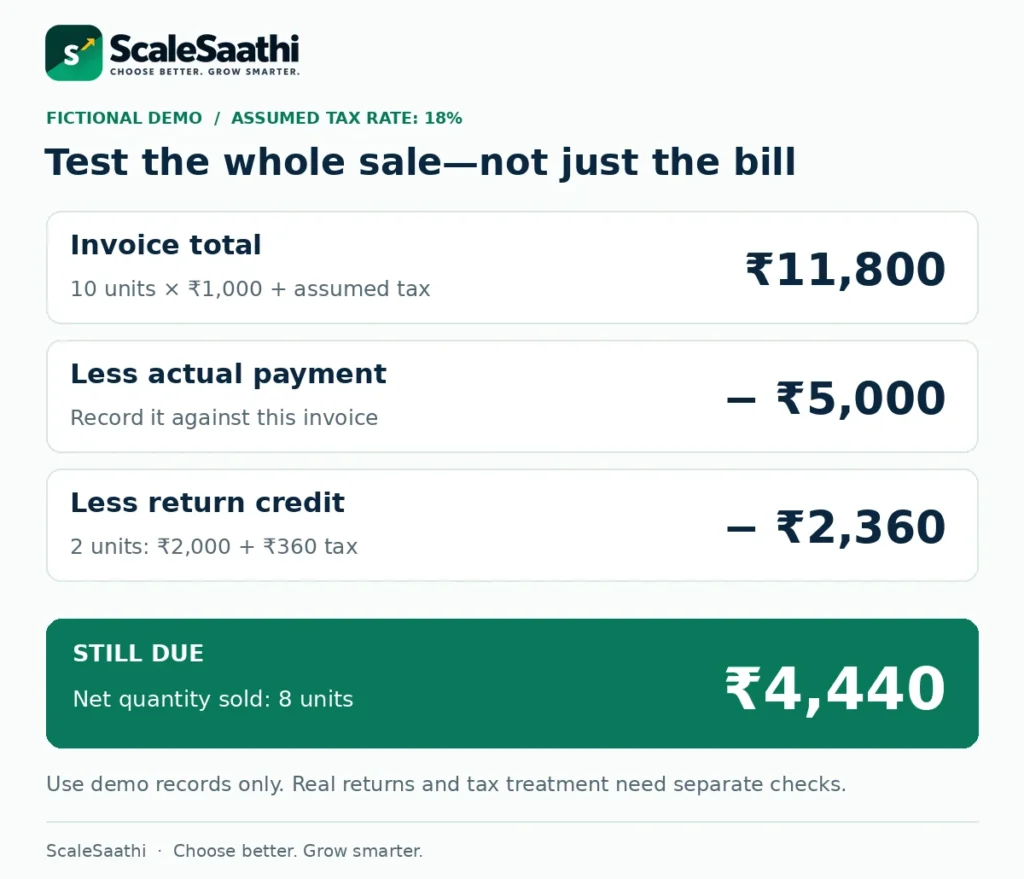
Use a demo company or the seller’s test environment. Do not send made-up records to a live GST portal. The following fictional test assumes a taxable sale at 18% only to make the arithmetic easy; it is not a rate recommendation.
1. Make the bill
Sell 10 units at ₹1,000 each. Value before tax: ₹10,000. At the assumed 18% rate, tax is ₹1,800 and the invoice total is ₹11,800.
2. Record part payment
Record ₹5,000 actually received against the bill. The customer’s remaining balance should be ₹6,800, not zero.
3. Record a genuine return
Return two units. Under this simplified example, the credit note is ₹2,000 plus ₹360 tax: ₹2,360. Check the required return and tax treatment separately for real transactions.
4. Check the result
The remaining balance should be ₹4,440. Net quantity sold is eight units. Confirm the two returned items go to the appropriate stock location and condition.
Now print the documents, open the customer balance and export the records for the accountant. Check that all documents still refer to the right transaction. A return should not make the original sale disappear.
Repeat the tasks with the person who will actually use the software. Ask them to explain the steps back to you. Confusion in a quiet demo will not become easier when customers are waiting.
Compare the full cost, not just the monthly number
Ask each seller for a written quotation covering the same period and the same work. Separate the software licence from extra users, devices, registrations, setup, data migration, training, printers, cloud hosting and connectors. A connector is an extra link between two systems that may carry its own charge.
This is a fictional budget, not a price for a shortlisted product: ₹3,600 licence cost for the first year, ₹1,200 setup and an optional ₹100 monthly connector. The cost is ₹3,600 + ₹1,200 + (₹100 × 12) = ₹6,000 before tax. If all those quoted items attract an assumed 18% tax, cash due across the year totals ₹7,080.

A ₹300 monthly-equivalent licence can therefore lead to a larger first-year bill. Tax treatment can differ across invoice lines and sellers; use their actual quotation. Input tax credit, where eligible, is a separate accounting matter and does not remove the need to fund the purchase.
For subscriptions, record the covered dates and renewal. For a one-time licence purchase, separate the initial cost from optional or necessary ongoing services. Do not compare BUSY’s stated 360-day term with a full year without noticing the difference.
Our business software buying guide explains how to include setup effort and ownership, not just the advertised rate.
If you are considering a one-time licence instead of a subscription, see the Marg ERP price by edition, which shows licence, yearly renewal and 18% GST separately.
Use the free comparison workbook
GST billing software comparison workbook
Record three quotations, compare the first-year cash requirement, check must-have tasks and repeat the worked sale example. The sheets are editable; no provider is pre-selected as the winner.
Start with Plan Evidence for the published references and their limits. In My Quotes, enter your own licence cash cost for the first 365 days, setup and recurring extras. Include any renewal needed within that period. Enter zero only after confirming a cost does not apply; unknown costs should remain blank.
Select whether each amount already includes tax, then enter the rate applicable to that line. The workbook adds tax only to tax-exclusive entries. Its sample figures are fictional and separate from the empty quote columns. It does not apply input tax credit or decide GST rates.
Use Trial Checklist to mark a task as Required or Not required. A failed or untested required task blocks the “required tests passed” result. That is a checklist result, not proof of legal compliance, security or reliability.
A suitable free plan may be enough at first. Read our free accounting software guide to understand limits before buying an upgrade.
Move records carefully—and know how to leave
Before switching, ask the accountant which records must move. Agree a start date and verify customer balances, stock quantities, unpaid invoices and the last document numbers. Keep a readable copy of the old records rather than cancelling the old service immediately.
Ask for an actual export during the trial. Check its contents, not only its file name. Test whether the new system can import what you need and identify anything that must be entered manually. Keep copies under the business’s control.
Confirm which person owns the account, recovery email and billing. Give staff only the access they need. Review correction rights and backups with the seller; we have not independently audited these products’ security or recovery performance.
For freelancers whose main concern is invoicing and accounts rather than shop stock, our accounting and invoicing comparison for freelancers offers a more focused starting point.
The practical choice for your business
Start with the smallest plan that passes your must-have tests. Vyapar belongs on an offline-shop shortlist; myBillBook on a shared-billing shortlist (our Vyapar vs myBillBook comparison helps if you are choosing between the two); Zoho Books on an online-accounts shortlist. TallyPrime and BUSY deserve closer attention when trained staff, existing records or detailed stock work shape the decision.
Do not pay yet when the price, required users, data export or an essential GST function is unclear. A short written clarification is cheaper than migrating twice.
The best GST billing software for your business is the one that lets your staff make the right bill, track the money, handle mistakes and hand over usable records. Choose it after the trial—not before.
What to do next
- Get a starting shortlist in two minutes. Answer a few questions about your billing, stock and users.
- Billing software for a retail shop. For counter billing, barcodes and offline use.
- Tally or Zoho Books? Compare the two. If your shortlist is down to desktop vs online accounting.
- Check whether you need e-invoicing software. For businesses near or above the e-invoice turnover limit.
What users commonly report
These themes summarise public reviews of Vyapar (Google Play, Capterra, Software Advice) and Marg ERP (Trustpilot, Capterra, Software Advice, SoftwareSuggest)—the two GST billing options examined here. They are paraphrased and India-focused where the sources allow.
- Vyapar is easy for small-shop GST bills: reviewers commonly praise quick invoices, WhatsApp sharing and simple stock tracking.
- Vyapar support and data glitches: slow or unhelpful help after purchase, plus sync mismatches and update errors, are recurring complaints.
- Marg suits pharmacy and distribution: batch or expiry tracking, reorder help and GST reports that match the portal are often praised.
- Marg after-sales support is the weak spot: unanswered calls, tickets closed without a fix, and dealer versus head-office blame-shifting repeat across sources.
- Marg renewal and dealer charges: annual renewals and separate dealer support fees surprise some long-time users.
- Both have limits on depth: Vyapar users note limited customisation and accounting depth; Marg users note dated tech and dealer dependence.
Frequently asked questions
Which GST billing software is best for a small shop?
Start with the shop’s actual work. Vyapar and myBillBook are sensible options to trial for everyday billing and stock, but check offline use, devices, users, printing and returns on the exact plan. There is no universal winner.
Can I use free GST billing software?
A suitable free plan may be enough for a small workload. Confirm eligibility, invoice limits, required tax documents and export options. Do not confuse a software company’s free-plan revenue limit with a legal GST registration threshold.
Is Zoho Books the same as Zoho Billing?
No. They are separate Zoho products. This guide compares Zoho Books for billing connected with business accounts. Do not assume a quotation for another Zoho product buys the same features or access.
Can offline software complete GST portal work without internet?
No. Making or saving a bill offline is different from sending data to a government portal. Test the basic offline work and separately confirm how e-invoice registration, syncing and other connected tasks are completed.
Does a GST invoice PDF count as an e-invoice?
Not by itself. For covered taxpayers and documents, the required invoice-registration process returns an IRN and signed QR code. A PDF or an ordinary payment QR image does not replace that process.
Does GST billing software automatically file my returns?
Do not assume so. Report preparation, data export, portal upload and completed filing are different tasks. Ask the seller to show exactly what is included and who remains responsible for review and filing.
Is a lifetime licence the same as free updates forever?
Not necessarily. The licence and connected-service subscription may have different terms. Tally’s regular licence includes first-year TSS, while later updates and connected services require the appropriate active entitlement.
Why not recommend the plan with the lowest displayed price?
The prices may cover different periods, devices and users. Some need separate setup or add-ons. Compare written quotations for the same work and period, then test the essential tasks before deciding.
Can I move my old records to a new billing app?
Often some records can be imported, but the supported format and detail vary. Test an export and import with sample records. Check balances and stock before moving the whole business, and preserve the old records.
Does the Excel workbook select a winner or calculate my GST liability?
No. It compares your entered costs and records whether required trial tasks passed. Its sale example is fictional. It does not certify software, decide tax treatment, calculate return liability or award rankings.
Sources and further reading
- Vyapar: POS billing page — Gold price reference and annual billing terms
- Vyapar: offline small-business accounting — supported platforms and offline work
- myBillBook: current pricing page — plans, access limits and inconsistent price wording
- myBillBook: product features — invoices, stock, payments and device access
- Zoho Books India: plans — prices, Free eligibility and Standard limits
- Zoho Books India: detailed plan comparison
- Zoho Books: audit trail and transaction edit history
- Tally Solutions: official India price data — Silver and Gold regular licences
- TallyHelp: licence options, Silver/Gold access and TSS entitlements
- TallyHelp: e-invoice FAQ — online generation and TSS
- BUSY: pricing — BUSY Magic plans, 360-day terms and older BUSY 21 editions
- BUSY Magic Smart: GST, stock and invoicing features
- CBIC: CGST Rule 46 — tax-invoice particulars
- GST-authorised IRIS IRP: e-invoice mandate and Invoice Registration Number
- NIC: e-way bill system FAQ — separate goods-movement document
- Zoho Billing India: a separate billing product, not a Zoho Books edition
- IRIS IRP: 30-day e-invoice reporting restriction for AATO of ₹10 crore and above
Product names and logos are trademarks of their respective owners. They are shown only to identify the products compared in this guide, and their use does not imply endorsement by or affiliation with ScaleSaathi.